1. შესავალი
Thank you for choosing the Irfora T58B Digital Multimeter. This instrument is a handheld, true RMS digital multimeter designed for accurate measurement of AC/DC voltage, AC/DC current, frequency, resistance, capacitance, and diodes. It is a versatile tool for solving industrial and household electrical problems, suitable for both DIY enthusiasts and professionals.
Please read this manual thoroughly before use to ensure safe and proper operation. Keep this manual for future reference.
2. უსაფრთხოების ინფორმაცია
გაფრთხილება: To avoid electric shock or personal injury, and to prevent damage to the meter or the equipment under test, observe the following safety rules:
- Always ensure the meter is in the correct function and range for the measurement.
- არ გამოიყენოთ რეიტინგულ მოცულობაზე მეტიtage, როგორც აღნიშნულია მრიცხველზე, ტერმინალებს შორის ან რომელიმე ტერმინალსა და დამიწებულ მიწას შორის.
- სიფრთხილე გამოიჩინეთ voltag30V AC RMS-ზე, 42V პიკზე ან 60V DC-ზე მეტი ძაბვა. ასეთი მოცულობაtagეს არის შოკის საშიშროება.
- Before making current measurements, ensure the meter's fuses are intact and the test leads are connected to the correct input jacks.
- ფუნქციების ან დიაპაზონების შეცვლამდე გამორთეთ სატესტო გამტარები წრედიდან.
- არ გამოიყენოთ მრიცხველი, თუ ის დაზიანებული ჩანს ან თუ სატესტო გამტარების იზოლაცია დაზიანებულია.
- Replace the battery as soon as the low battery indicator appears to avoid incorrect readings.
- დაიცავით ადგილობრივი და ეროვნული უსაფრთხოების კოდები.
3. პროდუქტი დასრულდაview
The Irfora T58B Digital Multimeter features a robust design and a clear LCD display for easy readings.
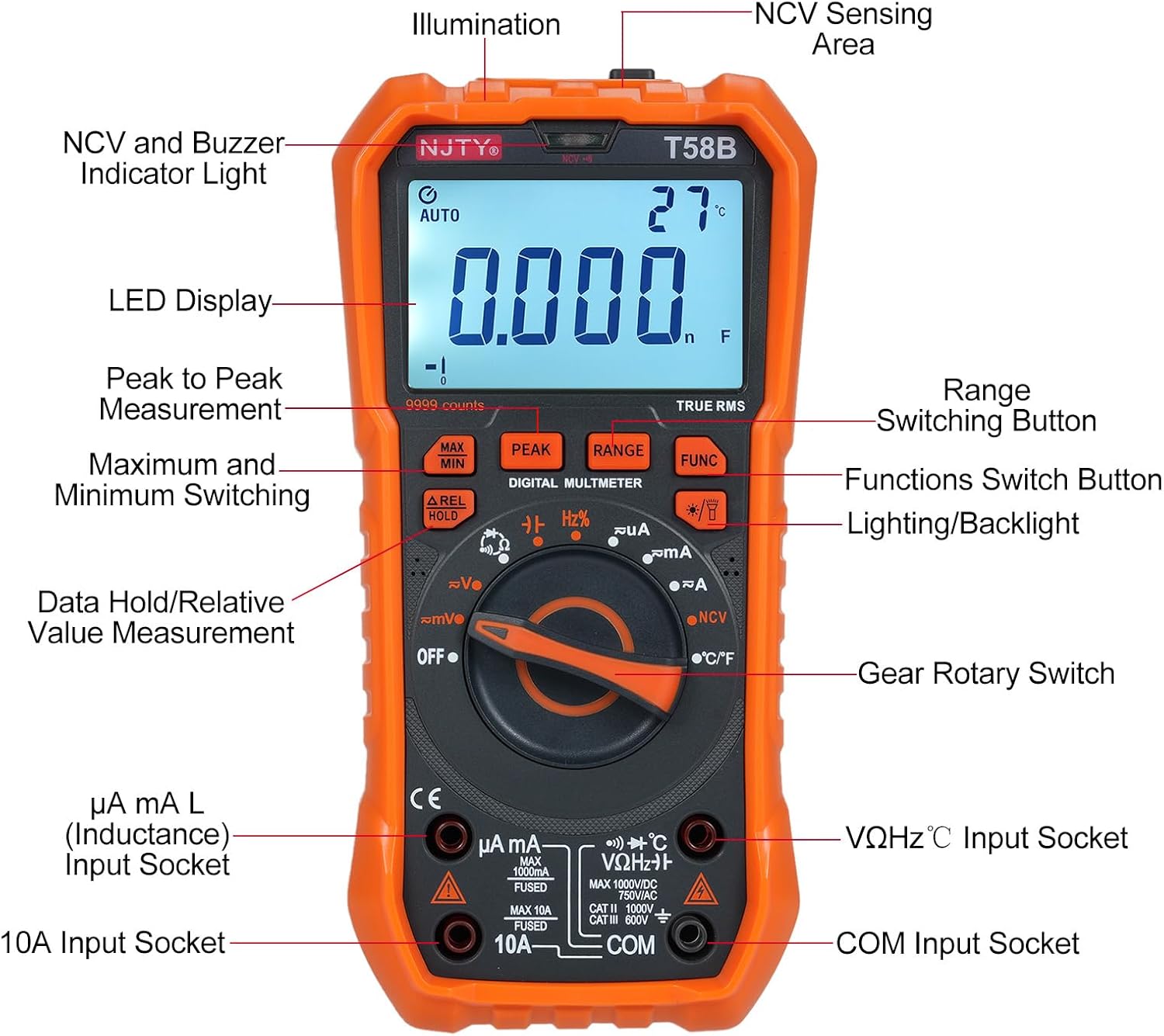
სურათი 3.1: წინა view of the Irfora T58B Digital Multimeter with labeled components. Key features include the LED Display, NCV and Buzzer Indicator Light, Gear Rotary Switch, Input Sockets, and various function buttons.

სურათი 3.2: Dimensions of the Irfora T58B Digital Multimeter. The device measures approximately 187mm (7.36in) in height, 95mm (3.74in) in width, and 55mm (2.16in) in depth.

სურათი 3.3: უკანა view of the multimeter showing the 90-degree adjustable support stand and integrated storage slots for test leads, designed for convenience and protection.

სურათი 3.4: დასრულდაview of the Irfora T58B Digital Multimeter's capabilities, including 9999 counts display, and measurement of current, resistance, capacitance, temperature, and frequency.
ძირითადი მახასიათებლები:
- 9999 Counts LCD Digital Display with Backlight
- ჭეშმარიტი RMS გაზომვა
- უკონტაქტო ტომიtage (NCV) გამოვლენა
- ავტომატური გამორთვა
- Data Hold and Relative Value Measurement
- Flashlight Function for low-light conditions
- ზომავს AC/DC Voltage, AC/DC Current, Resistance, Capacitance, Frequency, and Temperature
- დიოდისა და უწყვეტობის ტესტი
4. დაყენება
4.1. ბატარეის მონტაჟი
The Irfora T58B Multimeter requires 3 x 1.5V AAA batteries (not included). To install or replace batteries:
- Ensure the multimeter is turned OFF and disconnect all test leads from the input terminals.
- იპოვეთ ბატარეის განყოფილების საფარი მრიცხველის უკანა მხარეს.
- აკუმულატორის საფარის დამჭერი ხრახნის(ების) გასახსნელად გამოიყენეთ ხრახნიანი.
- Remove the cover and insert the 3 AAA batteries, observing the correct polarity (+ and -).
- დაახურეთ აკუმულატორის საფარი და გამკაცრეთ ხრახნი(ები).
შენიშვნა: Remove batteries if the meter is not used for an extended period to prevent leakage.
4.2. სატესტო გამტარების შეერთება
Always connect the black test lead to the "COM" (Common) input jack. Connect the red test lead to the appropriate input jack based on the measurement type:
- ტtage, Resistance, Capacitance, Frequency, Diode, and Temperature measurements: Connect the red lead to the "VΩHz°C" jack.
- For Current measurements (up to 600mA): Connect the red lead to the "µA mA" jack.
- For High Current measurements (up to 10A): Connect the red lead to the "10A" jack.
Ensure test leads are fully inserted into the jacks before use.
5. საოპერაციო ინსტრუქციები
To operate the multimeter, turn the Gear Rotary Switch to the desired function. The meter will automatically select the appropriate range in most modes (AUTO function).
5.1. AC/DC ტtage გაზომვა
- გადაატრიალეთ მბრუნავი გადამრთველი "V~"-ზე (AC Voltagე) ან "V-" (DC ტომიtagე) თანამდებობა.
- Connect the black test lead to the "COM" jack and the red test lead to the "VΩHz°C" jack.
- შეეხეთ სატესტო ზონდებს წრედის წერტილებთან, სადაც მოცულობააtage არის გასაზომი.
- წაიკითხეთ ტtage მნიშვნელობა LCD ეკრანზე.
5.2. AC/DC დენის გაზომვა
სიფრთხილე: Never connect the meter in parallel to a voltagდენის გაზომვისას წყარო. ამან შეიძლება ააფეთქოს დაუკრავენი ან დააზიანოს მრიცხველი.
- Turn the rotary switch to the "µA mA" or "A" position for AC or DC current. Use the "FUNC" button to switch between AC and DC if necessary.
- Connect the black test lead to the "COM" jack. Connect the red test lead to the "µA mA" jack for currents up to 600mA, or to the "10A" jack for currents up to 10A.
- გახსენით წრედი, სადაც დენის გაზომვაა საჭირო და მრიცხველი სერიაში შეაერთეთ დატვირთვასთან.
- წაიკითხეთ მიმდინარე მნიშვნელობა LCD ეკრანზე.
5.3. წინააღმდეგობის გაზომვა
- გადაატრიალეთ მბრუნავი გადამრთველი „Ω“ პოზიციაზე.
- Connect the black test lead to "COM" and the red test lead to "VΩHz°C".
- წინააღმდეგობის გაზომვამდე დარწმუნდით, რომ წრედი გამორთულია ენერგიით.
- Touch the test probes across the component or circuit where resistance is to be measured.
- წაიკითხეთ წინააღმდეგობის მნიშვნელობა LCD ეკრანზე.
5.4. ტევადობის გაზომვა
- Turn the rotary switch to the "Capacitance" position (often shared with other functions, use FUNC button if needed).
- Connect the black test lead to "COM" and the red test lead to "VΩHz°C".
- Discharge the capacitor completely before measurement to avoid damage to the meter.
- Touch the test probes across the capacitor terminals.
- წაიკითხეთ ტევადობის მნიშვნელობა LCD ეკრანზე.
5.5. სიხშირის გაზომვა
- Turn the rotary switch to the "Hz" position.
- Connect the black test lead to "COM" and the red test lead to "VΩHz°C".
- Touch the test probes across the circuit where frequency is to be measured.
- წაიკითხეთ სიხშირის მნიშვნელობა LCD ეკრანზე.
5.6. Diode Test and Continuity
- Turn the rotary switch to the "Diode/Continuity" position. Use the "FUNC" button to toggle between diode test and continuity.
- Connect the black test lead to "COM" and the red test lead to "VΩHz°C".
- For Diode Test: Place the red probe on the anode and the black probe on the cathode. The display will show the forward voltagწვეთი. გადააბრუნეთ ზონდები; კარგი დიოდისთვის ეკრანზე უნდა ჩანდეს „OL“ (ღია მარყუჟი).
- For Continuity Test: Touch the probes to the circuit points. If resistance is below approximately 50Ω, the buzzer will sound, indicating continuity.
5.7. ტემპერატურის გაზომვა
- Turn the rotary switch to the "°C/°F" position.
- Connect the thermocouple (included) to the "VΩHz°C" and "COM" jacks, observing polarity.
- Place the thermocouple tip on the object or area where temperature is to be measured.
- Read the temperature value on the LCD display. Use the "FUNC" button to switch between Celsius and Fahrenheit.
5.8. უკონტაქტო ტtage (NCV) გამოვლენა

სურათი 5.1: Demonstrating NCV (Non-Contact Voltage) detection. The meter's top is placed near an AC voltage source, and the signal strength indicator lights up, accompanied by an audible alarm.
- Turn the rotary switch to the "NCV" position.
- Place the top of the meter (NCV sensing area) close to the conductor or outlet you suspect has AC voltage.
- თუ AC voltage is detected, the corresponding signal strength indicator (low-yellow, high-red) will light up, and the buzzer will emit different frequency alarms based on signal strength.
5.9. Backlight and Flashlight
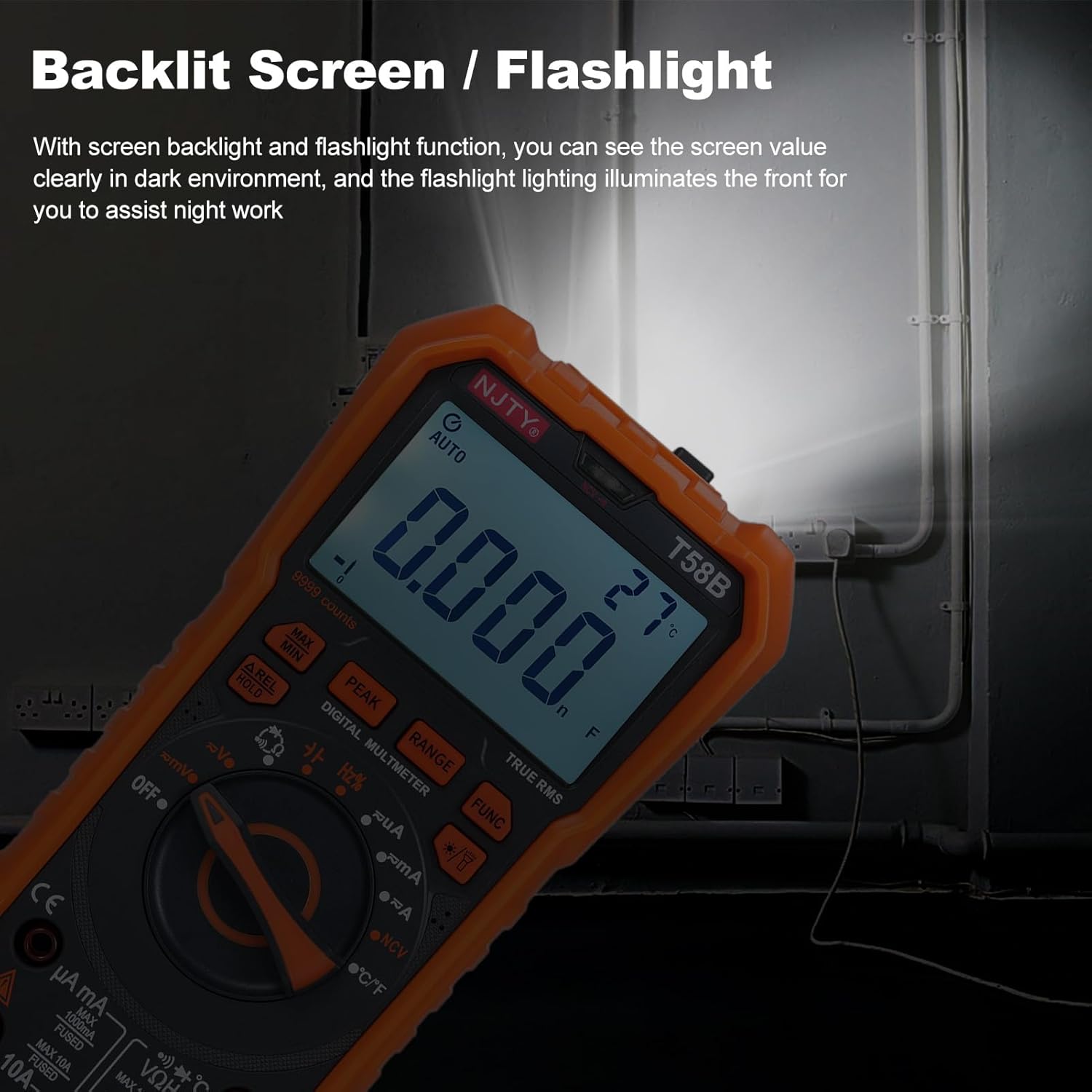
სურათი 5.2: The multimeter's backlit screen and integrated flashlight illuminate the display and work area, enhancing visibility in dark environments.
Press the "Lighting/Backlight" button (often marked with a light bulb icon) to turn on the display backlight. Press and hold the same button to activate the flashlight located at the top of the meter. Press again to turn off.
5.10. Automatic Power Off

სურათი 5.3: The multimeter features an automatic shutdown function, turning off after approximately 15 minutes of inactivity to conserve battery life.
The multimeter will automatically power off after approximately 15 minutes of inactivity to conserve battery life. An audible voice prompt will sound before shutdown. To restart the meter, press any button or turn the rotary switch.
6. მოვლა
6.1. დასუფთავება
გაწმინდეთ მრიცხველი რეკლამითamp ნაჭერი და რბილი სარეცხი საშუალება. არ გამოიყენოთ აბრაზიული საშუალებები ან გამხსნელები. შეყვანის ტერმინალები შეინახეთ ჭუჭყისა და ტენიანობისგან თავისუფალი.
6.2. ბატარეის გამოცვლა
When the low battery indicator appears on the display, replace the batteries as described in Section 4.1. Prompt battery replacement ensures accurate readings.
6.3. დაუკრავების გამოცვლა
If the meter fails to measure current, the fuse may be blown. To replace the fuse:
- დარწმუნდით, რომ მულტიმეტრი გამორთულია და გათიშეთ ყველა სატესტო გამტარი.
- გახსენით ბატარეის განყოფილების საფარი, როგორც ეს აღწერილია 4.1 ნაწილში.
- ფრთხილად ამოიღეთ ძველი დაუკრავენი.
- Replace with a fuse of the same type and rating:
- For µA mA input: F 600mA/250V
- For 10A input: F 10A/250V
- დაახურეთ აკუმულატორის საფარი და გამკაცრეთ ხრახნი(ები).
7. Დიაგნოსტიკა
| პრობლემა | შესაძლო მიზეზი | გამოსავალი |
|---|---|---|
| მრიცხველი არ ირთვება. | მკვდარი ან არასწორად დამონტაჟებული ბატარეები. | Check battery polarity and replace batteries if necessary (Section 4.1). |
| No reading or "OL" displayed during measurement. | Incorrect range, open circuit, or blown fuse (for current). | Ensure correct function/range. Check test lead connections. For current, check and replace fuse (Section 6.3). Verify circuit continuity. |
| არაზუსტი წაკითხვები. | Low battery, incorrect connection, or external interference. | Replace batteries. Recheck test lead connections. Move away from strong electromagnetic fields. |
| Buzzer does not sound during continuity test. | Circuit resistance is too high. | Ensure resistance is below approximately 50Ω for continuity indication. |
თუ პრობლემა ამ გადაწყვეტილებების მცდელობის შემდეგაც არ მოგვარებულა, დაუკავშირდით მომხმარებელთა მხარდაჭერის სამსახურს.
8. სპეციფიკაციები
The following specifications are for the Irfora T58B Digital Multimeter:
ზოგადი სპეციფიკაციები:
- Display: 9999 Counts LCD display
- Safety Rating: CAT III 600V, CAT II 1000V
- Pollution Grade: 2
- Working Height: Under 2000m
- Working Temperature: 0-40°C (<80%RH, not considered <10°C)
- Storage Temperature: -10~60°C (<80%RH, remove battery)
- Test/Calibration Ambient Temperature: 20°C ± 2°C
- მაქსიმალური მოცულობაtage between Measurement End and Ground: 1000V DC or 750V AC
- დაუკრავენ დაცვა:
- For µA mA input: F 600mA/250V
- For 10A input: F 10A/250V
- Conversion Rate: Approximately 3 readings/second
- Overload Display: "OL"
- Power Supply: 3 * 1.5V AAA batteries (Not included)
- Item Size: 187 * 95 * 55mm / 7.36 * 3.74 * 2.16in
- Item Weight: 331g / 11.67oz
გაზომვის დიაპაზონი:
- DC ტომიtage: 100mV, 600mV, 1V, 60V, 600V, 1000V
- AC ტომიtage: 100mV, 600mV, 1V, 60V, 600V, 750V
- DC Current: 600µA, 6mA, 60mA, 600mA, 6A, 10A
- AC Current: 600µA, 6mA, 60mA, 600mA, 6A, 10A
- Resistance: 600Ω, 6kΩ, 60kΩ, 600kΩ, 6MΩ, 60MΩ
- Capacitance: 6nF, 60nF, 600nF, 6µF, 60µF, 600µF, 6mF, 60mF
- Frequency: 100Hz, 1KHz, 10KHz, 100KHz, 1MHz, 10MHz, 25MHz
- Temperature: -50°C~1000°C / -58°F~1832°F
- დიოდის ტესტი: დიახ
- Buzzer (Continuity): Yes
9. გარანტია და მხარდაჭერა
For warranty information or technical support, please refer to the purchase platform or contact Irfora customer service directly. Keep your purchase receipt as proof of purchase.
საკონტაქტო ინფორმაცია: Please refer to the seller's contact details on the platform where the product was purchased.
