მოგესალმებით
Thank you for choosing the BYTECH BICONIC True Wireless Earbuds. This manual provides essential information on how to set up, operate, maintain, and troubleshoot your new earbuds. Please read this manual thoroughly before use to ensure optimal performance and longevity of your device.
უსაფრთხოების მნიშვნელოვანი ინსტრუქციები
- ყურსასმენები ან დამტენი ქეისი არ დააზიანოთ ექსტრემალური ტემპერატურის, ტენიანობის ან სითხეების ზემოქმედების ქვეშ.
- მოერიდეთ მოწყობილობის დავარდნას, დარტყმას ან დაშლას.
- Do not use abrasive cleaners or harsh chemicals to clean the earbuds or case.
- სმენის დაზიანების თავიდან ასაცილებლად მოუსმინეთ საშუალო ხმის დონეზე. ხმამაღალი ხმების ხანგრძლივმა ზემოქმედებამ შეიძლება გამოიწვიოს სმენის შეუქცევადი დაქვეითება.
- შეინახეთ ბავშვებისა და შინაური ცხოველებისთვის მიუწვდომელ ადგილას.
- Dispose of the device responsibly according to local regulations. Do not dispose of with household waste.
რა შედის
გთხოვთ, შეამოწმოთ პაკეტის შიგთავსი, რათა დარწმუნდეთ, რომ ყველა ნივთი ადგილზეა:
- BYTECH BICONIC True Wireless Earbuds (Left and Right)
- დამუხტვის ქეისი
- დამტენი კაბელი
- მომხმარებლის სახელმძღვანელო
პროდუქტი დასრულდაview
Familiarize yourself with the components of your BYTECH BICONIC True Wireless Earbuds.

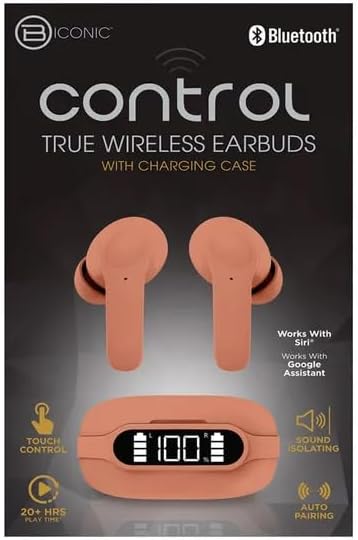
დაწყება
ყურსასმენების და ქეისის დამუხტვა
The BYTECH BICONIC earbuds come with a rechargeable battery in both the earbuds and the charging case. Ensure both are fully charged before first use.
- Place the earbuds into the charging case, ensuring they are correctly seated in their respective slots (L for left, R for right).
- Connect the provided charging cable to the charging port on the case and the other end to a USB power source (e.g., computer USB port, wall adapter).
- დამტენი ქეისის ციფრული ეკრანი აჩვენებს ბატარეის დონეს. სრულად დატენვისთვის საკმარისი დრო უნდა დაელოდოთ.
- სრულად დატენვის შემდეგ გათიშეთ დამტენი კაბელი.
Bluetooth დაწყვილება
Follow these steps to pair your earbuds with your Bluetooth-enabled device:
- დარწმუნდით, რომ ყურსასმენები დატენილია და დამტენ ქეისშია მოთავსებული.
- Open the charging case. The earbuds will automatically enter pairing mode, and an indicator light on the earbuds will flash.
- On your device (smartphone, tablet, etc.), go to the Bluetooth settings and turn Bluetooth on.
- ძიება available devices. You should see "BYTECH BICONIC" or a similar name appear in the list.
- Select "BYTECH BICONIC" to connect. Once connected, a voice prompt will confirm the successful pairing, and the indicator lights on the earbuds will stop flashing.
- ყურსასმენები ქეისიდან ამოღების შემდეგ ავტომატურად დაუკავშირდება ბოლოს დაწყვილებულ მოწყობილობას, იმ პირობით, რომ მოწყობილობაზე Bluetooth ჩართულია.
ოპერაციული ინსტრუქციები
შეეხეთ კონტროლს
The BYTECH BICONIC earbuds feature intuitive touch controls for easy management of your audio and calls.
| მოქმედება | ფუნქცია |
|---|---|
| ერთჯერადი შეხება (მარცხენა/მარჯვენა ყურსასმენი) | დაკვრა/პაუზა მუსიკა, პასუხის გაცემა/ზარის დასრულება |
| ორმაგი შეხება (მარჯვენა ყურსასმენი) | შემდეგი სიმღერა |
| ორმაგი შეხება (მარცხენა ყურსასმენი) | წინა სიმღერა |
| სამმაგი შეხება (მარცხენა/მარჯვენა ყურსასმენი) | ხმოვანი ასისტენტის გააქტიურება (Siri/Google Assistant) |
| ხანგრძლივი დაჭერა (მარცხენა/მარჯვენა ყურსასმენი) | ზარის უარყოფა |
ჩართვა და გამორთვა
- ჩართვა: ყურსასმენები ავტომატურად ჩაირთვება დამტენი ჩანთიდან ამოღებისას.
- Გამორთვა: ყურსასმენები დააბრუნეთ დამტენ ქეისში და დახურეთ სახურავი. ისინი ავტომატურად გამოირთვება და დაიწყებენ დატენვას.
მოვლა და მოვლა
Proper care will extend the life of your BYTECH BICONIC True Wireless Earbuds.
- დასუფთავება: Use a soft, dry, lint-free cloth to clean the earbuds and charging case. Do not use liquids or aerosol cleaners.
- შენახვა: როდესაც ყურსასმენები არ იყენებთ, ყოველთვის შეინახეთ დამტენ ქეისში, რათა დაიცვათ ისინი და დატენილი იყოს.
- მოერიდეთ ექსტრემალურ პირობებს: Do not expose the device to extreme heat, cold, or direct sunlight.
- წყლის წინააღმდეგობა: ეს ყურსასმენები წყალგაუმტარი არ არის. მოერიდეთ წყალთან ან ჭარბ ტენიანობასთან კონტაქტს.
პრობლემების მოგვარება
თუ ყურსასმენებთან დაკავშირებით რაიმე პრობლემა შეგექმნათ, იხილეთ შემდეგი გავრცელებული გადაწყვეტილებები:
| პრობლემა | გამოსავალი |
|---|---|
| ყურსასმენები არ არის დაწყვილებული | დარწმუნდით, რომ ყურსასმენები დატენილია. გამორთეთ და ჩართეთ Bluetooth თქვენს მოწყობილობაზე. დაივიწყეთ მოწყობილობა Bluetooth-ის პარამეტრებში და ხელახლა დააწყვილეთ. |
| მუშაობს მხოლოდ ერთი ყურსასმენი | ორივე ყურსასმენი დააბრუნეთ დამტენ ქეისში, დაახურეთ თავსახური, დაელოდეთ რამდენიმე წამი და შემდეგ ისევ ამოიღეთ. დარწმუნდით, რომ ორივე დატენილია. |
| ხმა არ არის | შეამოწმეთ ხმის დონე როგორც თქვენს მოწყობილობაზე, ასევე ყურსასმენებზე. დარწმუნდით, რომ ყურსასმენები სწორად არის დაკავშირებული. სცადეთ სხვა აუდიოს დაკვრა. |
| დამტენი ქეისი არ იტენება | დარწმუნდით, რომ დამტენი კაბელი საიმედოდ არის დაკავშირებული როგორც კორპუსთან, ასევე კვების წყაროსთან. სცადეთ სხვა USB პორტი ან კვების ადაპტერი. |
ტექნიკური მახასიათებლები
Detailed specifications for your BYTECH BICONIC True Wireless Earbuds:
| ფუნქცია | დეტალი |
|---|---|
| მოდელის ნომერი | BC-AU-BE-144-TN |
| დაკავშირების ტექნოლოგია | უსადენო (Bluetooth) |
| ფორმის ფაქტორი | ყურში (Intraurales) |
| ფერი | კაფე |
| განსაკუთრებული თვისებები | Rechargeable Battery, Touch Control, Sound Isolating, Auto Pairing |
| მოყვება კომპონენტები | კაბელი |
| Estimated Play Time | 20+ Hours (with charging case) |
გარანტიის ინფორმაცია და მომხმარებელთა მხარდაჭერა
BYTECH products are designed and manufactured to the highest quality standards. For information regarding warranty coverage, please refer to the warranty card included with your purchase or visit the official BYTECH webსაიტი.
If you require further assistance or have questions not covered in this manual, please contact BYTECH customer support through their official channels. Please have your model number (BC-AU-BE-144-TN) and purchase details ready when contacting support.


