1. შესავალი
The MAXHUB UC P30 SC802A 12X VHD Camera is a high-definition video capture device designed for professional use. Featuring 12x optical zoom and 1080p video resolution, it is ideal for various applications including video conferencing, live streaming, and educational environments. This manual provides detailed instructions to help you set up, operate, and maintain your camera for optimal performance.
2. რა არის ყუთში
გთხოვთ, დარწმუნდეთ, რომ ყველა კომპონენტი შეფუთვაშია:
- 1 x MAXHUB UC P30 SC802A 12X VHD Camera
- (Additional accessories such as power adapter, USB cable, remote control, etc., would typically be listed here if provided in the product data. Based on "Included Components: 1 product", only the camera is explicitly mentioned.)
3. პროდუქტი დასრულდაview
Familiarize yourself with the key components and features of your MAXHUB UC P30 SC802A camera.
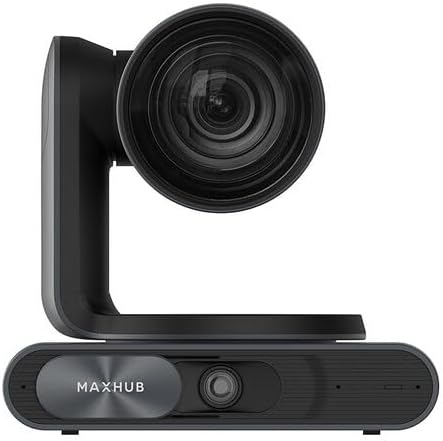
სურათი 3.1: წინა view of the MAXHUB UC P30 SC802A camera, showing the main lens and the MAXHUB branding on the base.

სურათი 3.2: დახრილი view of the MAXHUB UC P30 SC802A camera, highlighting its compact design and the rotating camera head.
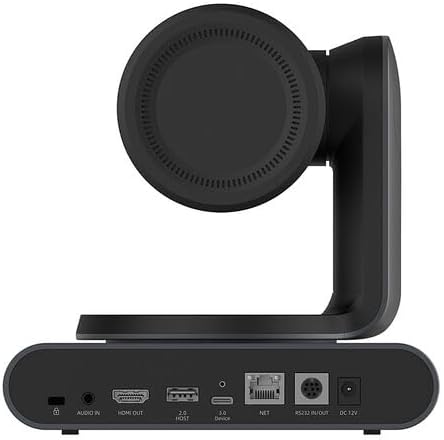
სურათი 3.3: უკანა view of the MAXHUB UC P30 SC802A camera, displaying various connectivity ports including Audio In, HDMI Out, USB 2.0 Host, USB 3.0 Device, NET (Ethernet), RS232 In/Out, and DC 12V power input.
4. დაყენება
Follow these steps to set up your MAXHUB UC P30 SC802A camera:
- განთავსება: Place the camera on a stable, flat surface or mount it securely using compatible mounting hardware (not included, unless specified). Ensure it has a clear line of sight to the area you wish to capture.
- დენის კავშირი: Connect the provided power adapter to the DC 12V input port on the rear of the camera (refer to Figure 3.3) and plug the adapter into a power outlet.
- USB კავშირი: Connect the camera to your computer using a USB cable (USB 3.0 Device port, refer to Figure 3.3). The camera is designed for plug-and-play operation with most operating systems.
- ვიდეო გამომავალი (სურვილისამებრ): For direct video monitoring, connect an HDMI cable from the HDMI Out port on the camera to an HDMI input on a display device (refer to Figure 3.3).
- აუდიო შეყვანა (არასავალდებულო): If using an external microphone, connect it to the Audio In port on the camera (refer to Figure 3.3).
- ქსელური კავშირი (არასავალდებულო): For network control or streaming, connect an Ethernet cable to the NET port (refer to Figure 3.3).
- დრაივერის ინსტალაცია: In most cases, the camera will be recognized automatically by your operating system. If prompted, allow the system to install necessary drivers. For advanced features or specific software, refer to the manufacturer's webსაიტი დრაივერის ჩამოტვირთვისთვის.
5. საოპერაციო ინსტრუქციები
Once the camera is set up, you can begin operation:
- ჩართვა: The camera will power on automatically once connected to power. An indicator light (if present) will illuminate.
- პროგრამული უზრუნველყოფის ამოცნობა: Open your preferred video conferencing, streaming, or recording software on your computer. Select the MAXHUB UC P30 camera as your video input device.
- Pan, Tilt, Zoom (PTZ) Control:
- ხელით კონტროლი: The camera head can be manually adjusted for initial positioning.
- პროგრამული უზრუნველყოფის კონტროლი: Utilize the PTZ controls within your video software or a dedicated MAXHUB control application (if available) to remotely adjust pan, tilt, and zoom.
- დისტანციური მართვა (თუ შესაძლებელია): If a remote control was included, use it to precisely adjust the camera's position and zoom level.
- ფოკუსის რეგულირება: The camera typically features auto-focus. If manual focus is required, it can usually be adjusted via software controls.
- ვიდეოს პარამეტრები: Adjust video settings such as resolution (up to 1080p), frame rate, brightness, contrast, and white balance through your software's camera settings.
- Გამორთვა: Disconnect the power adapter from the camera or the power outlet to turn off the device.
6. მოვლა
სათანადო მოვლა უზრუნველყოფს თქვენი კამერის ხანგრძლივობას და ოპტიმალურ მუშაობას:
- ლინზების გაწმენდა: Use a soft, lint-free cloth specifically designed for optical lenses to gently wipe the camera lens. Avoid abrasive materials or harsh chemicals.
- სხეულის გაწმენდა: გაწმინდეთ კამერის კორპუსი რბილი, მშრალი ქსოვილით. ჯიუტი ჭუჭყის შემთხვევაში, ოდნავamp cloth can be used, but ensure no moisture enters the ports or internal components.
- შენახვა: When not in use for extended periods, store the camera in a cool, dry place, away from direct sunlight and extreme temperatures. Use the original packaging or a protective case if available.
- მოერიდეთ დაბრკოლებებს: Ensure the camera's ventilation openings (if any) are not blocked to prevent overheating.
7. Დიაგნოსტიკა
გავრცელებული პრობლემებისა და მათი გადაჭრის გზებისთვის იხილეთ ეს განყოფილება:
| პრობლემა | შესაძლო მიზეზი | გამოსავალი |
|---|---|---|
| სურათის/ვიდეოს გამომავალი არ არის |
|
|
| გამოსახულების ცუდი ხარისხი |
|
|
| კამერა კომპიუტერმა არ ამოიცნო |
|
|
8. სპეციფიკაციები
Key technical specifications for the MAXHUB UC P30 SC802A 12X VHD Camera:
| ფუნქცია | დეტალი |
|---|---|
| მოდელის სახელი | UCP30 |
| ბრენდი | MAXHUB |
| ვიდეოკამერის ტიპი | Action Camera (Note: This might be a misclassification in the source data, as it's a PTZ camera. Describing it as a "Professional Video Conferencing Camera" would be more accurate based on its features.) |
| ოპტიკური ზუმი | 12 x |
| ვიდეო გადაღების გარჩევადობა | 1080p |
| ვიდეო გადაღების ფორმატი | MP4 |
| დაკავშირების ტექნოლოგია | USB |
| ფერი | შავი |
| ნივთის წონა | 2.2 ფუნტი |
| პაკეტის ზომები | 3.94 x 0.79 x 0.39 ინჩი |
| ASIN | B0DF5RFM3J |
| პირველი ხელმისაწვდომი თარიღი | 25 წლის 2024 აგვისტო |
9. ინფორმაცია გარანტიის შესახებ
MAXHUB products are typically covered by a manufacturer's warranty. For specific warranty terms, conditions, and duration, please refer to the warranty card included with your product or visit the official MAXHUB webსაიტი. შეინახეთ შეძენის დამადასტურებელი საბუთი გარანტიის მოთხოვნისთვის.
10. მხარდაჭერა
If you encounter any issues not covered in this manual or require further assistance, please contact MAXHUB customer support. You can usually find contact information on the official MAXHUB webსაიტზე ან იმ საცალო ვაჭრობის მეშვეობით, სადაც პროდუქტი შეიძინეთ.
ონლაინ რესურსებისთვის ეწვიეთ MAXHUB მაღაზია Amazon-ზე.


