შესავალი
The YMOO SafeFly Min+ is a versatile 2-in-1 Bluetooth 5.4 audio adapter designed to enhance your audio experience across various devices and environments. It functions as both a transmitter (TX mode) and a receiver (RX mode), allowing you to wirelessly connect your audio sources to Bluetooth headphones or speakers, or to enable Bluetooth functionality for wired audio systems. Featuring an intuitive OLED screen and a long-lasting battery, this device is ideal for travel, home entertainment, and fitness activities.
რა არის ყუთში
- YMOO SafeFly Min+ Bluetooth Adapter
- USB-C დამტენი კაბელი
- Key Chain Attachment
- 3.5mm to 3.5mm Audio Adapter
- თვითმფრინავის აუდიო ადაპტერი (ორმაგი შეერთებით)
- მომხმარებლის სახელმძღვანელო

პროდუქტი დასრულდაview
The SafeFly Min+ is a compact and feature-rich device designed for seamless audio connectivity.
- OLED ეკრანი: The device features an OLED screen that clearly displays pairing status, volume level, current mode (TX or RX), battery capacity, and supported audio codecs (aptX-HD/LL/AD/SBC). This allows for easy monitoring and control.
- 2-1-ში ფუნქციონალობა: Operates as both a Bluetooth transmitter (TX Mode) and a Bluetooth receiver (RX Mode).
- Bluetooth 5.4: Equipped with the latest Bluetooth 5.4 technology for quick pairing, stable connection, and a wireless range of up to 70 feet (line-of-sight).
- ორმაგი მოწყობილობის მხარდაჭერა: Supports simultaneous connection to two Bluetooth devices (e.g., two headphones or two speakers) in TX mode.
- ბატარეის ხანგრძლივი ხანგრძლივობა: Provides up to 25 hours of playtime on a single charge, making it suitable for extended use during travel. Charges via a USB-C port.
- aptX დაბალი შეყოვნება: Supports aptX Low Latency mode for audio synchronization with minimal delay (less than 40ms), ideal for video and gaming. Note: Both the adapter and your headphones must support aptX-LL for this feature to work. It cannot be used when pairing two Bluetooth headsets simultaneously.
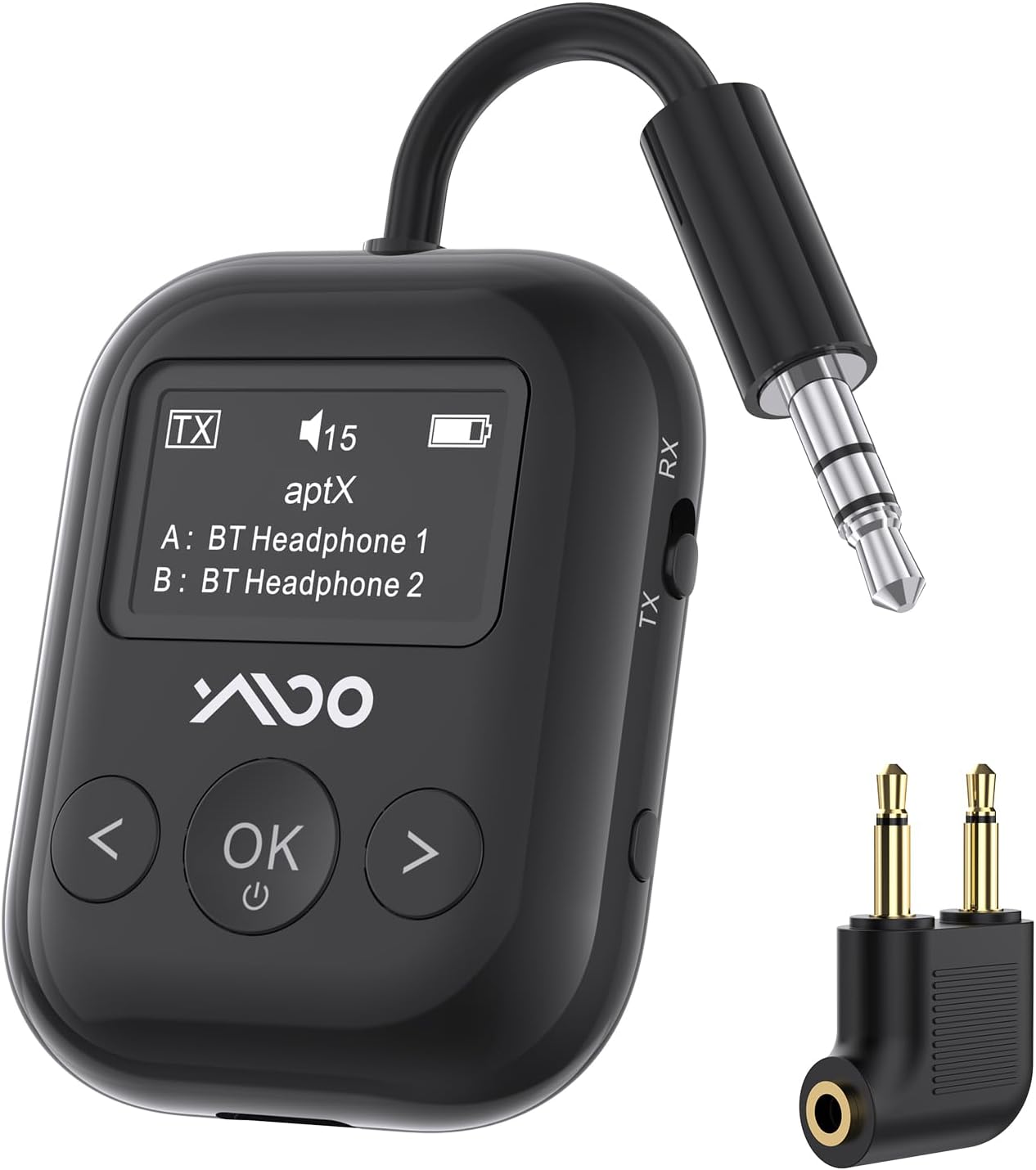

დაყენება
- მოწყობილობის დატენვა:
Before first use, fully charge the SafeFly Min+ using the provided USB-C cable. Connect the USB-C end to the device and the USB-A end to a compatible power source (e.g., computer USB port, wall adapter). The OLED screen will indicate charging status.

Image: The YMOO SafeFly Min+ device connected to a USB-C charging cable, illustrating its charging capability. - Selecting Operating Mode (TX/RX):
Locate the TX/RX switch on the side of the device. Slide the switch to the desired mode:
- გადამცემის რეჟიმი: For sending audio from a non-Bluetooth device (e.g., TV, airplane entertainment) to Bluetooth headphones/speakers.
- RX (მიმღების) რეჟიმი: For receiving audio from a Bluetooth device (e.g., smartphone) to wired headphones/speakers or a car stereo.

სურათი: ახლო ხედი view of the physical TX/RX switch on the side of the YMOO SafeFly Min+ for mode selection. - Initial Pairing (TX Mode Exampლე):
Follow these steps for quick pairing:
- Slide the TX/RX button to TX mode to turn on the adapter. The screen will display "Searching...".
- Ensure your Bluetooth headphones/earbuds are in pairing mode.
- The SafeFly Min+ will automatically search for and display available Bluetooth devices on its OLED screen.
- Use the left/right arrow buttons to navigate and the "OK" button to select your desired device. Connection should occur within 2 seconds.
- Once connected, the screen will display the connected device's name.
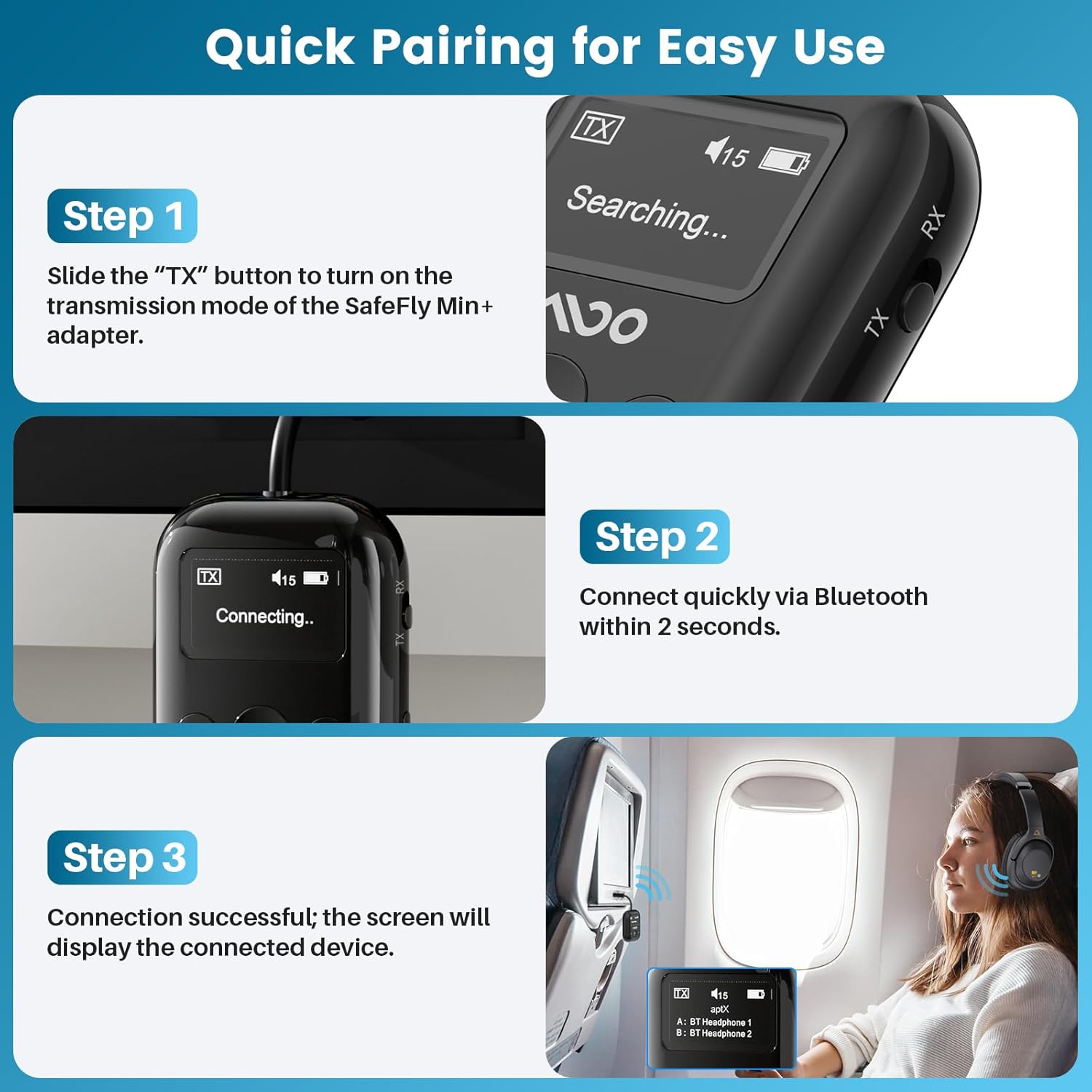
Image: A visual guide demonstrating the three steps for quick pairing the YMOO SafeFly Min+ adapter with Bluetooth headphones, including turning on, connecting, and successful pairing display.
ოპერაციული ინსტრუქციები
TX (Transmitter) Mode
In TX mode, the SafeFly Min+ transmits audio from a non-Bluetooth source to your Bluetooth headphones or speakers.
- დაკავშირება აუდიო წყაროსთან: Plug the integrated 3.5mm audio jack of the SafeFly Min+ into the audio output port of your device (e.g., TV, PC, airplane entertainment system, gym equipment). Use the provided airplane adapter if necessary for dual-prong jacks.
- Pair Bluetooth Headphones/Speakers: Ensure the SafeFly Min+ is in TX mode and your Bluetooth headphones/speakers are in pairing mode. Select your device on the SafeFly Min+ screen to connect.
- Enjoy Wireless Audio: Once connected, audio from your source device will be streamed wirelessly to your paired Bluetooth headphones or speakers.


RX (Receiver) Mode
In RX mode, the SafeFly Min+ receives audio from a Bluetooth source (e.g., smartphone) and outputs it to a wired audio system.
- Connect to Wired Audio System: Plug the integrated 3.5mm audio jack of the SafeFly Min+ into the audio input port of your wired headphones, car stereo, home stereo, or AV receiver.
- Bluetooth მოწყობილობის დაწყვილება: Ensure the SafeFly Min+ is in RX mode. On your smartphone or other Bluetooth audio source, search for "SafeFly Min+" in the Bluetooth settings and connect.
- აუდიოს სტრიმინგი: Once connected, audio from your Bluetooth device will play through your wired audio system.

Dual Headphone Connection (TX Mode)
The SafeFly Min+ can transmit audio to two Bluetooth headphones simultaneously.
- Connect the first pair of Bluetooth headphones as described in the TX Mode instructions.
- Once the first pair is connected, put the second pair of Bluetooth headphones into pairing mode.
- On the SafeFly Min+ screen, select the second device to connect. The screen will show both connected devices (A and B).

ხმის კონტროლი
Use the left (<) and right (>) arrow buttons on the device to adjust the volume level. The current volume will be displayed on the OLED screen.
აუდიო კოდეკის ინფორმაცია
The OLED screen will display the active audio codec (e.g., aptX, SBC, AAC). For aptX Low Latency (aptX-LL) to function, both the SafeFly Min+ and your connected headphones must support aptX-LL. This mode is not available when two Bluetooth headsets are paired simultaneously.

Video: An official product video from YMOO-US demonstrating the YMOO Bluetooth Transmitter Receiver for Airplane, showcasinმისი მახასიათებლები და გამოყენების სიმარტივე.
მოვლა
- დასუფთავება: Use a soft, dry cloth to clean the device. Avoid using liquid cleaners or solvents.
- შენახვა: Store the device in a cool, dry place when not in use. Use the provided key chain attachment to protect the 3.5mm jack.
- ბატარეის მოვლა: To prolong battery life, avoid fully discharging the device frequently. Recharge it regularly, especially if stored for long periods.
პრობლემების მოგვარება
- მოწყობილობა არ ირთვება: დარწმუნდით, რომ მოწყობილობა დატენილია. შეაერთეთ ის კვების წყაროსთან USB-C კაბელის გამოყენებით.
- დაწყვილება შეუძლებელია:
- Check that the SafeFly Min+ is in the correct TX or RX mode.
- Ensure your target Bluetooth device (headphones/speaker/phone) is in pairing mode.
- მოწყობილობები ერთმანეთთან უფრო ახლოს მიიტანეთ, რათა დარწმუნდეთ, რომ ისინი მოქმედების რადიუსში არიან.
- Restart both the SafeFly Min+ and the target Bluetooth device.
- ხმა არ არის ან ხმის ხარისხი ცუდია:
- Verify that the 3.5mm audio jack is fully inserted into the source/destination device.
- Check the volume levels on both the SafeFly Min+ and the connected audio device.
- Ensure there are no obstructions or strong interference sources between the SafeFly Min+ and the paired Bluetooth device.
- If using aptX-LL, confirm both devices support it and only one headset is connected.
- OLED screen not displaying correctly: If the screen is unresponsive or shows garbled text, try restarting the device.
სპეციფიკაციები
| ფუნქცია | სპეციფიკაცია |
|---|---|
| ბრენდი | YMOO |
| მოდელი | SafeFly Min+ |
| Bluetooth ვერსია | 5.4 |
| დაკავშირების ტექნოლოგია | AUX |
| დენის წყარო | იკვებება ბატარეით (USB-C დატენვადი) |
| განსაკუთრებული თვისებები | AptX LL/HD/Adaptive, Built-in Battery, High fidelity sound quality, Low latency transmission, OLED Screen |
| ბატარეის ხანგრძლივობა | 25 საათამდე |
| ნივთის წონა | 2.39 უნცია |
| მასალა | პლასტიკური |
| პაკეტის ზომები | 4.53 x 3.58 x 0.75 ინჩი |
უსაფრთხოების ინფორმაცია
This product contains a lithium battery. Ensure proper handling and disposal. Avoid using near other wireless devices to minimize interference. Use with caution during travel, adhering to temperature and humidity limitations.
გარანტია და მხარდაჭერა
For warranty information and technical support, please refer to the official YMOO webსაიტზე ან პირდაპირ დაუკავშირდით მათ მომხმარებელთა მომსახურების სამსახურს. დეტალები, როგორც წესი, შეგიძლიათ იხილოთ პროდუქტის შეფუთვაზე ან მწარმოებლის ონლაინ რესურსებზე.


