1. შესავალი
This manual provides essential information for the safe and efficient installation, operation, and maintenance of your TCP Economy LED UFO High Bay Luminaire. Please read this manual thoroughly before installation and retain it for future reference.
The TCP Economy LED UFO High Bay Luminaire is designed for commercial and industrial applications, offering high efficacy and a long operational lifespan. It features a robust design suitable for various environments, including warehouses, retail spaces, and gymnasiums.

სურათი 1: წინა view of the TCP Economy LED UFO High Bay Luminaire, showing the LED array and clear lens.
2. უსაფრთხოების ინფორმაცია
- ელექტრო უსაფრთხოება: Installation must be performed by a qualified electrician in accordance with all national and local electrical codes. Always disconnect power at the circuit breaker before installing, servicing, or cleaning the fixture.
- დამიწება: Ensure the fixture is properly grounded to prevent electrical shock.
- დამუშავება: Do not handle the fixture with wet hands. Avoid touching the LED array directly.
- საოპერაციო გარემო: This luminaire is rated IP65 for outdoor use and protection against dust and water jets. Do not submerge the fixture in water. Ensure the operating temperature is within the specified range.
- მონტაჟი: The mounting structure must be capable of supporting the weight of the fixture.
- ცვლილებები: Do not attempt to modify or disassemble the fixture. This will void the warranty and may create safety hazards.
3. პაკეტის შიგთავსი
Upon unpacking, verify that all components are present and undamaged. The package should contain:
- 1 x TCP Economy LED UFO High Bay Luminaire
- 1 x Eyebolt for suspended mounting
Note: Additional mounting hardware (e.g., chains, hooks) may be required and is sold separately.
4. სპეციფიკაციები
| ფუნქცია | სპეციფიკაცია |
|---|---|
| მოდელის ნომერი | 762148336747 |
| ბრენდი | TCP |
| ვატtage ოფციები | 115 W / 160 W / 200 W |
| ეფექტურობა | 145 LPW-მდე |
| ფერის ტემპერატურა (CCT) | 4000K / 5000K |
| ჩაბნელება | 0-10 ვ დაბნელება |
| IP რეიტინგი | IP65 (მტვერგაუმტარი, დაცულია წყლის ჭავლებისგან) |
| სიცოცხლის ხანგრძლივობა | 50,000 საათი |
| შეყვანის მოცულობაtage | 120-277V AC (Typical, verify product label) |
| სინათლის წყაროს ტიპი | LED |
| ინსტალაციის ტიპი | Suspended (Eyebolt included) |
| ფიქსაციის ფორმა | ჭერი |
| შიდა/გარე გამოყენება | გარე |
| ჩრდილის მასალა | აკრილის |
| ნივთის წონა | 6.44 ფუნტი |
| პაკეტის ზომები | 12.48 x 12.44 x 5.87 ინჩი |
| Fixture Dimensions (approx.) | 11" Diameter x 5.9" Height (with eyebolt) |
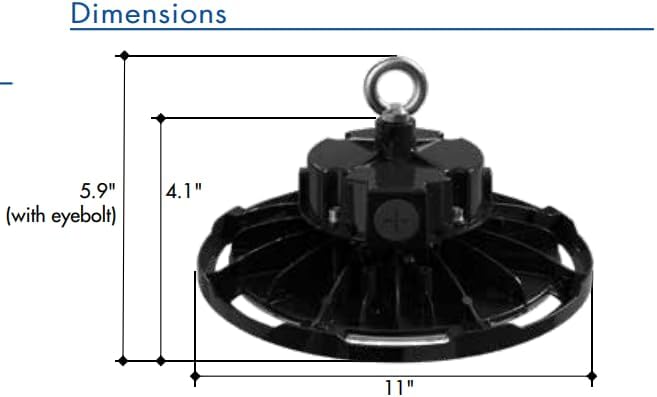
Figure 2: Approximate dimensions of the luminaire, including height with eyebolt and diameter.
5. ინსტალაციის ინსტრუქციები (პარამეტრები)
This luminaire is designed for suspended mounting. Follow these steps for proper installation:
- უსაფრთხოება პირველ რიგში: Ensure power to the installation area is turned OFF at the circuit breaker before beginning any work.
- შეამოწმეთ მოწყობილობა: Carefully remove the luminaire from its packaging and inspect for any damage. Do not install if damaged.
- მოამზადეთ სამონტაჟო წერტილი: Identify a suitable structural mounting point capable of safely supporting the luminaire's weight (6.44 lbs). Install appropriate mounting hardware (e.g., chain, hook) if not already present.
- Attach Eyebolt: Securely thread the provided eyebolt into the top of the luminaire housing.
- ჩამოკიდებული მოწყობილობა: Carefully lift the luminaire and attach the eyebolt to your chosen mounting hardware. Ensure the fixture is stable and level.
- გაყვანილობა:
- Open the wiring compartment on the top of the fixture.
- Connect the AC input wires (Line, Neutral, Ground) from your power supply to the corresponding wires on the luminaire. Refer to local electrical codes for proper wiring practices.
- For 0-10V dimming functionality, connect the purple (DIM+) and gray (DIM-) wires from your 0-10V dimmer to the corresponding dimming wires on the luminaire. If dimming is not desired, cap these wires individually.
- დარწმუნდით, რომ ყველა კავშირი უსაფრთხო და იზოლირებულია.
- დახურული განყოფილება: საიმედოდ დახურეთ გაყვანილობის განყოფილების საფარი.
- ენერგიის აღდგენა: Once installation is complete and all connections are verified, restore power at the circuit breaker.
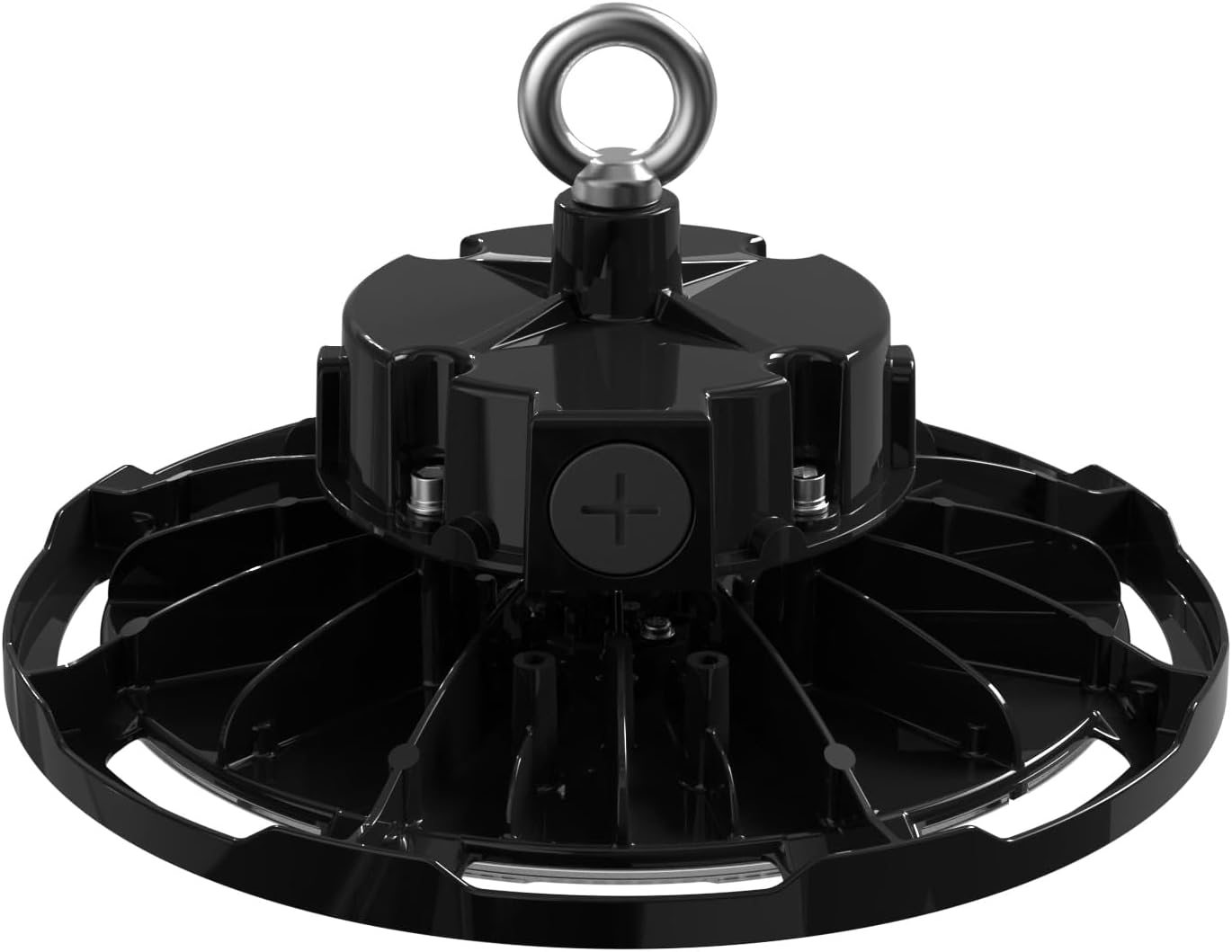
სურათი 3: ზედა view of the luminaire, illustrating the eyebolt for suspension and the location of the wiring compartment.
6. ოპერაცია
The TCP Economy LED UFO High Bay Luminaire operates immediately upon receiving power.
- ჩართვა/გამორთვა: Control the luminaire's power supply via the connected wall switch or circuit breaker.
- Dimming: If connected to a compatible 0-10V dimmer, adjust the light output by manipulating the dimmer control. The luminaire will respond to the 0-10V signal to vary its brightness.
7. მოვლა
The TCP Economy LED UFO High Bay Luminaire requires minimal maintenance.
- დასუფთავება: Ensure power is disconnected before cleaning. Use a soft, damp cloth to wipe the exterior of the fixture. Do not use abrasive cleaners or solvents, as these may damage the finish or optical components.
- ინსპექტირება: Periodically inspect the fixture and its mounting hardware for any signs of damage, loose connections, or wear. Address any issues promptly.
- არ არის მომხმარებლის მიერ მომსახურე ნაწილები: There are no user-serviceable parts inside the luminaire. Do not attempt to open or repair the unit.
8. Დიაგნოსტიკა
If the luminaire is not functioning as expected, perform the following basic checks:
- შუქის გარეშე:
- Verify that the power supply to the fixture is active at the circuit breaker and wall switch.
- Check all wiring connections for proper contact and insulation.
- დაბნელება არ მუშაობს:
- Ensure the 0-10V dimmer is compatible and correctly wired to the luminaire's dimming leads (purple and gray).
- Verify the dimmer is functioning correctly.
- ციმციმი:
- შეამოწმეთ ფხვიერი გაყვანილობის კავშირები.
- დარწმუნდით, რომ შეყვანის მოცულობაtage სტაბილურია და მითითებული დიაპაზონის ფარგლებშია.
If these steps do not resolve the issue, contact customer support for assistance. Do not attempt further repairs yourself.
9. გარანტია და მხარდაჭერა
This TCP Economy LED UFO High Bay Luminaire is covered by a ხუთწლიანი შეზღუდული გარანტია against defects in manufacturing. Please retain your proof of purchase for warranty claims.

Figure 4: Warranty statement and product listings (UL and cUL listed, IP65 Rated).
For technical support, warranty inquiries, or replacement parts, please contact TCP customer service:
- Webსაიტი: www.tcpi.com
- ტელეფონი: Refer to TCP's official webსაიტი მიმდინარე საკონტაქტო ნომრებისთვის.


