1. შესავალი
This manual provides essential instructions for the safe and efficient use of your DALI IO-8 Wireless/Wired Hi-Fi Headphones. Please read this manual thoroughly before using the product and retain it for future reference. The DALI IO-8 headphones are designed to deliver a high-fidelity audio experience with advanced features such as Active Noise Cancellation (ANC), Bluetooth AptX Adaptive connectivity, and a long-lasting battery.
2. პროდუქტი დასრულდაview
გაეცანით თქვენი DALI IO-8 ყურსასმენების კომპონენტებსა და მართვის საშუალებებს.

სურათი 2.1: წინა view of the DALI IO-8 headphones, showcasing the caramel and white color scheme and overall design.

სურათი 2.2: Ზემოდან ქვემოთ view of the DALI IO-8 headphones, highlighting the earcups and visible control buttons on the side.
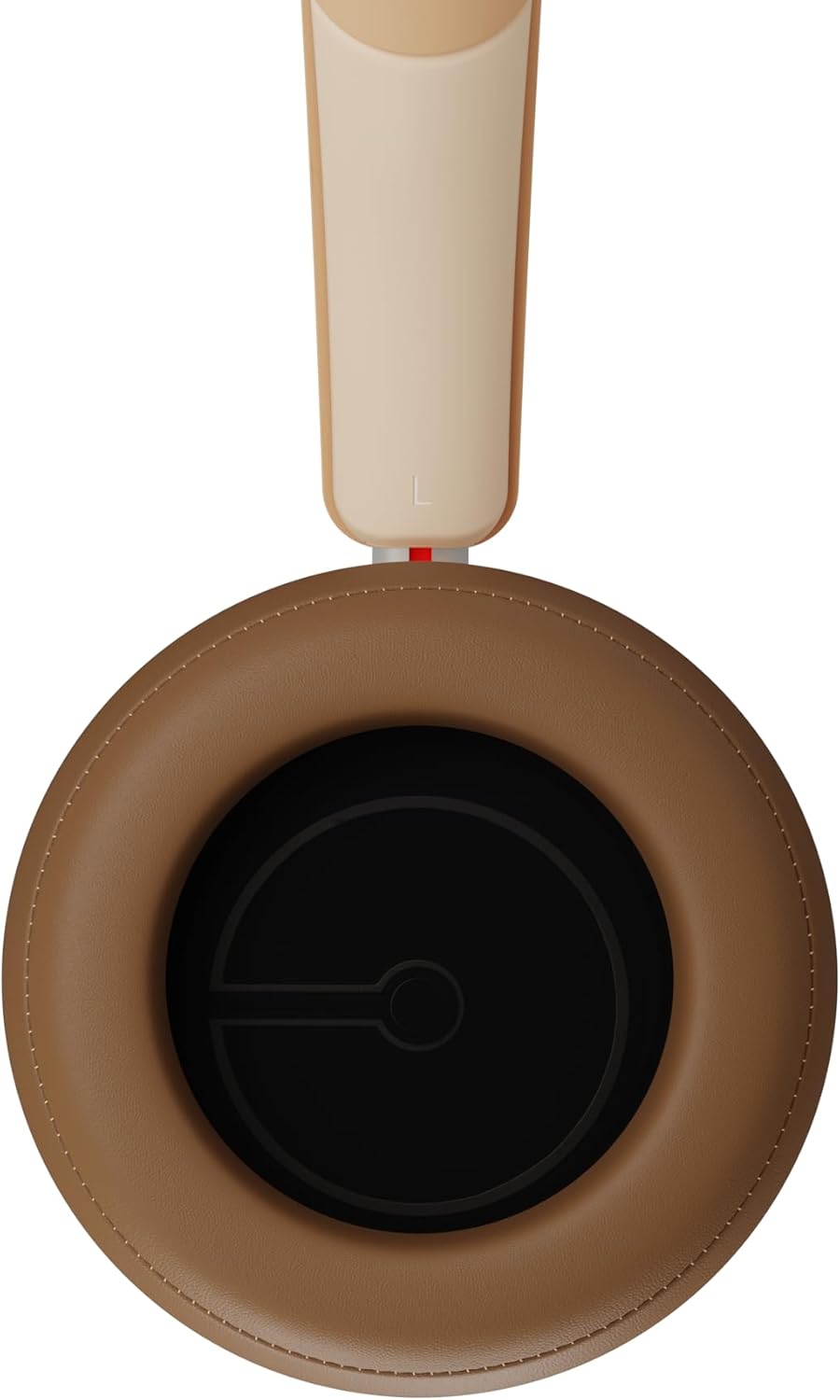
სურათი 2.3: ინტერიერი view of a DALI IO-8 earcup, showing the soft padding and driver grille, designed for comfort and sound delivery.

სურათი 2.4: ახლოდან view of the DALI IO-8 earcup, showing the USB-C charging port and other control buttons.
2.1 პაკეტის შიგთავსი
- DALI IO-8 ყურსასმენები
- USB-C დამტენი კაბელი
- 3.5 მმ აუდიო კაბელი
- Travel Case (if included)
- მომხმარებლის სახელმძღვანელო (ეს დოკუმენტი)
2.2 ყურსასმენის კომპონენტები

სურათი 2.5: აფეთქდა view illustrating the internal components of the DALI IO-8 headphones, including the 50mm driver, circuitry, and earcup structure.
- Headband (Adjustable)
- Earcups (Over-ear design with genuine leather)
- 50mm Driver (SMC Driver Technology)
- Control Buttons (Power, Volume, ANC, Multifunction)
- USB-C Port (Charging and Wired Audio)
- 3.5mm Audio Jack (Wired Audio)
- Microphones (for ANC and calls)
3. დაყენება
3.1 ყურსასმენების დატენვა
Before initial use, fully charge your DALI IO-8 headphones.
- Connect the supplied USB-C cable to the USB-C port on the headphone earcup.
- USB-C კაბელის მეორე ბოლო შეაერთეთ თავსებად USB კვების წყაროსთან (მაგ., კომპიუტერის USB პორტი, USB კედლის ადაპტერი).
- LED ინდიკატორი აჩვენებს დატენვის სტატუსს. სრული დატენვა უზრუნველყოფს 35 საათამდე დაკვრას ANC ჩართული რეჟიმის შემთხვევაში.
- სრულად დატენვის შემდეგ გათიშეთ კაბელი.
3.2 ჩართვა/გამორთვა
- ჩართვა: Press and hold the Power button for approximately 2 seconds until the LED indicator illuminates.
- გამორთვა: დააჭირეთ და გააჩერეთ ჩართვის ღილაკი დაახლოებით 3 წამის განმავლობაში, სანამ LED ინდიკატორი არ გაქრება.
3.3 Bluetooth დაწყვილება
The DALI IO-8 supports Bluetooth AptX Adaptive for high-quality wireless audio.
- დარწმუნდით, რომ ყურსასმენები გამორთულია.
- Press and hold the Power button for approximately 5 seconds until the LED indicator flashes blue rapidly. This indicates pairing mode.
- თქვენს აუდიო მოწყობილობაზე (სმარტფონი, პლანშეტი, კომპიუტერი) ჩართეთ Bluetooth და მოძებნეთ ხელმისაწვდომი მოწყობილობები.
- Select "DALI IO-8" from the list of found devices.
- Once paired, the LED indicator will glow solid blue or flash slowly.
- ყურსასმენები ჩართვისას ავტომატურად შეეცდებიან ბოლოს დაწყვილებულ მოწყობილობასთან ხელახლა დაკავშირებას.
3.4 სადენიანი კავშირი
The DALI IO-8 can be used with a wired connection via the 3.5mm audio jack or USB-C.
- 3.5 მმ აუდიო კაბელი: Connect one end of the supplied 3.5mm audio cable to the headphone's 3.5mm jack and the other end to your audio source's headphone output. The headphones can be used passively in this mode, or actively with ANC and amplification if powered on.
- USB-C Audio: Connect the supplied USB-C cable to the headphone's USB-C port and the other end to a compatible USB audio output on your computer or device. This mode allows for digital audio transmission and charging simultaneously.
4. ყურსასმენების გამოყენება
4.1 ხმაურის აქტიური გაუქმება (ANC)
The DALI IO-8 features three distinct ANC modes and wind noise suppression.
- Press the dedicated ANC button to cycle through the available modes:
- ANC ჩართულია: მაქსიმალური ხმაურის ჩახშობა.
- გამჭვირვალობის რეჟიმი: Allows ambient sounds to pass through for situational awareness.
- ANC გამორთულია: Active noise cancellation is disabled.
- Wind noise suppression is automatically engaged in ANC modes to reduce interference from wind.
4.2 ხმის რეჟიმი
Customize your listening experience with two sound profiles.
- Press the Sound Mode button (if available, or refer to specific button on device) to switch between:
- Hi-Fi რეჟიმი: Delivers a balanced and neutral sound signature.
- ბასის რეჟიმი: Enhances low-frequency response for a more impactful bass.
4.3 Playback and Volume Control
Use the control buttons on the earcup for media playback and volume adjustments.
- მოცულობა: დააჭირეთ ღილაკს '+'.
- Ხმის დაწევა: დააჭირეთ ღილაკს '-'.
- დაკვრა/პაუზა: ერთხელ დააჭირეთ მრავალფუნქციური ღილაკს.
- შემდეგი სიმღერა: Double-press the Multifunction button.
- წინა ჩანაწერი: Triple-press the Multifunction button.
4.4 ზარების მართვა
Manage phone calls when connected via Bluetooth.
- ზარის პასუხი/დასრულება: ერთხელ დააჭირეთ მრავალფუნქციური ღილაკს.
- ზარის უარყოფა: დააჭირეთ და გააჩერეთ Multifunction ღილაკს 2 წამის განმავლობაში.
- ხმოვანი ასისტენტის გააქტიურება: Press and hold the Multifunction button for 2 seconds (when not on a call).
5. მოვლა
5.1 დასუფთავება
- ყურსასმენები გაწმინდეთ რბილი, მშრალი, ბუსუსების გარეშე ქსოვილით.
- არ გამოიყენოთ აბრაზიული საწმენდები, გამხსნელები ან ქიმიური სპრეი.
- ყურსასმენებისთვის, ნაზად გაწმინდეთ ოდნავamp საჭიროების შემთხვევაში, ქსოვილი გახეხეთ და შემდეგ დაუყოვნებლივ გააშრეთ.
- Ensure no moisture enters the ports or openings.
5.2 შენახვა
- When not in use, store the headphones in their protective travel case to prevent damage.
- მოერიდეთ ყურსასმენების ექსტრემალურ ტემპერატურაზე, ტენიანობაზე ან მზის პირდაპირ სხივებზე ზემოქმედებას.
6. Დიაგნოსტიკა
| პრობლემა | შესაძლო მიზეზი | გამოსავალი |
|---|---|---|
| არავითარი ძალა | ბატარეა დაცლილია. | ყურსასმენები დატენეთ მოწოდებული USB-C კაბელის გამოყენებით. |
| Bluetooth-ის საშუალებით დაწყვილება შეუძლებელია | ყურსასმენები დაწყვილების რეჟიმში არ არის; მოწყობილობა Bluetooth გამორთულია; მოწყობილობიდან ძალიან შორს არის. | Ensure headphones are in pairing mode (rapid blue LED flash). Turn on Bluetooth on your device. Move headphones closer to the device. Forget "DALI IO-8" on your device and re-pair. |
| ხმა არ არის | Volume too low; incorrect input source; headphones not connected. | Increase volume on headphones and source device. Check Bluetooth connection or wired cable. Ensure the correct audio output is selected on your device. |
| ANC ეფექტურად არ მუშაობს | ANC mode off; poor earcup seal. | Ensure ANC is enabled. Adjust headphones for a proper seal around your ears. |
7. სპეციფიკაციები
| ფუნქცია | დეტალი |
|---|---|
| მოდელის სახელი | დალი IO-8 |
| ბრენდი | დალი |
| დაკავშირების ტექნოლოგია | სადენიანი, უსადენო (Bluetooth) |
| უსადენო საკომუნიკაციო ტექნოლოგია | Bluetooth (AptX Adaptive) |
| ხმაურის გაუქმება | Active Noise Suppression (ANC) with Wind Noise Suppression |
| ყურის განთავსება | ყურზე |
| დრაივერის ზომა | 50mm (SMC Driver Technology) |
| წინაღობა | 25 ohms |
| ყურსასმენის ჯეკი | 3.5 მმ |
| ბატარეის ხანგრძლივობა | 35 საათამდე (ANC-ით) |
| მასალები | Genuine Leather (earcups) |
8. უსაფრთხოების ინფორმაცია
Please observe the following safety guidelines to ensure safe operation and prevent damage to your headphones or injury to yourself.
- Do not expose the headphones to water, rain, or moisture.
- მოერიდეთ ექსტრემალურ ტემპერატურას.
- Do not disassemble, repair, or modify the headphones. This voids the warranty.
- სმენის დაზიანების თავიდან ასაცილებლად, მოუსმინეთ საშუალო ხმის დონეზე.
- შეინახეთ ბავშვებისთვის მიუწვდომელ ადგილას.
- გადაყარეთ პროდუქტი პასუხისმგებლობით ადგილობრივი წესების შესაბამისად.
9. გარანტია და მხარდაჭერა
DALI products are manufactured to high standards and are covered by a limited warranty. For specific warranty terms and conditions, please refer to the warranty card included with your product or visit the official DALI website. For technical support, troubleshooting assistance, or service inquiries, please contact your authorized DALI dealer or DALI customer support.

სურათი 9.1: A person wearing the DALI IO-8 headphones, demonstrating their comfortable fit and use in a real-world environment.


