1. შესავალი
The BOYA BY-V10 is a compact and lightweight wireless lavalier microphone system designed for use with USB-C compatible devices, including Android smartphones, iPhone 15/16, iPads, and laptops. It offers high-quality audio recording with features like one-click noise cancellation and stable wireless transmission, making it suitable for various content creation scenarios.

Image: The BOYA BY-V10 USB-C Wireless Lavalier Microphone system, showing the transmitter and receiver.
ვიდეო: ოვერview of the BOYA BY-V10 Wireless Microphone, highlighting its ease of use for recording.
2. რა არის ყუთში
დარწმუნდით, რომ თქვენს პაკეტში ყველა კომპონენტია:
- 1 x გადამცემი (TX)
- 1 x Receiver (RXU) with USB-C connector
- 1 x USB-A-დან USB-C-ის დამტენი კაბელი
- 1 x ქაფიანი საქარე მინა
- 1 x ტარების ჩანთა
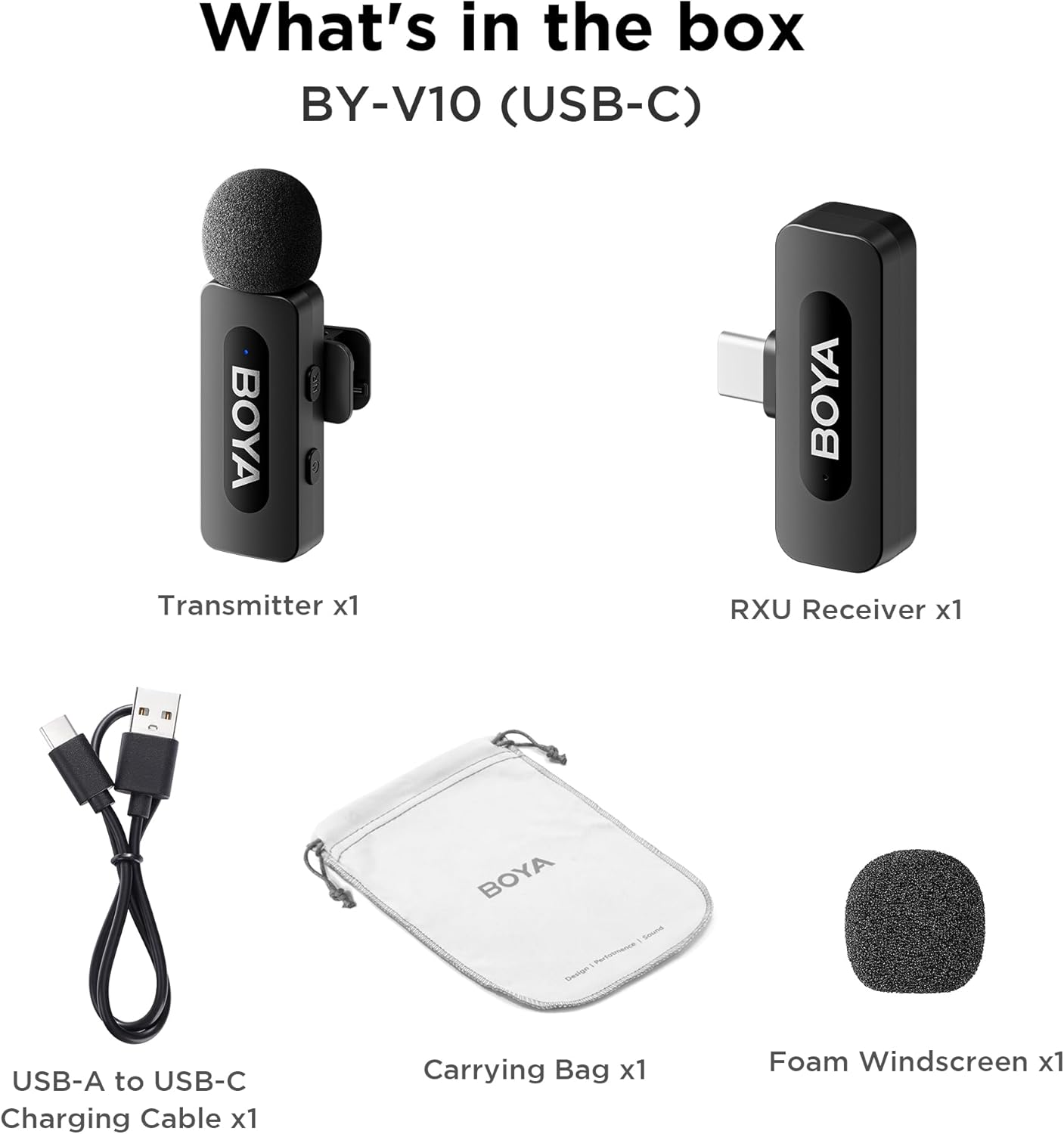
Image: The complete packing list for the BY-V10, showing all included accessories.
Video: An unboxing video demonstrating the contents of the BOYA BY-V Wireless Lavalier Microphone package.
3. დაყენების გზამკვლევი
3.1 საწყისი დატენვა
Before first use, ensure the transmitter is fully charged using the provided USB-A to USB-C charging cable. The receiver does not require charging as it draws power directly from your connected device.

Image: Battery life and charging details for the BY-V10 transmitter.
3.2 თქვენს მოწყობილობასთან დაკავშირება
- Press and hold the power button on the Transmitter (TX) for 2 seconds to turn it on. The indicator light will blink.
- Plug the Receiver (RXU) directly into the USB-C port of your smartphone, iPad, or laptop.
- The Transmitter and Receiver will automatically pair within 10 seconds. The indicator light on both units will turn solid blue once successfully paired.
- შენიშვნა Android-ის მომხმარებლებისთვის: Enable the "OTG" function in your device's settings before connecting the USB Type-C microphone.

Image: Visual instructions for the plug-and-play setup process.
3.3 მოწყობილობის თავსებადობა
The BY-V10 is compatible with devices featuring a USB-C port, including:
- Android სმარტფონები
- iPhone 15/16 მოდელები
- iPads with USB-C
- Laptops with USB-C
Please ensure your device supports external USB-C audio input.

Image: Visual representation of compatible devices for the BY-V10 microphone.
4. საოპერაციო ინსტრუქციები
4.1 Wearing the Microphone
The transmitter features a 360° rotatable clip for easy attachment to your clothing. For optimal sound capture, clip the microphone approximately 6-8 inches from your mouth.

Image: The compact size and clip-on design of the BY-V10 transmitter.
4.2 One-Click Noise Cancellation
To activate or deactivate the noise reduction mode, press the 'NR' button on the side of the transmitter. The indicator light will change to static green when noise reduction is enabled, and blink blue slowly when muted.

Image: Visual comparison of audio with and without noise cancellation enabled.

Image: Detailed explanation of the noise cancellation button and indicator lights.
4.3 Mute ფუნქცია
To mute the microphone, briefly press the power button on the transmitter. The indicator light will blink blue slowly. Press again to unmute.
4.4 გადაცემის დიაპაზონი
The BY-V10 offers a stable audio signal transmission range of up to 100 meters (328 feet) in open environments without obstacles or interference.

Image: Demonstration of the microphone's long-distance transmission capability.

Image: Further illustration of the extended transmission range.
4.5 დატენვა ჩაწერის დროს
The receiver allows you to charge your phone or connected device while recording, ensuring uninterrupted long sessions for streaming or course recording.

Image: The receiver connected to a smartphone, illustrating the ability to charge the phone during recording.

Image: Another visual of the 'Support Using While Charging' feature.
5. მოვლა
To ensure the longevity and optimal performance of your BOYA BY-V10 microphone, follow these maintenance guidelines:
- დასუფთავება: მიკროფონისა და რესივერის გასაწმენდად გამოიყენეთ რბილი, მშრალი ქსოვილი. მოერიდეთ სითხეების ან აბრაზიული საწმენდი საშუალებების გამოყენებას.
- შენახვა: Store the microphone system in its carrying bag when not in use to protect it from dust, moisture, and physical damage.
- ბატარეის მოვლა: Fully charge the transmitter before long periods of storage to maintain battery health.
- სიფრთხილით მოპყრობა: Avoid dropping the devices or exposing them to extreme temperatures.
6. Დიაგნოსტიკა
If you encounter problems when using the unit, please refer to the following checklist. If the problem cannot be solved, please contact the seller for after-sales service.
- The unit fails to pair: Make sure to pair the transmitter(s) with one receiver. If paired with more than one receiver, which receiver will be paired with the transmitter(s) cannot be specified.
- No sound from the unit or no sound when connected to an external device:
- დარწმუნდით, რომ მიმღების კონექტორი კარგად არის დაკავშირებული თქვენს მოწყობილობასთან.
- დარწმუნდით, რომ გადამცემ(ებ)ი არ არის დადუმებული. თუ მისი ინდიკატორი ნელა ციმციმებს ლურჯად, მომხმარებლებმა ერთხელ უნდა დააჭირონ ჩართვის ღილაკს გადამცემ(ებ)ის გამორთვისთვის.
- The operation range of the unit is limited and the sound is frequently intermittent: Make sure there is no interference between the transmitter(s) and receiver. If the intermittent sound still occurs frequently, please contact us for after-sales service.
- The unit shuts off automatically: როდესაც არ არის დაწყვილებული, გადამცემ(ებ)ი ავტომატურად გაითიშება 10 წუთის შემდეგ.
- The unit fails to be powered on: დარწმუნდით, რომ მოწყობილობას აქვს საკმარისი ბატარეა ჩართვისთვის. სცადეთ ჩართოთ დამტენი კაბელი მიკროსქემის გასააქტიურებლად.
- The charging case fails to charge the unit:
- Make sure the charging case's battery is not depleted. Try charging the case.
- Wipe the charging contacts of the unit and charging pins of the charging case with a clean cloth and to make sure no dust is covering them.
- Try to push down the unit placed in the charging case until the charging contacts are fully connected. After that, if the unit still fails to be charged, the magnetic force may be aging. Please contact us for after-sales service.

Image: A troubleshooting guide with solutions for common operational problems.
7. სპეციფიკაციები
| ფუნქცია | დეტალი |
|---|---|
| ბრენდი | ბოია |
| მოდელის სახელი | BY-V10(USB-C) |
| მიკროფონის ფორმის ფაქტორი | ლავალიერი |
| დაკავშირების ტექნოლოგია | USB |
| კონექტორის ტიპი | USB Type-C |
| პოლარული ნიმუში | ყოვლისმომცველი |
| აუდიო მგრძნობელობა | 42 დეციბელი |
| სიგნალი ხმაურის თანაფარდობა | 80 დბ |
| ნივთის წონა | 1.76 უნცია (0.05 კილოგრამი) |
| პროდუქტის ზომები | 3.27 x 4.45 x 1.38 ინჩი |
| დენის წყარო | Battery Powered (Transmitter) |
| ბატარეის ხანგრძლივობა (გადამცემი) | 9 საათამდე |
| დატენვის დრო (გადამცემი) | დაახლ. 2 საათი |
| სპეციალური ფუნქცია | Mute Function, One-Click Noise Cancellation |
| თავსებადი მოწყობილობები | Laptop, Smartphone (USB-C) |
8. გარანტია და მხარდაჭერა
For warranty information, technical support, or any inquiries regarding your BOYA BY-V10 microphone, please refer to the official BOYA website or contact the seller directly through your purchase platform. Keep your proof of purchase for warranty claims.


