შესავალი
Thank you for choosing the bmani Wireless Bluetooth Earbuds. These earbuds are designed to provide an immersive music experience with enhanced bass and effective noise cancellation. This manual will guide you through the setup, operation, and maintenance of your new earbuds.

Image: The bmani Wireless Bluetooth Earbuds in their charcoal charging case, displaying a digital battery percentage.
ვიდეო: ოფიციალური პირი დასრულდაview of the bmani S13 Wireless Bluetooth Earbuds, highlighting key features, design, and compatibility. This video provides a visual introduction to the product.
რა არის ყუთში
პაკეტის გახსნისას, თქვენ უნდა იპოვოთ შემდეგი ნივთები:
- bmani Wireless Bluetooth Earbuds (in-the-ear-headphones)
- დამუხტვის ქეისი
- მომხმარებლის სახელმძღვანელო (ეს დოკუმენტი)
- USB-C დამტენი კაბელი
- ყურის წვერების სხვადასხვა ზომა
ძირითადი მახასიათებლები
The bmani S13 Earbuds are equipped with advanced features for a superior audio experience:
- Enhanced Bass & Hi-Fi Stereo Sound: Features 13mm dynamic drivers for deep bass and crystal-clear treble.
- აქტიური ხმაურის გაუქმება: Provides an isolated listening environment by reducing ambient noise.
- Bluetooth 5.3 დაკავშირება: Ensures faster and more stable wireless connection.
- ბატარეის ხანგრძლივი ხანგრძლივობა: Up to 8 hours of playback on a single charge for earbuds, and 48 hours total with the charging case.
- ორმაგი დატენვის პარამეტრები: Supports both USB-C wired charging and wireless Qi charging.
- მსუბუქი და ერგონომიული დიზაინი: Designed for comfortable and secure fit during extended use.
- IPX7 წყალგაუმტარი: Resistant to sweat, rain, and splashing, making them suitable for various activities.
- LED ციფრული ბატარეის დისპლეი: Clear indication of charging case and earbud battery status.
- Smart Button Control: Intuitive touch controls for music playback, calls, and voice assistant.
- Monaural/Binaural Mode: Use one or both earbuds as needed.

Image: Illustration of the earbuds' internal components, emphasizing the 13mm dynamic driver for deep bass and crystal treble, delivering HiFi Stereo Sound.

სურათი: აფეთქებული დიაგრამა აჩვენებსasing the intricate components of the earbud's audio driver, designed for deep bass and high-fidelity stereo sound.
დიზაინი და კომფორტი
The bmani S13 earbuds are engineered for maximum comfort and a secure fit, making them ideal for prolonged use.
- მსუბუქი: Each earbud is designed to be extremely light, minimizing ear fatigue.
- ერგონომიული მორგება: The rounded tips and in-ear design conform naturally to the ear canal, ensuring stability during movement.
- კომპაქტური ზომები: The earbuds and case are designed for portability.

Image: A woman wearing a bmani earbud, highlighting its lightweight nature and ergonomic design for comfortable wear.
დაყენება და დაწყვილება
Follow these steps to pair your bmani S13 Earbuds with your device:
- საწყისი გადასახადი: Before first time use, please ensure both the earbuds and the charging case are fully charged.
- Power On & Pairing Mode: გახსენით დამტენის ყუთი. ყურსასმენები ავტომატურად ჩაირთვება და გადადის დაწყვილების რეჟიმში.
- დაკავშირება Bluetooth-ით: On your device (smartphone, tablet, etc.), go to Bluetooth settings and select "S13" from the list of available devices.
- დადასტურება: დაკავშირების შემდეგ, თქვენ მოისმენთ ხმოვან შეტყობინებას და ყურსასმენები მზად იქნება გამოსაყენებლად.

Image: A smartphone screen displaying a successful Bluetooth connection to the "S13" earbuds, demonstrating the one-step pairing process.
ოპერაციული ინსტრუქციები
The bmani S13 Earbuds feature intuitive touch controls for easy management of your audio and calls.
შეხების კონტროლი:
- დაკვრა/პაუზა: Tap L/R earbud 1 time.
- მოცულობა +/-: Tap L/R earbud 2 times.
- წინა/შემდეგი ჩანაწერი: Tap L/R earbud for 2 seconds.
- უპასუხეთ/გააჩერეთ ზარი: Tap L/R earbud 1 time.
- ზარის უარყოფა: Tap L/R earbud for 2 seconds.
- ხმის ასისტენტი: Tap L/R earbud 3 times.

Image: A visual guide detailing the smart button controls on the earbuds for various functions like play/pause, volume adjustment, track skipping, call management, and voice assistant activation.
Monaural/Binaural Mode:
You can use either a single earbud (Monaural Mode) or both earbuds together (Binaural Mode) depending on your preference and situation. Simply take one or both earbuds out of the case to activate the desired mode.

Image: A couple enjoying music, illustrating the flexibility of using the earbuds in either monaural (single earbud) or binaural (both earbuds) mode.
დამუხტვა
Keep your bmani S13 Earbuds powered up with convenient charging options:
- USB-C დატენვა: Connect the provided USB-C cable to the charging case and a power source.
- უსადენო დატენვა: Place the charging case on a Qi-compatible wireless charging pad.
- ბატარეის ჩვენება: The LED digital display on the charging case shows the battery percentage of the case and the charging status of each earbud.

Image: The bmani earbud charging case being charged via a USB-C cable and simultaneously on a wireless charging pad, demonstrating both charging methods.
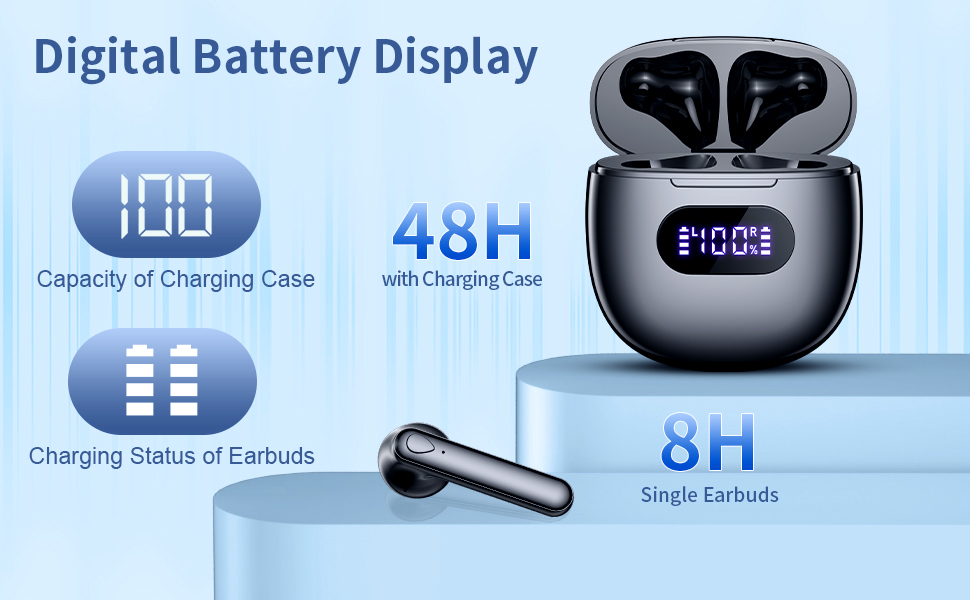
Image: A close-up of the charging case's LED digital display, indicating the charging case capacity and the individual charging status of the earbuds.
წყალგამძლეობა (IPX7)
Your bmani S13 Earbuds are rated IPX7 waterproof, meaning they can withstand:
- Raining conditions
- Sweat during workouts
- Splashing from water
Note: IPX7 rating means the earbuds can be submerged in up to 1 meter of water for 30 minutes. However, it is not recommended for swimming or showering. The charging case is NOT waterproof.

Image: A man wearing the earbuds while engaging in an activity, demonstrating their IPX7 waterproof capability against rain, sweat, and splashing.
თავსებადობა
The bmani S13 Earbuds are designed for wide compatibility with various Bluetooth-enabled devices, including:
- სმარტფონები (iOS და Android)
- ტაბლეტები
- ლეპტოპები და პერსონალური კომპიუტერები
- Other Bluetooth audio devices
They also support voice assistant integration for convenient hands-free control.

სურათი: ილუსტრაციის ჩვენებაasing the wide compatibility of the earbuds with various Bluetooth-enabled devices, including smartphones and tablets, along with features like voice assistant support and portability.
სპეციფიკაციები
| ფუნქცია | დეტალი |
|---|---|
| მოდელის სახელი | S13 |
| დაკავშირების ტექნოლოგია | უსადენო (Bluetooth 5.3) |
| ყურის განთავსება | ყურში |
| ფორმის ფაქტორი | ყურში |
| ხმაურის კონტროლი | აქტიური ხმაურის გაუქმება |
| აუდიო დრაივერის ტიპი | დინამიური დრაივერი |
| სიხშირის დიაპაზონი | 20 ჰც - 20,000 ჰც |
| ნივთის წონა | 3.2 უნცია |
| პაკეტის ზომები | 3.7 x 3.27 x 1.54 ინჩი |
| ბატარეები | 1 ლითიუმ პოლიმერული ბატარეა (შედის) |
| წყალგაუმტარი რეიტინგი | IPX7 |
მოვლა
To ensure the longevity and optimal performance of your bmani S13 Earbuds, follow these maintenance tips:
- დასუფთავება: Regularly wipe the earbuds and charging case with a soft, dry, lint-free cloth. For ear tips, remove them and clean with mild soap and water, then dry thoroughly before reattaching.
- შენახვა: ყურსასმენები, როდესაც არ იყენებთ, დამტენ ქეისში შეინახეთ, რათა დაიცვათ ისინი მტვრისა და დაზიანებისგან.
- მოერიდეთ ექსტრემალურ პირობებს: Do not expose the earbuds or case to extreme temperatures, humidity, or corrosive liquids.
- დატენვის პრაქტიკა: Avoid overcharging. Disconnect the charger once the battery is full.
პრობლემების მოგვარება
If you encounter any issues with your bmani S13 Earbuds, try the following solutions:
- ხმა არ არის/ცუდი ხმის ხარისხი:
- დარწმუნდით, რომ ყურსასმენები სრულად დატენილია.
- Check if the earbuds are properly connected to your device via Bluetooth. Try re-pairing.
- ყურსასმენების დინამიკებიდან და თავისთავებიდან გაწმინდეთ ნებისმიერი ნარჩენი.
- დაარეგულირეთ ხმის დონე როგორც თქვენს მოწყობილობაზე, ასევე ყურსასმენებზე.
- ყურსასმენები არ არის დაწყვილებული:
- დარწმუნდით, რომ Bluetooth ჩართულია თქვენს მოწყობილობაზე.
- Ensure the earbuds are in pairing mode (open the case lid).
- დაივიწყეთ „S13“ თქვენი მოწყობილობის Bluetooth სიიდან და ხელახლა სცადეთ დაწყვილება.
- Ensure the earbuds and device are within the effective Bluetooth range.
- დატენვის საკითხები:
- შეამოწმეთ USB-C კაბელი და კვების ადაპტერი დაზიანებისთვის.
- დარწმუნდით, რომ ყურსასმენებზე და ქეისის შიგნით დამტენი კონტაქტები სუფთა და მშრალია.
- თუ უსადენო დატენვას იყენებთ, დარწმუნდით, რომ ქეისი სწორად არის მოთავსებული დამტენ პლანშეტზე.
- Earbuds Not Fitting Comfortably:
- Try different sizes of ear tips (if included) to find the best fit for your ears.
- Adjust the angle of the earbuds in your ear until they feel secure and comfortable.
გარანტია და მხარდაჭერა
For information regarding warranty coverage, technical support, or replacement parts, please refer to the product's official listing page on Amazon or contact bmani customer service directly. Keep your purchase receipt as proof of purchase.
You can visit the bmani Store for more information: bmani Store on Amazon


