1. შესავალი
Thank you for choosing the Sharkoon AK6 RGB ATX PC Case. This manual provides essential information for the proper installation, operation, and maintenance of your new PC case. Please read this guide thoroughly before beginning the assembly process to ensure optimal performance and longevity of your components.
2. უსაფრთხოების ინფორმაცია
- Always disconnect the power supply from the wall outlet before installing or removing any components inside the PC case.
- Handle tempered glass panels with care. They are fragile and can break if dropped or subjected to impact.
- მოერიდეთ კორპუსის ექსტრემალურ ტემპერატურაზე, ტენიანობაზე ან მზის პირდაპირ სხივებზე ზემოქმედებას.
- Keep small parts and screws out of reach of children.
- Ensure proper grounding to prevent electrostatic discharge (ESD) damage to sensitive electronic components.
3. პაკეტის შიგთავსი
გთხოვთ, დარწმუნდეთ, რომ თქვენს პაკეტში ყველა ნივთია:
- Sharkoon AK6 RGB ATX PC Case
- Accessory box (containing screws, cable ties, and other small parts)
- მომხმარებლის სახელმძღვანელო (ეს დოკუმენტი)
4. პროდუქტი დასრულდაview
The Sharkoon AK6 RGB ATX PC Case is designed with a modern glass aesthetic, featuring seamless integration of tempered glass on the front and side panels. It includes four pre-installed 120mm addressable RGB PWM fans for optimal airflow and visual appeal. The case supports a wide range of components, including BTF motherboards, and offers ample space for high-performance hardware.

Figure 4.1: Front interior view of the Sharkoon AK6 RGB PC case, showcasing the pre-installed addressable RGB fans and the spacious main chamber.

სურათი 4.2: დახრილი view of the Sharkoon AK6 RGB PC case, highlighting the tempered glass side panel and the top mesh for ventilation.

სურათი 4.3: უკანა view of the Sharkoon AK6 RGB PC case, showing the I/O shield cutout, rear exhaust fan mount, and expansion slots.
წინა I/O პანელი
The front I/O panel is located on the side of the case and includes:
- დენის ღილაკი
- გადატვირთვის ღილაკი
- 2 x USB Ports (Type-A)
- 1 x USB Type-C პორტი
- Audio Jacks (TRRS)
5. დაყენება და ინსტალაცია
Follow these steps to install your components into the Sharkoon AK6 RGB PC Case.
5.1 საქმის მომზადება
- მოათავსეთ ქეისი ბრტყელ, სტაბილურ ზედაპირზე.
- Carefully remove the tempered glass side panel by unscrewing the thumb screws at the rear and gently pulling the panel away.
- Remove the rear metal side panel by unscrewing the thumb screws.
5.2 დედაპლატის ინსტალაცია
The AK6 RGB supports Mini-ITX, Micro-ATX, ATX, and BTF motherboards.
- Install the I/O shield into the cutout at the rear of the case (if not pre-installed on your motherboard).
- Align your motherboard with the standoffs inside the case. Ensure all standoffs match the motherboard's mounting holes.
- დაამაგრეთ დედა დაფა აქსესუარების ყუთიდან შესაბამისი ხრახნებით.
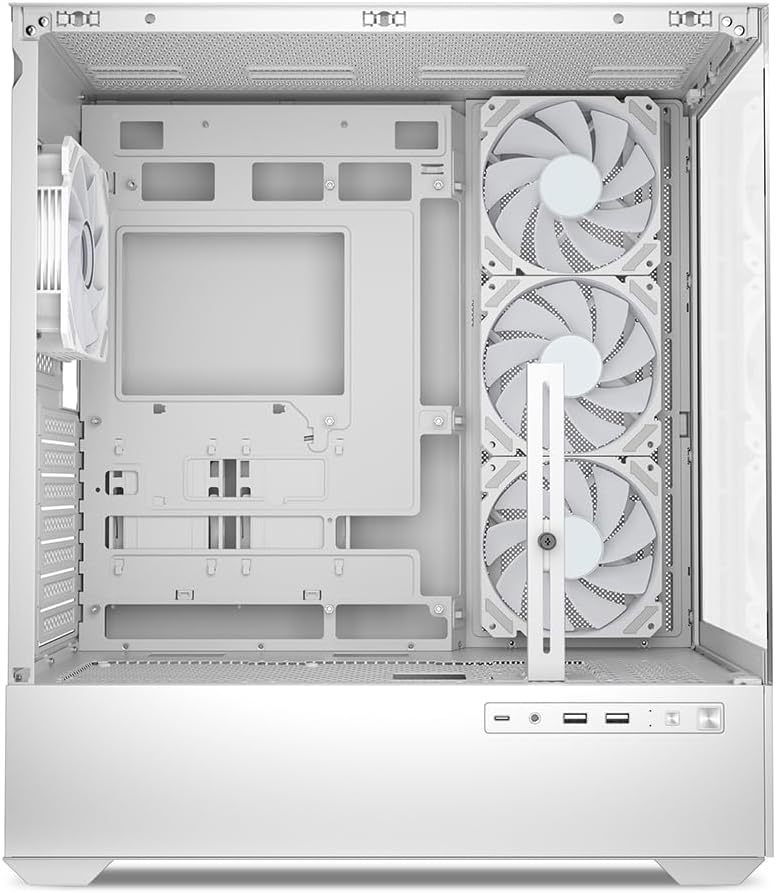
სურათი 5.1: ინტერიერი view of the Sharkoon AK6 RGB PC case, illustrating the motherboard tray, cable management cutouts, and front fan mounting points.
5.3 კვების წყაროს მონტაჟი
The case features a bottom-mount power supply design.
- Slide the power supply unit (PSU) into the dedicated compartment at the bottom rear of the case.
- Align the PSU with the screw holes at the rear of the case.
- დაამაგრეთ კვების ბლოკი მოწოდებული ხრახნებით.
5.4 შესანახი მოწყობილობის ინსტალაცია
The AK6 RGB supports up to two 3.5" HDDs or four 2.5" SSDs.
- For 3.5" HDDs: Locate the drive cages beneath the PSU shroud. Slide the HDD into a drive tray and secure it with screws.
- For 2.5" SSDs: SSDs can be mounted on the dedicated brackets behind the motherboard tray or on the 3.5" drive trays using adapter screws.
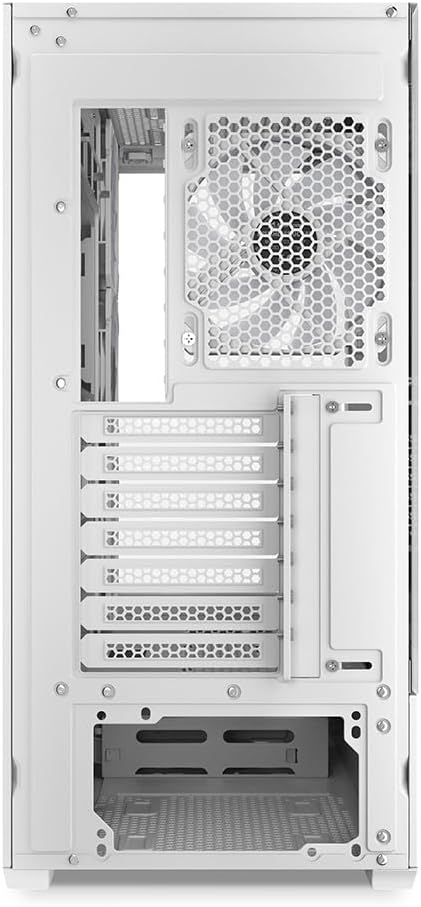
სურათი 5.2: უკანა ინტერიერი view of the Sharkoon AK6 RGB PC case, detailing the drive cages for 3.5-inch HDDs and 2.5-inch SSDs, and the power supply shroud area.
5.5 გრაფიკული ბარათის და გაფართოების ბარათის ინსტალაცია
- მოხსენით საჭირო გაფართოების სლოტების გადასაფარებლები კორპუსის უკანა მხარეს.
- Insert your graphics card or other expansion cards into the appropriate PCIe slots on your motherboard.
- Secure the cards with screws. The case includes a rubberized graphics card support for larger cards.
5.6 CPU Cooler and Radiator Installation
The case supports CPU coolers up to 17 cm in height and allows for extensive liquid cooling setups.
- დააინსტალირეთ თქვენი პროცესორის გამაგრილებელი მწარმოებლის ინსტრუქციის შესაბამისად.
- For liquid cooling, the case can accommodate a 360mm radiator at the top and an additional 280mm radiator.
5.7 საკაბელო მენეჯმენტი
კაბელების დასამაგრებლად და დასამაგრებლად გამოიყენეთ დედაპლატის უჯრის უკან არსებული კაბელების მართვის ჭრილები და შემაერთებელი წერტილები. ეს აუმჯობესებს ჰაერის ნაკადს და ესთეტიკას.
6. საოპერაციო ინსტრუქციები
6.1 ჩართვა
After all components are installed and cables are connected, replace the side panels. Connect the power cable to your PSU and a wall outlet, then press the power button on the front I/O panel to start your system.
6.2 RGB ვენტილატორის კონტროლი
The AK6 RGB comes with four pre-installed addressable RGB PWM fans. These fans are connected to an RGB controller which also provides connections for up to four LED elements and four PWM fans. The RGB lighting can typically be controlled via your motherboard's RGB software (if compatible) or through a dedicated button on the case (if present and connected).
6.3 ჰაერის ნაკადის ოპტიმიზაცია
The case is designed for ideal airflow, with three inverted fans drawing air from the side into the case. The top and rear fan mounts allow for additional exhaust fans. Ensure proper fan orientation for optimal cooling performance.

სურათი 6.1: მაგample of a fully assembled system within the Sharkoon AK6 RGB PC case, featuring various components and active RGB lighting.
7. მოვლა
Regular maintenance helps ensure the longevity and performance of your PC components.
- მტვრის ფილტრები: Periodically clean the removable dust filters (e.g., on the top and bottom) to maintain optimal airflow and prevent dust buildup inside the case. Use compressed air or a soft brush.
- შუშის პანელები: გაწმინდეთ გამაგრებული მინის პანელები რბილი, უბუსუსო ქსოვილით და მინის საწმენდი საშუალებით. მოერიდეთ აბრაზიულ მასალებს, რომლებმაც შეიძლება ზედაპირი დაკაწროს.
- ინტერიერის გაწმენდა: შიდა კომპონენტებიდან და ვენტილატორებიდან მტვრის მოსაშორებლად გამოიყენეთ შეკუმშული ჰაერი. გაწმენდამდე დარწმუნდით, რომ სისტემა გამორთულია და გამორთულია დენის წყაროდან.
8. Დიაგნოსტიკა
If you encounter issues with your PC case, refer to the following common troubleshooting steps:
- ძალა არ არის: Ensure the power supply is properly connected to the wall outlet and the motherboard. Check all internal power cables (24-pin ATX, 8-pin CPU, PCIe power).
- ვენტილატორები არ ბრუნავენ/RGB არ მუშაობს: Verify that all fan and RGB cables are correctly connected to the motherboard or the included RGB controller. Check your motherboard's BIOS/UEFI settings or RGB software for fan speed and lighting control.
- Front I/O Ports Not Functioning: Confirm that the front panel connectors (USB, audio, power/reset switches) are correctly plugged into the corresponding headers on your motherboard.
- გადახურება: Ensure all fans are spinning correctly and oriented for proper airflow. Clean dust filters and internal components. Verify CPU cooler installation.
For further assistance, please contact Sharkoon support.
9. სპეციფიკაციები
| ფუნქცია | სპეციფიკაცია |
|---|---|
| ბრენდი | შარკუნი |
| მოდელის სახელი | AK6 RGB |
| მოდელის ნომერი | C-AK6W |
| საქმის ტიპი | ATX Tower |
| ფერი | თეთრი |
| მასალა | მთვრალი მინა |
| დედაპლატის თავსებადობა | Mini ITX, Micro ATX, ATX, BTF |
| კვების წყაროს მონტაჟის ტიპი | ქვედა მთა |
| გაგრილების მეთოდი | ჰაერი |
| წინასწარ დაინსტალირებული ფანები | 4 x 120mm Addressable RGB PWM Fans |
| CPU გამაგრილებლის მაქსიმალური სიმაღლე | 17 სმ |
| გრაფიკული ბარათის მაქსიმალური სიგრძე | 41 cm (with rubberized support) |
| მაქსიმალური PSU სიგრძე | 23.5 სმ |
| რადიატორის მხარდაჭერა | Top: up to 360mm, Additional: up to 280mm |
| Drive Bays | 2 x 3.5" HDD or 4 x 2.5" SSD |
| წინა I / O პორტები | 2 x USB Type-A, 1 x USB Type-C, Audio (TRRS) |
| ნივთის წონა | 6.1 კგ |
| განსაკუთრებული თვისებები | RGB Lighting, Unique Glass Appearance, BTF Motherboard Support |
10. გარანტია
Sharkoon products are manufactured to high quality standards. For detailed warranty information, please refer to the warranty card included with your product or visit the official Sharkoon webგარანტია, როგორც წესი, ფარავს მასალებისა და დამუშავების დეფექტებს ნორმალური გამოყენების პირობებში.
11. მხარდაჭერა
If you require technical assistance or have questions regarding your Sharkoon AK6 RGB ATX PC Case, please visit the official Sharkoon website for support resources, FAQs, and contact information. You may also find updated drivers or software for the RGB controller there.
Webსაიტი: www.sharkoon.com


