შესავალი
This manual provides detailed instructions for the installation, operation, and maintenance of your Carro Smart Ceiling Fan. The Tilbury 52-inch smart ceiling fan is designed to provide efficient cooling and lighting for large indoor and outdoor living spaces. It features a modern design with a white finish, elegant plywood blades, and an integrated 4000K LED cool light. This fan incorporates remote control, Wi-Fi app control, Siri Shortcut, and voice control technology, compatible with Amazon Alexa and Google Home Assistant, to customize your fan preferences.
უსაფრთხოების ინფორმაცია
გთხოვთ, ინსტალაციამდე და გამოყენებამდე ყურადღებით წაიკითხოთ ყველა უსაფრთხოების ინსტრუქცია. ამ ინსტრუქციების შეუსრულებლობამ შეიძლება გამოიწვიოს ელექტროშოკი, ხანძარი ან პირადი დაზიანება.
- ინსტალაციამდე ან მომსახურებამდე დარწმუნდით, რომ დენი გამორთულია ამომრთველზე.
- ყველა გაყვანილობა უნდა შეესაბამებოდეს ეროვნულ და ადგილობრივ ელექტრო კოდებს.
- თუ გაყვანილობის პროცედურებთან დაკავშირებით არ ხართ დარწმუნებული, მიმართეთ კვალიფიციურ ელექტრიკოსს.
- Mount the fan to a structurally sound ceiling capable of supporting the fan's weight.
- მუშაობის დროს ხელები, თმა და ტანსაცმელი ვენტილატორის პირებისგან მოარიდეთ.
- ნუ შეეცდებით ვენტილატორის დამოუკიდებლად შეკეთებას ან მოდიფიცირებას. დახმარებისთვის დაუკავშირდით მომხმარებელთა მხარდაჭერის სამსახურს.
დაყენება და ინსტალაცია
The Carro Smart Ceiling Fan is designed for straightforward installation. The process typically takes about 20 minutes to replace your current ceiling fan.
- ამოალაგე კომპონენტები: ფრთხილად ამოიღეთ შეფუთვიდან ყველა ნაწილი. დარწმუნდით, რომ ყველა კომპონენტი ადგილზეა შეფუთვის სიის შესაბამისად.
- დენის გათიშვა: Before beginning installation, ensure the power supply to the fan location is turned off at the main circuit breaker.
- სამონტაჟო სამაგრის მონტაჟი: Securely attach the mounting bracket to the ceiling junction box. Ensure the junction box is rated for ceiling fan support.
- გაყვანილობის კავშირები: Connect the fan's electrical wires to the household wiring according to the provided wiring diagram. Ensure all connections are secure and properly insulated.
- გულშემატკივართა ასამბლეა: Attach the fan motor assembly to the mounting bracket. Install the fan blades and light kit as per the instructions.
- დენის აღდგენა: Once installation is complete, restore power at the circuit breaker and test the fan's operation.

სურათი: მეტიview of Carro Smart Ceiling Fan components and general installation steps.
ოპერაციული ინსტრუქციები
Your Carro Smart Ceiling Fan offers multiple control methods for convenience and customization.
1. კონტროლის მეთოდები
The fan can be controlled via the included remote, a mobile app, or voice commands through smart home assistants.
- დისტანციური მართვა: Use the dedicated remote to adjust fan speed, light settings, and turn the fan on/off. This ensures control even without a Wi-Fi connection.
- მობილური აპლიკაცია: Download the Carro Home app to customize settings remotely. The app allows for advanced control and scheduling.
- ხმის კონტროლი: The fan is compatible with Amazon Alexa, Siri, and Google Assistant. Use voice commands such as "Alexa, set the white ceiling fan in the bedroom to speed 8, turn the yellow light to 75%, and adjust the white light to 36%."

Image: Remote control and mobile phone app interface for fan operation.

Image: Demonstrates voice control functionality with Amazon Alexa, Google Assistant, and Siri Shortcuts.
2. Fan Operation (DC Motor)
The fan is equipped with an efficient DC motor, offering quiet operation and energy savings.
- სიჩქარის პარამეტრები: Choose from 10 adjustable wind speeds, ranging from a maximum airflow of 4500 CFM to a minimum of 980 CFM.
- შექცევადი ჰაერის ნაკადი: The reversible function allows you to change the direction of airflow. Use the downward airflow for cooling in summer and upward airflow to circulate warm air in winter.
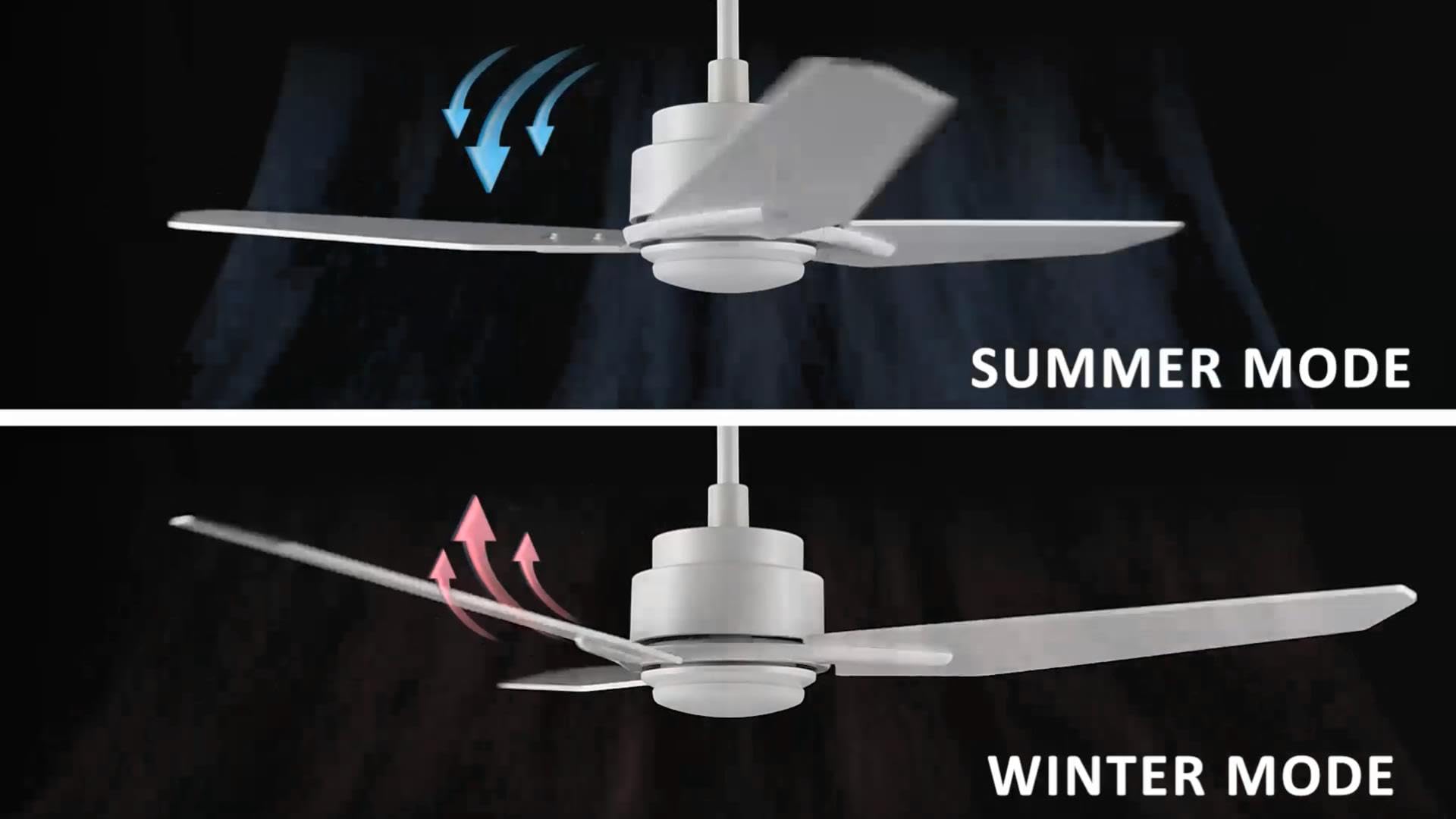
Image: Illustration of summer mode (downward airflow) and winter mode (upward airflow) for optimal air circulation.
3. Adjustable Dimmable LED Lights
Control the fan's lighting independently with ease.
- ფერის ტემპერატურის პარამეტრები: Select from three light colors: 4000K (cool light), 3000K (bright light), and 2700K (warm light).
- დაბნელების ფუნქცია: The LED lights are dimmable from 1% to 100%, allowing you to adjust brightness for any situation.
- Smart Grouping: Group the LED lights with the fan or other smart devices for unified control via the app or voice commands.

Image: Visual representation of the three dimmable light color options: Cool Light (4000K), Natural Light (3000K), and Warm Light (2700K).
4. Timer and Scheduling Options
Utilize the scheduling feature through the mobile app to automate fan and light operations.
- Set Routines: Program the fan to activate at specific times, with desired light and fan settings, for different areas of your home.
- Exampლე: Program the living room fan to turn on daily at 18:00 with both yellow and white lights. Set the study fan to turn on at 21:00 from Monday to Friday, illuminating only the yellow light.
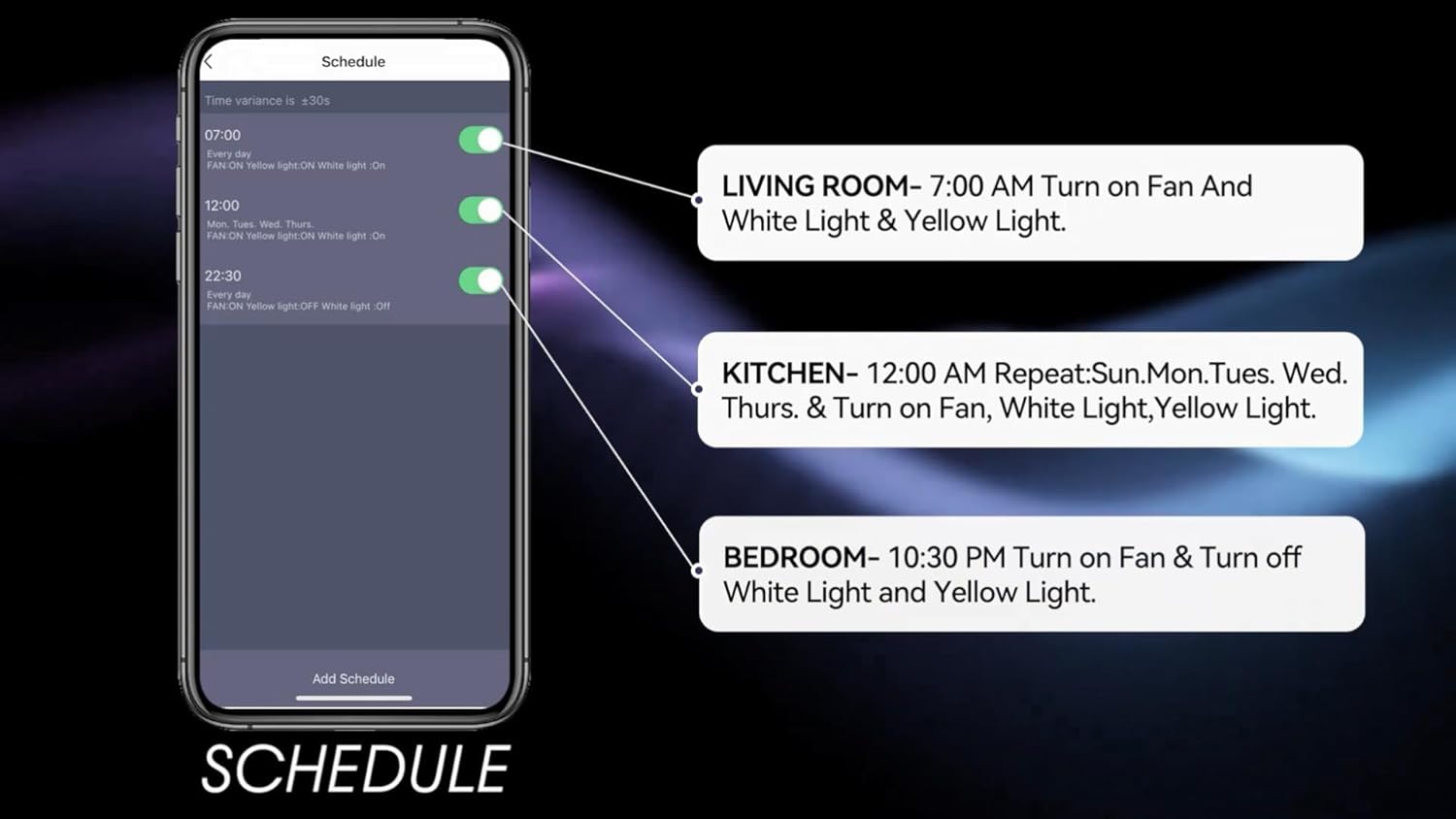
Image: Screenshot of the mobile app's scheduling interface, demonstrating how to set routines for different rooms.
მოვლა
რეგულარული მოვლა უზრუნველყოფს თქვენი ჭერის ვენტილატორის ოპტიმალურ მუშაობას და გამძლეობას.
- დასუფთავება: პერიოდულად გაწმინდეთ ვენტილატორის პირები და ძრავის კორპუსი რბილი, დ-სპირტით.amp ქსოვილი. არ გამოიყენოთ აბრაზიული გამწმენდები ან გამხსნელები.
- პირის სიმჭიდროვე: Check blade screws annually to ensure they are secure. Loose blades can cause wobbling and noise.
- სინათლის ნაკრები: The integrated LED light source is designed for long life and typically does not require replacement. If issues arise, contact customer support.
- Გამორთვა: ნებისმიერი გაწმენდის ან ტექნიკური სამუშაოების შესრულებამდე ყოველთვის გამორთეთ დენი ამომრთველზე.
პრობლემების მოგვარება
If you encounter issues with your Carro Smart Ceiling Fan, refer to the following common problems and solutions:
| პრობლემა | შესაძლო მიზეზი | გამოსავალი |
|---|---|---|
| ვენტილატორი არ იწყება | ვენტილატორს დენი არ მიეწოდება; მავთულის შეერთებები სუსტია; დისტანციური მართვის პულტის ბატარეა დაბალია. | შეამოწმეთ ამომრთველი; დარწმუნდით, რომ ყველა მავთულის შეერთება საიმედოა; შეცვალეთ დისტანციური მართვის ბატარეა. |
| ვენტილატორი ირხევა | ფხვიერი პირების ხრახნები; არასწორად დაბალანსებული პირები; ფხვიერი სამონტაჟო ფრჩხილი. | Tighten all blade screws; Use a balancing kit (not included) to balance blades; Ensure mounting bracket is securely fastened. |
| სინათლე არ მუშაობს | No power to the light kit; Loose wire connections; Light setting off. | Check power supply; Verify light kit wiring; Ensure light is turned on via remote, app, or voice control. |
| დისტანციური მართვა არ მუშაობს | Low battery; Remote not paired. | Replace remote battery; Refer to pairing instructions in the full manual (if applicable). |
| Wi-Fi-სთან/აპლიკაციასთან დაკავშირება შეუძლებელია | არასწორი Wi-Fi პაროლი; როუტერი ძალიან შორს არის; აპლიკაცია არ განახლებულა. | Verify Wi-Fi password; Move router closer or use a Wi-Fi extender; Update the Carro Home app to the latest version. |
პროდუქტის სპეციფიკაციები
| ფუნქცია | სპეციფიკაცია |
|---|---|
| ბრენდი | კარო |
| მოდელი | 52" White |
| ფერი | თეთრი |
| ელექტრო ვენტილატორის დიზაინი | ჭერის გულშემატკივართა |
| დენის წყარო | AC/DC |
| სტილი | თანამედროვე |
| პროდუქტის ზომები | 52"D x 52"W x 13.4"H |
| ოთახის ტიპი | Bedroom, Dining Room, Home Office, Living Rooms, Study Room |
| სპეციალური ფუნქცია | პროგრამირებადი |
| რეკომენდებული გამოყენება | ჰაერის ცირკულაცია |
| პირების რაოდენობა | 3 |
| ჰაერის ნაკადის მოცულობა | 4500 კუბური ფუტი წუთში |
| დანის სიგრძე | 22.7 ინჩი |
| ტtage | 120 ვოლტი |
| მოყვება კომპონენტები | Ceiling fan X1 |
| სპეციფიკაცია შეხვდა | ETL |
| კონტროლის მეთოდი | ხმა, დისტანციური მართვა, აპლიკაცია |
| ნივთის წონა | 15.7 ფუნტი |
| სამონტაჟო ტიპი | Downrod Mount |
საგარანტიო ინფორმაცია
Carro products are manufactured to the highest quality standards. This product comes with a limited warranty against defects in materials and workmanship. Please refer to the warranty card included in your product packaging or visit the official Carro webსაიტზე დეტალური გარანტიის პირობებისთვის.
მომხმარებელთა მხარდაჭერა
For technical assistance, troubleshooting, or warranty claims, please contact Carro customer support:
- Webსაიტი: Visit the official Carro webსაიტი ხშირად დასმული კითხვებისა და დამხმარე რესურსებისთვის.
- ელფოსტა: Refer to your product packaging for customer service email.
- ტელეფონი: Refer to your product packaging for customer service phone number.
Please have your model number (52" White) and purchase date ready when contacting support.


