1. შესავალი
This manual provides detailed instructions for the installation, operation, and maintenance of your VANBAR 2-in-1 Android Car Wireless Adapter. This device converts your car's wired Apple CarPlay or Android Auto system into a wireless connection, enhancing convenience and user experience.
2. უსაფრთხოების ინფორმაცია
- ნუ ეცდებით მოწყობილობის დაშლას ან შეცვლას.
- შეინახეთ მოწყობილობა წყლისგან, ტენიანობისა და ექსტრემალური ტემპერატურისგან.
- Ensure the device is securely placed to avoid obstruction while driving.
- Operate the device responsibly and avoid distractions while driving.
3. პაკეტის შიგთავსი
გთხოვთ, შეამოწმოთ შეფუთვა შემდეგი ნივთებისთვის:
- VANBAR 2-in-1 Wireless Adapter (Model: Carplay01)
- USB-A to USB-C Adapter Cable
- მომხმარებლის სახელმძღვანელო (ეს დოკუმენტი)
4. პროდუქტი დასრულდაview
The VANBAR 2-in-1 Wireless Adapter is a compact device designed to enable wireless Apple CarPlay and Android Auto in compatible vehicles. It features a durable alloy casing for efficient heat dissipation and includes both USB-A and USB-C connectivity options.

Image 4.1: VANBAR 2-in-1 Wireless Adapter showing USB-A and USB-C connectivity. The adapter is a small black square with a USB cable attached, and an additional USB-C adapter is shown.

Image 4.2: Diagram illustrating the internal structure of the adapter, highlighting the glass and metal alloy components for excellent heat dissipation.
5. დაყენების ინსტრუქციები
მიჰყევით ამ ნაბიჯებს საწყისი დაყენებისთვის:
- შეაერთეთ ადაპტერი:
Plug the VANBAR wireless adapter into your car's USB port that supports wired Apple CarPlay or Android Auto. Use the provided USB-C adapter if your car has a USB-C port.
- დაწყვილება Bluetooth- ით:
თქვენს სმარტფონზე ჩართეთ Bluetooth და Wi-Fi. ძიება the adapter's Bluetooth name (e.g., "VANBAR-XXXX") and pair with it. Confirm any pairing requests on your phone and car display.
- ავტომატური კავშირი:
Once paired, the adapter will automatically connect to your phone via Wi-Fi to initiate Apple CarPlay or Android Auto. The car's display should switch to the CarPlay or Android Auto interface.

Image 5.1: Visual guide for connecting the adapter to the car's USB port, pairing via Bluetooth, and the automatic connection process.
6. საოპერაციო ინსტრუქციები
After successful setup, the adapter will automatically connect to your smartphone when you start your car. You can then use Apple CarPlay or Android Auto wirelessly.
- ნავიგაცია: Use your preferred navigation apps directly on your car's display.
- მუსიკა და მედია: Stream music, podcasts, and audiobooks.
- ზარები და შეტყობინებები: Make and receive calls, and send/receive messages using voice commands or the car's interface.
- ხმის კონტროლი: Utilize Siri (for Apple CarPlay) or Google Assistant (for Android Auto) for hands-free operation.

სურათი 6.1: ყოფილიample of a car display showing multiple CarPlay functions simultaneously, including navigation, music playback, and an incoming call.

Image 6.2: Illustration of different control methods for the car's infotainment system, including touchscreen, steering wheel buttons, and a central rotary knob.
7. თავსებადობა
This wireless adapter is designed for vehicles equipped with factory-wired Apple CarPlay or Android Auto. It supports:
- მანქანები: Compatible with most car models from 2015 onwards that have wired CarPlay/Android Auto.
- სმარტფონები:
- Apple CarPlay: Requires iPhone with iOS 10 or later.
- Android Auto: Requires Android phone with Android 11 or later.
For detailed compatibility lists, please refer to the official resources:
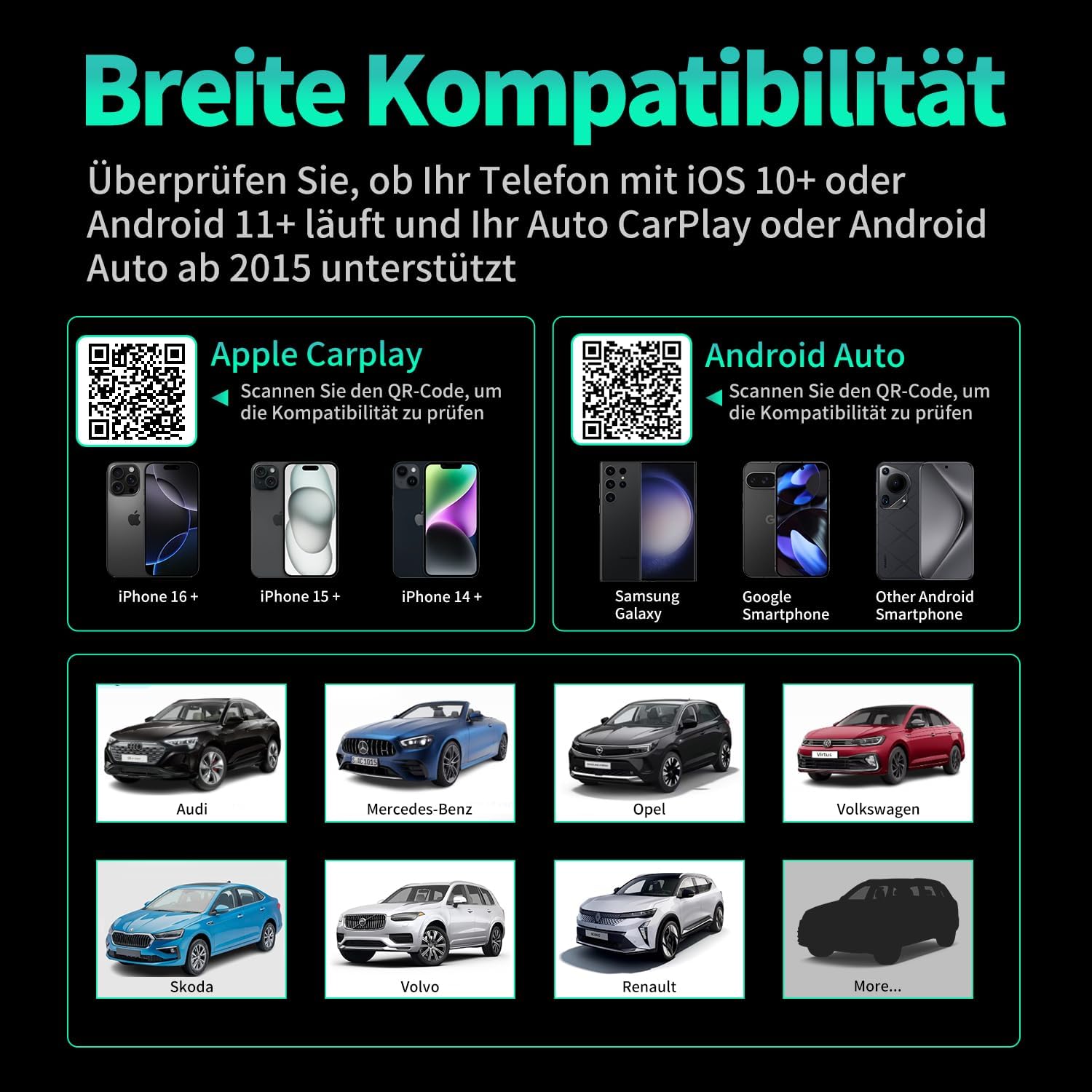
სურათი 7.1: თავსებადობაview displaying supported iPhone models (14+, 15+, 16+), Samsung Galaxy, Google, and other Android smartphones, along with car brands like Audi, Mercedes-Benz, Opel, Volkswagen, Skoda, Volvo, and Renault.
8. მოვლა
- დასუფთავება: გაწმინდეთ მოწყობილობა რბილი, მშრალი ქსოვილით. არ გამოიყენოთ თხევადი საწმენდი საშუალებები ან აბრაზიული მასალები.
- შენახვა: შეინახეთ მოწყობილობა გრილ, მშრალ ადგილას, თუ დიდი ხნის განმავლობაში არ იყენებთ.
- Firmware განახლებები: შეამოწმეთ მწარმოებლის webოპტიმალური მუშაობისა და თავსებადობის უზრუნველსაყოფად, პერიოდულად განაახლეთ საიტი პროგრამული უზრუნველყოფის ნებისმიერი ხელმისაწვდომი განახლებისთვის.
9. Დიაგნოსტიკა
| პრობლემა | შესაძლო მიზეზი | გამოსავალი |
|---|---|---|
| Adapter not connecting to car. | Incorrect USB port, car not compatible, loose connection. | Ensure the adapter is plugged into the correct USB port that supports wired CarPlay/Android Auto. Verify car compatibility. Re-plug the adapter firmly. |
| Phone not connecting to adapter. | Bluetooth/Wi-Fi off, incorrect pairing, phone OS not supported. | Ensure Bluetooth and Wi-Fi are enabled on your phone. Forget previous Bluetooth connections and re-pair. Check phone OS version for compatibility (iOS 10+, Android 11+). |
| წყვეტილი კავშირი ან შეფერხება. | Interference, weak signal, outdated firmware. | Ensure no other devices are causing Wi-Fi interference. Try restarting both the car's infotainment system and your phone. Check for firmware updates. |
| CarPlay/Android Auto არ ირთვება. | CarPlay/Android Auto not enabled in car settings, app issues. | Check your car's infotainment settings to ensure CarPlay/Android Auto is enabled. Restart your phone and the car's system. |
10. სპეციფიკაციები
| მოდელის ნომერი | Carplay01 |
| ბრენდი | ვანბარი |
| დაკავშირების ტექნოლოგია | Bluetooth 5.0, Wi-Fi (2.4 GHz + 5 GHz), USB |
| თავსებადი მოწყობილობები | Smartphones (iOS 10+, Android 11+) |
| კონექტორის ტიპი | USB Type A, USB Type C (with adapter) |
| პროდუქტის ზომები | 1 x 5.5 x 4.5 სმ |
| ნივთის წონა | 12 გ |
| ფერი | შავი |
| განსაკუთრებული თვისებები | Wireless Android Auto, Wireless Apple CarPlay, GPS Navigation, Spotify, iHeart Radio support |
11. გარანტია და მხარდაჭერა
For warranty information and technical support, please refer to the official VANBAR webსაიტზე ან პირდაპირ დაუკავშირდით მათ მომხმარებელთა მომსახურების სამსახურს. შეინახეთ თქვენი შესყიდვის ქვითარი გარანტიის მოთხოვნებისთვის.


