1. შესავალი
The Fenton Pulse65 is a versatile portable party speaker designed for various events and environments. It delivers powerful sound, offers wireless connectivity, and features dynamic lighting. This manual provides essential information for the safe and optimal use of your Pulse65 speaker.
ძირითადი მახასიათებლები:
- 60W RMS (140W max) output for clear, powerful sound with deep bass.
- Bluetooth 5.3 for wireless streaming and stereo pairing (TWS).
- Dynamic multicolour light show synchronized with music.
- IPX4 splashproof design for outdoor use.
- Integrated 12-hour rechargeable battery.
- Includes a wireless UHF microphone and remote control.
- USB playback and FM radio functionality.
2. უსაფრთხოების ინფორმაცია
გთხოვთ, ამ პროდუქტის გამოყენებამდე წაიკითხოთ და გაითვალისწინოთ ყველა უსაფრთხოების ინსტრუქცია. შეინახეთ ეს სახელმძღვანელო მომავალი მითითებისთვის.
- წყლის წინააღმდეგობა: The Pulse65 is IPX4 splashproof. Do not immerse the speaker in water or expose it to heavy rain. Ensure all port covers are securely closed when used near water.
- დენის წყარო: Use only the specified charging cable and power adapter. Do not attempt to open or modify the battery compartment.
- ვენტილაცია: არ დაბლოკოთ ვენტილაციის ღიობები. უზრუნველყავით დინამიკის გარშემო საკმარისი ჰაერის ნაკადი.
- დასუფთავება: Disconnect the power before cleaning. Use a soft, dry cloth. Do not use liquid cleaners or aerosols.
- ტემპერატურა: Avoid extreme temperatures. Do not expose to direct sunlight for extended periods or place near heat sources.
- ბავშვები: შეინახეთ ბავშვებისათვის მიუწვდომელ ადგილას. ეს პროდუქტი არ არის სათამაშო.
3. პაკეტის შიგთავსი
დარწმუნდით, რომ შეფუთვაში ყველა ნივთია:
- Fenton Pulse65 Portable Party Speaker
- უკაბელო UHF მიკროფონი
- დისტანციური მართვა
- USB დამტენი კაბელი
- მომხმარებლის სახელმძღვანელო
4. დაყენება
4.1. საწყისი დატენვა
Before first use, fully charge the speaker. Connect the provided USB charging cable to the speaker's charging port and a suitable USB power adapter (not included). The charging indicator will show the charging status. A full charge provides approximately 12 hours of playback, depending on usage volume and light effects.
4.2. ჩართვა/გამორთვა
დააჭირეთ და გააჩერეთ ძალაუფლება მართვის პანელზე ღილაკი დინამიკის ჩასართავად ან გამოსართავად.
4.3. Wireless Microphone Setup
The included wireless UHF microphone is pre-paired with the speaker. Ensure the microphone has fresh batteries (not included) and is powered on. The microphone's display will indicate its status.

Image: The Fenton Pulse65 speaker shown with its wireless microphone and remote control, illustrating the complete package.
5. საოპერაციო ინსტრუქციები
5.1. პანელი დასრულდაview
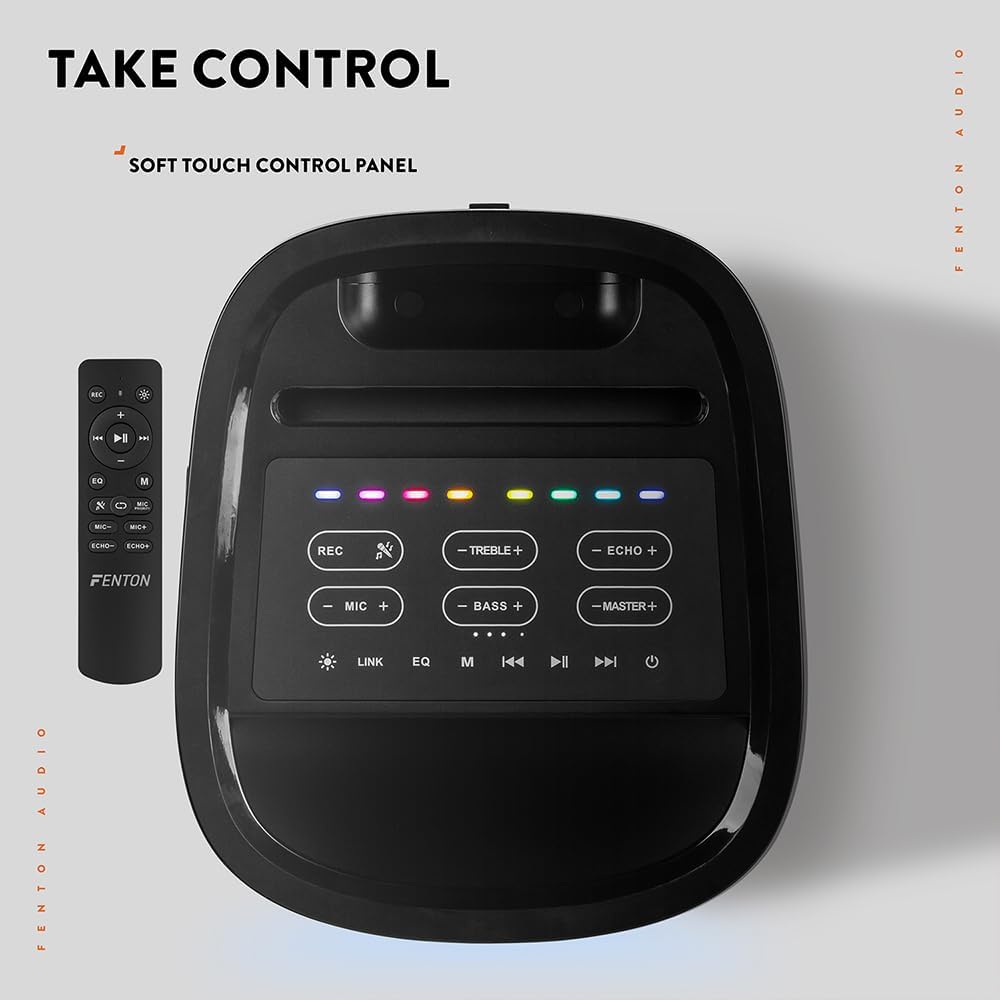
სურათი: ზემოდან ქვემოთ view of the Fenton Pulse65 speaker's soft-touch control panel, alongside the remote control, highlighting various buttons for audio and light adjustments.
The top panel features soft-touch controls for various functions:
- ჩაწერა: აუდიოს ჩაწერა.
- TREBLE +/-: მაღალი სიხშირეების დონეების რეგულირება.
- ECHO +/-: მიკროფონის ექოს ეფექტის რეგულირება.
- მიკროფონი +/-: შეცვალეთ მიკროფონის ხმა.
- ბასი +/-: ბასის დონის რეგულირება.
- MASTER +/-: Adjust overall master volume.
- ბმული: Activate TWS (True Wireless Stereo) pairing.
- EQ: ეკვალაიზერის წინასწარ დაყენებულ პარამეტრებს შორის გადადით.
- M (რეჟიმი): Switch between input modes (Bluetooth, USB, FM Radio, AUX).
- დაკვრა/პაუზა: აუდიოს დაკვრის დაკვრა ან პაუზა.
- Წინა შემდეგი: Skip tracks or tune FM radio stations.
- სიმძლავრე: ჩართეთ/გამორთეთ დინამიკი.
5.2. Bluetooth კავშირი
- Turn on the Pulse65 speaker.
- დააჭირეთ M (რეჟიმი) button until the Bluetooth indicator lights up or you hear a Bluetooth pairing prompt.
- თქვენს მობილურ მოწყობილობაზე ჩართეთ Bluetooth და მოძებნეთ ხელმისაწვდომი მოწყობილობები.
- Select "Fenton Pulse65" from the list.
- Once connected, the speaker will confirm with an audible prompt.

Image: The Fenton Pulse65 speaker with a smartphone placed in its integrated dock, illustrating the Bluetooth streaming and charging capabilities.
5.3. True Wireless Stereo (TWS) დაწყვილება
To link two Pulse65 speakers for stereo sound:
- Ensure both Pulse65 speakers are powered on and in Bluetooth mode, but not connected to any device.
- ერთ დინამიკზე (ეს იქნება მთავარი დინამიკი), დააჭირეთ ღილაკს ბმული button. It will search for another Pulse65.
- The primary speaker will automatically connect to the secondary speaker. Once connected, you will hear a confirmation tone.
- Now, connect your mobile device to the primary Pulse65 speaker via Bluetooth as described in section 5.2.
- აუდიო ახლა სტერეო ფორმატში დაუკრავს ორივე დინამიკიდან.
5.4. USB დაკვრა
ჩადეთ USB ფლეშ დრაივი, რომელიც შეიცავს MP3 აუდიოს files into the USB port on the back of the speaker. The speaker will automatically switch to USB mode and begin playback. Use the Play/Pause and Previous/Next buttons to control playback.
5.5. FM რადიო
- დააჭირეთ M (რეჟიმი) ღილაკი FM რადიოს რეჟიმში გადასართავად.
- დააჭირეთ და გააჩერეთ დაკვრა/პაუზა ღილაკი ხელმისაწვდომი FM სადგურების ავტომატურად სკანირებისა და შენახვისთვის.
- გამოიყენეთ წინა/შემდეგი ღილაკები შენახულ სადგურებში ნავიგაციისთვის.
5.6. მიკროფონისა და გიტარის შესასვლელები
The speaker features dedicated inputs for a wired microphone and a guitar on the rear panel. Connect your devices to these ports. Use the MIC +/- და ECHO +/- controls on the top panel to adjust the microphone's volume and echo effect.

Image: A composite image showing the rear panel of the Fenton Pulse65 speaker with its various input ports, and a front view of the speaker with a microphone, illustrating connectivity options.
5.7. სინათლის რეჟიმები
The multicolour LED lights on the speaker can be controlled via the remote control or specific buttons on the control panel (if available, refer to the remote for full control). Cycle through different light patterns or turn them off as desired.

სურათი: ახლო ხედი view of the Fenton Pulse65 speaker, highlighting its multicolour LED light ring on the front grille, indicating its splashproof design.
6. მოვლა
6.1. დასუფთავება
გაწმინდეთ დინამიკის გარე ზედაპირი რბილი, მშრალი ან ოდნავ მშრალი ქსოვილით.amp cloth. Do not use abrasive cleaners, waxes, or solvents. Ensure all port covers are closed before cleaning if using a damp ქსოვილი.
6.2. შენახვა
შეინახეთ დინამიკი გრილ, მშრალ ადგილას, მზის პირდაპირი სხივებისა და ექსტრემალური ტემპერატურისგან მოშორებით. თუ დიდხანს ინახავთ, ბატარეის მუშაობის შესანარჩუნებლად, რამდენიმე თვეში ერთხელ დაახლოებით 50%-მდე დატენეთ ბატარეა.
6.3. ბატარეის მოვლა
To prolong battery life, avoid fully discharging the battery frequently. Recharge the speaker when the low battery indicator appears. Do not expose the battery to excessive heat.
7. Დიაგნოსტიკა
If you encounter issues with your Fenton Pulse65, refer to the following common problems and solutions:
| პრობლემა | შესაძლო მიზეზი | გამოსავალი |
|---|---|---|
| დინამიკი არ ირთვება. | დაბალი ბატარეა; ჩართვის ღილაკი სწორად არ არის დაჭერილი. | სრულად დატენეთ დინამიკი. რამდენიმე წამის განმავლობაში დააჭირეთ და გააჩერეთ ჩართვის ღილაკი. |
| დინამიკიდან ხმა არ ისმის. | ხმა ძალიან დაბალია; შეყვანის რეჟიმი არასწორია; მოწყობილობა არ არის დაკავშირებული. | Increase master volume. Press 'M' to select correct input mode. Ensure Bluetooth device is connected or USB is inserted correctly. |
| Bluetooth დაწყვილება ვერ ხერხდება. | დინამიკი არ არის დაწყვილების რეჟიმში; მოწყობილობა ძალიან შორს არის; ჩარევა. | Ensure speaker is in Bluetooth mode and not connected to another device. Move device closer to speaker. Turn off other Bluetooth devices. |
| მიკროფონი არ მუშაობს. | Microphone off; Low battery in mic; Mic volume too low. | Ensure wireless mic is powered on. Replace mic batteries. Increase MIC volume on speaker. |
| TWS დაწყვილება ვერ ხერხდება. | Speakers already connected to a device; Speakers too far apart. | Disconnect both speakers from any Bluetooth devices. Ensure both are in Bluetooth mode. Place speakers close together during pairing. |
8. სპეციფიკაციები
- ბრენდი: ფენტონი
- მოდელი: პულსი 65
- დინამიკის მაქსიმალური გამომავალი სიმძლავრე: 140 ვატი (პიკი)
- სიხშირის პასუხი: 12000 ჰც
- კავშირის ტექნოლოგია: Bluetooth 5.3
- აუდიო გამომავალი რეჟიმი: სტერეო
- სამონტაჟო ტიპი: მაგიდის
- სპიკერის ტიპი: გარე
- პროდუქტის ზომები: 49 x 34.5 x 39.5 სმ
- წონა: 7.6 კგ
- ბატარეა: 1 Nonstandard Battery (included), 12-hour playback
- IP რეიტინგი: IPX4 (აფრქვევის საწინააღმდეგო)
- მწარმოებელი: Tronios BV
- წარმოშობის ქვეყანა: ჩინეთი

Image: The Fenton Pulse65 speaker displayed with its approximate dimensions (40cm height, 32cm width, 27cm depth) and an icon indicating 12 hours of battery life.
9. გარანტია და მხარდაჭერა
For warranty information and customer support, please refer to the documentation provided with your purchase or visit the official Fenton brand store. You can find more information and contact details at the Fenton Brand Store.