1. შესავალი
This manual provides detailed instructions for the proper use, setup, and maintenance of your Pard NV009-850nm Digital Night Vision Monocular. Please read this manual thoroughly before operating the device to ensure optimal performance and longevity. This device is designed for wildlife observation, hunting, and general outdoor viewing in various light conditions.

Image 1.1: The Pard NV009-850nm Digital Night Vision Monocular. This image displays the compact and ergonomic design of the monocular, highlighting its main body, objective lens, and eyepiece.
2. პროდუქტი დასრულდაview
2.1 პაკეტის შიგთავსი
ყუთის გახსნისას, დარწმუნდით, რომ ქვემოთ ჩამოთვლილი ყველა ნივთი ხელთ არის:
- Pard NV009-850nm Digital Night Vision Monocular
- დამცავი ჩანთა
- USB დამტენი კაბელი
- Wrist Strap / Neck Strap
- მომხმარებლის სახელმძღვანელო (ეს დოკუმენტი)

Image 2.1: Contents of the Pard NV009-850nm package. This image shows the monocular, its carrying case, charging cable, straps, and the user manual, all neatly arranged.
2.2 ძირითადი მახასიათებლები
- Daytime and Nighttime Operation: Seamless transition between full-color daytime viewing and monochrome night vision mode.
- მაღალი რეზოლუციის გამოსახულება: Features a 1920x1080 FHD CMOS image sensor and a 1024x768 OLED display for clear, detailed visuals.
- Adjustable IR Illuminator: Integrated 850nm IR illuminator with three intensity levels, providing effective illumination up to 200 meters.
- ფოტო და ვიდეო გადაღება: Capture 2608x1944 resolution photos and 1920x1080 Full HD videos directly to a Micro SD card.
- ოპტიკური და ციფრული ზუმი: Offers 4.7x optical magnification and 1.5x-3.0x digital zoom for precise target observation.
- Wi-Fi კავშირი: Connects to smart mobile devices via the "PardVision" app for remote viewინგი და მონაცემთა გადაცემა.
- სურათი-სურათში (PIP) რეჟიმი: Provides a magnified inset view of the central area for enhanced detail without losing the wider field of view.
- გამძლე დიზაინი: IP67 waterproof rating ensures reliability in various outdoor conditions.

Image 2.2: Comparison of day and night vision modes. This image illustrates the monocular's capability to provide full-color images during the day and clear monochrome images at night, featuring a fox in both scenarios.

Image 2.3: Nighttime viewing range illustration. This graphic demonstrates the monocular's effective viewing distance of up to 200 meters (656 feet) in low-light conditions, showing a wild boar as an example target.

Image 2.4: Enhanced image quality demonstration. This image compares a blurred, lower-quality image with a sharp, enhanced image, illustrating the effectiveness of the PARD Visual Light Enhancement Algorithm (VLEA) and OLED display.
3. დაყენება
3.1 ბატარეის დაყენება
- Locate the battery compartment cover, typically on the underside or side of the monocular.
- გახსენით საფარი ინდიკატორის მიხედვით მისი მობრუნებით ან გასრიალებით.
- Insert a fully charged 18650 type battery (not included) with the correct polarity (+/-) as indicated inside the compartment.
- უსაფრთხოდ დახურეთ ბატარეის განყოფილების საფარი.
3.2 მიკრო SD ბარათის ჩასმა
The device supports Micro SD cards for storing photos and videos.
- Locate the Micro SD card slot, usually protected by a rubber cover.
- ფრთხილად ჩადეთ მიკრო SD ბარათი სლოტში, სანამ არ დააწკაპუნებს. დარწმუნდით, რომ ბარათი სწორად არის განლაგებული.
- დახურეთ რეზინის საფარი, რათა დაიცვათ სლოტი მტვრისა და ტენიანობისგან.
3.3 პირველადი ჩართვა და ფოკუსის რეგულირება
- ხანგრძლივად დააჭირეთ ჩართვის ღილაკს მოწყობილობის ჩასართავად.
- Adjust the diopter ring on the eyepiece until the on-screen display (OSD) text appears sharp and clear to your eye.
- Rotate the objective lens focus ring to bring the observed image into sharp focus.
4. საოპერაციო ინსტრუქციები
4.1 ჩართვა/გამორთვა
- ჩართვა: დააჭირეთ და გააჩერეთ ჩართვის ღილაკი დაახლოებით 3 წამის განმავლობაში.
- Გამორთვა: Press and hold the Power button for approximately 3 seconds until the device shuts down.
4.2 Mode Selection (Day/Night)
The NV009-850nm automatically adjusts to ambient light, but you can manually switch modes:
- ძირითადში viewing interface, short press the Mode button to toggle between Day (color) and Night (monochrome) vision modes.
4.3 ინფრაწითელი განათების რეგულირება
The integrated IR illuminator enhances visibility in complete darkness.
- Activate the IR illuminator by pressing its dedicated button (if available) or through the menu.
- Short press the IR button to cycle through the three intensity levels (Low, Medium, High) or to turn it off.

Image 4.1: IR Illuminator functionality. This graphic illustrates the 200m adjustable beam IR illuminator with its three intensity levels, showing how it illuminates a target in darkness.
4.4 მასშტაბირების ოპერაცია
- Use the designated zoom buttons (often '+' and '-') to adjust the digital magnification. The optical magnification is fixed at 4.7x.
4.5 ფოტო და ვიდეო გადაღება
- ფოტო: In viewing mode, short press the Photo button to capture an image.
- ვიდეო: Short press the Video button to start recording. Press again to stop recording.

Image 4.2: Video recording and playback function. This image shows the monocular's ability to capture and play back high-definition video, with a simulated screen displaying a recorded scene of a fox.
4.6 დაკვრა
- Enter the Playback menu via the main menu.
- Navigate through your recorded photos and videos using the directional buttons.
- აირჩიეთ ნივთი view it on the OLED display.
4.7 Wi-Fi Connectivity (PardVision App)
- Download the "PardVision" app from your device's app store (Apple App Store or Google Play Store).
- On the monocular, enable Wi-Fi through the system settings. The device will broadcast a Wi-Fi network.
- Connect your smartphone or tablet to the monocular's Wi-Fi network.
- Open the PardVision app to view a live feed, control settings, and transfer files.
4.8 სურათი სურათში (PIP) რეჟიმი
- Activate PIP mode through the quick menu or system settings.
- A magnified window will appear on the main display, showing a zoomed-in view of the central area.
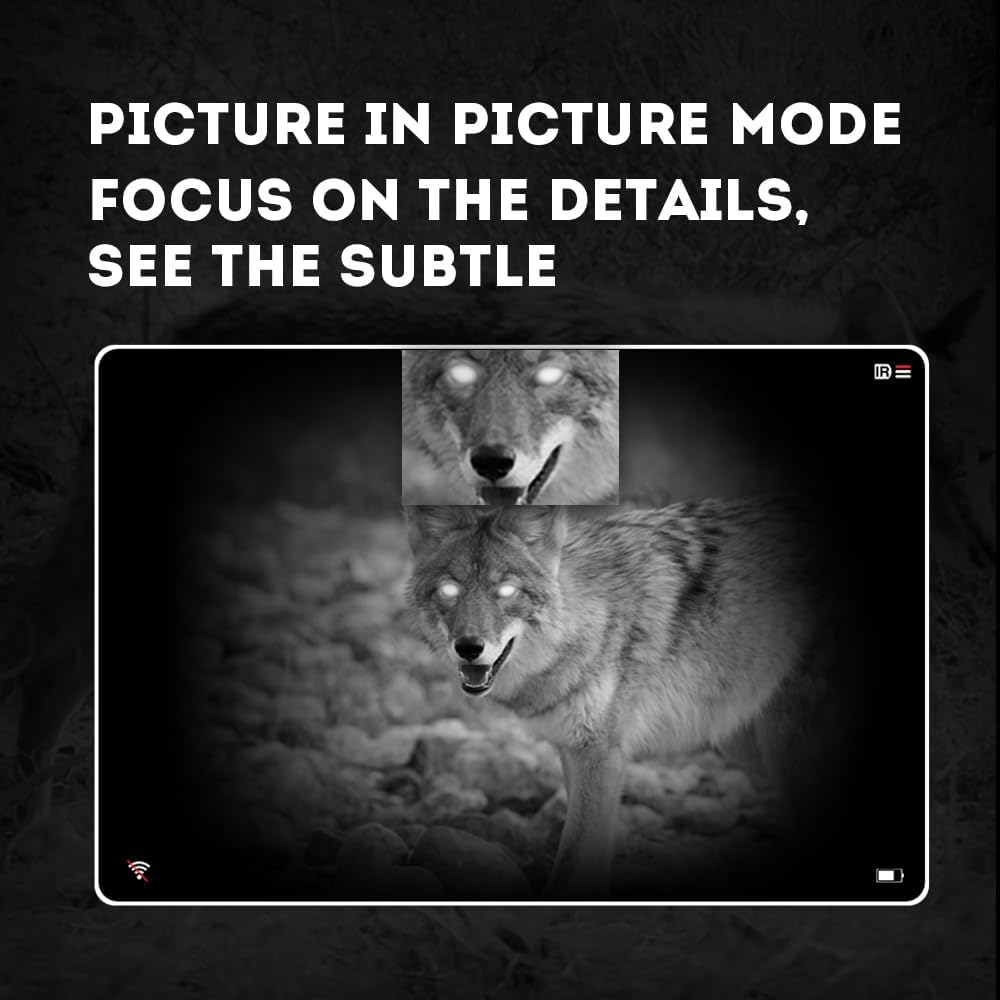
Image 4.3: Picture-in-Picture (PIP) mode. This image demonstrates how PIP mode allows users to focus on specific details within the main view, showing a magnified inset of a coyote's face.
5. მოვლა
5.1 მოწყობილობის გაწმენდა
- ლინზები: Use a soft, lint-free cloth specifically designed for optical lenses. For stubborn smudges, use a small amount of lens cleaning solution. Avoid abrasive materials.
- სხეული: მონოკულარის კორპუსი რბილი, დ-ით გაწმინდეთamp ქსოვილი. არ გამოიყენოთ უხეში ქიმიკატები ან გამხსნელები.
5.2 ბატარეის მოვლა
- Always use high-quality, rechargeable 18650 batteries.
- ამოიღეთ ბატარეა, თუ მოწყობილობა არ იქნება გამოყენებული დიდი ხნის განმავლობაში.
- შეინახეთ ბატარეები გრილ, მშრალ ადგილას.
5.3 შენახვა
- Store the monocular in its protective carrying case when not in use.
- შეინახეთ მოწყობილობა მშრალ ადგილას, მოარიდეთ მზის პირდაპირ სხივებს და ექსტრემალურ ტემპერატურას.
6. Დიაგნოსტიკა
If you encounter issues with your Pard NV009-850nm, refer to the following common problems and solutions:
| პრობლემა | შესაძლო მიზეზი | გამოსავალი |
|---|---|---|
| მოწყობილობა არ ჩაირთვება | Low or depleted battery; Incorrect battery installation | Charge or replace the battery; Reinstall battery with correct polarity. |
| გამოსახულება ბუნდოვანია | Improper focus adjustment; Dirty lens | Adjust the diopter and objective lens focus rings; Clean the lenses. |
| No image in night mode | IR illuminator is off or set too low | Turn on the IR illuminator and adjust its intensity. |
| Wi-Fi კავშირის პრობლემები | Wi-Fi not enabled on device; Incorrect app settings | Ensure Wi-Fi is enabled on the monocular; Check app permissions and settings. |
| Cannot record photos/videos | No Micro SD card; SD card full or corrupted | Insert a Micro SD card; Delete old files or format the card (backup important data first). |
If the problem persists after attempting these solutions, please contact Pard customer support.
7. სპეციფიკაციები
| ფუნქცია | დეტალი |
|---|---|
| ბრენდი | პარდ |
| მოდელის სახელი | PARD Night Vision Monocular |
| მოდელის ნომერი | NV009-850nm |
| ფერი | შავი |
| პროდუქტის ზომები (LxWxH) | 7.16" x 2.24" x 2.79" (18.19 სმ x 5.69 სმ x 7.09 სმ) |
| ნივთის წონა | 340 გრამი |
| მასალა | ალუმინის |
| ობიექტური ლინზის დიამეტრი | 25 მილიმეტრი |
| თვალის რელიეფი | 25 მილიმეტრი |
| ღამის ხედვის შესაძლებლობა | დიახ |
| IR Illuminator Wavelength | 850nm (with 940nm option available in other variants) |
| CMOS Sensor Resolution | 1920x1080 პიქსელი |
| ჩვენების ეკრანი | 1024x768 OLED |
| ოპტიკური გადიდება | 4.7x |
| ციფრული მასშტაბირება | 1.5x-3.0x |
| ფოტო რეზოლუცია | 2608x1944 პიქსელი |
| ვიდეო რეზოლუცია | 1920x1080 პიქსელი |
| წყალგაუმტარი რეიტინგი | IP67 |
| თავსებადი მოწყობილობები | Camera (for recording) |
| სამონტაჟო ტიპი | Rail Mount (if applicable for accessories) |
8. გარანტია და მხარდაჭერა
8.1 ინფორმაცია გარანტიის შესახებ
The Pard NV009-850nm Digital Night Vision Monocular comes with a 1 წლიანი გარანტია შეძენის დღიდან. ეს გარანტია ფარავს წარმოების დეფექტებს და გაუმართაობას ნორმალური გამოყენების პირობებში. ის არ ფარავს არასწორი გამოყენებით, უბედური შემთხვევებით, არაავტორიზებული მოდიფიკაციებით ან არასათანადო მოვლით გამოწვეულ ზიანს.
გთხოვთ, შეინახოთ თქვენი შეძენის მტკიცებულება გარანტიის პრეტენზიებისთვის.
8.2 მომხმარებელთა მხარდაჭერა
For technical assistance, warranty claims, or any questions regarding your device, please contact Pard customer support through the official Pard website or your retailer. When contacting support, please have your model number (NV009-850nm) and purchase date available.


