1. შესავალი
Thank you for choosing the GenMachine Mini PC AMD Ryzen 3 4300U. This compact and high-performance mini computer is designed for both home and office use, offering efficient multitasking, 4K visuals, and advanced connectivity. This manual provides essential information for setting up, operating, and maintaining your device.
2. რა არის ყუთში
დარწმუნდით, რომ თქვენს პაკეტში ყველა ნივთია:
- GenMachine Mini PC (R3 4300U 8G 256G)
- მომხმარებლის სახელმძღვანელო
- დენის ადაპტერი
- HDMI კაბელი
- Mounting Bracket (for VESA mounting)

3. პროდუქტი დასრულდაview (აპარატურა)
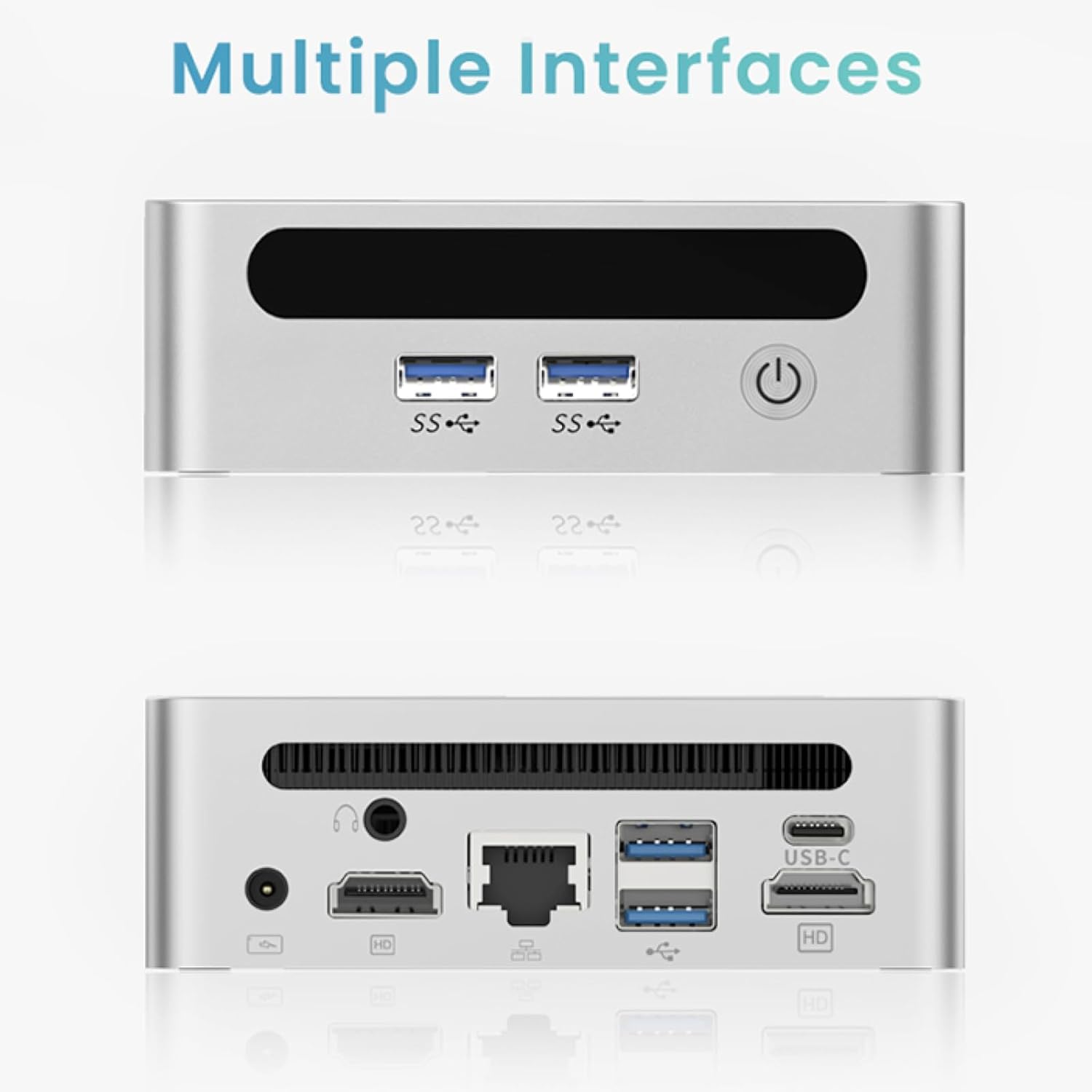
The GenMachine Mini PC features a compact design with various ports for connectivity and expansion.
წინა პანელი
- დენის ღილაკი: მოწყობილობის ჩართვის/გამორთვისთვის.
- USB 3.0 პორტები (x2): For high-speed data transfer and peripheral connections.
- USB 2.0 პორტი (x1): For standard peripheral connections.
უკანა პანელი
- DC დენის შეყვანა: მოწოდებული კვების ადაპტერი აქ შეაერთეთ.
- USB 2.0 პორტი (x1): For standard peripheral connections.
- HDMI პორტები (x2): დისპლეების დასაკავშირებლად, 4K-მდე გარჩევადობის მხარდაჭერით.
- Ethernet (LAN) პორტი: სადენიანი ქსელის დასაკავშირებლად.
- 3.5 მმ აუდიო ჯეკი: ყურსასმენებისთვის ან დინამიკებისთვის.
- Kensington Lock Slot: მოწყობილობის დასამაგრებლად.
4. დაყენების გზამკვლევი
საწყისი კავშირი
- Power off the Mini PC and disconnect all cables.
- Connect your monitor(s) to the HDMI port(s) on the rear panel.
- შეაერთეთ თქვენი კლავიატურა და მაუსი არსებულ USB პორტებთან.
- (Optional) For a wired network connection, plug an Ethernet cable into the LAN port.
- Connect the power adapter to the DC input port and then to a power outlet.
- მინი კომპიუტერის ჩასართავად დააჭირეთ წინა პანელზე არსებულ ჩართვის ღილაკს.
Operating System Setup (Windows 11)
Your GenMachine Mini PC comes with Windows 11 pre-installed. Upon first boot, you will be guided through the initial Windows setup process, including:
- რეგიონისა და კლავიატურის განლაგების შერჩევა.
- Network connection (Wi-Fi 6 or Ethernet).
- Microsoft-ის ანგარიშში შესვლა ან ლოკალური ანგარიშის შექმნა.
- კონფიდენციალურობის პარამეტრების კონფიგურაცია.
დაყენების დასასრულებლად მიჰყევით ეკრანზე მითითებებს.
5. Performance and Usage
The AMD Ryzen 3 4300U processor, combined with 8GB DDR4 RAM and a 256GB SSD, provides robust performance for various tasks.
ძირითადი მახასიათებლები:
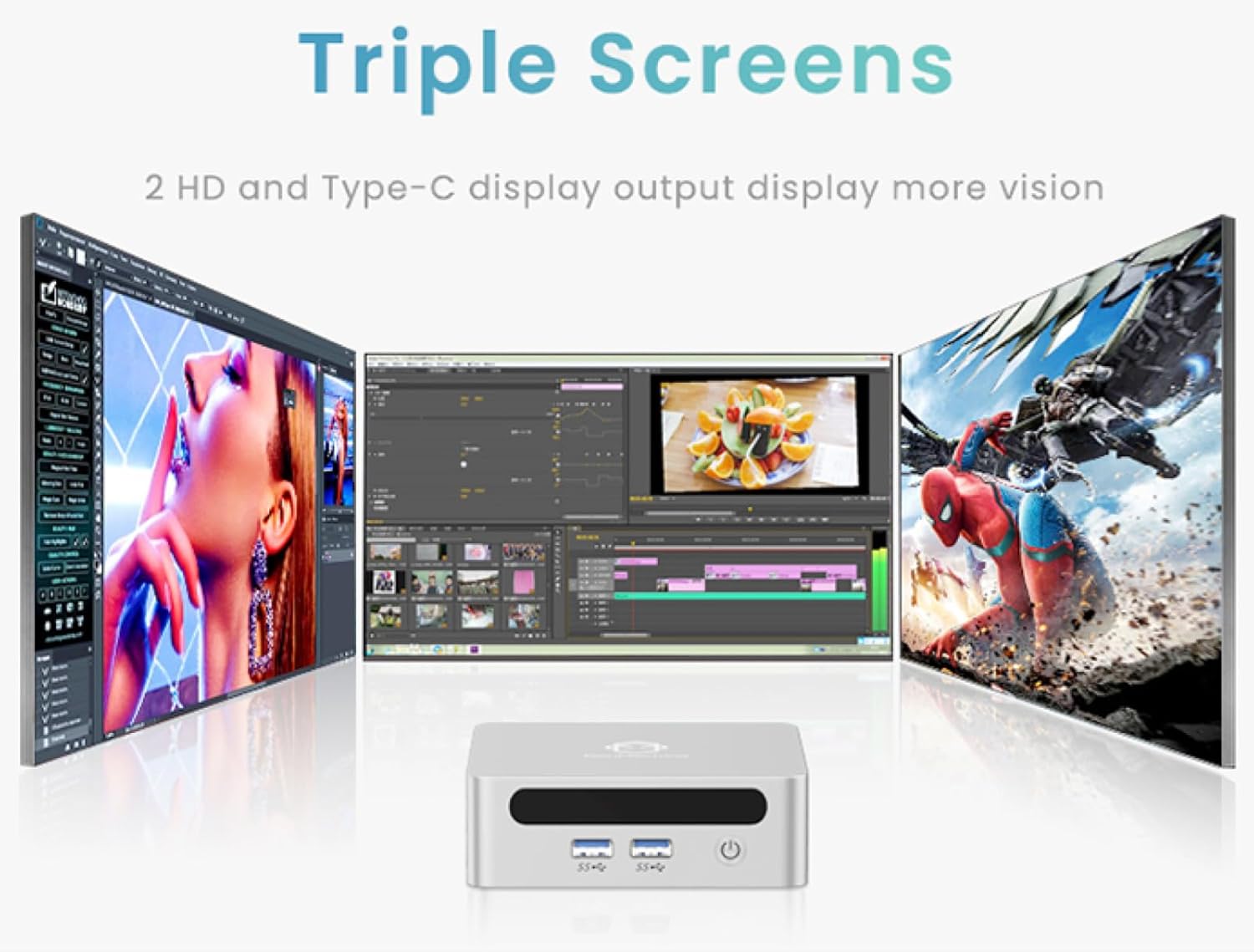
- 4K Ultra HD Visuals & Dual Display Support: Connect up to two 4K monitors for enhanced productivity or immersive entertainment.
- Wi-Fi 6 & Bluetooth 5.2: Enjoy faster and more stable wireless internet and seamless connectivity with Bluetooth peripherals.
- Compact and Quiet Design: Its small footprint and ultra-quiet cooling system make it suitable for any workspace without distraction.

6. Upgrading Components (Maintenance)
The GenMachine Mini PC allows for easy upgrades of its RAM and SSD to further enhance performance or storage capacity.
საჭირო ინსტრუმენტები:
- პატარა ფილიპსის თავიანი ხრახნიანი
- Plastic pry tool (optional, for opening the case)
- New SSD (M.2 2280 NVMe or 2.5-inch SATA SSD)
- New RAM (DDR4 SODIMM)
პროცედურა:
- Power off the Mini PC and disconnect all cables.
- Carefully remove the four rubber foot pads on the bottom of the Mini PC to reveal the hidden screws.
- გახსენით ოთხი ხრახნი.
- Gently pry open the bottom plate along the edges. Be careful with the internal clips.
- Locate the existing SSD and RAM modules.
- To remove the SSD: If fixed by screws, unscrew them. If by clips, open the clips and pull out the original SSD.
- To remove RAM: Open the clips at both ends of the memory slot and pull out the original memory vertically.
- Insert the new SSD/RAM into the respective slots, ensuring they are properly seated and secured.
- Replace the bottom plate, aligning it with the clips and screw holes.
- Screw on the previously removed screws and reattach the foot pads.
7. სამონტაჟო პარამეტრები
The GenMachine Mini PC can be mounted behind a VESA-compatible monitor using the included mounting bracket, saving desk space and creating a clean setup.

8. სპეციფიკაციები
| ფუნქცია | დეტალი |
|---|---|
| პროცესორი | AMD Ryzen 3 4300U (2.7 GHz) |
| ოპერატიული მეხსიერება | 8 GB DDR4 SDRAM |
| შენახვა | 256GB 2280 SSD (PCIE x 16 interface) |
| გრაფიკა | ინტეგრირებული AMD Radeon გრაფიკა |
| ოპერაციული სისტემა | OS (Windows 11 pre-installed) |
| დაკავშირება | Wi-Fi 6, Bluetooth 5.2, Ethernet |
| ვიდეო გამომავალი | 2x HDMI (4K @ 60Hz), USB-C (DisplayPort Alt Mode) |
| USB პორტები | 2x USB 3.0, 2x USB 2.0, 1x USB-C |
| ზომები | 6.26 x 6.26 x 3.6 ინჩი |
| წონა | 2 ფუნტი |
9. Დიაგნოსტიკა
- ძალა არ არის: დარწმუნდით, რომ კვების ადაპტერი საიმედოდ არის დაკავშირებული როგორც მინი კომპიუტერთან, ასევე მოქმედ დენის წყაროსთან.
- ჩვენების გარეშე: Verify that the HDMI cable(s) are correctly connected to the monitor(s) and the Mini PC. Check monitor input source settings.
- No Internet (Wi-Fi): Ensure Wi-Fi is enabled in Windows settings and you are connected to the correct network.
- No Internet (Wired): Check the Ethernet cable connection and ensure your router is functioning correctly.
- ნელი შესრულება: Close unnecessary applications. Check for background updates. Consider upgrading RAM or SSD if issues persist.
10. გარანტია და მხარდაჭერა
For warranty information, technical support, or service inquiries, please refer to the contact details provided in your product packaging or visit the official GenMachine webსაიტი. შეინახეთ თქვენი შესყიდვის ქვითარი საგარანტიო პრეტენზიებისთვის.