JONSBO ZA-240B კომპიუტერის კორპუსის ვენტილატორის ინსტრუქციის სახელმძღვანელო
Model: ZA-240B
1. შესავალი
This manual provides detailed instructions for the installation, operation, and maintenance of your JONSBO ZA-240B PC Case Fan. Please read this manual thoroughly before installation and use to ensure proper function and longevity of the product. The JONSBO ZA-240B is an all-in-one unit featuring two 120mm ARGB fans, designed for efficient cooling and customizable lighting within a PC chassis.
2. უსაფრთხოების ინფორმაცია
ინსტალაციამდე ან მოვლა-პატრონობამდე დარწმუნდით, რომ თქვენი კომპიუტერული სისტემა გამორთულია და დენის წყაროდან გამორთულია.
ვენტილატორის მუშაობის დროს მოერიდეთ ვენტილატორის პირებზე შეხებას.
Handle the fan unit carefully to prevent damage to components or wiring.
არ დაუშვათ პროდუქტი ტენიანობის ან ექსტრემალურ ტემპერატურაზე.
Use only compatible power and ARGB connectors as specified. Incorrect connections may cause damage.
შეინახეთ ბავშვებისთვის მიუწვდომელ ადგილას.
3. პაკეტის შიგთავსი
დარწმუნდით, რომ შეფუთვაში ყველა ნივთია:
JONSBO ZA-240B PC Case Fan Unit (with 2x120mm ARGB Fans)
სამონტაჟო ხრახნები
დოკუმენტაცია (ეს სახელმძღვანელო)
Image: JONSBO ZA-240B fan unit with its integrated cables for power and ARGB connection.
4. პროდუქტის მახასიათებლები
All-in-One დიზაინი: Single frame unit integrating two 120mm ARGB fans, simplifying installation and cable management.
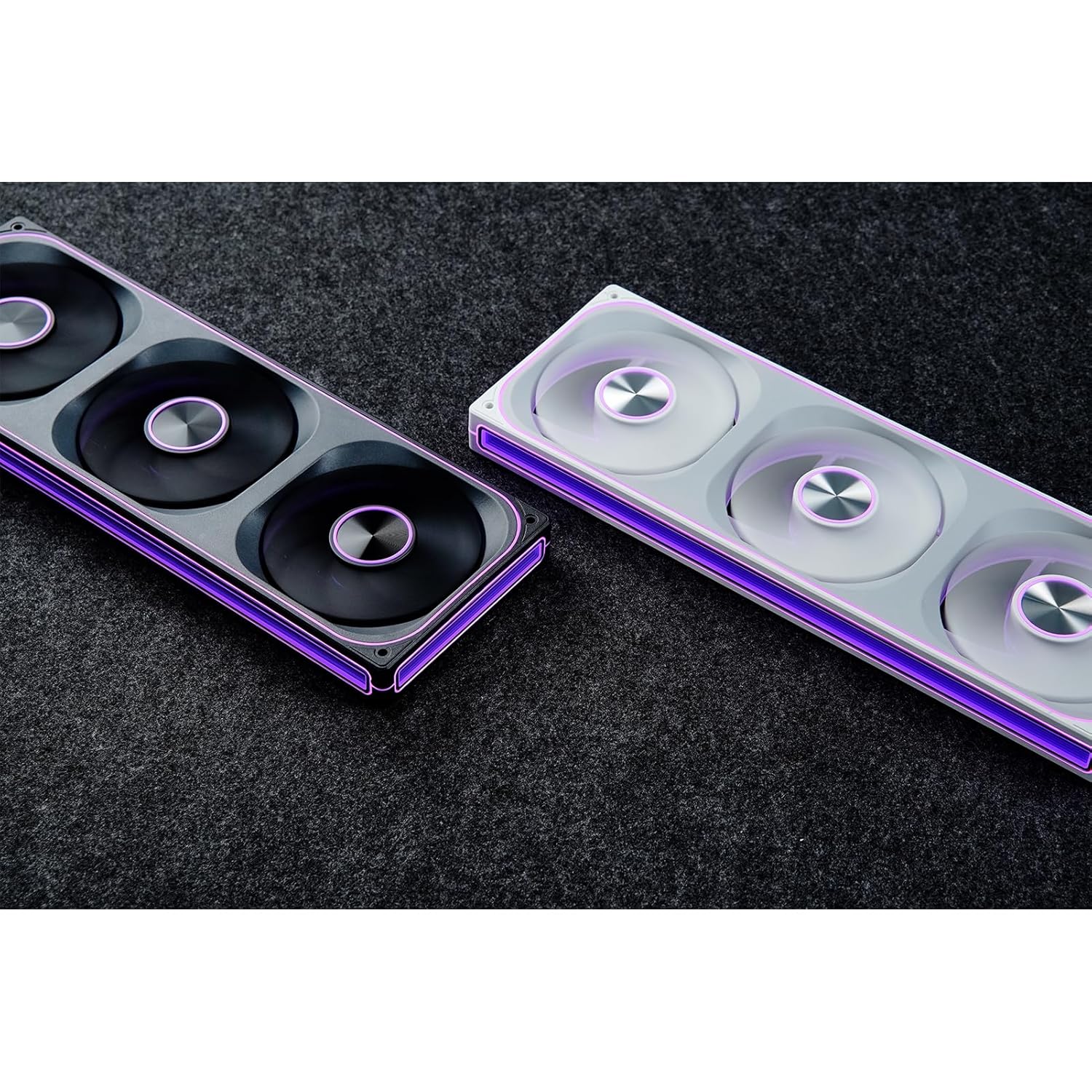
ARGB Infinity Mirror: Features 4-sides thousand-layer mirror illusion with 52 lamp beads around the circumference and 18 in the axis for dynamic lighting effects.
Addressable RGB Sync: Direct 3-pin ARGB connection to compatible motherboards for synchronized lighting control and over 16 million color effects.
PWM კონტროლი: Quiet and low-noise PWM fan operation with an integrated male/female head for speed regulation.
Aluminum Nameplate: Includes an aluminum CD pattern nameplate for enhanced aesthetics.
Simplified Cabling: One-line connection to the motherboard for both fan power and ARGB lighting.
სურათი: წინა მხარე view of the JONSBO ZA-240B PC Case Fan showcasing its ARGB lighting and infinity mirror effect.
5. დაყენება და ინსტალაცია
Follow these steps to install the JONSBO ZA-240B PC Case Fan into your computer chassis:
მოამზადეთ თქვენი სისტემა: გამორთეთ კომპიუტერი და გამორთეთ დენის წყაროდან. გახსენით კომპიუტერის კორპუსი შიდა სივრცის სანახავად.
დამონტაჟების ადგილის იდენტიფიცირება: Determine the desired mounting location for the fan unit (e.g., top, front, bottom, or side of the case). Ensure there is sufficient clearance.
Secure the Fan Unit: Align the fan unit with the screw holes in your PC case. Use the provided mounting screws to firmly attach the fan unit to the chassis. Do not overtighten.
Image: JONSBO ZA-240B fan unit installed at the top of a PC case, demonstrating typical mounting.
Connect PWM Cable: Locate an available 4-pin PWM fan header on your motherboard. Connect the 4-pin PWM connector from the fan unit to this header. This allows the motherboard to control fan speed.
ARGB კაბელის შეერთება: Locate an available 3-pin 5V Addressable RGB header on your motherboard. Connect the 3-pin ARGB connector from the fan unit to this header. Ensure the arrow on the connector aligns with the +5V pin on the motherboard header to prevent damage. არ შეაერთოთ 12 ვოლტიან RGB ჰედერთან.
საკაბელო მენეჯმენტი: Route the cables neatly to avoid interference with other components and to improve airflow.
დახურეთ ქეისი და ჩართეთ: ყველა შეერთების საიმედოდ დამაგრების შემდეგ, დახურეთ კომპიუტერის კორპუსი, შეაერთეთ კვების კაბელი და ჩართეთ სისტემა.
6. ოპერაცია
ვენტილატორის სიჩქარის კონტროლი (PWM)
The JONSBO ZA-240B fan unit utilizes Pulse Width Modulation (PWM) technology, allowing your motherboard to dynamically adjust fan speeds based on system temperature. This ensures optimal cooling performance while minimizing noise levels. You can configure fan curves through your motherboard's BIOS/UEFI settings or using compatible software provided by your motherboard manufacturer.
ARGB განათების კონტროლი
The Addressable RGB (ARGB) lighting of the ZA-240B can be controlled via your motherboard's ARGB software (e.g., ASUS Aura Sync, MSI Mystic Light Sync, GIGABYTE RGB Fusion, ASRock Polychrome Sync). Ensure your motherboard supports 3-pin 5V ARGB headers. This software allows you to customize lighting effects, colors, and synchronization with other ARGB components in your system.
Image: The JONSBO ZA-240B fan unit displaying its customizable ARGB lighting within a computer system.
7. მოვლა
Regular maintenance helps ensure optimal performance and extends the lifespan of your fan unit.
მტვრის მოცილება: Periodically clean dust from the fan blades and frame using compressed air or a soft brush. Ensure the system is powered off and unplugged before cleaning.
ინსპექტირება: Occasionally inspect the fan and its cables for any signs of wear, damage, or loose connections.
8. Დიაგნოსტიკა
საკითხი
შესაძლო მიზეზი
გამოსავალი
ვენტილატორი არ ტრიალებს
Loose or incorrect PWM cable connection. Insufficient power.
Check the 4-pin PWM cable connection to the motherboard. Ensure the motherboard is supplying power to the fan header.
ARGB განათება არ მუშაობს
Loose or incorrect ARGB cable connection. Connected to 12V RGB header. Motherboard ARGB software not configured.
Verify the 3-pin ARGB cable is securely connected to a 5V ARGB header. Ensure it is not connected to a 12V RGB header. Check motherboard ARGB software settings.
ვენტილატორი ძალიან ხმამაღალია
Fan speed set too high. Obstruction.
Adjust fan speed settings in your motherboard's BIOS/UEFI or software. Ensure no cables or objects are obstructing the fan blades.
ცუდი გაგრილების შესრულება
Insufficient airflow. Dust buildup. Incorrect fan orientation.
Ensure proper airflow within the case. Clean dust from fans. Verify fan is oriented to push or pull air in the desired direction.
9. სპეციფიკაციები
ფუნქცია
დეტალი
მოდელის ნომერი
ZA-240B
ვენტილატორის ზომა
2 x 120mm (integrated unit)
Fan Thickness
28 მმ
ბრუნვის სიჩქარე
700-2400 ბრ/წთ (±10%)
ხმაურის დონე
21.3-37.3 dB(A)
დენის კონექტორი
4 პინიანი PWM
ARGB კონექტორი
3-Pin 5V ARGB
ტtage
DC 12 Volts (Fan), 5 Volts (LED)
ვატtage
5.16 watts (Fan), 5.80 watts (LED)
თავსებადი მოწყობილობები
კომპიუტერის ქეისი
ზომები (ამანათი)
29.97 x 15.75 x 4.19 სმ
წონა (ამანათი)
707.6 გ
10. გარანტია და მხარდაჭერა
For warranty information and technical support, please refer to the official JONSBO webადგილზე ან დაუკავშირდით თქვენს საცალო მოვაჭრეს. შეინახეთ შეძენის დამადასტურებელი საბუთი გარანტიის მოთხოვნებისთვის.
დაკავშირებული დოკუმენტები - ZA-240B
Jonsbo-ს ვენტილატორის უსაფრთხოების ინსტრუქციები და გაფრთხილებები ეს დოკუმენტი შეიცავს Jonsbo-ს ვენტილატორის უსაფრთხოების აუცილებელ ინსტრუქციებსა და გაფრთხილებებს, რომლებიც მოიცავს მექანიკურ უსაფრთხოებას, ელექტრო უსაფრთხოებას, ვენტილაციას და მოვლა-პატრონობას. იგი განკუთვნილია პროდუქტის უსაფრთხო დამუშავებისა და სათანადო გამოყენებისთვის.
Jonsbo D31 კომპიუტერის კორპუსის დაყენების სახელმძღვანელო და სპეციფიკაციები Jonsbo D31 კომპიუტერის კორპუსის ყოვლისმომცველი სახელმძღვანელო, რომელიც მოიცავს ნაწილების ჩამონათვალს, კორპუსის სპეციფიკაციებს, კვების ბლოკისა და ვიდეო ბარათის მონტაჟს, გაგრილების ვარიანტებს და თავსებადობას. შეიცავს თქვენი კომპიუტერის აწყობის დეტალურ ეტაპებს.
JONSBO NV10 კომპიუტერის კორპუსის დაყენების სახელმძღვანელო JONSBO NV10 კომპიუტერის კორპუსის ყოვლისმომცველი ინსტალაციის სახელმძღვანელო, რომელშიც დეტალურად არის აღწერილი შეფუთვის შიგთავსი, ნაწილები, კონექტორები და თქვენი კომპიუტერის აწყობის ეტაპობრივი ინსტრუქციები.
JONSBO N5 NAS ქეისის მომხმარებლის სახელმძღვანელო Comprehensive user guide for the JONSBO N5 NAS Case, detailing product specifications, parts list, and step-by-step installation instructions for components like power supply, motherboard, storage drives, and cooling.