1. შესავალი
Welcome to the user manual for your Nothing Phone (3a). This guide provides detailed instructions on setting up, operating, maintaining, and troubleshooting your device to ensure optimal performance and user experience.

Figure 1.1: The Nothing Phone (3a) showcasing its unique transparent back design and Glyph Interface.
2. დაყენება
2.1. ამოღება და პირველადი შემოწმება
Upon receiving your Nothing Phone (3a), carefully open the packaging and inspect the contents. Ensure all items listed in the "What's in the Box" section are present and undamaged.
- Nothing Phone (3a) device
- USB-C კაბელი
- SIM უჯრის ეჟექტორი
- წინასწარ გამოყენებული ეკრანის დამცავი
2.2. SIM ბარათის ჩასმა
- იპოვეთ SIM ბარათის უჯრა ტელეფონის გვერდზე.
- ჩადეთ SIM ბარათის უჯრის ამომხტარი ხელსაწყო უჯრის გვერდით პატარა ხვრელში და მჭიდროდ დააჭირეთ მანამ, სანამ უჯრა არ ამოვარდება.
- მოათავსეთ თქვენი Nano-SIM ბარათი(ები) უჯრაში ოქროსფერი კონტაქტებით ქვემოთ.
- ფრთხილად ჩადეთ SIM ბარათის უჯრა ტელეფონში, სანამ არ დააწკაპუნებს.
2.3. პირველადი ჩართვისა და დაყენების ოსტატი
Press and hold the power button on the right side of the phone until the Nothing logo appears. Follow the on-screen instructions to complete the initial setup, including language selection, Wi-Fi connection, Google account sign-in, and data transfer.
3. Operating Your Nothing Phone (3a)
3.1. Nothing OS 3.1 Overview
The Nothing Phone (3a) runs on Nothing OS 3.1, an intuitive and customizable Android-based operating system. It features functional adaptations for an optimized user experience.

Figure 3.1: Visual representation of Nothing OS 3.1's customizable interface.
3.2. კამერის სისტემა
The Nothing Phone (3a) is equipped with an advanced camera system designed to capture high-quality photos and videos.
- მთავარი კამერა: 50-MP OIS (Optical Image Stabilization) main camera for detailed and stable shots.
- ტელეფოტო კამერა: 50-MP telephoto lens with up to 30x Ultra Zoom for capturing distant subjects.
- ულტრა ფართო კამერა: 8-MP ultra-wide-angle lens for expansive landscape and group shots.
- წინა კამერა: 32-MP front camera for sharp selfies and video calls.

Figure 3.2: Detailed breakdown of the Phone (3a)'s Elite Camera System components.

Figure 3.3: Illustration of the telephoto zoom lens technology and its capability to capture distant scenes.
3.3. Essential Key and Essential Space
The Essential Key is a new physical button on the side of your device. A short press captures screen content, while a long press allows you to record voice notes, ideas, and inspirations. The Essential Space organizes your captures and provides personalized suggestions.

Figure 3.4: The Essential Key and its integration with the Essential Space for content organization.
3.4. გლიფის ინტერფეისი
The Glyph Interface on the back of the phone provides unique LED light and sound notifications for calls, messages, and other alerts, offering a distinct visual and auditory experience.

Figure 3.5: The Glyph Interface on the rear of the Nothing Phone (3a), demonstrating its illuminated patterns.
4. მოვლა
4.1. ბატარეის მართვა
The Nothing Phone (3a) features a 5,000 mAh battery with 50W fast charging. To maximize battery lifespan:
- მოერიდეთ ექსტრემალურ ტემპერატურას.
- დატენვისთვის გამოიყენეთ მოწოდებული USB-C კაბელი.
- მოერიდეთ ბატარეის ხშირ სრულ დაცლას.

Figure 4.1: Visual representation of the 5,000 mAh battery capacity.
4.2. თქვენი მოწყობილობის გაწმენდა
Use a soft, lint-free cloth to clean the screen and back of your phone. For stubborn smudges, slightly dampქსოვილი წყლით დაასველეთ. მოერიდეთ უხეში ქიმიკატების ან აბრაზიული მასალების გამოყენებას.
4.3. პროგრამული უზრუნველყოფის განახლებები
რეგულარულად შეამოწმეთ და დააინსტალირეთ პროგრამული უზრუნველყოფის განახლებები, რათა დარწმუნდეთ, რომ თქვენს მოწყობილობას აქვს უახლესი ფუნქციები, უსაფრთხოების პატჩები და მუშაობის გაუმჯობესებები. გადადით პარამეტრები > სისტემა > პროგრამული უზრუნველყოფის განახლება განახლებების შესამოწმებლად.
5. Დიაგნოსტიკა
5.1. გავრცელებული პრობლემები და გადაწყვეტილებები
| საკითხი | შესაძლო მიზეზი | გამოსავალი |
|---|---|---|
| ტელეფონი არ ირთვება | დაბალი ბატარეა, პროგრამული უზრუნველყოფის გაუმართაობა | Charge the phone for at least 30 minutes. Perform a forced restart by holding the power button for 10-15 seconds. |
| აპლიკაციების გათიშვა ან გაყინვა | App bug, insufficient RAM, outdated software | Clear app cache/data. Close background apps. Update the app or phone software. |
| ცუდი ბატარეის ხანგრძლივობა | High screen brightness, background apps, network issues | Adjust screen brightness. Close unused apps. Disable unnecessary features like GPS/Bluetooth. |
5.2. ქარხნული გადატვირთვა
If issues persist, a factory reset may be necessary. This will erase all data on your phone, so ensure you have backed up important information. Navigate to პარამეტრები > სისტემა > გადატვირთვის ოფციები > წაშალე ყველა მონაცემი (ქარხნული პარამეტრების გადატვირთვა).
6. სპეციფიკაციები
Key technical specifications for the Nothing Phone (3a) (Model: A059).
| ფუნქცია | დეტალი |
|---|---|
| მოდელის სახელი | არაფერი ტელეფონი (3ა) |
| მოდელის ნომერი | A059 |
| ოპერაციული სისტემა | Android 15, Nothing OS 3.1 |
| ჩვენება | 6.77-inch Flexible FHD+ AMOLED, 120 Hz, 1.07 billion colors |
| პროცესორი | Snapdragon 7s Gen 3 (2.5 GHz, 8-core) |
| ოპერატიული მეხსიერება | 12 GB (up to 20GB RAM Boost) |
| შენახვა | 256 GB |
| მთავარი კამერა | 50-MP OIS |
| ტელეფოტო კამერა | 50-MP (30x Ultra Zoom) |
| ულტრაფართო კამერა | 8-მპ |
| წინა კამერა | 32-მპ |
| ბატარეა | 5,000 mAh (50W Fast Charging) |
| ზომები | 7.75 x 0.83 x 16.35 სმ |
| წონა | 201 გრამი |
| წყლის/მტვრის წინააღმდეგობა | IP64 |
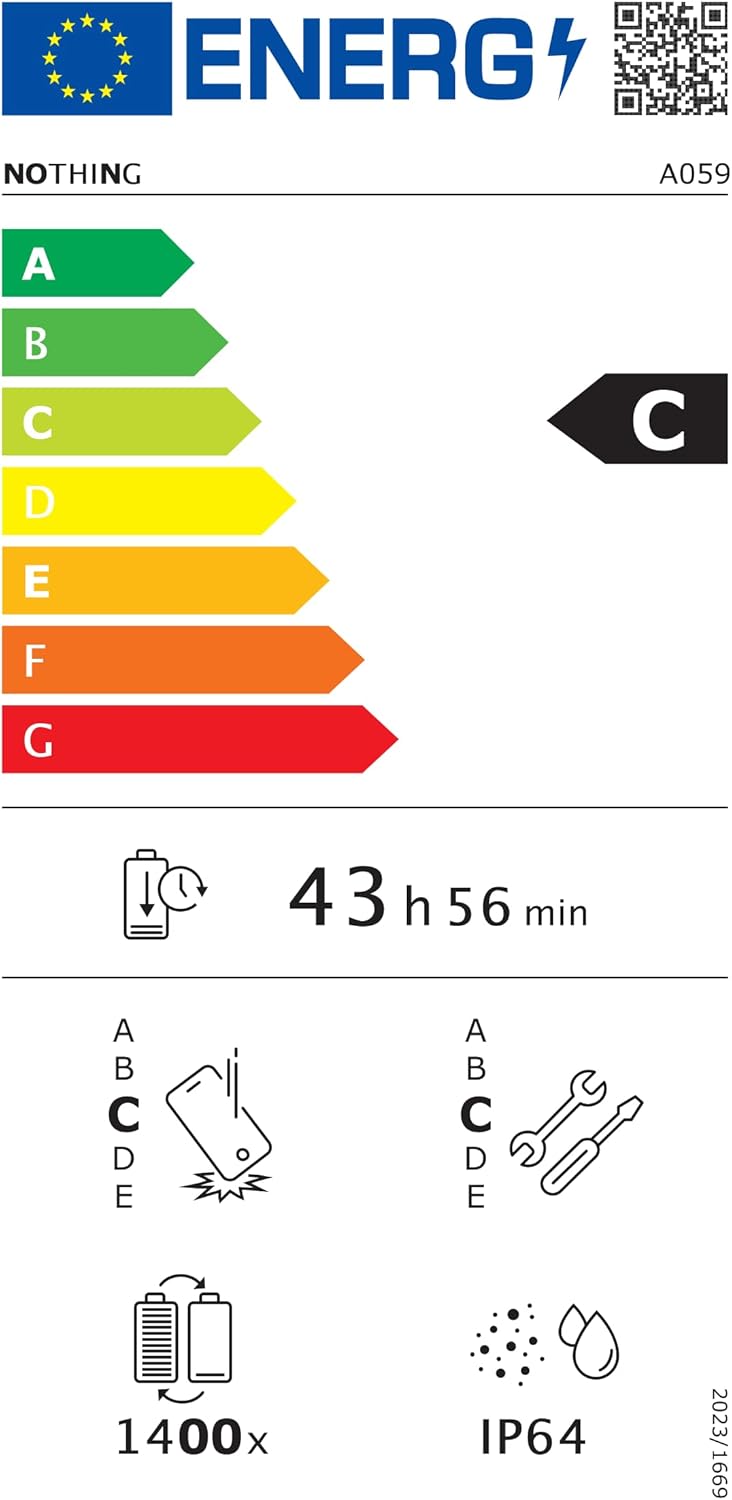
Figure 6.1: EU Energy Label for Nothing Phone (3a), indicating energy efficiency and IP64 rating. More details available at eprel.ec.europa.eu/qr/2179652.
7. გარანტია და მხარდაჭერა
Your Nothing Phone (3a) comes with a manufacturer's warranty. Please refer to the warranty card included in your product packaging for specific terms and conditions.
For further assistance, technical support, or warranty claims, please visit the official Nothing support webსაიტზე ან დაუკავშირდით მათ მომხმარებელთა მომსახურების სამსახურს. დამატებითი ინფორმაციის მოძიება შეგიძლიათ Nothing Store on Amazon.


