შესავალი
The Imou 3K/5MP Outdoor Solar PTZ Wireless IP Surveillance Camera (Model: IPC-B7C-5M0WEH) provides comprehensive outdoor security with advanced features. This manual guides you through the setup, operation, and maintenance of your camera to ensure optimal performance and security.
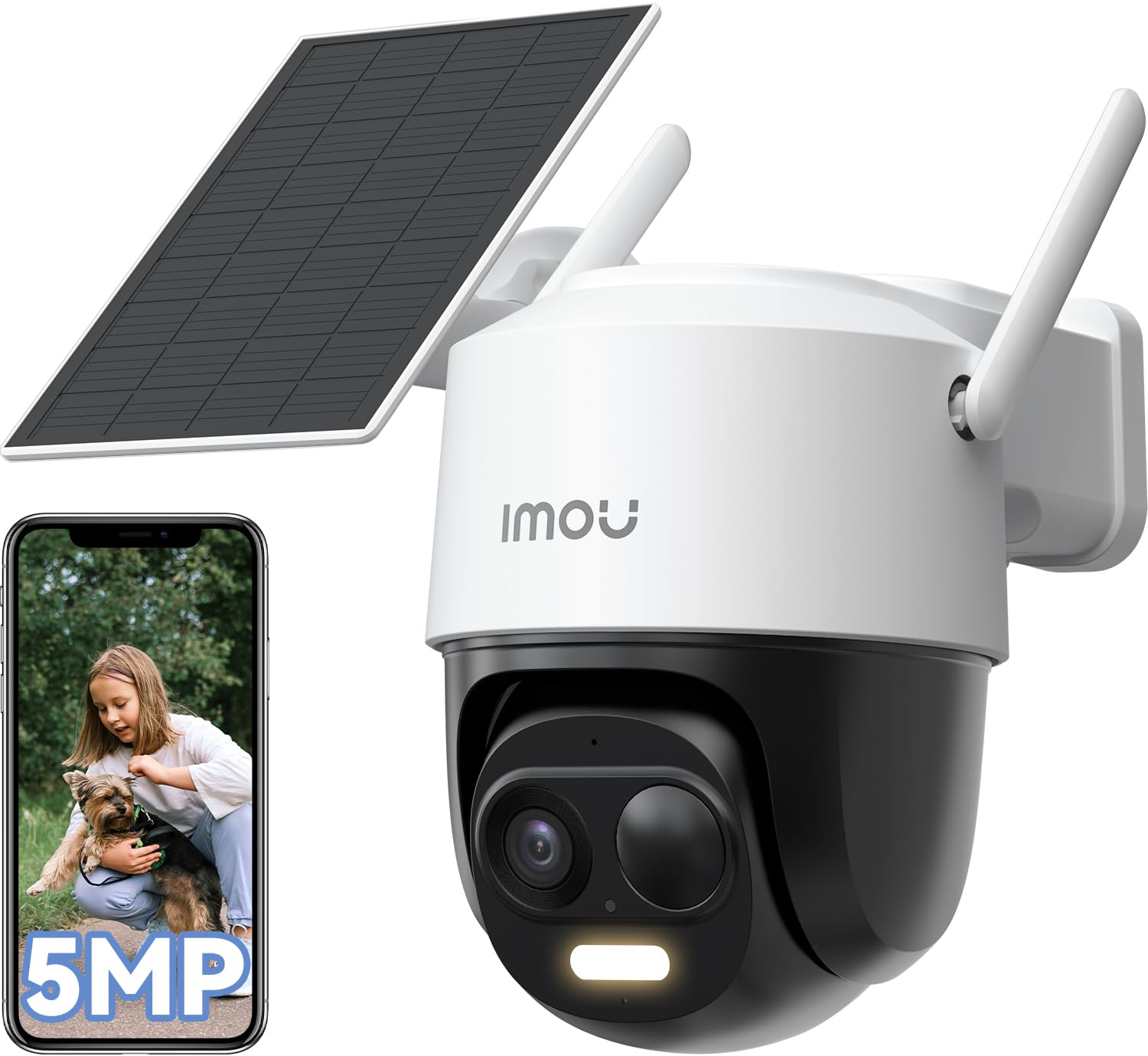
Image: The Imou 3K/5MP Outdoor Solar PTZ Wireless IP Surveillance Camera, showcasinგ მისი კომპაქტური დიზაინი.
1. დაყენება
- ყუთის ამოღება და კომპონენტები: Verify all components are present: camera unit, solar panel, mounting kit, USB-C cable.
- დამუხტვა: Ensure the camera has an initial charge. The solar panel will maintain power after installation.
- აპლიკაციის ინსტალაცია: Download the "Imou Life" app from your smartphone's app store. Create an account or log in.
- კამერის დაწყვილება:
- ჩართეთ კამერა.
- Open the Imou Life app and tap the "+" icon to add a new device.
- დაასკანირეთ კამერაზე ან მის შეფუთვაზე განთავსებული QR კოდი.
- Follow the in-app instructions to connect the camera to your 2.4GHz Wi-Fi network. Ensure your router is configured for 2.4GHz as 5GHz is not supported for initial setup.
- მონტაჟი:
- Choose a suitable outdoor location with direct sunlight exposure for the solar panel and a clear view კამერისთვის.
- Use the provided mounting template and screws to securely attach the camera and solar panel.
- Connect the solar panel to the camera using the 4-meter USB-C cable. Ensure the connection is secure and waterproof.

Image: The Imou camera mounted with its solar panel, illustrating outdoor installation.
2. საოპერაციო ინსტრუქციები
- ცოცხალი View: გახსენით Imou Life აპლიკაცია და აირჩიეთ თქვენი კამერა view ცოცხალი არხი.
- PTZ კონტროლი: Use the pan-tilt-zoom controls within the app to adjust the camera's viewing angle (360° horizontal rotation). You can set multiple preset positions for quick access.
- Resolution and Zoom: The camera records in 5MP (3K QHD) resolution. Use the digital zoom feature in the app to magnify details.
- ღამის ხედვა: The camera automatically switches to night vision in low-light conditions, providing clear images up to 20 meters. Color night vision is available when sufficient ambient light or the camera's spotlight is active.
- AI გამოვლენა:
- Enable Person/Vehicle Detection in the app settings. This feature uses AI to distinguish between humans, vehicles, and other moving objects, reducing false alarms.
- ჭკვიანი თვალთვალი: When a person or vehicle is detected, the camera can automatically track their movement within its field of view.
- ხმოვანი და მსუბუქი სიგნალიზაცია: Configure the camera to activate a powerful spotlight and siren upon detection of suspicious activity.
- ორმხრივი აუდიო: Use the microphone and speaker in the camera to communicate with visitors or deter intruders. The app allows for customizable voice options (original, male, robot).
- კონფიდენციალურობის რეჟიმი: Activate privacy mode via the app to temporarily disable video streaming and recording, ensuring personal privacy when needed.
- Alexa ინტეგრაცია: Connect your Imou camera to Amazon Alexa for voice control and live view display on compatible devices.
- შენახვის მენეჯმენტი:
- MicroSD ბარათი: Insert a microSD card (up to 256GB, not included) into the designated slot for local video storage.
- Imou Cloud Storage: Utilize the optional Imou Cloud service for secure, remote video storage (30-day trial, 7-day recording plan available).
- მოძრაობის გამოვლენის ზონები: კამერის კონკრეტული ზონების პერსონალიზაცია view for motion detection to focus on critical zones and minimize unnecessary alerts.

Image: The Imou camera's dome design, indicating its pan-tilt-zoom capabilities for wide area coverage.
3. მოვლა
- დასუფთავება: რეგულარულად გაწმინდეთ კამერის ლინზა და მზის პანელი რბილი, დ...amp ქსოვილი გამოსახულების მკაფიო ხარისხისა და მზისგან დამუხტვის ეფექტურობის უზრუნველსაყოფად. მოერიდეთ აბრაზიულ საწმენდ საშუალებებს.
- Firmware განახლებები: Check the Imou Life app periodically for firmware updates to ensure your camera has the latest features and security enhancements.
- ბატარეის ჯანმრთელობა: The solar panel is designed to keep the internal battery charged. In prolonged periods of low sunlight, the battery may deplete. Ensure the solar panel is free from obstructions like snow or debris.
4. Დიაგნოსტიკა
- კამერა არ უკავშირდება Wi-Fi-ს: Ensure your Wi-Fi network is 2.4GHz. Verify the Wi-Fi password. Move the camera closer to the router during setup.
- ხშირი ცრუ განგაში: Adjust the sensitivity of motion detection in the app. Utilize AI Person/Vehicle Detection to filter out irrelevant movements. Define specific motion detection zones.
- ღამის ხედვის ცუდი ხარისხი: Ensure the camera lens is clean. Check for obstructions blocking the infrared lights.
- მზის პანელი არ იტენება: Ensure the solar panel is positioned in direct sunlight and free from dirt or obstructions. Verify the USB-C cable connection is secure.
- No audio or poor two-way audio: Check microphone and speaker settings in the app. Ensure there are no physical obstructions.
5. სპეციფიკაციები
| ფუნქცია | სპეციფიკაცია |
|---|---|
| მოდელის ნომერი | IPC-B7C-5M0WEH |
| რეზოლუცია | 5MP (3K QHD), 1620p video recording |
| სფერო View | 360° Pan-Tilt-Zoom |
| ღამის ხედვის დიაპაზონი | 20 მეტრამდე |
| დაკავშირება | Wi-Fi (2.4 გჰც) |
| დენის წყარო | მზის ენერგიაზე მომუშავე |
| წყლის წინააღმდეგობა | IP65 (წყალგამძლე) |
| განსაკუთრებული თვისებები | Two-way audio, AI Person/Vehicle Detection, Smart Tracking, Sound & Light Alarm, Privacy Mode, Alexa Integration |
| შენახვის პარამეტრები | MicroSD card (max. 256GB), Imou Cloud |
| ზომები (L x W x H) | 16.5 x 12.6 x 15.4 სმ |
| წონა | 1.23 კგ |
| ტtage | 5 ვოლტი |
| ბატარეა | 1 x 12V (internal, charged by solar) |
6. გარანტია
This product comes with a standard manufacturer's warranty. Please refer to the official Imou webკონკრეტული გარანტიის პირობებისთვის იხილეთ საიტი ან თქვენი შეძენის დოკუმენტაცია.
7. მხარდაჭერა
For technical assistance, troubleshooting, or further inquiries, please refer to the Imou Life app's help section or visit the official Imou support website. The Imou Life app supports smartphones, tablets, and PCs.