1. შესავალი
Thank you for choosing the Baseus 45W USB C Charger Block. This device is designed to provide efficient and fast charging for a wide range of compatible electronic devices. Please read this manual carefully to ensure proper usage and to maximize the product's lifespan.

Image 1.1: Two Baseus 45W USB C Charger Blocks and two USB-C to USB-C cables included in the package.
2. პროდუქტის მახასიათებლები
- 45 W სწრაფი დატენვა: Equipped with PPS/PD 3.0 technology, this charger delivers rapid power, capable of charging compatible devices like the iPhone 16 series and Galaxy S24 quickly. For Super Fast Charge 2.0, a 5A charging cable is required.
- კომპაქტური და პორტატული დიზაინი: The charger block is significantly smaller than standard chargers, making it ideal for travel and saving space on power strips.
- Quad Thermal Management: Advanced cooling features including graphene application, scientific thermal layout, polymer silicon-based design, and 720K/h charging status monitoring ensure optimal heat dissipation and device protection.
- Powered by GaN6 Technology: Utilizes GaN6 chip technology for a 92% energy conversion rate, resulting in higher efficiency, lower operating temperatures, and a smaller physical size.
- ფართო თავსებადობა: Supports multiple fast charging protocols including PD3.0, PPS, QC3.0, FCP, SCP, and AFC, ensuring compatibility with a broad range of devices.

Image 2.1: Illustration of the 45W Super Fast Charging capability, showing a Samsung S24 Ultra reaching 61% charge in 30 minutes.

Image 2.2: Visual comparison demonstrating the compact size of the Baseus 45W charger, which is 46.66% smaller than typical chargers.

სურათი 2.3: დეტალური view of the Quad Thermal Management system, including graphene cooling and scientific thermal layout.

Image 2.4: Illustration of the GaN6 technology, showing a 92% energy conversion rate for enhanced efficiency.
3. დაყენება
- შეფუთვა: Carefully remove the charger block and USB-C cable(s) from the packaging.
- შეამოწმეთ: შეამოწმეთ დამტენი და კაბელი ხილული დაზიანებისთვის. დაზიანების შემთხვევაში არ გამოიყენოთ.
- დაკავშირება დენის წყაროსთან: Plug the Baseus 45W USB C Charger Block into a standard wall outlet. Ensure the outlet is easily accessible.
4. საოპერაციო ინსტრუქციები
- შეერთების კაბელი: Insert one end of the USB-C cable into the USB-C port on the charger block.
- მოწყობილობის დაკავშირება: Insert the other end of the USB-C cable into the charging port of your compatible electronic device.
- დატენვის დაწყება: The device should automatically begin charging. Monitor your device's screen for charging indicators.
- გათიშვა: Once charging is complete, safely disconnect the cable from your device, then from the charger block, and finally unplug the charger from the wall outlet.

სურათი 4.1: ყოფილიample of the charger in use for office charging, powering a smartphone and a laptop.

სურათი 4.2: ყოფილიample of the charger in use for home charging, providing power for leisure activities.
5. თავსებადობა
The Baseus 45W USB C Charger Block is compatible with a wide range of devices supporting USB-C charging and various fast charging protocols. Compatible devices include, but are not limited to:
- სმარტფონები: iPhone 12-16 Series (including Pro, Pro Max models), Galaxy S20-S24 Series, OnePlus 8 Pro, Google Pixel 6-8, Sony Xperia 5, Android phones.
- ტაბლეტები: iPad (various models).
- ლეპტოპები: MacBook Pro 2023, Lenovo ThinkPad T14, Dell XPS 13.
- Wearables & Accessories: Apple Watch, AirPods 2-3.

Image 5.1: Visual representation of the universal compatibility of the Baseus USB-C charger with various devices.
6. უსაფრთხოების ინფორმაცია
Your safety is a priority. The Baseus 45W USB C Charger Block incorporates multiple protection features to ensure safe and reliable charging:
- მოკლე ჩართვის დაცვა
- ელვისებური ტალღის დაცვა
- ელექტროსტატიკური დაცვა
- ჭარბი დენის დაცვა
- გადატვირთვისაგან დაცვა
- ზედმეტი ტომიtage დაცვა
- Low Leakage Current Protection
- Flame-Retardant Shell
- ტtage Stabilization Protection
- Low EMI Protection
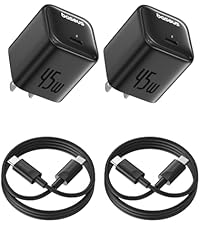
Image 6.1: Visual summary of the 10-point safety protection features integrated into the charger.
7. სპეციფიკაციები
| ფუნქცია | სპეციფიკაცია |
|---|---|
| მოდელის ნომერი | CCGAN45SECS |
| ბრენდი | ბასეუსი |
| ვატtage | 45 ვატი |
| სულ USB პორტები | 1 (USB ტიპი C) |
| შეყვანის მოცულობაtage | 240 ვოლტი |
| Ampგაბრაზება | 2.24 Amps |
| განსაკუთრებული თვისებები | Fast Charging, GaN6 Technology, Quad Thermal Management |
| დაკავშირების ტექნოლოგია | USB |
| ნივთის წონა | 8.8 უნცია |
| პაკეტის ზომები | 7.05 x 4.37 x 1.54 ინჩი |
| მოყვება კომპონენტები | USB-C კაბელი |
8. Დიაგნოსტიკა
- მოწყობილობა არ იტენება:
- დარწმუნდით, რომ დამტენი საიმედოდ არის შეერთებული მოქმედ კედლის სოკეტში.
- Verify the USB-C cable is firmly connected to both the charger and your device.
- კაბელთან დაკავშირებული პრობლემების გამოსარიცხად, სცადეთ სხვა USB-C კაბელის გამოყენება.
- Test the charger with a different compatible device to confirm charger functionality.
- ნელი დატენვა:
- Ensure your device supports 45W fast charging and the PPS/PD 3.0 protocol.
- For Super Fast Charge 2.0, use a 5A rated USB-C to USB-C cable.
- დატენვის დროს ენერგიის მოხმარების შესამცირებლად, დახურეთ თქვენს მოწყობილობაზე არასაჭირო აპლიკაციები.
- Avoid using your device intensively while charging for optimal speed.
- დამტენი თბება:
- It is normal for the charger to become warm during operation, especially during fast charging.
- If the charger becomes excessively hot to touch, disconnect it immediately and contact customer support.
9. მოვლა
- დასუფთავება: გაწმენდის წინ გამორთეთ დამტენი დენის წყაროდან. ზედაპირის გასაწმენდად გამოიყენეთ რბილი, მშრალი ქსოვილი. არ გამოიყენოთ თხევადი საწმენდი საშუალებები ან აეროზოლები.
- შენახვა: შეინახეთ დამტენი გრილ, მშრალ ადგილას, მზის პირდაპირი სხივებისა და ექსტრემალური ტემპერატურისგან მოშორებით.
- დამუშავება: მოერიდეთ დამტენის დავარდნას ან ძლიერ დარტყმებს. არ სცადოთ დამტენის დაშლა ან მოდიფიცირება.
10. გარანტია და მხარდაჭერა
Baseus products are manufactured with high-quality standards. For warranty information, technical support, or any product-related inquiries, please refer to the warranty card included with your purchase or visit the official Baseus website. You may also contact Baseus customer service directly for assistance.


