1. პროდუქტი დასრულდაview
The Grandstream WP816 is a compact, portable Wi-Fi phone designed for clear communication. It features dual-band Wi-Fi 6 for reliable connectivity, supports two SIP accounts and two lines, and delivers HD voice quality with dual microphones, Acoustic Echo Cancellation (AEC), and Noise Shield Technology. The phone includes integrated Bluetooth for headset connectivity, a long-lasting 1500mAh rechargeable battery providing 6 hours of talk time and 120 hours of standby time, and a configurable push-to-talk button. It is equipped with a Type C USB port for fast charging and a 3.5mm headset jack. Additional features include an accelerometer and an emergency button.
ძირითადი მახასიათებლები:
- Dual-band Wi-Fi 6 with efficient antenna design and advanced roaming support.
- Supports 2 SIP accounts and 2 lines.
- HD voice with dual MIC design, AEC, and Noise Shield Technology.
- Integrated Bluetooth for headset connection.
- Rechargeable 1500mAh battery: 6 hours talk time, 120 hours standby.
- Configurable button for push-to-talk functionality.
- Type C USB port (supports fast charging) and 3.5mm headset jack.
- Built-in accelerometer and emergency button.
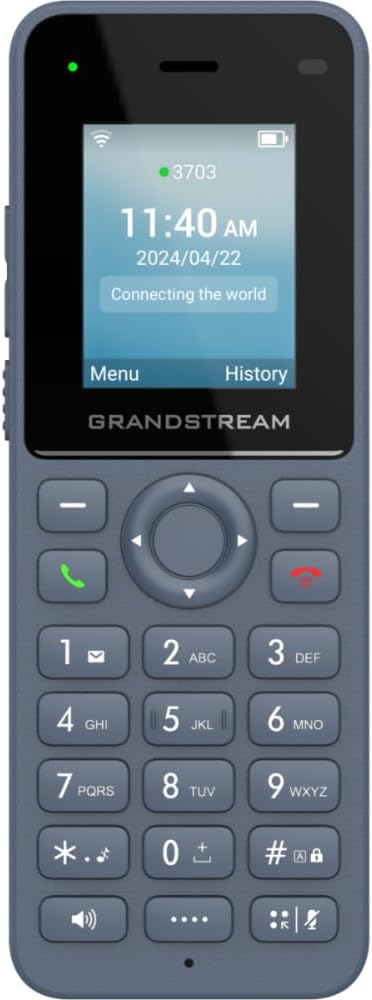
სურათი 1: წინა view of the Grandstream WP816 Wi-Fi Phone, displaying its screen, keypad, and branding.
2. დაყენება
2.1. რა არის ყუთში:
- Grandstream WP816 Wi-Fi ტელეფონი
- (Additional accessories such as power adapter, charging cradle, and battery are typically included but not explicitly detailed in the provided 'whats_in_the_box' field, which only states "Phone". Assuming standard phone accessories.)
2.2. ტელეფონის დამუხტვა:
- Connect the power adapter to the charging cradle and a power outlet.
- Place the WP816 phone into the charging cradle. Ensure the phone is seated correctly and the charging indicator illuminates.
- Allow the phone to charge fully before initial use. This typically takes several hours. The Type C USB port also supports fast charging.
2.3. საწყისი დაყენება:
- ჩართვა: ეკრანის განათებამდე დააჭირეთ და გეჭიროთ ჩართვის/ზარის დასრულების ღილაკი.
- Wi-Fi კავშირი: Navigate to the "Settings" menu, then "Wi-Fi". Select your desired Wi-Fi network and enter the password if prompted. The phone supports dual-band Wi-Fi 6.
- SIP ანგარიშის კონფიგურაცია: Access the "Settings" menu to configure your SIP accounts. The phone supports 2 SIP accounts. Refer to your VoIP service provider for specific SIP settings (SIP server, User ID, Password).
- თარიღი და დრო: Ensure the date and time are correctly set, either manually or via network synchronization.
3. საოპერაციო ინსტრუქციები
3.1. ზარების განხორციელება:
- აკრეფა: შეიყვანეთ ტელეფონის ნომერი კლავიატურის გამოყენებით.
- Initiate Call: Press the Green Call button to place the call.
- ზარის დასრულება: Press the Red End Call button to terminate the conversation.
3.2. ზარების მიღება:
- როდესაც ტელეფონი დარეკავს, პასუხის გასაცემად დააჭირეთ მწვანე ზარის ღილაკს.
- To reject an incoming call, press the Red End Call button.
3.3. Speakerphone Function:
- During a call, press the Speaker button (often indicated by a speaker icon) to activate the speakerphone.
- Press the Speaker button again to switch back to the earpiece.
3.4. Push-to-Talk (PTT):
- The WP816 features a configurable button for Push-to-Talk functionality.
- Consult your system administrator or service provider for configuration details and usage of the PTT feature.
3.5. Bluetooth Headset Connectivity:
- დარწმუნდით, რომ თქვენი Bluetooth ყურსასმენი დაწყვილების რეჟიმშია.
- On the WP816, navigate to "Settings" > "Bluetooth".
- Turn Bluetooth on and scan for available devices.
- Select your headset from the list and follow any on-screen prompts to complete pairing.
4. მოვლა
4.1. ბატარეის მოვლა:
- ბატარეის მაქსიმალურად ხანგრძლივობის უზრუნველსაყოფად, მოერიდეთ ექსტრემალურ ტემპერატურას.
- Charge the phone regularly. Do not let the battery completely drain for extended periods.
- If the phone will not be used for a long time, charge it to about 50% and store it in a cool, dry place.
4.2. დასუფთავება:
- ტელეფონის გარე ზედაპირის გასაწმენდად გამოიყენეთ რბილი, მშრალი ქსოვილი.
- მოერიდეთ უხეში ქიმიკატების, გამწმენდი გამხსნელების ან ძლიერი სარეცხი საშუალებების გამოყენებას.
5. Დიაგნოსტიკა
5.1. No Power:
- დარწმუნდით, რომ ბატარეა სწორად არის ჩასმული და დამუხტული.
- Verify the charging cradle is properly connected to a power source.
5.2. Cannot Connect to Wi-Fi:
- Check if the Wi-Fi network is active and within range.
- დაადასტურეთ, რომ Wi-Fi პაროლი სწორად არის შეყვანილი.
- Restart the phone and the Wi-Fi router.
5.3. Poor Call Quality:
- Ensure you are within good Wi-Fi signal range.
- შეამოწმეთ თქვენი ინტერნეტ კავშირის სიჩქარე და სტაბილურობა.
- Verify SIP account settings with your service provider.
5.4. Phone Not Responding:
- Perform a soft reset by removing and reinserting the battery.
- If the issue persists, a factory reset might be necessary (refer to advanced settings, note this will erase all data).
6. სპეციფიკაციები
| ფუნქცია | დეტალი |
|---|---|
| მოდელი | WP816 |
| ბრენდი | გრანდსტრიმი |
| პროდუქტის ზომები | 7 x 5 x 4 ინჩი |
| ნივთის წონა | 13.8 უნცია (390 გრამი) |
| ბატარეები | საჭიროა 1 არასტანდარტული ბატარეა |
| დაკავშირება | Dual-band Wi-Fi 6, Integrated Bluetooth |
| SIP ანგარიშები | 2 SIP ანგარიში, 2 ხაზი |
| ხმის მახასიათებლები | HD voice, Dual MIC design with AEC and Noise Shield Technology |
| ბატარეის ტევადობა | 1500 mAh |
| საუბრის დრო | 6 საათი |
| ლოდინის დრო | 120 საათი |
| პორტები | Type C USB (fast charging support), 3.5mm headset jack |
| დამატებითი ფუნქციები | Accelerometer, Emergency button, Configurable Push-to-Talk button |
| ფერი | რუხი |
| მასალა | პლასტიკური |
| ტელეფონის ტიპი | უკაბელო |
| აკრიფეს ტიპი | ტონალური აკრეფა |
| მრავალხაზიანი ოპერაცია | მრავალხაზიანი ოპერაცია |
7. გარანტია და მხარდაჭერა
გარანტიის შესახებ ინფორმაციისა და ტექნიკური მხარდაჭერისთვის, გთხოვთ, იხილოთ თქვენს შენაძენთან ერთად მოწოდებული დოკუმენტაცია ან ეწვიოთ Grandstream-ის ოფიციალურ ვებგვერდს. webსაიტი. შეინახეთ შეძენის დამადასტურებელი საბუთი გარანტიის მოთხოვნისთვის.