1. შესავალი
The Havit Gamenote F2005 is a 120mm RGB CPU Cooler designed to provide efficient cooling for your computer's processor. It features copper pipe technology for enhanced heat dissipation and integrated RGB lighting for visual customization. This cooler is compatible with various Intel and AMD sockets, ensuring stable performance even during demanding tasks.
This manual provides essential information for the proper installation, operation, maintenance, and troubleshooting of your Havit Gamenote F2005 CPU Cooler. Please read it carefully before proceeding with installation.

სურათი 1.1: დახრილი view of the Havit Gamenote F2005 CPU Cooler, showcasing the RGB fan and heatsink design.
2. დაყენება და ინსტალაცია
Before beginning installation, ensure your computer is powered off and disconnected from the main power supply. Refer to your motherboard's manual for specific CPU cooler mounting instructions if needed.
2.1 პაკეტის შიგთავსი
დარწმუნდით, რომ ყველა კომპონენტი შეფუთვაშია:
- Havit Gamenote F2005 CPU Cooler (Heatsink and Fan assembly)
- Mounting brackets for Intel sockets (LGA 1700, 1200, 115x)
- Mounting brackets for AMD sockets (AM4, AM5)
- თერმული პასტა
- Screws and backplate (if applicable for your socket type)
2.2 ინსტალაციის ეტაპები
- Prepare the CPU: Clean the surface of your CPU and the cooler's base plate thoroughly with isopropyl alcohol to remove any old thermal paste or residue.
- წაისვით თერმული პასტა: პროცესორის ინტეგრირებული სითბოს გამანაწილებლის (IHS) ცენტრში წაუსვით თერმოპასტის მცირე, ბარდის ზომის რაოდენობა. ხელით არ გადაანაწილოთ; გამაგრილებლის წნევა მას თანაბრად გადაანაწილებს.
- მიამაგრეთ სამონტაჟო ფრჩხილები: Secure the appropriate mounting brackets for your CPU socket (Intel LGA or AMD AM) to the cooler's base. Ensure they are firmly attached.
- მაცივრის განთავსება: Carefully align the cooler with the mounting holes on your motherboard. For Intel sockets, you may need to install a backplate behind the motherboard first.
- Secure the Cooler: Gently press the cooler down onto the CPU and secure it using the provided screws. Tighten screws in a diagonal pattern (e.g., top-left, bottom-right, top-right, bottom-left) to ensure even pressure. Do not overtighten.
- ვენტილატორის კვების ბლოკის შეერთება: Locate the CPU_FAN header on your motherboard and connect the cooler's 4-pin fan connector. Ensure it is securely plugged in.
- Connect RGB (Optional): If your motherboard supports RGB control, connect the cooler's RGB cable to the appropriate RGB header on your motherboard. Refer to your motherboard manual for header location.
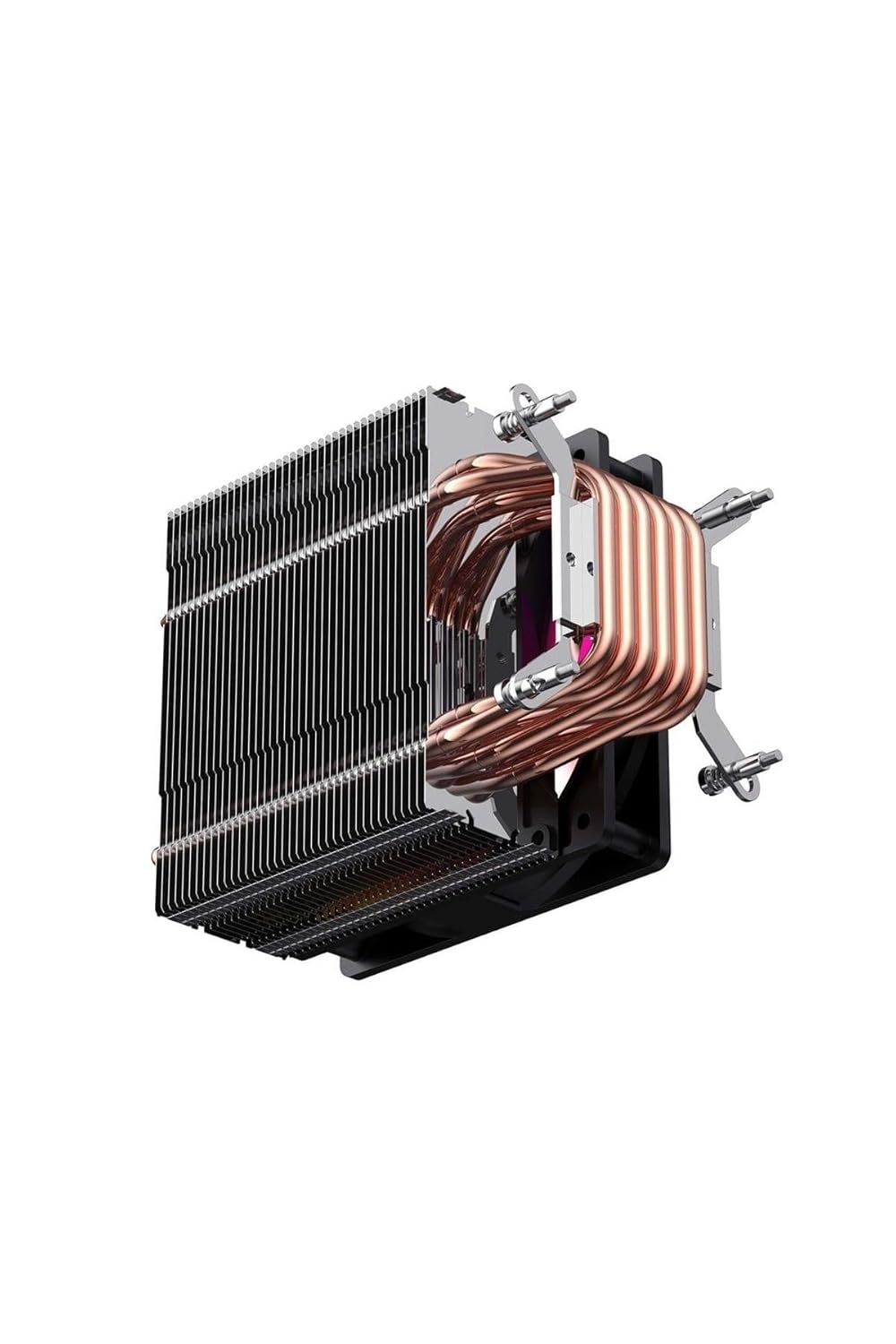
სურათი 2.1: გვერდი view of the Havit Gamenote F2005 CPU Cooler, highlighting the copper heat pipes and aluminum fins for efficient heat transfer.

სურათი 2.2: ქვედა view of the Havit Gamenote F2005 CPU Cooler, showing the direct contact copper heat pipes and the mounting bracket attachment points.
3. საოპერაციო ინსტრუქციები
Once installed, the Havit Gamenote F2005 CPU Cooler operates automatically to maintain optimal CPU temperatures.
3.1 ვენტილატორის მუშაობა
The 120mm fan's speed is controlled by your motherboard's BIOS/UEFI settings, typically adjusting automatically based on the CPU temperature. This ensures efficient cooling when needed and quiet operation during lighter loads. The Havit Gamenote F2005 is designed for quiet performance.
3.2 RGB განათება
The integrated RGB lighting will illuminate upon system power-on. If connected to a compatible motherboard RGB header, you can control the lighting effects and colors using your motherboard's dedicated RGB software (e.g., ASUS Aura Sync, MSI Mystic Light, Gigabyte RGB Fusion, ASRock Polychrome Sync).

სურათი 3.1: ზემოდან ქვემოთ view of the Havit Gamenote F2005 CPU Cooler, showcasing the vibrant RGB lighting of the fan.
4. მოვლა
რეგულარული მოვლა უზრუნველყოფს თქვენი პროცესორის გამაგრილებლის ხანგრძლივ მუშაობას და ოპტიმალურ მუშაობას.
- მტვრის მოცილება: Periodically (e.g., every 3-6 months), power off your computer and use compressed air to gently blow dust out of the heatsink fins and fan blades. Hold the fan blades to prevent them from spinning rapidly during cleaning, which can damage the bearings.
- შეამოწმეთ კავშირები: Ensure all power and RGB cables remain securely connected to the motherboard.
- Thermal Paste (Advanced): After several years, or if you notice a significant increase in CPU temperatures, consider reapplying thermal paste. This involves carefully removing the cooler, cleaning both surfaces, and applying new thermal paste. This is an advanced procedure and should only be performed if you are comfortable with it.
5. Დიაგნოსტიკა
If you encounter issues with your Havit Gamenote F2005 CPU Cooler, refer to the following common problems and solutions:
- მაღალი CPU ტემპერატურა:
- დარწმუნდით, რომ გამაგრილებელი საიმედოდ არის დამონტაჟებული და სათანადო კონტაქტშია პროცესორთან.
- Verify that thermal paste was applied correctly and is not dried out.
- Check if the fan is spinning.
- Clean any dust buildup from the heatsink fins.
- უზრუნველყავით საკმარისი ჰაერის ნაკადი თქვენი კომპიუტერის კორპუსში.
- ვენტილატორი არ ბრუნავს:
- შეამოწმეთ, რომ 4-პინიანი ვენტილატორის კონექტორი საიმედოდ არის შეერთებული დედა დაფაზე არსებულ CPU_FAN ჰედერთან.
- Verify BIOS/UEFI settings to ensure the CPU fan control is enabled and not set to a very low RPM profile.
- RGB განათება არ მუშაობს:
- Ensure the RGB cable (if present) is correctly connected to a compatible RGB header on your motherboard.
- Check your motherboard's RGB software for lighting control settings.
- Verify that the RGB header on your motherboard is enabled in BIOS/UEFI.
- Unusual Noise from Fan:
- შეამოწმეთ, ხომ არ ხვდება ვენტილატორის პირებს კაბელები ან დაბრკოლებები.
- დარწმუნდით, რომ ვენტილატორი საიმედოდ არის დამონტაჟებული და არ ვიბრირებს.
- Dust buildup can sometimes cause imbalance; clean the fan.
6. სპეციფიკაციები
| ფუნქცია | დეტალი |
|---|---|
| მოდელის ნომერი | F2005 |
| ბრენდი | ჰავიტი |
| პროდუქტის ზომები | 12 x 12 x 2.5 სმ |
| წონა | 360 გრამი |
| ვენტილატორის ზომა | 120 მმ |
| CPU Socket თავსებადობა | Intel: LGA 1700, LGA 1200, LGA 115x (1150, 1151, 1155, 1156) AMD: AM4, AM5 |
| რეიტინგული ტომიtage | 12 ვოლტი (DC) |
| სიმძლავრე ვატებში | 200 ვატი |
| დენის კონექტორი | 4-პინი |
| გაგრილების ტექნოლოგია | სპილენძის თბომილები, ალუმინის ფარფლები |
| განათება | RGB |
7. გარანტია და მხარდაჭერა
For detailed warranty information regarding your Havit Gamenote F2005 CPU Cooler, please refer to the official Havit webსაიტზე ან დაუკავშირდით თქვენს შეძენის პუნქტს. გარანტიის პირობები შეიძლება განსხვავდებოდეს რეგიონისა და საცალო მოვაჭრის მიხედვით.
For technical support or further assistance, please visit the official Havit support page or contact their customer service department.