1. შესავალი
This manual provides comprehensive instructions for the installation, operation, maintenance, and troubleshooting of your NIVIAN Professional WiFi SuperHD Surveillance Camera Kit. This system is designed to provide reliable and efficient security monitoring for your home or business.
Please read this manual carefully before using the product to ensure proper setup and optimal performance. Keep this manual for future reference.
2. პროდუქტი დასრულდაview
The NIVIAN CCTV Kit is a professional 2K SuperHD WiFi surveillance system featuring 6 IP cameras and a 10-channel Network Video Recorder (NVR) with a pre-installed 1TB hard drive. Key features include:
- 2K SuperHD Image Resolution: გთავაზობთ ნათელ და დეტალურ ვიდეო მასალასtage (3MP).
- AI ადამიანის გამოვლენა: Intelligent motion detection to reduce false alarms.
- ორმხრივი აუდიო: ჩაშენებული მიკროფონი და დინამიკი რეალურ დროში კომუნიკაციისთვის.
- ორმაგი ღამის ხედვა: Infrared mode for discreet monitoring and white LED mode for full-color night vision activated by motion.
- WiFi-6 Long Range Connectivity: Stable wireless connection up to 250 meters with repeater function.
- IP66 ამინდგამძლე კამერები: გამძლე ლითონის Casing suitable for outdoor use.
- პროფესიონალური ჩაწერა: Continuous or event-based recording to the included 1TB hard drive.
- HDMI გამომავალი: Connect to a monitor or TV for live viewინგ.
- EseeCloud აპლიკაცია: Remote access and control from mobile devices.
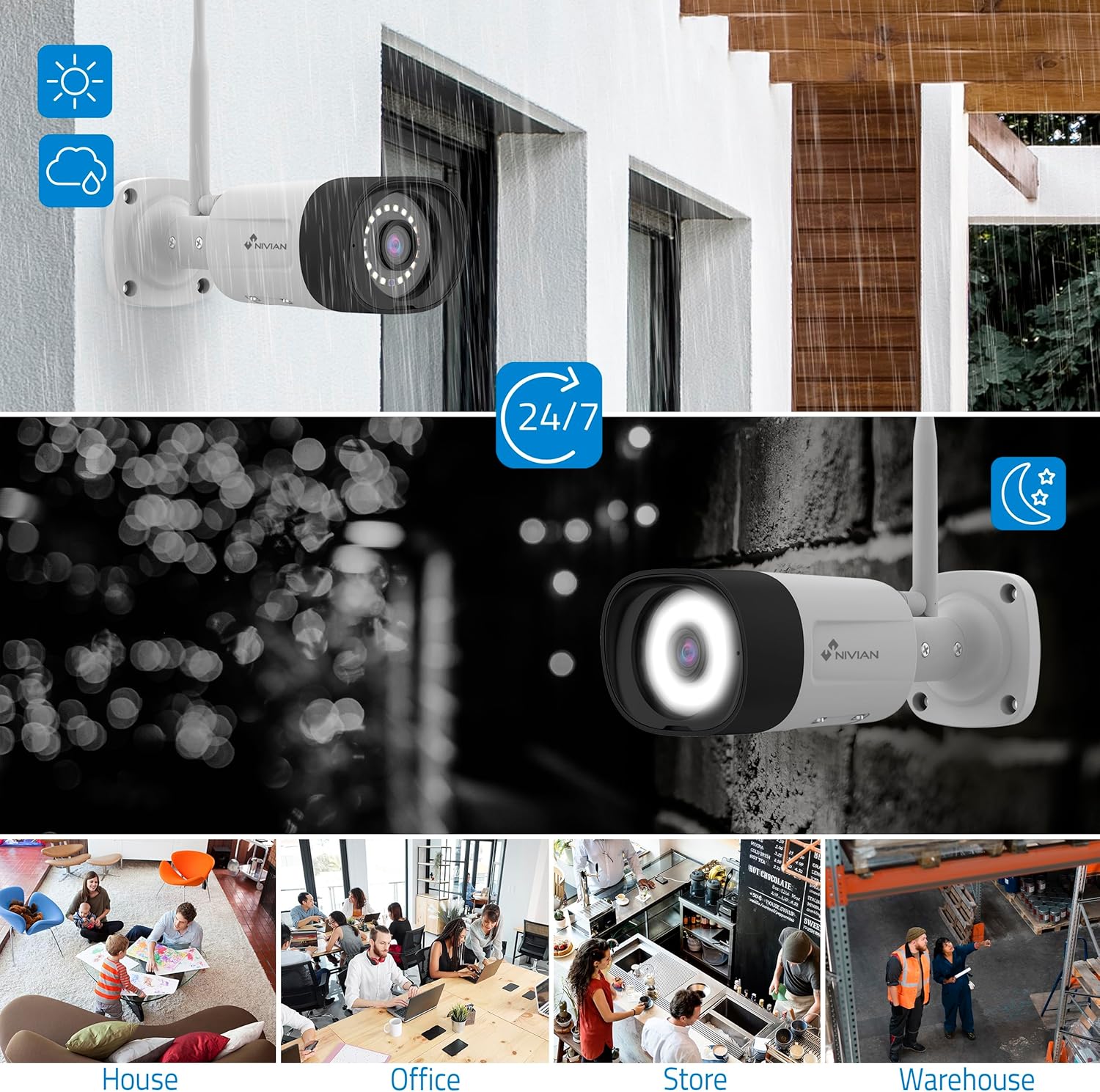
Image: NIVIAN CCTV Camera with day and night vision capabilities, showing weatherproof design and application in various environments like house, office, store, and warehouse.

Image: Comparison of 1080p Full HD video quality versus 2K Super HD video quality, demonstrating enhanced detail with 2K resolution.
3. პაკეტის შიგთავსი
დარწმუნდით, რომ თქვენს პაკეტში ყველა ნივთია:
- 1x 10-Channel NVR (Network Video Recorder) with 1TB Hard Drive
- 6x NIVIAN 2K SuperHD WiFi IP Cameras
- დენის ადაპტერები NVR-ისა და კამერებისთვის
- USB მაუსი
- Ethernet კაბელი
- სამონტაჟო ხრახნები და შტეფსელები
- სწრაფი დაწყების სახელმძღვანელო (დეტალური ინსტრუქციებისთვის იხილეთ ეს სახელმძღვანელო)
4. დაყენება
4.1. NVR-ის ინსტალაცია
- შეაერთეთ NVR:
- შეაერთეთ NVR დენის წყაროსთან მოწოდებული კვების ადაპტერის გამოყენებით.
- Connect the NVR to a monitor or TV via the HDMI port for local viewინგ.
- შეაერთეთ USB მაუსი NVR-ის USB პორტთან.
- For internet access, connect the NVR to your router using the Ethernet cable.
- ჩართვა: Turn on the NVR. Follow the on-screen prompts for initial setup, including language selection and network configuration.
4.2. კამერის დაყენება
- სამონტაჟო ადგილი: შეარჩიეთ თქვენი კამერებისთვის შესაფერისი ადგილები, დარწმუნდით, რომ მათ აქვთ სუფთა ხედვის არეალი. view and are within range of the NVR's WiFi signal. The IP66 rating allows for outdoor installation.
- კამერების ჩართვა: Connect each camera to a power outlet using its dedicated power adapter.
- დაწყვილება (ავტომატური): The cameras are pre-paired with the NVR. Once powered on, they should automatically connect to the NVR's WiFi network. You will see the camera feeds appear on the connected monitor.
- Signal Repetition Function: If a camera is too far from the NVR, you can use another camera as a repeater to extend the WiFi range up to 250m. Refer to the NVR's on-screen menu for configuring this feature.

Image: Diagram illustrating various connection options for the NIVIAN CCTV system, including direct WiFi-6 connection to NVR, HDMI output to a monitor, and NVR connection to a router via LAN for remote access via Eseecloud app. Also shows signal repetition function.
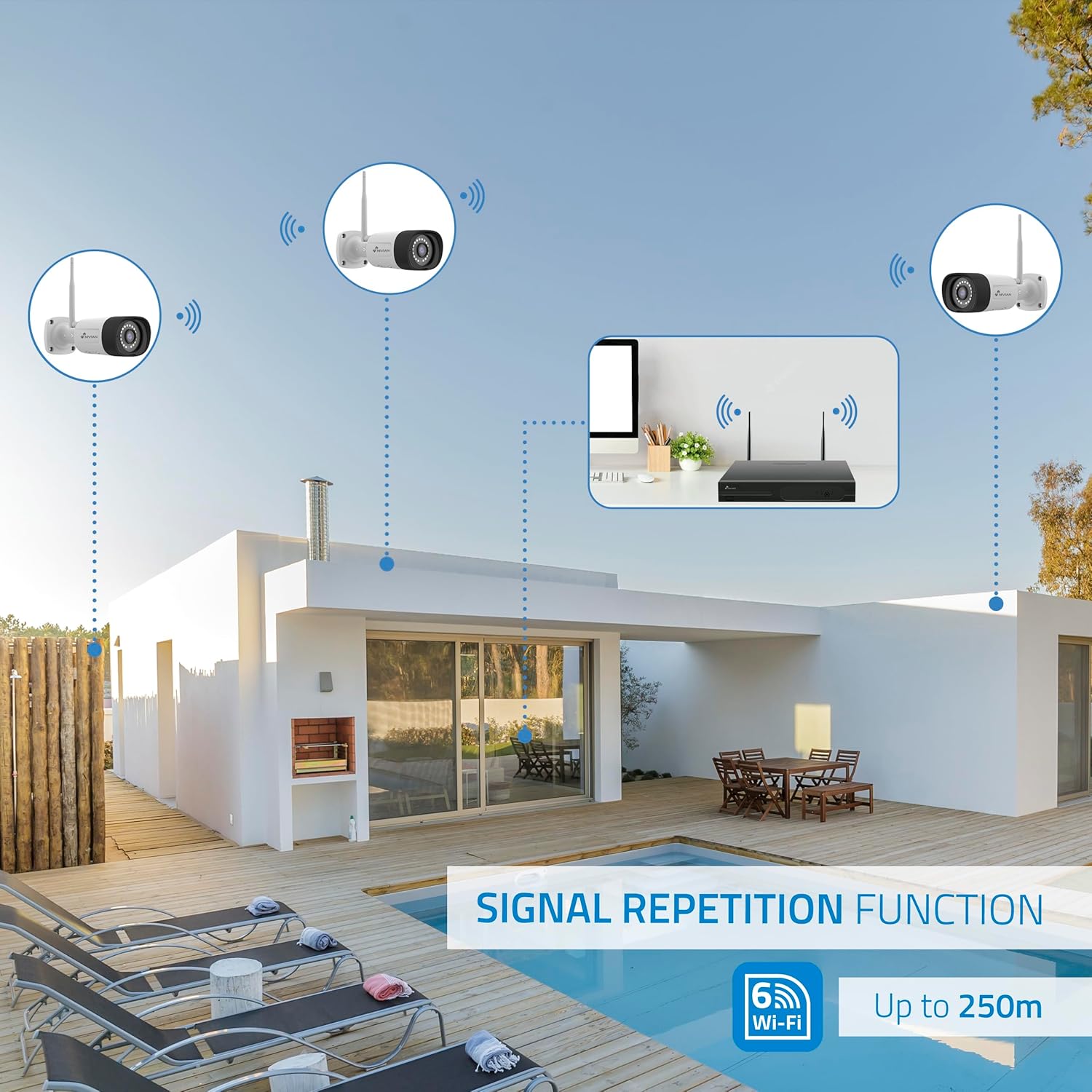
Image: Diagram showing the signal repetition function of the NIVIAN WiFi CCTV system, where cameras can extend the WiFi range up to 250 meters from the NVR.
4.3. EseeCloud App Setup
- ჩამოტვირთეთ აპლიკაცია: Download the "EseeCloud" app from your mobile device's app store (available for iOS, Android).
- ანგარიშის რეგისტრაცია: გახსენით აპლიკაცია და დარეგისტრირდით ახალი ანგარიშით ან შედით სისტემაში, თუ უკვე გაქვთ.
- მოწყობილობის დამატება: Follow the in-app instructions to add your NVR system. This typically involves scanning a QR code displayed on the NVR's monitor or entering the device ID manually.
- დისტანციური Viewing: დამატების შემდეგ, შეგიძლიათ view live feeds, access recordings, and configure settings remotely.

Image: Smartphone screen displaying the EseeCloud app interface for managing the security system, showing live camera feeds and control options, with NIVIAN cameras and a laptop in the background.
5. საოპერაციო ინსტრუქციები
5.1. იცხოვრე View
Access live camera feeds through the NVR connected to a monitor or via the EseeCloud mobile app. The NVR interface allows you to switch between single-camera view და მრავალკამერიანი ბადე view.
5.2. ჩაწერა
- უწყვეტი ჩაწერა: The system is configured for continuous recording by default to the 1TB hard drive.
- მოძრაობის გამოვლენის ჩაწერა: Configure cameras to record only when motion is detected. This can be scheduled via the NVR settings or EseeCloud app.
- H.265+ Codec: The system uses H.265+ video compression to optimize storage space while maintaining video quality.
5.3. დაკვრა
ჩანაწერებზე წვდომაtage through the NVR's playback menu or the EseeCloud app. You can search recordings by date, time, and event type (e.g., motion detection).
5.4. AI Human Detection
The cameras feature advanced AI human detection to differentiate human movement from other objects, significantly reducing false alarms. When human motion is detected, the system can trigger recordings, send notifications, and activate the white LED night vision for color footage.

Image: NIVIAN camera detecting a person at night, with the white LED light activated for color night vision, and a mobile notification indicating motion detection.
5.5. ორმხრივი აუდიო
Use the EseeCloud app to utilize the two-way audio feature. This allows you to listen to audio from the camera's location and speak through the camera's built-in speaker.
5.6. ღამის ხედვის რეჟიმები
- ინფრაწითელი (IR) რეჟიმი: Provides black and white video in low-light conditions for discreet surveillance.
- თეთრი LED რეჟიმი: When motion is detected in low light, the camera's white LEDs activate, providing full-color video and acting as a deterrent.
6. მოვლა
- კამერის გაწმენდა: რეგულარულად გაწმინდეთ კამერის ლინზები რბილი, დ...amp ქსოვილი გამოსახულების სიცხადის ხარისხის უზრუნველსაყოფად. არ გამოიყენოთ უხეში ქიმიკატები.
- Firmware განახლებები: Check for firmware updates for the NVR and cameras through the EseeCloud app or NVR settings. Keep your system updated for optimal performance and security.
- მყარი დისკის მართვა: The 1TB hard drive will automatically overwrite the oldest recordings when full. If you need to preserve specific footage, back it up to an external device.
- ელექტრომომარაგების შემოწმება: დარწმუნდით, რომ ყველა კვების ადაპტერი საიმედოდ არის დაკავშირებული და დაზიანებისგან თავისუფალი.
7. Დიაგნოსტიკა
7.1. No Camera Feed
- შეამოწმეთ სიმძლავრე: Ensure the camera is powered on and its adapter is working.
- WiFi სიგნალი: Verify the camera is within the NVR's WiFi range. Use the signal repetition function if necessary.
- Re-pair Camera: If issues persist, try re-pairing the camera with the NVR through the NVR's menu.
7.2. დაბალი ხარისხის სურათი
- სუფთა ლინზა: Clean the camera lens for any dirt or smudges.
- განათება: ოპტიმალური ხარისხის გამოსახულების მისაღებად, განსაკუთრებით ღამით, უზრუნველყავით საკმარისი განათება.
- WiFi Interference: Reduce potential WiFi interference by moving the camera or NVR, or by using the signal repetition function.
7.3. Remote Access Issues (EseeCloud App)
- ინტერნეტ კავშირი: Ensure both your NVR and mobile device have a stable internet connection.
- NVR Network Settings: Verify the NVR is correctly connected to your router and has internet access.
- აპის ვერსია: Ensure your EseeCloud app is updated to the latest version.
7.4. Hard Drive Full / Recording Issues
- შეამოწმეთ შენახვა: Verify the hard drive status in the NVR settings.
- ჩაწერის განრიგი: Ensure recording schedules are correctly configured.
- მყარი დისკის მდგომარეობა: If issues persist, the hard drive may need to be checked or replaced.
8. სპეციფიკაციები
| ბრენდი | ნივიანი |
| მოდელის ნომერი | NV-KIT830W-8CAM |
| პროდუქტის ზომები (L x W x H) | 23 x 12 x 8 სმ; 6.2 კგ |
| დაკავშირების ტექნოლოგია | უსადენო (WiFi-6) |
| ვიდეო გადაღების რეზოლუცია | 2K (3 MP) |
| არხების რაოდენობა | 10 (NVR) |
| კამერების რაოდენობა | 6 |
| შენახვის მოცულობა | 1 TB Hard Drive (included) |
| კამერის მახასიათებლები | IP Cameras SuperHD with PTZ, Night Vision, AI Human Detection, Two-Way Audio |
| კადრების სიხშირე | 15 fps, 24 fps, 30 fps |
| თავსებადი მოწყობილობები | Television (via HDMI) |
| კვების ბლოკის ტიპი | კედლის სამაგრი |
| წარმოშობის ქვეყანა | ჩინეთი |
9. გარანტია და მხარდაჭერა
NIVIAN offers technical support to all customers. If you have any questions, suggestions, or encounter any issues with your WiFi surveillance camera kit, please do not hesitate to contact us.
You can reach us through Amazon messages or via any official NIVIAN brand channel. Please refer to your purchase documentation for specific warranty terms and contact details.


