1. პროდუქტი დასრულდაview
The REOLINK TrackMix LTE Solar Kit is a 4K 8MP cellular security camera featuring dual lenses, 6X hybrid zoom, and auto-tracking capabilities. Designed for areas without Wi-Fi access, it operates on a 4G LTE network and is solar-powered for continuous operation. The camera offers crisp day and night video, smart detection for people, vehicles, and pets, and real-time alerts.

Image 1.1: REOLINK TrackMix LTE Solar Kit 4K Cellular Security Camera.
2. რა არის ყუთში
- 1x Reolink TrackMix LTE Camera
- 1x Reolink Solar Panel 2
- 1x SIM Card
- 1 x 128 GB microSD ბარათი
- სამონტაჟო სამაგრი და ხრახნები
- Tree Strap Mount
- USB დამტენი კაბელი
- SIM ბარათის ინსტრუმენტი
3. დაყენების გზამკვლევი
3.1. SIM ბარათის და MicroSD ბარათის ინსტალაცია
- Unscrew the cover of the SIM card slot on the camera.
- Insert the provided SIM card into the SIM card slot. Ensure it is correctly oriented.
- Insert the 128GB microSD card into its designated slot.
- Securely screw the cover back onto the SIM card slot to maintain weatherproofing.

Image 3.1: SIM Card slot on the camera.
3.2. აპლიკაციის ჩამოტვირთვა და გააქტიურება
- Download the Reolink App from the App Store (iOS) or Google Play (Android). You can also scan the QR code provided in the manual or on the product packaging.
- Log in or create a new account in the Reolink App.
- Tap the '+' icon in the top right corner of the app to scan your SIM card and follow the on-screen guidance for activation.
- Turn on the camera using the on/off switch located near the SIM card slot.
- Follow the app's instructions to complete the camera setup.
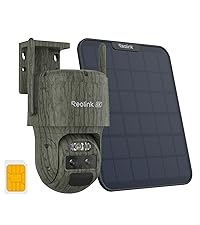
Image 3.2: Reolink App download options.

Image 3.3: Scanning the SIM card for activation.

Image 3.4: Inserting the nano SIM card into the camera.
3.3. კამერისა და მზის პანელის მონტაჟი
The camera can be mounted using the included bracket and screws or the heavy-duty strap for attachment to trees or poles. The solar panel should be mounted in a location that receives ampმზის შუქი მთელი დღის განმავლობაში.
- Attach the mounting bracket to the camera.
- აირჩიეთ შესაფერისი ადგილი კამერისთვის, დარწმუნდით, რომ მას აქვს ნათელი view and cellular signal.
- If using the strap, thread it through the designated slots on the bracket and secure it around a tree or pole.
- Mount the solar panel in a sunny spot and connect its cable to the camera's charging port.

Image 3.5: REOLINK TrackMix LTE camera and solar panel mounted.
4. საოპერაციო ინსტრუქციები
4.1. ორმაგი View and Hybrid Zoom
The camera features dual lenses, providing both a wide-angle overview and a zoomed-in detail view simultaneously on one screen within the app. Utilize the 6X hybrid zoom to focus on specific areas of interest.

Image 4.1: Dual view showing both wide-angle and telephoto perspectives.
4.2. PTZ Auto-Zoom Tracking
Control the camera to pan 355° horizontally and tilt 90° vertically for a 360° view. The camera can automatically track and zoom in on moving objects, providing clear footage of events.

Image 4.2: Illustrates the 360° pan, 90° tilt, and auto-tracking feature.
4.3. Smart Detection and Alerts
The camera is equipped with smart detection technology to differentiate between people, vehicles, and pets. Receive instant notifications via email, app push, or an audible siren when relevant motion is detected.

Image 4.3: Smart detection identifying a person in the camera's view.

სურათი 4.4: ყოფილიample of real-time alerts and the camera's spotlight deterring intruders.
4.4. ღამის ხედვის რეჟიმები
კამერას აქვს ღამის ხედვის ორი რეჟიმი:
- Infrared Black-and-White Night Vision: უზრუნველყოფს გამჭვირვალე შავ-თეთრ საკვებსtage დაბალი განათების პირობებში.
- Spotlight Color Night Vision: Activates built-in spotlights to deliver full-color video even in complete darkness.

Image 4.5: 4K image quality at night with the spotlight activated for color vision.

Image 4.6: 4K image quality at night with the spotlight off, showing infrared black-and-white vision.
4.5. იცხოვრე View და ორმხრივი საუბარი
Access live video feeds from your smartphone or tablet via the Reolink App. The integrated two-way talk feature allows you to listen in and speak through the camera.

Image 4.7: Demonstrates live view and two-way talk functionality through the Reolink app.
5. მოვლა
5.1. Solar Power Management
The camera is continuously charged by the included 6W solar panel. Ensure the solar panel is clean and positioned to receive maximum direct sunlight for optimal charging performance.

Image 5.1: The 6W solar panel providing continuous power to the camera.
5.2. ამინდისგან დაცვა
The camera is IP66 waterproof, designed to withstand various outdoor weather conditions including rain and shine. Regularly check for any debris or obstructions on the camera lenses or solar panel.

Image 5.2: The camera's IP66 waterproof rating for outdoor use.
6. Დიაგნოსტიკა
- ფიჭური სიგნალი არ არის: Ensure the camera is placed in an area with adequate 4G LTE coverage. Check the SIM card installation and activation status in the Reolink App.
- დატენვის საკითხები: Verify the solar panel is clean, unobstructed, and positioned for maximum sunlight exposure. Ensure the charging cable is securely connected.
- აპის დაკავშირება: Confirm your smartphone has an active internet connection. Restart the Reolink App or the camera if connectivity issues persist.
- მოძრაობის ამოცნობა არ მუშაობს: Check the motion detection settings in the Reolink App, including sensitivity and detection zones. Ensure the camera's view დაბრკოლებებისგან თავისუფალია.
7. სპეციფიკაციები
- მოდელი: TrackMix LTE Solar Kit
- ვიდეო რეზოლუცია: 4K 8 MP
- მასშტაბირება: 6X Hybrid Zoom
- დაკავშირება: 4G LTE Cellular (SIM Card Included)
- სიმძლავრე: Solar Powered (6W Solar Panel Included)
- ღამის ხედვა: ინფრაწითელი შავ-თეთრი, ფერადი ღამის ხედვა პროჟექტორზე
- გამოვლენა: ჭკვიანი ადამიანის/მანქანის/შინაური ცხოველის ამოცნობა
- PTZ: Pan 355°, Tilt 90°, Auto-Tracking
- შენახვა: Max. 128GB microSD Card (Included), 7-Day Free Cloud Storage
- ამინდის წინააღმდეგობა: IP66 წყალგაუმტარი
- ASIN: B0F53PBXND
- პირველი ხელმისაწვდომი: 12 წლის 2024 დეკემბერი
8. გარანტია და მხარდაჭერა
- თანხის დაბრუნების გარანტია: 30-Day Refund/Replacement Policy.
- შეზღუდული გარანტია: 2 წლიანი შეზღუდული გარანტია.
- მომხმარებელთა მხარდაჭერა: 24/7 ონლაინ მხარდაჭერა.


