შესავალი
This manual provides comprehensive instructions for the OMAIC EN2Q36H replacement remote control, designed for Hisense Smart TVs. It covers essential information regarding setup, operation, and maintenance to ensure optimal performance and user experience. This remote offers a direct replacement solution without the need for complex programming.
დაყენება
The OMAIC EN2Q36H remote control is designed for immediate use with compatible Hisense Smart TVs. No programming or pairing is required.
ბატარეის მონტაჟი
- იპოვეთ ბატარეის განყოფილება დისტანციური მართვის უკანა მხარეს.
- გასახსნელად, ბატარეის საფარი ქვემოთ ან ისრით მითითებული მიმართულებით გადაწიეთ.
- Insert two AAA alkaline batteries (not included), ensuring the positive (+) and negative (-) terminals align correctly with the markings inside the compartment.
- დაახურეთ ბატარეის საფარი უკან, სანამ არ დააწკაპუნებს.
Once batteries are installed, the remote is ready to operate your Hisense Smart TV.

ოპერაციული ინსტრუქციები
This remote control utilizes infrared (IR) technology for communication with your Hisense Smart TV. Ensure a clear line of sight between the remote and the TV's IR receiver for optimal performance.
ძირითადი მახასიათებლები
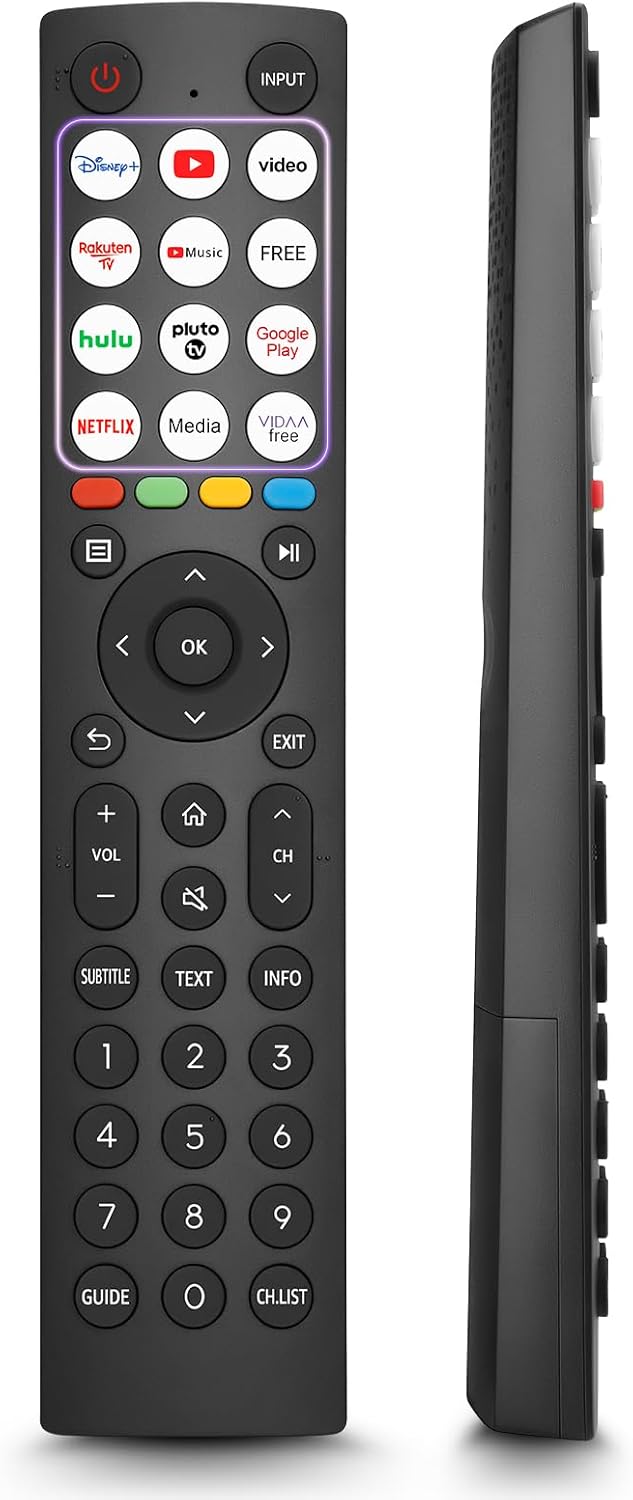
- 12 Shortcut Buttons: Quickly access popular streaming services and applications with dedicated buttons.
- Strong IR Signal: Provides a longer transmission distance and quick response without noticeable delay.
- გამძლე კონსტრუქცია: Made from high-quality ABS and silicone materials for extended lifespan.

ღილაკის ფუნქციები
Familiarize yourself with the functions of each button on your OMAIC EN2Q36H remote control:
| ღილაკი | ფუნქცია |
|---|---|
| სიმძლავრე | Switches the TV on or into standby mode. |
| INPUT | შეყვანის წყაროების შერჩევა (HDMI, AV და ა.შ.). |
| APP Buttons | Quick access buttons for specific applications (e.g., Disney+, Netflix, YouTube). |
| მენიუ | Displays the Quick Setup menu. |
| მედიის კონტროლი | Buttons for Play, Pause, Stop, Fast Forward, Rewind. |
| ნავიგაცია (ზემოთ/ქვემოთ/მარცხნივ/მარჯვნივ) | Navigates on-screen menus and adjusts system settings. |
| OK | Confirms selection in on-screen menus. |
| უკან | ბრუნდება წინა მენიუში. |
| გასვლა | გადის მიმდინარე მენიუდან. |
| VOL +/- | არეგულირებს ხმის დონეს. |
| მთავარი | Enters the Home screen. |
| დადუმება | დადუმებს ან აღადგენს ტელევიზორის ხმას. |
| CH ^/v | Switches channels. |
| SUBTITLE | Activates or deactivates subtitle mode. |
| ტექსტი | Turns teletext function on and off. |
| ინფორმაცია | Displays current program information. |
| NUMBER Buttons (0-9) | Direct channel selection or number input. |
| გზამკვლევი | Displays the Electronic Programme Guide (DTV input). |
| CH.LIST | Displays the Channel List on the screen. |

Compatible Hisense TV Models
The OMAIC EN2Q36H replacement remote control is compatible with the following Hisense VIDAA 4K HDTV Smart TV series:
- 32A4K, 40A4K, 43A4K
- 32A5KQ, 40A5KQ
- 43A6K, 50A6K, 55A6K, 58A6K, 65A6K, 70A6K, 75A6K, 85A6K
- 55U6KQ, 65U6KQ
- 43A7KQ, 50A7KQ, 55A7KQ, 65A7KQ, 75A7KQ
- 43E7KQ, 50E7KQ, 55E7KQ, 65E7KQ, 75E7KQ
მოვლა
დისტანციური მართვის პულტის ხანგრძლივი და გამართული მუშაობის უზრუნველსაყოფად, დაიცავით შემდეგი ტექნიკური ინსტრუქციები:
- დასუფთავება: Use a soft, dry cloth to clean the remote. Avoid using liquid cleaners or abrasive materials, as they may damage the surface or internal components.
- ბატარეის გამოცვლა: Replace batteries when the remote's response becomes sluggish or stops working. Always replace both batteries at the same time with new ones of the same type (AAA alkaline).
- შენახვა: შეინახეთ დისტანციური მართვა გრილ, მშრალ ადგილას, მოარიდეთ მზის პირდაპირ სხივებს, ექსტრემალურ ტემპერატურას და მაღალ ტენიანობას.
- მოერიდეთ წვეთებს: დაიცავით პულტი ფიზიკური ზემოქმედებისგან, რადგან ვარდნამ შეიძლება დააზიანოს შიდა წრედები.
პრობლემების მოგვარება
If you encounter issues with your remote control, refer to the following troubleshooting steps:
| პრობლემა | შესაძლო მიზეზი | გამოსავალი |
|---|---|---|
| დისტანციური რეაგირება არ ხდება | მკვდარი ან არასწორად ჩასმული ბატარეები. | შეცვალეთ ელემენტები ახალი AAA ტუტე ელემენტებით, სწორი პოლარობის დაცვით. |
| დისტანციური რეაგირება არ ხდება | დაბრკოლება დისტანციურ მართვასა და ტელევიზორს შორის. | Ensure a clear line of sight to the TV's IR receiver. Remove any objects blocking the path. |
| დისტანციური რეაგირება არ ხდება | Remote is too far from the TV. | Move closer to the TV. The remote has an extended range, but extreme distances may affect performance. |
| ღილაკები წებოვანია ან არ რეაგირებს | ჭუჭყი ან ნამსხვრევები ღილაკების ქვეშ. | Gently clean around the buttons with a soft, dry cloth. Avoid liquids. |
| Specific functions not working | TV model incompatibility (rare). | Verify your Hisense TV model is listed in the 'Compatible Hisense TV Models' section. |
სპეციფიკაციები
| ფუნქცია | დეტალი |
|---|---|
| მოდელის სახელი | EN2Q36H |
| ბრენდი | OMAIC |
| თავსებადი მოწყობილობები | Hisense Smart TVs |
| დაკავშირების ტექნოლოგია | ინფრაწითელი (IR) |
| ღილაკების რაოდენობა | 48 |
| კონტროლის ტიპი | ღილაკის კონტროლი |
| განსაკუთრებული თვისებები | Universal, Comfortable |
| ფერი | შავი |
| ბატარეის აღწერა | AAA (Alkaline) |
| Supported Devices (Max) | 1 |
| პროდუქტის ზომები (დაახლოებით) | 34.7 x 24.7 x 2.2 სმ |
| პროდუქტის წონა (დაახ.) | 80 გრამი |

გარანტია და მხარდაჭერა
OMAIC is committed to the quality and compatibility of its replacement remote controls. We provide professional after-sales support to ensure customer satisfaction.
If you have any questions or concerns regarding your OMAIC EN2Q36H remote control or your order, please contact us directly. Our support team aims to respond to inquiries within 12 working hours.