შესავალი

Image: Hamilton 1.1 cu ft Countertop Touchscreen Microwave Oven.
This manual provides essential information for the safe and efficient operation of your Hamilton 1.1 Cu. Ft. Countertop Touchscreen Microwave Oven. Please read this manual thoroughly before use and retain it for future reference.
უსაფრთხოების მნიშვნელოვანი ინსტრუქციები
ელექტრო მოწყობილობების გამოყენებისას ყოველთვის უნდა დაიცვან უსაფრთხოების ძირითადი ზომები, რათა შემცირდეს ხანძრის, ელექტროშოკის და ადამიანების დაზიანების რისკი, მათ შორის:
- წაიკითხეთ ყველა ინსტრუქცია მოწყობილობის გამოყენებამდე.
- არ გამოიყენოთ ღუმელი, თუ კარი ან კარის ლუქები დაზიანებულია.
- არ გააცხელოთ სითხეები ან სხვა საკვები დალუქულ კონტეინერებში, რადგან ისინი შეიძლება აფეთქდეს.
- ნება მიეცით ბავშვებს გამოიყენონ ღუმელი ზედამხედველობის გარეშე მხოლოდ მაშინ, როდესაც მიცემულია ადეკვატური ინსტრუქციები, რათა ბავშვმა შეძლოს ღუმელის უსაფრთხოდ გამოყენება და გააცნობიეროს არასათანადო გამოყენების საშიშროება.
- Refer to the "Child Safety Lock" section for specific instructions on this feature.
პროდუქტის მახასიათებლები
- Powerful 1000W output for efficient cooking.
- 10 adjustable power levels for versatile cooking and reheating.
- User-friendly touchscreen control panel with LED display.
- Convenience cooking controls for popular foods (e.g., potatoes, popcorn, frozen dinners, pizza, beverages).
- 8 Smart Sensor auto cooking menus for precise results.
- Integrated child safety lock for enhanced security.
- Sleek white finish with stainless-steel accents.
სპეციფიკაციები
| ატრიბუტი | დეტალი |
|---|---|
| ბრენდი | ჰამილტონი |
| მოდელის ნომერი | HB8436193153-02 |
| ტევადობა | 1.1 კუბური ფუტი |
| ვატtage | 1000 ვატი |
| ტtage | 120 ვოლტი (AC) |
| ზომები (D x W x H) | 21" x 12" x 19" |
| ინსტალაციის ტიპი | კონტრატი |
| მასალა (გარე) | ფოლადი |
| მასალა (ინტერიერი) | უჟანგავი ფოლადი |
| მოყვება კომპონენტები | შუშის გრუნტი |
დაყენება
- შეფუთვა: Carefully remove the microwave oven and all packing materials from the carton. Check for any damage, such as dents or a misaligned door. Do not operate if damaged.
- განთავსება: Place the microwave on a flat, stable surface that can support its weight. Ensure adequate ventilation by leaving at least 4 inches of space around the sides, back, and top of the oven. Do not block air vents.
- Turntable ინსტალაცია: Place the turntable ring in the center of the oven cavity. Then, place the glass turntable securely on top of the turntable ring. Ensure it rotates freely.
- დენის კავშირი: Plug the microwave oven into a grounded 120V AC electrical outlet.

სურათი: ინტერიერი view of the Hamilton microwave, highlighting the removable glass turntable for easy cleaning.
ოპერაციული ინსტრუქციები
ძირითადი ოპერაცია
- საათის დაყენება:
- დააჭირეთ საათი ღილაკი.
- მიმდინარე დროის შესაყვანად გამოიყენეთ ციფრული პანელები.
- დააჭირეთ საათი კვლავ დააწკაპუნეთ დასადასტურებლად.
- მიკროტალღოვანი სამზარეულო:
- საკვები მოათავსეთ მიკროტალღური ღუმელისთვის განკუთვნილ ჭურჭელში, შუშის მბრუნავ თეფშზე.
- დახურეთ კარი უსაფრთხოდ.
- ციფრული პანელების გამოყენებით შეიყვანეთ სასურველი მომზადების დრო.
- დააჭირეთ სიმძლავრის დონე button to adjust power if needed (default is 100%). Use number pads to select power level (1-10).
- დააჭირეთ START/+30SEC სამზარეულოს დასაწყებად.
- ექსპრეს მზარეული: For quick cooking, simply press the 1 წთ, 2 წთ, ან 3 წთ buttons for instant cooking at full power. Press პაუზა/გაუქმება to stop or clear settings. Press +30SEC to add 30 seconds to cooking time.
- გალღობა:
- დააჭირეთ წონის გაყინვა or დროის გაყინვა ღილაკი.
- Follow the prompts on the LED display to enter weight or time.
- დააჭირეთ START/+30SEC.
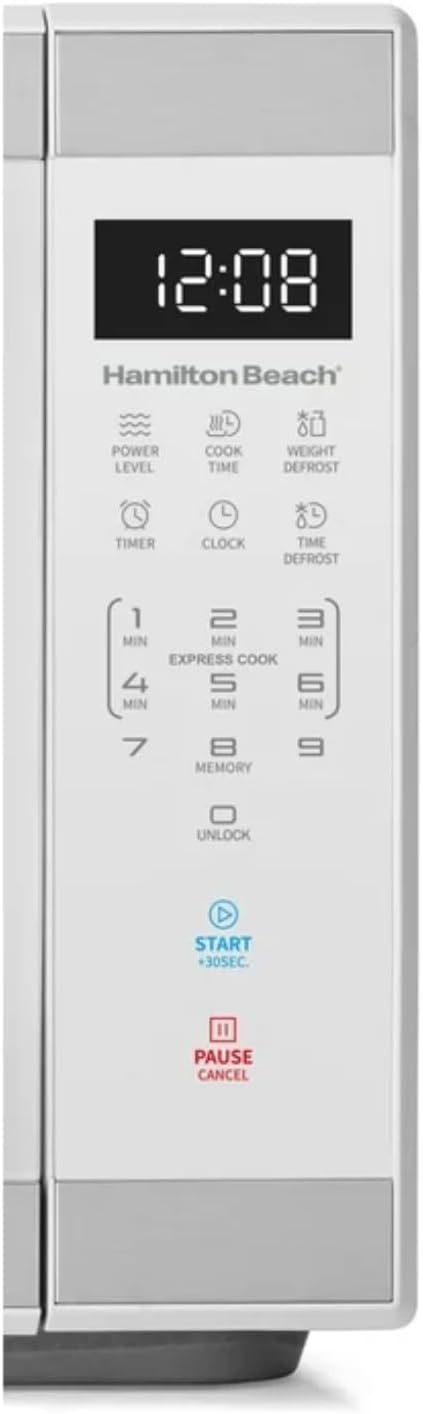
სურათი: დეტალური view of the intuitive touchscreen control panel and LED display.
ბავშვის უსაფრთხოების საკეტი
This microwave features a child safety lock to prevent unintended operation. The door automatically locks when cooking starts.
To Open Microwave During or After Use:
- დააჭირეთ 0/განბლოკვა or პაუზა/გაუქმება pad.
- Grasp the handle and open the door.
To Deactivate the Child Safety Lock:
- დააჭირეთ 0/განბლოკვა pad for 3 seconds. The display will indicate "Loc".
- დააჭირეთ 7 pad.
- დააჭირეთ 9 pad. The display will show "ULoc".
To re-activate the child safety lock, repeat the above steps.
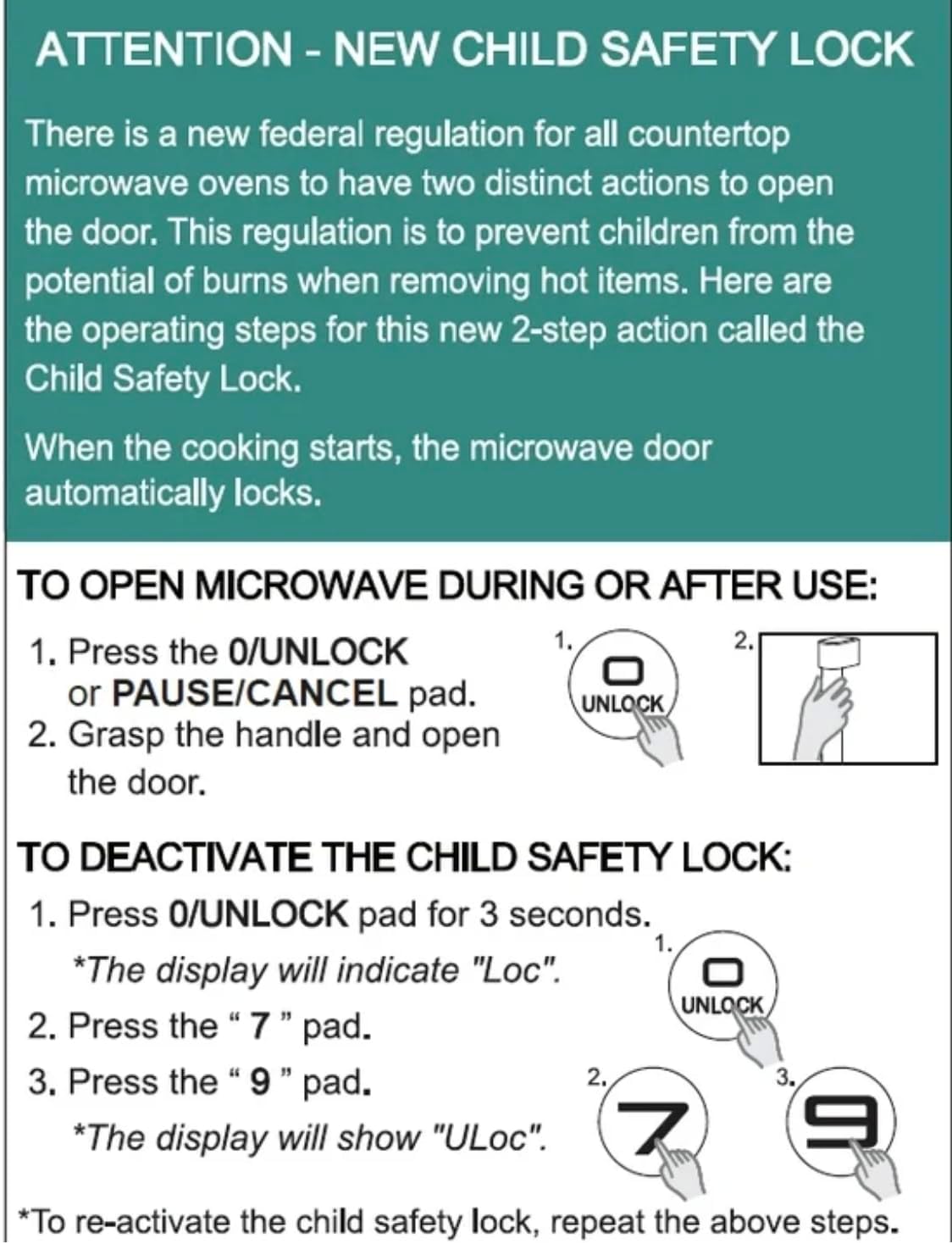
Image: Instructions for the new child safety lock feature, including how to open the door and deactivate the lock.
მოვლა და დასუფთავება
- ინტერიერის გაწმენდა: გაწურეთ ღუმელის შიგნით რეკლამაamp cloth after each use. For stubborn stains, use a mild detergent. Ensure the interior is dry before next use.
- გარე გაწმენდა: გარე ზედაპირი გაწმინდეთ რბილი, დamp ქსოვილი. არ გამოიყენოთ აბრაზიული საწმენდები ან უხეში ქიმიკატები.
- მბრუნავი დისკის გაწმენდა: The glass turntable and turntable ring can be removed for cleaning. They are dishwasher safe or can be hand-washed with warm, soapy water.
- კარის ლუქები: Regularly inspect the door seals and surrounding areas for any damage or food residue. Clean as needed to ensure proper sealing.
პრობლემების მოგვარება
| პრობლემა | შესაძლო მიზეზი / გამოსავალი |
|---|---|
| ღუმელი არ დაიწყება. |
|
| საკვები თანაბრად არ მზადდება. |
|
| Light bulb is out. | Contact customer support for bulb replacement. Do not attempt to replace it yourself. |
| Display shows "Loc". | Child safety lock is activated. Follow instructions in the "Child Safety Lock" section to deactivate. |
გარანტია და მხარდაჭერა
For warranty information or technical support, please refer to the warranty card included with your purchase or contact Hamilton customer service. Keep your proof of purchase for warranty claims.
მომხმარებელთა მომსახურება: გთხოვთ, ეწვიოთ მწარმოებლის webსაიტზე ან საკონტაქტო ინფორმაციისთვის იხილეთ თქვენი პროდუქტის შეფუთვა.


