1. შესავალი
მადლობა შენაძენისთვისasing the Supersonic Professional Stereo Amplifier AV-972SA. This amplifier is designed to provide high-fidelity audio for your home entertainment or karaoke system. With its versatile features, including USB/SD card playback, FM radio, and microphone inputs, it offers a powerful and clear sound experience. Please read this manual carefully before operating the unit to ensure proper use and to maximize its performance.
2. უსაფრთხოების მნიშვნელოვანი ინსტრუქციები
- ელექტრომომარაგება: დარწმუნდით, რომ კვების ბლოკიtage matches the requirements specified on the unit (220V~250V/50Hz).
- ვენტილაცია: არ დაბლოკოთ ვენტილაციის ღიობები. დაამონტაჟეთ მწარმოებლის ინსტრუქციის შესაბამისად.
- წყალი და ტენიანობა: არ დატოვოთ ეს მოწყობილობა წვიმის ან ტენიანობის ზემოქმედების ქვეშ. არ დადოთ სითხეებით სავსე ნივთები, მაგალითად, ვაზები, მოწყობილობაზე.
- სითბო: არ დააინსტალიროთ სითბოს წყაროსთან ახლოს, როგორიცაა რადიატორები, სითბოს რეგისტრები, ღუმელები ან სხვა მოწყობილობა (მათ შორის ampგამხსნელები), რომლებიც წარმოქმნიან სითბოს.
- დასუფთავება: გაწმინდეთ მხოლოდ მშრალი ქსოვილით.
- მომსახურება: ნუ ეცდებით ამ პროდუქტის საკუთარ მომსახურებას. მიაწოდეთ ყველა სერვისი კვალიფიციურ მომსახურე პერსონალს.
- სპიკერის კავშირი: Ensure correct polarity when connecting speakers to prevent damage to the ampგამხსნელი და დინამიკები.
3. ძირითადი მახასიათებლები
- Luxury Color Pointer Screen Display
- High-Fidelity Stereo Dynamic Ampუფრო ცოცხალი დიზაინი
- Bass-enhancement Technology
- ძლიერი 3000 W გამომავალი
- Professional Karaoke FM Radio Tuner
- USB/SD Card Playback for MP3 files
- Low Leak Magnetic Ring type Voltage
- Optimized for use with 12", 15", and 18" loudspeakers
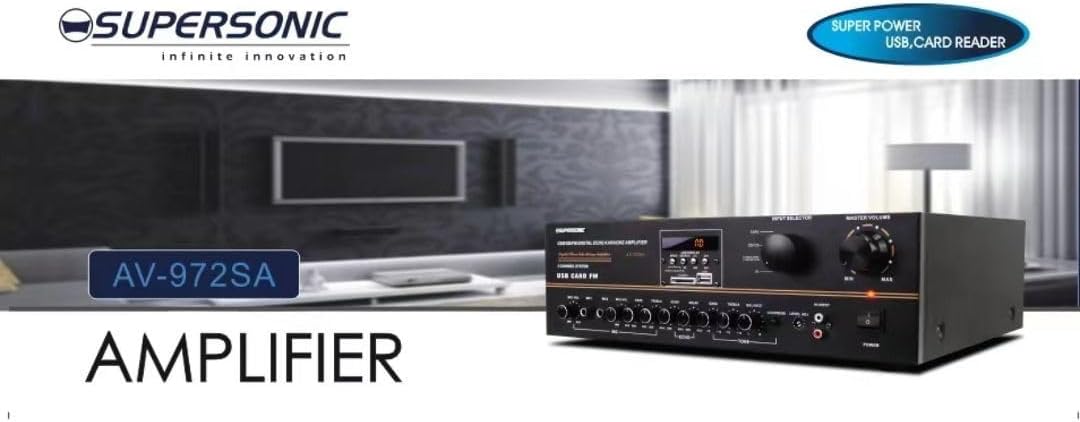
სურათი 3.1: A visual representation of the key features of the Supersonic AV-972SA amplifier, including its display, power output, and connectivity options.
4. პროდუქტი დასრულდაview
The Supersonic AV-972SA amplifier features a user-friendly front panel for easy control and a rear panel for all necessary connections.
4.1 წინა პანელი

სურათი 4.1: წინა view of the Supersonic AV-972SA ampლიფიერი, შოუasing its controls, display, and input ports in a home setting.
წინა პანელი მოიცავს:
- დენის ღილაკი: უხვევს ampუფრო ცოცხალი ჩართვა ან გამორთვა.
- მოცულობის სამაგისტრო კონტროლი: არეგულირებს საერთო გამომავალი ხმის მოცულობას.
- ბასის/სიხშირის მართვის საშუალებები: Adjusts low and high frequency response.
- შეყვანის ამომრჩევი: Switches between different audio sources (e.g., USB, SD, FM, AUX).
- USB/SD ბარათის სლოტი: აუდიოს დასაკრავად fileპირდაპირ USB დისკებიდან ან SD ბარათებიდან.
- FM ტიუნერის მართვა: For radio station selection and tuning.
- მიკროფონის შეყვანა: For connecting microphones for karaoke or public address.
- ეკრანის ჩვენება: აჩვენებს მიმდინარე რეჟიმს, ტრეკის ინფორმაციას ან FM სიხშირეს.
4.2 უკანა პანელი
The rear panel provides all necessary connections for speakers, power, and external audio sources.
- სპიკერი ტერმინალები: Connect your loudspeakers here. Ensure correct polarity (+ to + and - to -).
- Audio Input (RCA): For connecting external audio devices like CD players, DVD players, or other audio sources.
- კვების კაბელის შეყვანა: Connect the provided power cord here.
- FM ანტენის შეყვანა: Connect the FM antenna for improved radio reception.
5. დაყენების გზამკვლევი
Follow these steps to set up your Supersonic AV-972SA ampუფრო ცოცხალი:
- განთავსება: მოათავსეთ amplifier on a stable, flat surface with adequate ventilation around it. Avoid direct sunlight, heat sources, or areas with high humidity.
- სპიკერის კავშირი: Connect your loudspeakers to the speaker terminals on the rear panel. Match the positive (+) terminal on the amplifier to the positive (+) terminal on your speaker, and the negative (-) to the negative (-). Ensure all connections are secure. This amplifier is designed to work best with 12", 15", or 18" loudspeakers.
- აუდიო წყაროს კავშირი:
- გარე მოწყობილობები: Connect your CD player, DVD player, or other audio sources to the RCA audio input jacks on the rear panel.
- USB/SD ბარათი: Insert a USB flash drive or SD card into the respective slot on the front panel.
- FM ანტენა: Connect the FM antenna to the designated input on the rear panel for optimal radio reception.
- დენის კავშირი: უზრუნველყოს amplifier's power switch is in the OFF position. Connect the power cord to the amplifier's power input and then plug it into a suitable 220V~250V/50Hz AC power outlet.
6. საოპერაციო ინსტრუქციები
6.1 ჩართვა/გამორთვა
დააჭირეთ დენის ღილაკი წინა პანელზე ჩასართავად amplifier ON. The display will illuminate. Press it again to turn the ampლიფიერი გამორთულია.
6.2 Selecting Audio Source
გამოიყენეთ შეყვანის ამომრჩევი button or knob on the front panel to cycle through available audio sources: USB, SD, FM, or AUX (RCA input).
6.3 ხმის და ტონის კონტროლი
- სამაგისტრო მოცულობა: როტაცია სამაგისტრო ტომი knob to adjust the overall sound level. Start with a low volume and gradually increase it.
- ბასი/ტრიბლი: გამოიყენეთ ბასი და ტრიბლი knobs to fine-tune the low and high frequencies of the audio output to your preference.
6.4 USB/SD ბარათიდან დაკვრა
Once a USB drive or SD card containing MP3 audio files is inserted, the amplifier will automatically switch to USB/SD mode and begin playback. Use the control buttons (Play/Pause, Next, Previous) on the front panel to manage playback.
6.5 FM რადიოს მუშაობა
Select the FM input using the შეყვანის ამომრჩევი. Use the FM tuner controls to scan for and select radio stations. The display will show the current frequency.
6.6 მიკროფონის გამოყენება (კარაოკე)
Connect your microphones to the microphone input jacks on the front panel. Adjust the microphone volume and echo effects (if available) using the dedicated controls. Ensure the main volume is set appropriately to avoid feedback.
7. მოვლა
- დასუფთავება: Disconnect the power before cleaning. Use a soft, dry cloth to wipe the exterior of the amplifier. Do not use liquid cleaners or aerosol sprays.
- ვენტილაცია: რეგულარულად შეამოწმეთ, რომ ვენტილაციის ღიობები მტვრისა და ნარჩენებისგან თავისუფალია, რათა თავიდან აიცილოთ გადახურება.
- შენახვა: თუ ინახება amplifier for an extended period, ensure it is in a cool, dry place, away from direct sunlight and extreme temperatures.
8. Დიაგნოსტიკა
| პრობლემა | შესაძლო მიზეზი | გამოსავალი |
|---|---|---|
| არავითარი ძალა | დენის კაბელი არ არის შეერთებული; დენის წყარო გაუმართავია; Amplifier power switch off | Check power cord connection; Try a different outlet; Ensure power switch is ON |
| ხმის გამომავალი არ არის | Volume too low; Incorrect input selected; Speaker wires loose or incorrectly connected; Faulty audio source | Increase master volume; Select correct input; Check speaker connections and polarity; Test with a different audio source |
| ცუდი FM მიღება | ანტენა არ არის შეერთებული ან ცუდად არის განლაგებული; სუსტი სიგნალი | Connect FM antenna securely; Adjust antenna position; Try manual tuning |
| USB/SD არ უკრავს. | არასწორია file format; USB/SD card faulty or not inserted correctly; Amplifier not in USB/SD mode | უზრუნველყოს files are MP3 format; Reinsert USB/SD card; Select USB/SD input mode |
9. სპეციფიკაციები
| ფუნქცია | სპეციფიკაცია |
|---|---|
| ბრენდი | ზებგერითი |
| მოდელის ნომერი | AMP-AV972SA |
| გამომავალი ვატიtage | 3000 W |
| დაკავშირების ტექნოლოგია | USB |
| სპეციალური ფუნქცია | კომპაქტური დიზაინი |
| ფერი | შავი |
| პროდუქტის ზომები | 25D x 45W x 26H სანტიმეტრი |
| ნივთის წონა | 1 კგ |
| კონტროლის მეთოდი | შეეხეთ |
| ელექტრომომარაგება | 220V~250V/50Hz |
10. გარანტია და მხარდაჭერა
This Supersonic AV-972SA ampმაცხოვრებელი მოყვება ა 6 თვიანი მწარმოებლის გარანტია შეძენის დღიდან. ეს გარანტია ფარავს წარმოების დეფექტებს ნორმალური გამოყენების პირობებში. ის არ ფარავს არასწორი გამოყენებით, უბედური შემთხვევებით, არაავტორიზებული მოდიფიკაციებით ან არასწორი ინსტალაციით გამოწვეულ ზიანს.
For warranty claims or technical support, please contact your retailer or the Supersonic customer service department. Please have your proof of purchase and product model number (AMP-AV972SA) ready when contacting support.


