1. უსაფრთხოების ინფორმაცია
Please read all safety instructions carefully before using your iFFALCON TV. Retain this manual for future reference.
- ელექტრო უსაფრთხოება: Do not expose the TV to rain or moisture. Ensure the power cord is securely plugged into a grounded outlet. Do not overload electrical outlets.
- განთავსება: Place the TV on a stable, level surface or mount it securely to a wall. Ensure adequate ventilation around the TV to prevent overheating. Do not block ventilation openings.
- დასუფთავება: გაწმენდის წინ გამორთეთ ტელევიზორი დენის წყაროდან. გამოიყენეთ რბილი, მშრალი ქსოვილი. არ გამოიყენოთ თხევადი ან აეროზოლური საწმენდები.
- ბავშვები: Supervise children to prevent them from climbing on the TV or stand. Small parts can be a choking hazard.
- მომსახურება: ტელევიზორის დამოუკიდებლად მომსახურებას ნუ ეცდებით. ყველა სახის მომსახურებისთვის მიმართეთ კვალიფიციურ სერვის პერსონალს.
2. რა არის ყუთში
გახსნისას დარწმუნდით, რომ ყველა კომპონენტი ადგილზეა:
- iFFALCON 85-Inch U85 Series QD-Mini LED 4K UHD Google Smart TV
- დენის კაბელი
- 2 x AAA ბატარეები დისტანციური მართვისთვის
- 6 x საყრდენი ხრახნები
- Table stands (2 pieces)
- 5 x კაბელის სამაგრი
- სწრაფი დაწყების სახელმძღვანელო
- ტელევიზორი დისტანციური
3. დაყენება
3.1 ფიზიკური დაყენება
Before powering on, ensure the TV is securely placed or mounted.
- სადგამის მონტაჟი: If using the table stands, carefully attach them to the designated slots at the bottom of the TV using the provided stand screws. Ensure they are tightened securely.
- კედელზე მონტაჟი: If wall mounting, follow the instructions provided with your wall mount kit. Ensure the mount is compatible with VESA standards for the 85U85 model.
- დენის კავშირი: დენის კაბელი შეაერთეთ ტელევიზორის დენის წყაროსთან, შემდეგ კი კედლის სოკეტთან.
- გარე მოწყობილობები: Connect any external devices (e.g., cable box, gaming console, Blu-ray player) to the appropriate HDMI or other input ports on the TV.

Image: The iFFALCON 85-Inch U85 Series TV, showcasinმისი თხელი დიზაინი და ნათელი ეკრანი.
3.2 პირველადი ჩართვა და Google TV-ს დაყენება
After connecting power, press the power button on the remote control or TV to turn it on.
- დისტანციური მართვის დაწყვილება: If the remote does not respond, insert the AAA batteries and follow on-screen instructions to pair it via Bluetooth.
- ენის შერჩევა: შეარჩიეთ თქვენთვის სასურველი ენა.
- ქსელთან კავშირი: Select your Wi-Fi network and enter the password. A stable internet connection is required for Google TV features.
- Google ანგარიშში შესვლა: Sign in with your Google account to access Google TV features, personalized recommendations, and app downloads.
- Google Assistant Setup: Follow prompts to set up Google Assistant for voice control.

Image: A user interacting with the iFFALCON TV using hands-free voice control, demonstrating the integrated Google TV interface.
4. თქვენი ტელევიზორის მართვა
4.1 დისტანციური მართვის ფუნქციები
The provided remote control allows full navigation and control of your iFFALCON TV.
- დენის ღილაკი: რთავს ან გამორთავს ტელევიზორს.
- ნავიგაციის ბალიში: მენიუებში გადასაადგილებლად გამოიყენეთ მიმართულების ღილაკები, ხოლო ასარჩევად - OK ღილაკი.
- მოცულობა +/-: არეგულირებს ხმის დონეს.
- არხი +/-: ტელევიზიის არხებს ცვლის.
- შეყვანა: შეყვანის წყაროს ირჩევს (HDMI 1, HDMI 2 და ა.შ.).
- Google ასისტენტის ღილაკი: Activates voice control. Press and speak your command.
- Სახლის ღილაკი: ბრუნდება Google TV-ის მთავარ ეკრანზე.
- აპლიკაციის მალსახმობების ღილაკები: სწრაფი წვდომა პოპულარულ სტრიმინგ სერვისებზე.
4.2 Smart Features and Google TV
Your iFFALCON U85 Series TV runs on Google TV, offering a personalized and integrated smart experience.
- Google TV Home Screen: Provides access to movies, shows, and apps from all your subscriptions, organized for easy discovery.
- ხმის კონტროლი: Use Google Assistant or Alexa (via compatible devices) to search for content, control smart home devices, and manage TV settings hands-free.
- აპლიკაციების ბიბლიოთეკა: ჩამოტვირთეთ და დააინსტალირეთ აპლიკაციების ფართო სპექტრი Google Play Store-დან.
- ჩაშენებული Chromecast: Cast content from your compatible smartphone, tablet, or computer directly to the TV.
4.3 სურათისა და ხმის პარამეტრები
მოარგეთ თქვენი viewდაკვრისა და მოსმენის გამოცდილება ტელევიზორის პარამეტრების მენიუს მეშვეობით.
- სურათის რეჟიმები: Select from various preset picture modes (e.g., Standard, Vivid, Movie, Game) or customize settings like brightness, contrast, color, and sharpness.
- Mini LED Precision: The TV features 352 local dimming zones and 1000 nits peak brightness for enhanced contrast and detail.
- Dolby Vision IQ: Automatically adjusts HDR brightness based on the room's ambient light for optimal viewინგ.
- ხმის რეჟიმები: აირჩიეთ ხმის წინასწარ დაყენებული პარამეტრებიდან (მაგ., სტანდარტული, მუსიკა, ფილმი, მეტყველება) ან შეცვალეთ ექვალაიზერის პარამეტრები.
- Dolby Atmos & DTS Virtual X: Experience immersive spatial audio with the integrated 2.1-channel 50W sound system.

Image: Visual comparison illustrating the superior contrast and detail of Mini LED technology compared to conventional TVs.

Image: Depiction of the immersive audio experience with the TV's 2.1 speaker system and Dolby Atmos technology.
4.4 სათამაშო ფუნქციები
The iFFALCON U85 Series TV is equipped with features designed for an enhanced gaming experience.
- 144Hz თამაშის რეჟიმი Pro: Provides a high refresh rate for smooth, responsive gameplay.
- 288Hz DLG Acceleration: კიდევ უფრო აუმჯობესებს მოძრაობის სიცხადეს კონკურენტული თამაშებისთვის.
- FreeSync Premium Pro: Reduces screen tearing and stuttering for fluid visuals.
- ავტომატური დაბალი შეყოვნების რეჟიმი (ALLM): Automatically switches to a low-latency mode when a gaming console is detected.
- თამაშის პანელი: Access and adjust key gaming settings quickly during gameplay.
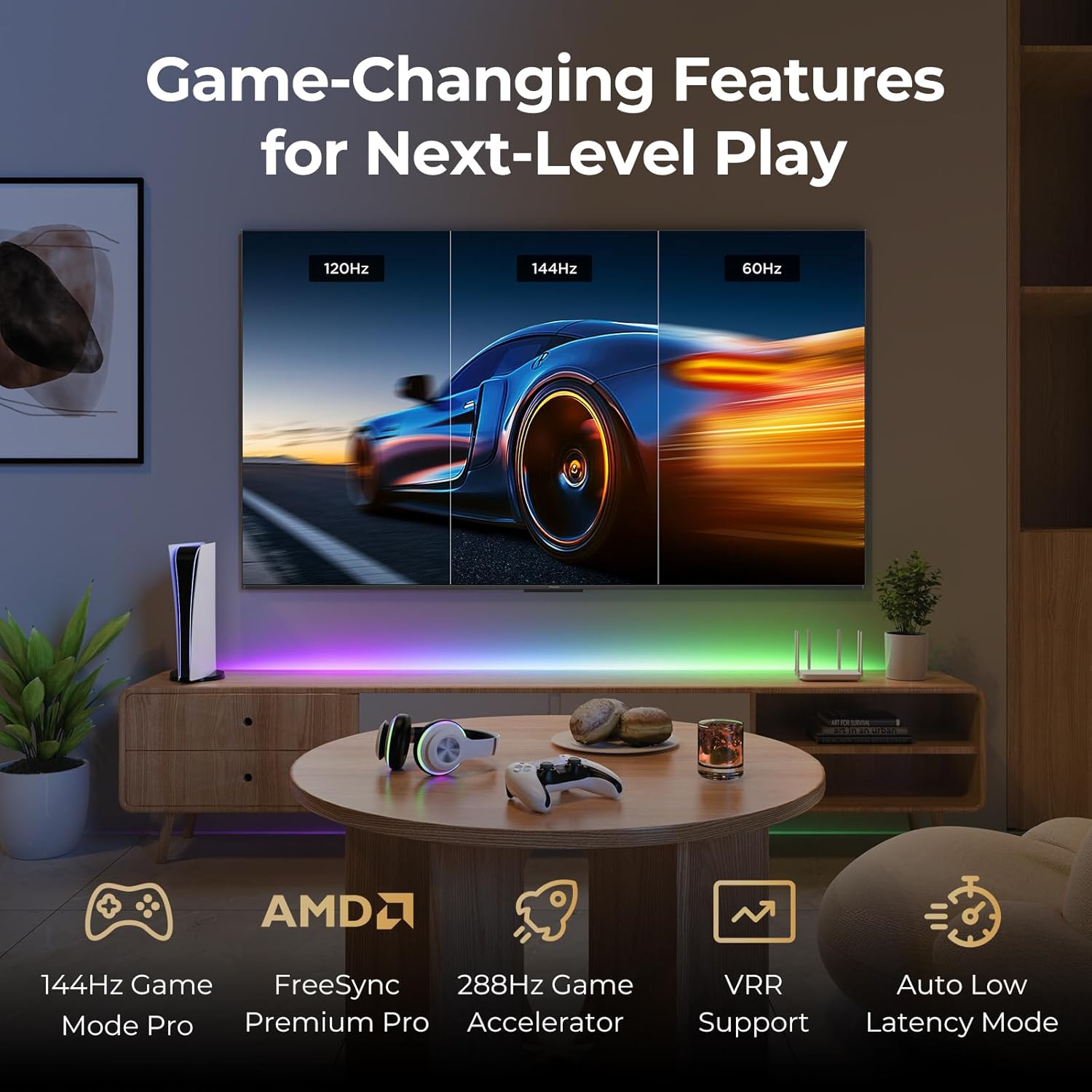
Image: A gaming setup featuring the iFFALCON TV, illustrating its high refresh rate and gaming-specific features for an optimized experience.
5. მოვლა
5.1 ტელევიზორის გაწმენდა
რეგულარული წმენდა ხელს უწყობს ტელევიზორის იერსახისა და მუშაობის შენარჩუნებას.
- ეკრანი: ფრთხილად გაწმინდეთ ეკრანი რბილი, უბუშტო ქსოვილით. ჯიუტი ლაქების შემთხვევაში, მსუბუქად გაწმინდეთ.ampქსოვილი გაწმინდეთ წყლით ან ეკრანისთვის განკუთვნილი საწმენდი ხსნარით (არ შეასხუროთ პირდაპირ ეკრანზე).
- სხეული: Use a soft, dry cloth to wipe the TV's frame and back panel. Avoid abrasive materials or harsh chemicals.
- პორტები: Ensure ports are free of dust. Use compressed air if necessary, holding the can upright.
5.2 პროგრამული უზრუნველყოფის განახლებები
Your TV may receive automatic software updates to improve performance and add new features. Ensure your TV is connected to the internet for these updates.
- You can check for updates manually in the TV's settings menu under System > About > System update.
6. Დიაგნოსტიკა
If you encounter issues, try these common solutions before contacting support.
- ძალა არ არის: Ensure the power cable is securely plugged into both the TV and the wall outlet. Test the outlet with another device.
- სურათი/ხმა არ არის: Check the selected input source. Ensure all cables to external devices are connected correctly. Restart the TV and connected devices.
- დისტანციური არ მუშაობს: შეცვალეთ ელემენტები. დარწმუნდით, რომ პულტსა და ტელევიზორს შორის არანაირი დაბრკოლება არ არის. თუ ის Bluetooth-ს იყენებს, ხელახლა დააკავშირეთ პულტი.
- ქსელთან დაკავშირების პრობლემები: Restart your Wi-Fi router. Check TV network settings to ensure correct Wi-Fi password and connection.
- სურათის ხარისხის პრობლემები: შეცვალეთ სურათის პარამეტრები (სიკაშკაშე, კონტრასტი, ფერი). დარწმუნდით, რომ კონტენტის წყარო მაღალი ხარისხისაა.
- ქარხნის გადაყენება: If problems persist, a factory reset can resolve many software-related issues. Navigate to Settings > System > About > Reset. გაფრთხილება: This will erase all personal data and settings.
7. სპეციფიკაციები
| ფუნქცია | აღწერა |
|---|---|
| ბრენდი | iFFALCON |
| მოდელის ნომერი | 85U85 |
| ეკრანის ზომა | 85 ინჩი |
| ჩვენების ტექნოლოგია | QD-Mini LED |
| რეზოლუცია | 4K UHD (3840 x 2160) |
| განახლების სიხშირე | 144 Hz (Native), 288Hz DLG |
| პიკური სიკაშკაშე | 1000 ნიტამდე |
| კონტრასტის თანაფარდობა | 6500:1-მდე |
| ადგილობრივი დაბნელების ზონები | 352 |
| პროცესორი | AiPQ Pro პროცესორი |
| ოპერაციული სისტემა | Google TV |
| ხმის ასისტენტი | Google ასისტენტი და Alexa თავსებადია |
| აუდიო სისტემა | 2.1-channel 50W, Dolby Atmos, DTS Virtual X |
| HDR მხარდაჭერა | HDR10+, Dolby Vision IQ |
| თამაშის მახასიათებლები | 144Hz VRR, FreeSync Premium Pro, ALLM, Game Bar |
| დაკავშირება | Bluetooth, WiFi |
| პროდუქტის ზომები (D x W x H) | 15.2 x 74.4 x 45.5 ინჩი |
| ნივთის წონა | 76.7 ფუნტი |
8. გარანტია და მხარდაჭერა
Your iFFALCON U85 Series TV is covered by a manufacturer's warranty. Please refer to the warranty card included with your product for specific terms and conditions.
For technical support, service inquiries, or additional information, please visit the official iFFALCON support website or contact their customer service. Keep your purchase receipt and product serial number handy for warranty claims.
დამატებითი ინფორმაციისა და დახმარების რესურსების მოძიება შეგიძლიათ ეწვიოთ iFFALCON Store on Amazon.