1. პროდუქტი დასრულდაview
The E-ACE 4.3-inch Dual Lens Car DVR Rearview Mirror Dash Cam is designed to enhance driving safety by providing comprehensive video recording of your journeys. This device integrates a front-facing camera and supports an optional rear-facing camera, offering a wide field of view and continuous recording capabilities. Its sleek design replaces your existing rearview mirror, providing a discreet and integrated solution for vehicle surveillance.
Key features include a 4.3-inch high-definition display, dual-lens recording, night vision, loop recording, and a G-sensor for automatic incident detection.

Image: The E-ACE rearview mirror dash cam displaying both front and rear camera feeds on its integrated screen.
2. პაკეტის შიგთავსი
გთხოვთ, შეამოწმოთ შეფუთვა შემდეგი ნივთებისთვის:
- E-ACE Rearview Mirror Dash Cam Unit
- მანქანის დამტენი
- Fixed Bandages (for mounting)
- მომხმარებლის სახელმძღვანელო
- ბარათის წამკითხველი
- დამატებითი: უკანა View Camera + Cable (6M or 10M, depending on variant)
- Optional: Buck Line (for parking monitoring power)
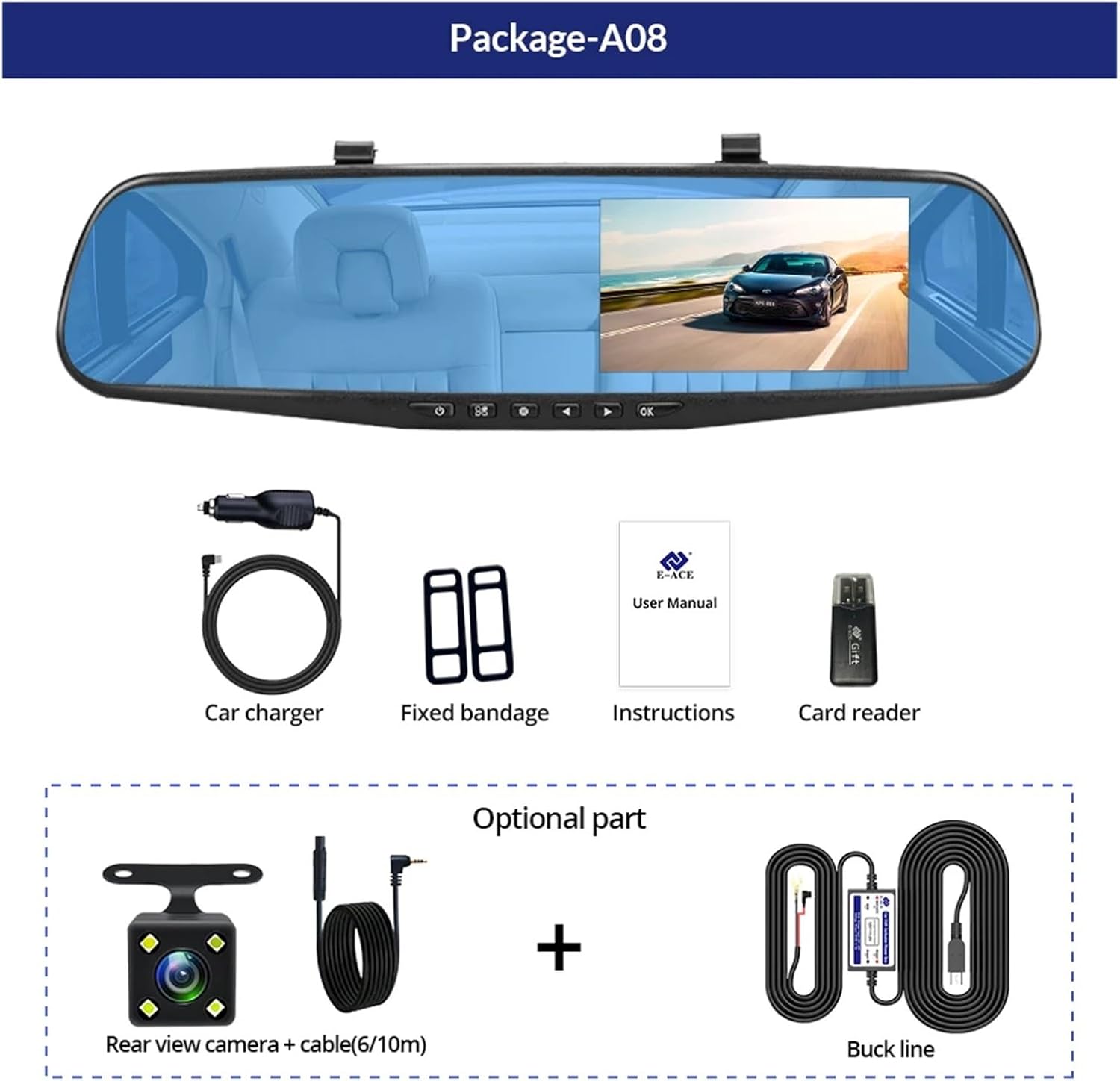
Image: A visual representation of the items included in the E-ACE dash cam package, showing the main unit and accessories.
3. პროდუქტის მახასიათებლები
- 4.3-inch High-Definition Display: Provides clear visibility for real-time monitoring and playback.
- ორმაგი ლინზის დიზაინი: Captures both front and rear footage simultaneously for comprehensive coverage.
- Built-in Night Vision Technology: Ensures clear recordings in low-light conditions.
- მომხმარებლისთვის მოსახერხებელი ინსტალაცია: Sleek rearview mirror design integrates seamlessly into your vehicle.
- მარყუჟის ჩაწერა: ავტომატურად ცვლის უძველეს foo-სtagროდესაც მეხსიერების ბარათი სავსეა, რაც უზრუნველყოფს უწყვეტ ჩაწერას.
- G-Sensor Feature: Detects sudden movements or impacts and automatically locks the current video file რათა თავიდან აიცილოს მისი გადაწერა.
- პარკინგის მონიტორინგი: Records video when motion or impact is detected while the vehicle is parked (requires buck line connection).
- 170 გრადუსიანი ფართო კუთხე: უზრუნველყოფს ფართო view წინ გზის.
- საპირისპირო სურათი: Displays the rear camera view უკუსვლისას პარკირების მითითებებით.
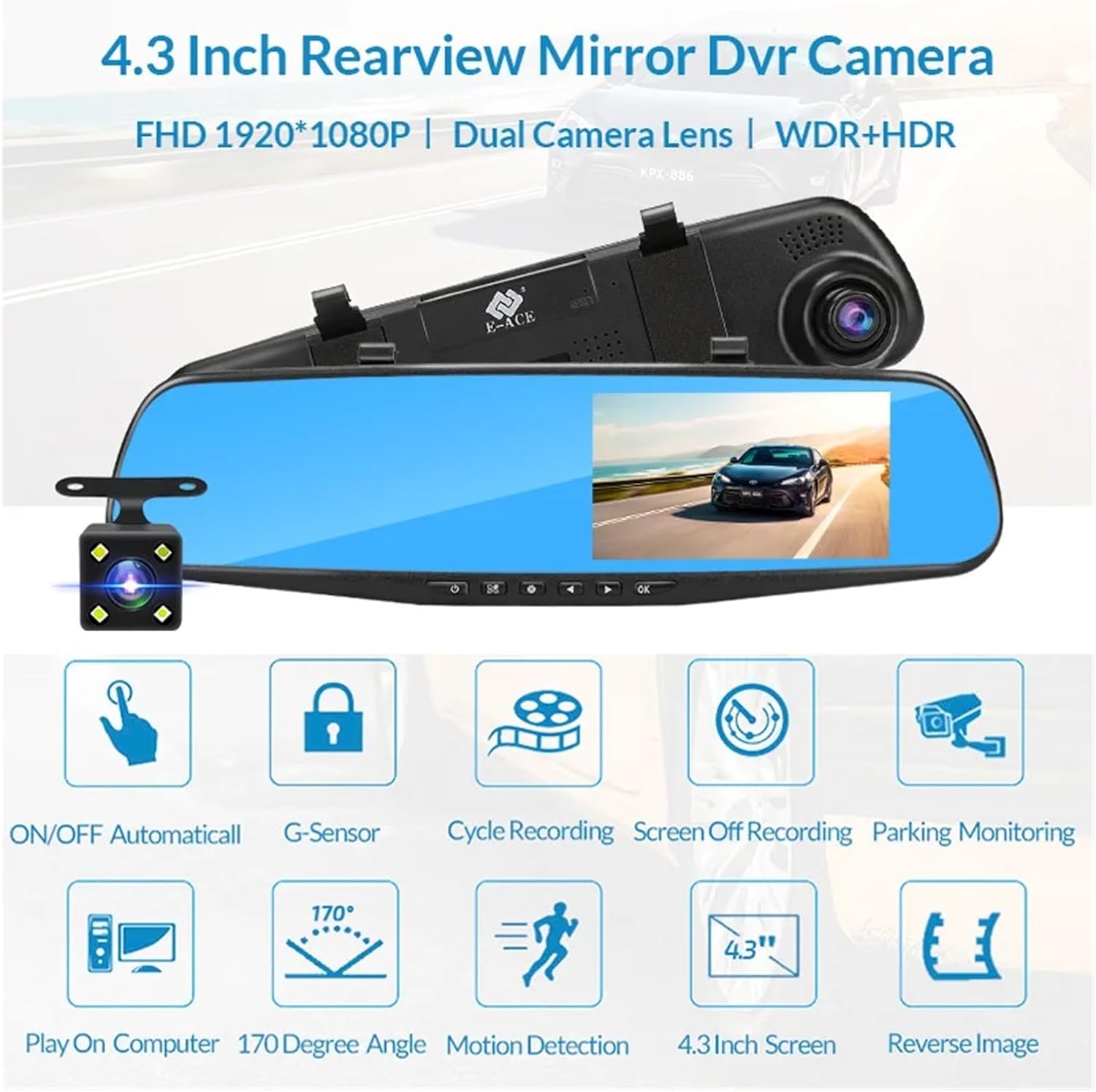
Image: An illustration highlighting the various functional features of the E-ACE dash cam.
4. კომპონენტის იდენტიფიკაცია
Familiarize yourself with the various parts and controls of your E-ACE dash cam:

Image: A detailed diagram identifying the buttons, ports, and features on the E-ACE dash cam unit.
- ჩართვა/გამორთვის ღილაკი: მოწყობილობის ჩართვა ან გამორთვა.
- მენიუს ღილაკი: წვდომა აქვს პარამეტრებსა და ოფციებზე.
- რეჟიმის ღილაკი: Switches between video recording, photo, and playback modes.
- UP ღილაკი: Navigates up in menus or adjusts settings.
- ქვემოთ ღილაკი: Navigates down in menus or adjusts settings.
- OK ღილაკი: Confirms selections or starts/stops recording.
- TF ბარათის სლოტი: ჩადეთ თქვენი MicroSD (TF) ბარათი აქ.
- AV-IN Port: Connects the rear camera.
- USB პორტი: დენის წყაროსა და მონაცემთა გადაცემისთვის.
- გადატვირთვის ღილაკი: Resets the device to factory settings (use a thin pin).
- მიკროფონი: იწერს აუდიოს მანქანის შიგნით.
5. დაყენება და ინსტალაცია
5.1 მეხსიერების ბარათის ჩასმა
Before installation, insert a high-speed MicroSD (TF) card (Class 10 or higher, up to 64GB recommended) into the TF Card Slot (7) with the contacts facing the screen. Ensure the card is inserted correctly until it clicks into place.
5.2 ვიდეოდაფის კამერის დამონტაჟება
- Attach the fixed bandages to the back of the dash cam unit.
- Securely strap the dash cam over your vehicle's existing rearview mirror using the fixed bandages. Ensure it is centered and stable.
5.3 კვების წყაროს დაკავშირება
- Connect the car charger to the USB Port (9) on the dash cam.
- მანქანის დამტენის მეორე ბოლო შეაერთეთ თქვენი მანქანის სიგარეტის სანთებლის ბუდეში.
- Route the power cable neatly along the windshield trim to avoid obstructing your view.
5.4 უკანა კამერის დაყენება (არასავალდებულო)
- Connect the rear camera cable to the AV-IN Port (8) on the dash cam.
- Route the rear camera cable from the dash cam to the rear of your vehicle. This typically involves tucking the cable under the headliner and along the side pillars.
- Mount the rear camera on the rear windshield or near the license plate using its adhesive or screws. Ensure it has a clear view უკანა გზის.
- If using the reverse image function, connect the red wire from the rear camera cable to your vehicle's reverse light power supply.
6. საოპერაციო ინსტრუქციები
6.1 ჩართვა/გამორთვა
- ავტომატური: The dash cam will automatically power on and start recording when your vehicle's ignition is turned on (if connected to a switched power source).
- სახელმძღვანელო: Press and hold the ON/OFF Button (1) to manually power the device on or off.
6.2 ძირითადი ოპერაცია
- რეჟიმების გადართვა: Press the Mode Button (3) to cycle between Video Recording, Photo, and Playback modes.
- წვდომის მენიუ: In any mode, press the Menu Button (2) to enter the settings menu. Use the UP (4) and Down (5) buttons to navigate, and OK (6) to select.
- ჩაწერის დაწყება/შეწყვეტა: In Video Recording mode, press the OK Button (6) to manually start or stop recording.
6.3 ჩვენების რეჟიმი
While recording, you can typically switch between different display views by pressing the UP or Down buttons:
- Front Camera Only
- Rear Camera Only
- Picture-in-Picture (Front main, Rear sub-window)
- Picture-in-Picture (Rear main, Front sub-window)
6.4 მარყუჟის ჩაწერა
Set the loop recording duration (e.g., 1, 3, or 5 minutes) in the settings menu. When the memory card is full, the oldest unlocked files-ზე ახალი ჩანაწერები ჩაიწერება.
6.5 G-სენსორი
The G-sensor automatically detects collisions or sudden braking. When triggered, it locks the current video file, preventing it from being overwritten by loop recording. Adjust sensitivity in the settings.
6.6 პარკირების მონიტორინგი (არასავალდებულო)
If the buck line is installed, the dash cam can monitor your vehicle while parked. When motion or impact is detected, it will automatically record a short video. Enable this feature in the settings.
6.7 თარიღისა და დროის დაყენება
It is important to set the correct date and time in the system settings for accurate timestamps თქვენს ჩანაწერებზე.
7. მოვლა
- დასუფთავება: ლინზისა და ეკრანის გასაწმენდად გამოიყენეთ რბილი, მშრალი ქსოვილი. მოერიდეთ აბრაზიული საწმენდების ან გამხსნელების გამოყენებას.
- მეხსიერების ბარათი: Format the MicroSD card regularly (e.g., once a month) within the dash cam's settings to maintain optimal performance and prevent data corruption. Back up important files ფორმატირებამდე.
- ტემპერატურა: Avoid exposing the device to extreme temperatures, as this can affect battery life and component integrity.
- Firmware განახლებები: შეამოწმეთ მწარმოებლის webპერიოდულად განაახლეთ საიტი პროგრამული უზრუნველყოფის განახლებების შესახებ, რომლებმაც შეიძლება გააუმჯობესოს მუშაობა ან დაამატოს ფუნქციები.
8. Დიაგნოსტიკა
| პრობლემა | შესაძლო მიზეზი | გამოსავალი |
|---|---|---|
| ვიდეორეგისტრატორი არ ირთვება. | No power supply; faulty charger; loose connection. | Check car charger connection and vehicle's cigarette lighter. Try a different USB cable/charger. |
| ჩაწერა ავტომატურად ჩერდება. | Memory card full; slow memory card; G-sensor sensitivity too high. | Format the memory card. Use a Class 10 or higher MicroSD card. Lower G-sensor sensitivity in settings. |
| ვიდეო ფუtage ბუნდოვანია. | ლინზაზე დამცავი ფირი; დაბინძურებული ლინზა; არასწორი ფოკუსირება. | Remove any protective film. Clean the lens with a soft cloth. |
| უკანა კამერა არ ჩანს. | შეერთება გაფუჭებულია; კაბელი/კამერა გაუმართავია. | Check the AV-IN connection. Ensure the rear camera is properly installed. |
| Device freezes or crashes. | Software issue; memory card error. | Press the Reset Button (10) with a thin pin. Format the memory card. |
9. სპეციფიკაციები
- მოდელის სახელი: DMMRUTXB
- ჩვენება: 4.3 ინჩი
- კამერა: Dual Lens (Front & Rear support)
- ვიდეო რეზოლუცია: FHD 1920x1080P (Front)
- მახასიათებლები: Loop Recording, G-Sensor, Night Vision, Parking Monitoring, 170-degree wide angle
- შენახვა: Supports MicroSD (TF) card, Class 10 or higher (up to 64GB)
- დაკავშირება: USB, AV-IN (for rear camera)
- ნივთის წონა: დაახლოებით 1.76 უნცია (50 გრამი)
- პაკეტის ზომები: დაახლოებით 0.39 x 0.39 x 0.39 ინჩი
- მწარმოებელი: DMMRUTXB
10. გარანტია და მხარდაჭერა
For warranty information and technical support, please refer to the documentation provided with your purchase or contact the retailer/manufacturer directly. Keep your purchase receipt as proof of purchase.


