შესავალი
This manual provides detailed instructions for the installation, operation, and maintenance of your ANJIELO SMART Wired Video Intercom System. This system features a 7-inch color touch monitor and a 1080P doorbell camera, designed to enhance your home security and communication. Please read this manual thoroughly before using the product to ensure proper functionality and safety.
პაკეტის შიგთავსი
დარწმუნდით, რომ ქვემოთ ჩამოთვლილი ყველა ნივთი შედის თქვენს პაკეტში:
- 1 x Outdoor Doorbell Camera
- 2 x შიდა 7 დიუმიანი სენსორული მონიტორი
- მონიტორების კვების ადაპტერები
- სამონტაჟო ხრახნები და აპარატურა
- გაყვანილობა კაბელები
- მომხმარებლის სახელმძღვანელო (ეს დოკუმენტი)
სპეციფიკაციები
| ფუნქცია | აღწერა |
|---|---|
| ვიდეო გადაღების გარჩევადობა | 1080p |
| შიდა მონიტორი | 7 დიუმიანი HD IPS სენსორული ეკრანი, აკრილის მავთულის ხატვის პანელი |
| გარე ზარის კამერა | 1080P FHD, 140° Wide Angle, 2 White LEDs for Night Vision, IP65 Weatherproof, Anti-destructive Metal Material |
| დაკავშირება | Wired, Supports Wi-Fi for Tuya Smart / Smart Life App |
| ინტერკომის რეჟიმი | Hands-free dual-way communication, Room-to-Room Intercom |
| შენახვა | Built-in memory for 86 pictures, supports external Max. 128GB SD Card (not included) |
| უსაფრთხოების მახასიათებლები | Motion Detection, Anti-Tamper Alarm, Dual Door Unlock Support (Electric Lock) |
| ელექტრომომარაგება | External power DC15V 1.2A |
| ოპერაციული ტემპერატურა | -45℃-დან +60℃-მდე |
| ზომები (მონიტორი) | 7 x 5 x 0.7 ინჩი |
დაყენების სახელმძღვანელო
Follow these steps to set up your ANJIELO SMART Video Intercom System:
- Mounting the Doorbell Camera: Install the outdoor doorbell camera at your desired location using the provided screws and hardware. Ensure it is within reach of your existing doorbell wiring or a new wired connection.
- Mounting the Indoor Monitors: Install the indoor monitors at convenient locations within your home.
- გაყვანილობის კავშირები: Connect the doorbell camera to the indoor monitors using the provided wiring. Refer to the wiring diagram in the separate installation guide for specific connections. Ensure all connections are secure.
- დენის კავშირი: Connect the power adapters to the indoor monitors and plug them into a power outlet. The system will power on automatically.
- აპის ჩამოტვირთვა და დაკავშირება:
ჩამოტვირთეთ ტუია სმარტი or ჭკვიანი ცხოვრება app from your mobile device's app store. Once installed, open the app and follow the on-screen instructions to add your device. You will typically scan a QR code displayed on the indoor monitor to bind the app to your system.

Image: Easy internet connection via QR code scanning on the monitor to bind the mobile app.
ოპერაციული ინსტრუქციები
This section details the various functions and operations of your intercom system.
პროდუქტი დასრულდაview და ძირითადი ფუნქციები
Video: This product overview demonstrates making calls from the doorbell to monitors, two-way intercom functionality, controlling door and gate locks, transferring calls between outdoor units and indoor monitors, switching between CCTV camera views, enabling motion detection, displaying weather forecasts, and reviewing recorded media.
1. ორმხრივი ინტერკომი
When a visitor presses the doorbell, the indoor monitor will ring and display the visitor's image. You can engage in two-way audio communication with the visitor. If you are away, notifications will be sent to your mobile device via the app, allowing you to communicate remotely.

Image: Two-way audio communication between the outdoor doorbell and an indoor monitor or mobile device.
2. დისტანციური View and Unlock via App
With the Tuya Smart / Smart Life app, you can view your doorstep from anywhere, anytime. The app also allows you to remotely unlock connected electric locks for visitors or deliveries.

სურათი: დისტანციური მართვა viewing and unlocking functionality through the mobile application.
3. Motion Detection and Automatic Recording
The system is equipped with motion detection. When motion is detected or the doorbell is pressed, the camera will automatically record videos or capture snapshots. These recordings are saved to the additional Micro SD card (32GB card included) and can be reviewed on your mobile phone or the indoor monitor.
4. ანტი-ტamper სიგნალიზაცია
The system includes an anti-tamper alarm function. If the outdoor unit is tampered with, an alarm will be triggered, and alerts will be sent to your mobile phone, providing an additional layer of security.

Image: The system supports a siren alarm feature for enhanced security against tampერინგი.
5. ღამის ხედვა
The outdoor doorbell camera features 2 white LEDs for night vision, ensuring clear visibility even in low-light or dark conditions. This allows you to identify visitors at any time.

Image: Infrared night vision ensures clear visibility and detail capture even in complete darkness.
6. Dual Lock Control
The indoor monitor supports one-button operation to switch between and control two connected electric locks, such as a main door lock and a patio gate lock.

Image: One-button operation on the indoor unit to control double-lock modes for patio and door locks.
7. Multi-Device Usage and Expansion
The system is expandable, supporting connections for up to 2 outdoor doorbell cameras, 4 indoor monitors, and 2 additional 1080P AHD CCTV cameras for comprehensive security coverage.

Image: System capacity diagram showing connections for multiple door stations, monitors, and CCTV cameras.
8. Weatherproof Outdoor Unit
The outdoor doorbell camera is IP65 rated, making it waterproof and dustproof. It is designed to withstand various weather conditions with a high-performance temperature resistance from -45℃ to +60℃.
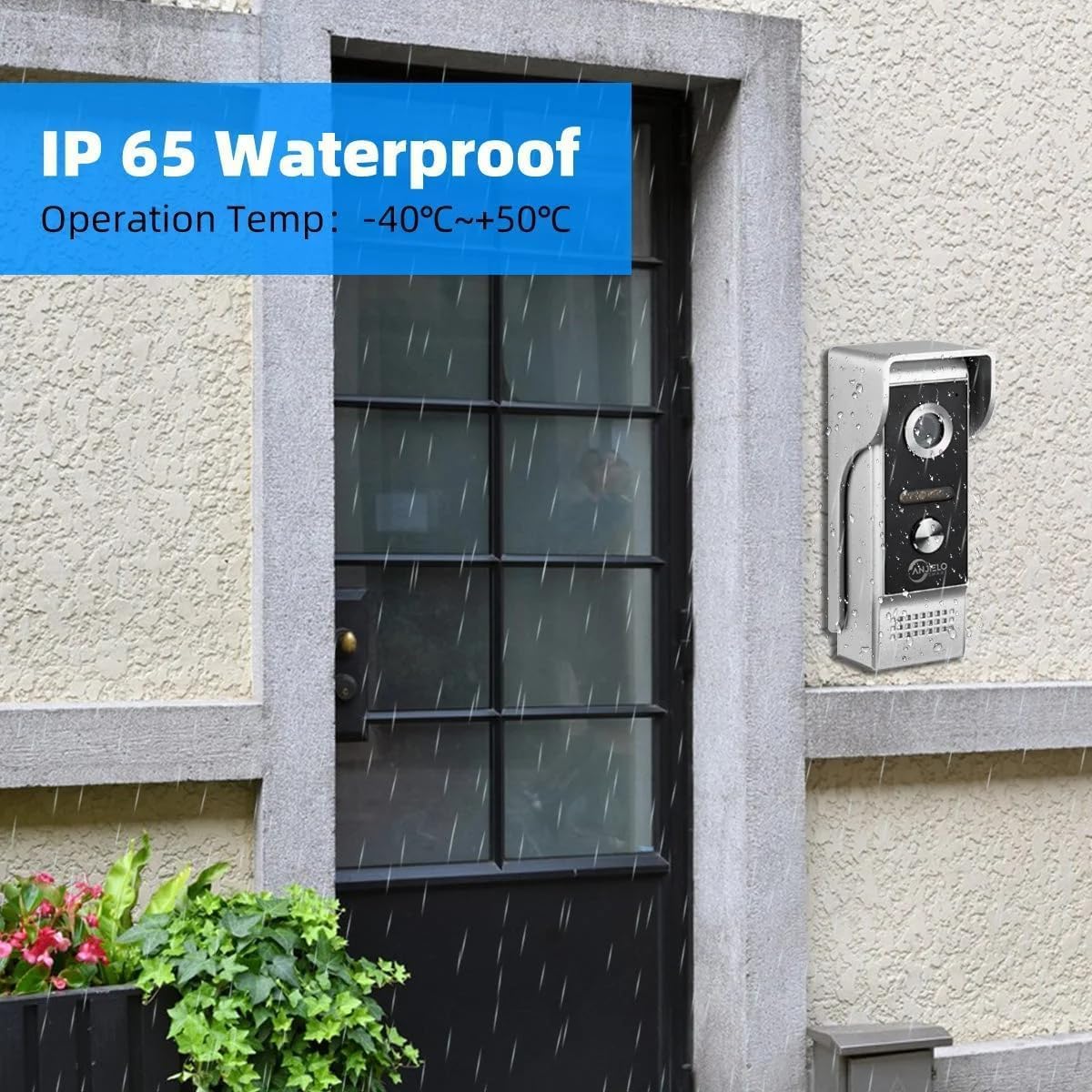
Image: The outdoor doorbell unit features an IP65 waterproof rating, suitable for various weather conditions.
მოვლა
თქვენი ANJIELO SMART ვიდეო ინტერკომის სისტემის ოპტიმალური მუშაობისა და ხანგრძლივი მუშაობის უზრუნველსაყოფად, დაიცავით შემდეგი ტექნიკური მომსახურების ინსტრუქციები:
- დასუფთავება: Regularly wipe the indoor monitors and outdoor doorbell camera with a soft, dry cloth. Avoid using abrasive cleaners or solvents that could damage the surfaces.
- შეამოწმეთ კავშირები: Periodically inspect all wired connections to ensure they are secure and free from corrosion or damage.
- პროგრამული განახლებები: Check the Tuya Smart / Smart Life app or the manufacturer's website for any available firmware updates for your system. Keeping the software updated can improve performance and add new features.
- SD ბარათის მენეჯმენტი: If using an SD card for recording, periodically review და მართეთ შენახული საკვებიtage to ensure sufficient space is available.
პრობლემების მოგვარება
თუ თქვენს ინტერკომ სისტემასთან დაკავშირებით პრობლემებს წააწყდებით, იხილეთ შემდეგი პრობლემების მოგვარების გავრცელებული ნაბიჯები:
- ძალა არ არის: Ensure all power adapters are securely plugged into both the monitors and working power outlets. Check circuit breakers if necessary.
- ვიდეო/აუდიო არ არის: Verify all wiring connections between the doorbell camera and monitors are correct and secure. Restart the system by unplugging and replugging the power.
- აპებთან დაკავშირების პრობლემები: Ensure your Wi-Fi network is active and the monitors are connected. Restart your router and the monitors. Re-attempt the app binding process if needed.
- ცუდი ღამის ხედვა: დარწმუნდით, რომ კამერის ლინზა სუფთაა და არ აქვს დაბრკოლებები.
- მოძრაობის ამოცნობა არ მუშაობს: Check the settings on your indoor monitor and the mobile app to ensure motion detection is enabled and configured correctly.
- Door/Gate Unlock Failure: Verify that the electric locks are correctly wired to the system and are receiving power. Check the unlock duration settings on the monitor.
For further assistance, please contact ANJIELO SMART customer support.
გარანტია და მხარდაჭერა
Your ANJIELO SMART Wired Video Intercom System is covered by a manufacturer's warranty. Please refer to the warranty card included in your package or visit the official ANJIELO SMART webსაიტზე დეტალური გარანტიის პირობებისთვის.
For technical support, product inquiries, or warranty claims, please contact ANJIELO SMART customer service through their official channels. Keep your purchase receipt and product model number (66012+67024B) handy when contacting support.
ონლაინ დახმარება: ეწვიეთ ANJIELO SMART მაღაზიას Amazon-ზე


