1. შესავალი
This manual provides detailed instructions for the installation, operation, and maintenance of your Shelly Wall Display 2 and Shelly BLU H&T bundle. The Shelly Wall Display 2 is a 6.95-inch color touchscreen smart home control panel with an integrated 5A relay, designed for monitoring and controlling your Shelly ecosystem. The Shelly BLU H&T is a Bluetooth-enabled sensor for accurate temperature and humidity readings.
Please read this manual carefully before installation and use to ensure proper functionality and safety.
2. უსაფრთხოების ინფორმაცია
- ელექტრო უსაფრთხოება: Installation must be performed by a qualified electrician in accordance with local electrical codes. Ensure power is disconnected before installation. The Shelly Wall Display 2 requires a neutral conductor.
- მხოლოდ შიდა გამოყენება: This device is designed for indoor use in dry environments. Do not expose to water or high humidity.
- ტემპერატურის დიაპაზონი: დაზიანების თავიდან ასაცილებლად, იმუშავეთ მითითებულ ტემპერატურის დიაპაზონში.
- დასუფთავება: გასაწმენდად გამოიყენეთ რბილი, მშრალი ქსოვილი. არ გამოიყენოთ აბრაზიული საწმენდები ან გამხსნელები.
- ბავშვები: შეინახეთ ბავშვებისთვის მიუწვდომელ ადგილას.
3. პაკეტის შიგთავსი
Your Shelly Wall Display 2 and BLU H&T bundle package should contain the following items:
- Shelly Wall Display 2 (Silver)
- Shelly BLU H&T Sensor (Silver)
- Installation accessories (screws, etc. - specific items may vary)
- მომხმარებლის სახელმძღვანელო (ეს დოკუმენტი)

სურათი 1: Shelly Wall Display 2 and Shelly BLU H&T Sensor. This image shows the main Wall Display unit with its large screen interface, alongside the smaller, compact BLU H&T sensor. The display shows various smart home controls and environmental data.
4. დაყენება და ინსტალაცია
4.1. Shelly Wall Display 2 Installation
- დენის გათიშვა: Before starting, ensure the main power supply to the circuit where the Wall Display will be installed is turned off at the circuit breaker.
- სამონტაჟო ადგილი: Choose a suitable wall location, typically replacing a standard light switch. The device supports both portrait and landscape installation.
- გაყვანილობა: The Shelly Wall Display 2 requires a neutral conductor for operation. Connect the Live (L), Neutral (N), and Load (O) wires according to the wiring diagram provided in the separate installation guide (not included in this manual). The integrated 5A relay allows direct control of connected lighting or appliances.
- უსაფრთხო მონტაჟი: Secure the Wall Display to the wall box using the provided screws.
- დენის აღდგენა: Once securely mounted and wired, restore power to the circuit. The display will power on.
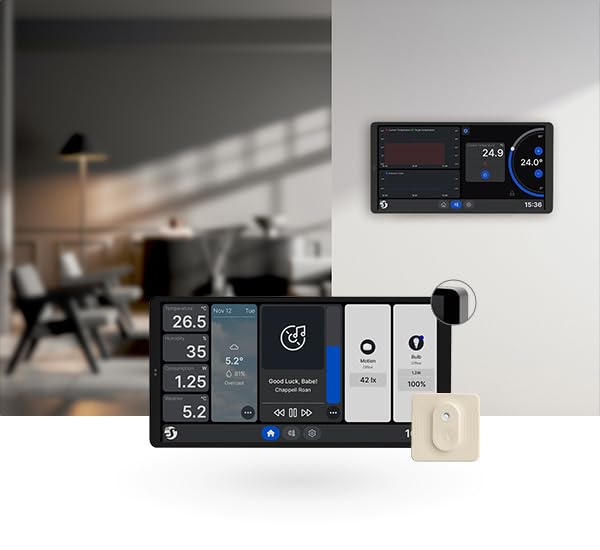
სურათი 2: Shelly Wall Display 2 installed on a wall. This image illustrates the Wall Display mounted in a home environment, showcasing its sleek design and how it integrates into a modern interior. Another display is visible in the background, suggesting multi-device integration.
4.2. Initial Setup and Connectivity
- პირველი ჩატვირთვა: Upon first power-up, the Wall Display will guide you through initial setup steps on its 6.95-inch color touchscreen.
- Wi-Fi კავშირი: Connect the device to your 2.4 GHz Wi-Fi network. This is essential for seamless smart home control and integration with the Shelly ecosystem.
- Shelly App Integration: Download the Shelly Smart Control app from your device's app store. Follow the in-app instructions to add your Shelly Wall Display 2 to your Shelly account.
- Bluetooth დაწყვილება: The device includes Bluetooth for simplified connection with other Shelly BLU devices.
4.3. Pairing Shelly BLU H&T Sensor
The Shelly BLU H&T sensor comes pre-bundled and is designed for easy integration:
- სენსორის გააქტიურება: Ensure the Shelly BLU H&T sensor is activated (e.g., by pulling a battery tab if present, or inserting the included Lithium Metal battery).
- მოწყობილობის დამატება აპლიკაციაში: In the Shelly Smart Control app, navigate to the device addition section and select to add a new Bluetooth device.
- აღმოჩენა: The app will discover the BLU H&T sensor. Follow the prompts to pair it with your Shelly ecosystem, typically linking it to your Wall Display 2 or another Shelly gateway.
- განთავსება: Place the BLU H&T sensor in the desired room for accurate temperature and humidity readings.
5. ოპერაცია
5.1. სენსორული ინტერფეისი
The Shelly Wall Display 2 features a 6.95-inch color touchscreen for intuitive control. Use multi-touch gestures for navigation and interaction.
- საწყისი ეკრანი: The customizable home screen provides central access to your devices, scenes, and environmental data.
- ნავიგაცია: Swipe left/right to access different panels or menus. Tap icons to select functions or devices.
- რეგულირებადი სიკაშკაშე: Screen brightness can be adjusted in the settings menu for optimal viewინგ.
- ეკრანმზოგის რეჟიმი: Configure a screen saver to activate after a period of inactivity.
5.2. Device Control and Monitoring
- Integrated 5A Switch: Use the built-in 5A relay to directly control connected lighting or other appliances. This function is accessible via the touchscreen interface.
- ეკოლოგიური სენსორები: The Wall Display includes integrated sensors for temperature, humidity, and LUX (light intensity). These readings are displayed on the screen and can be used for automation triggers.
- BLU H&T Data: Real-time temperature and humidity data from the paired Shelly BLU H&T sensor will be displayed and can be utilized for precise climate control.
- ენერგიის მონიტორინგი: If you have other Shelly PM (Power Monitoring) devices, the Wall Display can show their energy consumption data.
5.3. Smart Home Features
- სცენები და განრიგი: Create custom scenes (e.g., "Good Morning" scene to turn on lights and adjust thermostat) and schedules for automated actions based on time or sensor input.
- მედია ფლეერი: The home screen is equipped with a media player, supporting integrations like Sonos for audio control.
- ხმის ასისტენტის ინტეგრაცია: The Shelly Wall Display 2 is compatible with popular voice assistants like Alexa and Google Assistant for hands-free control (requires integration through the Shelly app).
6. მოვლა
6.1. დასუფთავება
To clean the Shelly Wall Display 2 screen and body:
- Ensure the device is in screen saver mode or temporarily turn off the display.
- Use a soft, lint-free, slightly damp cloth. Do not spray cleaning solutions directly onto the screen.
- Avoid using abrasive materials, alcohol, or chemical cleaners, as these can damage the screen and finish.
6.2. პროგრამული უზრუნველყოფის განახლებები
Periodically check for firmware updates through the Shelly Smart Control app. Updates provide new features, performance improvements, and security enhancements. Follow the in-app instructions for updating your device.
6.3. Shelly BLU H&T Battery Replacement
The Shelly BLU H&T sensor is powered by a Lithium Metal battery. When the battery level is low (indicated in the Shelly app), replace it with a new, compatible battery (e.g., CR2032, refer to the BLU H&T specific manual for exact type). Ensure correct polarity during replacement.
7. Დიაგნოსტიკა
| პრობლემა | შესაძლო მიზეზი | გამოსავალი |
|---|---|---|
| მოწყობილობა არ ირთვება. | No power supply; incorrect wiring; neutral conductor missing. | Check circuit breaker. Verify wiring connections, ensuring neutral is connected. Consult a qualified electrician. |
| Wi-Fi-თან დაკავშირება შეუძლებელია. | Incorrect Wi-Fi password; device too far from router; 5GHz network selected. | Double-check password. Move device closer to router. Ensure you are connecting to a 2.4 GHz Wi-Fi network. |
| BLU H&T sensor not pairing. | Sensor not activated; battery low; out of Bluetooth range. | Ensure sensor is active. Replace battery if needed. Move sensor closer to the Wall Display or Shelly gateway. |
| სენსორული ეკრანი არ რეაგირებს. | Temporary software glitch; screen protector interference. | Restart the device (if possible, via app or power cycle). Remove any screen protectors to test. |
8. სპეციფიკაციები
| ფუნქცია | დეტალი |
|---|---|
| მოდელის ნომერი | 3800238072308 |
| ბრენდი | შელი |
| ჩვენება | 6.95 დიუმიანი ფერადი სენსორული ეკრანი |
| დაკავშირება | Wi-Fi (2.4 GHz), Bluetooth |
| ინტეგრირებული რელე | 5 Amps (Normally Open) |
| Sensors (Wall Display) | Temperature, Humidity, LUX (Light Intensity) |
| Sensors (BLU H&T) | ტემპერატურა, ტენიანობა |
| დენის მოთხოვნილება | Neutral Conductor Required |
| სამონტაჟო ტიპი | Wall Mount (Portrait or Landscape) |
| პროდუქტის ზომები | 3.3 x 17.8 x 8.7 სმ |
| წონა | 256 გრამი |
| BLU H&T Battery | 1 ლითიუმის ლითონის ბატარეა (შედის) |
| მასალა | Steel (Contact material) |
9. გარანტია და მხარდაჭერა
For warranty information and technical support, please refer to the official Shelly webადგილზე ან დაუკავშირდით თქვენს ადგილობრივ დისტრიბუტორს. შეინახეთ შეძენის დამადასტურებელი საბუთი გარანტიის მოთხოვნებისთვის.
Manufacturer: Shelly Europe


