1. შესავალი
The FIREBAT X3 Wired RGB Gaming Mouse is designed for precision and comfort, suitable for various computing tasks including gaming, office work, and general use. This manual provides detailed instructions for setting up, operating, and maintaining your mouse.

დასრულდაview of the FIREBAT X3 Wired RGB Gaming Mouse highlighting its main features.
2. დაყენება
2.1 მაუსის შეერთება
The FIREBAT X3 Gaming Mouse features a simple plug-and-play design for easy setup.
- Locate an available USB-A port on your computer or laptop.
- Insert the USB connector of the mouse into the USB-A port.
- Your operating system will automatically detect and install the necessary drivers. No additional software installation is required for basic functionality.

The FIREBAT X3 mouse connects via a standard USB-A port for immediate use.
3. ოპერაცია
3.1 ღილაკის ფუნქციები
The FIREBAT X3 Gaming Mouse is equipped with 6 programmable buttons for enhanced control.
- მარცხენა ღილაკი: სტანდარტული დაწკაპუნების ფუნქცია.
- მარჯვენა ღილაკი: სტანდარტული მარჯვენა ღილაკის დაჭერის ფუნქცია.
- გადახვევის ბორბალი: Scrolls up and down. Can also be pressed for a middle-click function.
- DPI რეგულირების გასაღები: Changes the mouse sensitivity (DPI).
- წინსვლის ღილაკი: წინ გადადის web ბრაუზერები ან file მკვლევარები.
- უკანა ღილაკი: უკან ნავიგაცია web ბრაუზერები ან file მკვლევარები.

Illustration of the 6-button layout on the FIREBAT X3 Gaming Mouse.
3.2 DPI-ს (მგრძნობელობის) რეგულირება
The mouse features 4 adjustable DPI levels to suit different tasks and preferences.
- დააჭირეთ DPI Adjustment Key (located behind the scroll wheel) to cycle through the preset DPI settings.
- The default DPI levels are 1200, 1800, 2400, and 3600.
- Each press will switch to the next DPI level, allowing you to find the optimal sensitivity for your current activity.

The DPI adjustment key allows for quick changes in mouse sensitivity.
3.3 RGB განათების რეჟიმი
The FIREBAT X3 mouse features 7 dynamic RGB backlit modes to enhance your setup.
- The RGB lighting automatically cycles through its 7 distinct modes.
- There is no manual button to change the RGB mode; the mouse will continuously display various lighting effects.
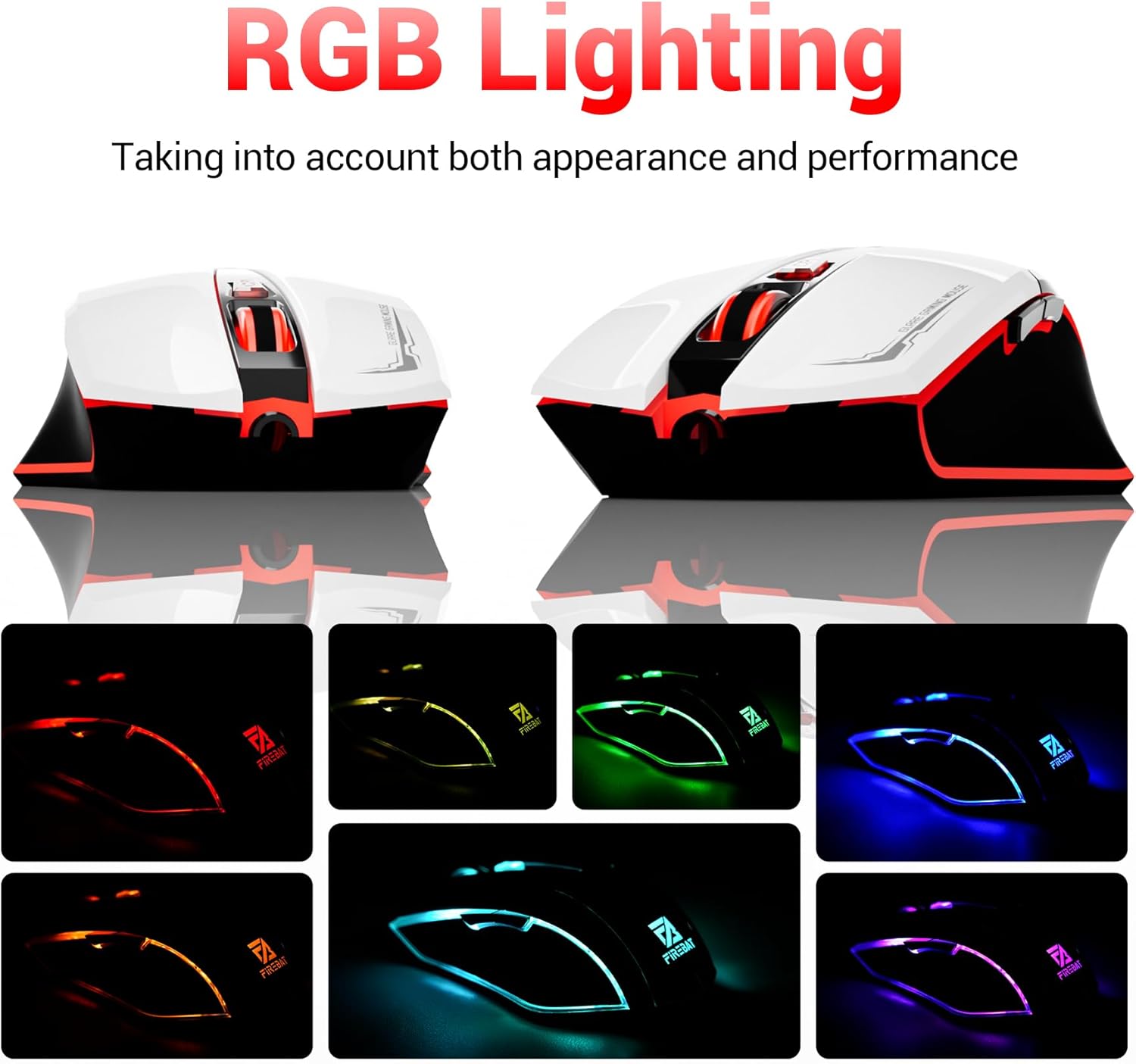
The mouse features vibrant RGB lighting with multiple dynamic modes.
3.4 Ergonomic Design and Comfort
The mouse is designed with an ergonomic shape to provide a comfortable grip and reduce hand fatigue during extended use, suitable for both right and left-hand users.

The ergonomic design ensures comfort during prolonged use.
3.5 Quiet Click Feature
The mouse incorporates a 'Heavy Bass Design' for its key sounds, ensuring soft clicks without excessive noise, which is beneficial in quiet environments.

The mouse features quiet clicks, minimizing noise during use.
4. მოვლა
4.1 დასუფთავება
To ensure optimal performance and longevity, keep your mouse clean.
- გაწმენდის დაწყებამდე მაუსი გამორთეთ კომპიუტერიდან.
- მსუბუქად გამოიყენეთ რბილი, უბინაო ქსოვილი დampმაუსის ზედაპირის გასაწმენდად ჩამოიბანეთ წყლით ან რბილი საწმენდი ხსნარით.
- მოერიდეთ უხეში ქიმიკატების, აბრაზიული საწმენდების ან ზედმეტი ტენიანობის გამოყენებას, რადგან მათ შეუძლიათ თაგვის დაზიანება.
- For the optical sensor, use a cotton swab to gently remove any dust or debris.
4.2 შენახვა
როდესაც მაუსი არ გამოიყენება, შეინახეთ სუფთა, მშრალ გარემოში, ექსტრემალური ტემპერატურისა და მზის პირდაპირი სხივებისგან მოშორებით.
5. Დიაგნოსტიკა
5.1 მაუსი არ რეაგირებს
- შეამოწმეთ USB კავშირი: დარწმუნდით, რომ USB კაბელი საიმედოდ არის შეერთებული თქვენი კომპიუტერის მოქმედ USB პორტში. სცადეთ სხვა USB პორტი.
- გადატვირთეთ კომპიუტერი: ზოგჯერ მარტივი გადატვირთვა შეიძლება გადაჭრას კავშირის პრობლემები.
- ტესტი სხვა კომპიუტერზე: თუ შესაძლებელია, შეამოწმეთ მაუსი სხვა კომპიუტერზე, რათა დაადგინოთ, პრობლემა მაუსშია თუ თქვენი კომპიუტერის პარამეტრებში.
5.2 Cursor Movement is Erratic or Jumpy
- ოპტიკური სენსორის გაწმენდა: Dust or debris on the optical sensor can cause erratic movement. Refer to the cleaning instructions in the Maintenance section.
- Use a Mouse Pad: Ensure you are using the mouse on a suitable surface. Reflective, transparent, or uneven surfaces can interfere with the optical sensor.
5.3 RGB განათება არ მუშაობს
- შეამოწმეთ USB კვება: Ensure the mouse is receiving sufficient power through the USB connection.
- ხელით კონტროლი არ არის: Remember that the RGB lighting cycles automatically and does not have a manual control button. If the mouse is functioning otherwise, the lighting should be active.
6. სპეციფიკაციები
| ფუნქცია | დეტალი |
|---|---|
| მოდელის ნომერი | X3 Gaming Mouse |
| ბრენდი | FIREBAT |
| დაკავშირების ტექნოლოგია | USB სადენიანი |
| მოძრაობის გამოვლენა | ოპტიკური |
| DPI დონეები | 1200 / 1800 / 2400 / 3600 |
| ღილაკების რაოდენობა | 6 (პროგრამირებადი) |
| უკანა განათება | 7 RGB რეჟიმი |
| პროდუქტის ზომები | 5 x 3 x 0.1 ინჩი (12.7 x 7.6 x 0.25 სმ) |
| ნივთის წონა | 5.1 უნცია (144.6 გრამი) |
| ერგონომიკა | Right or Left Hand Use |
| მწარმოებელი | FIREBAT |
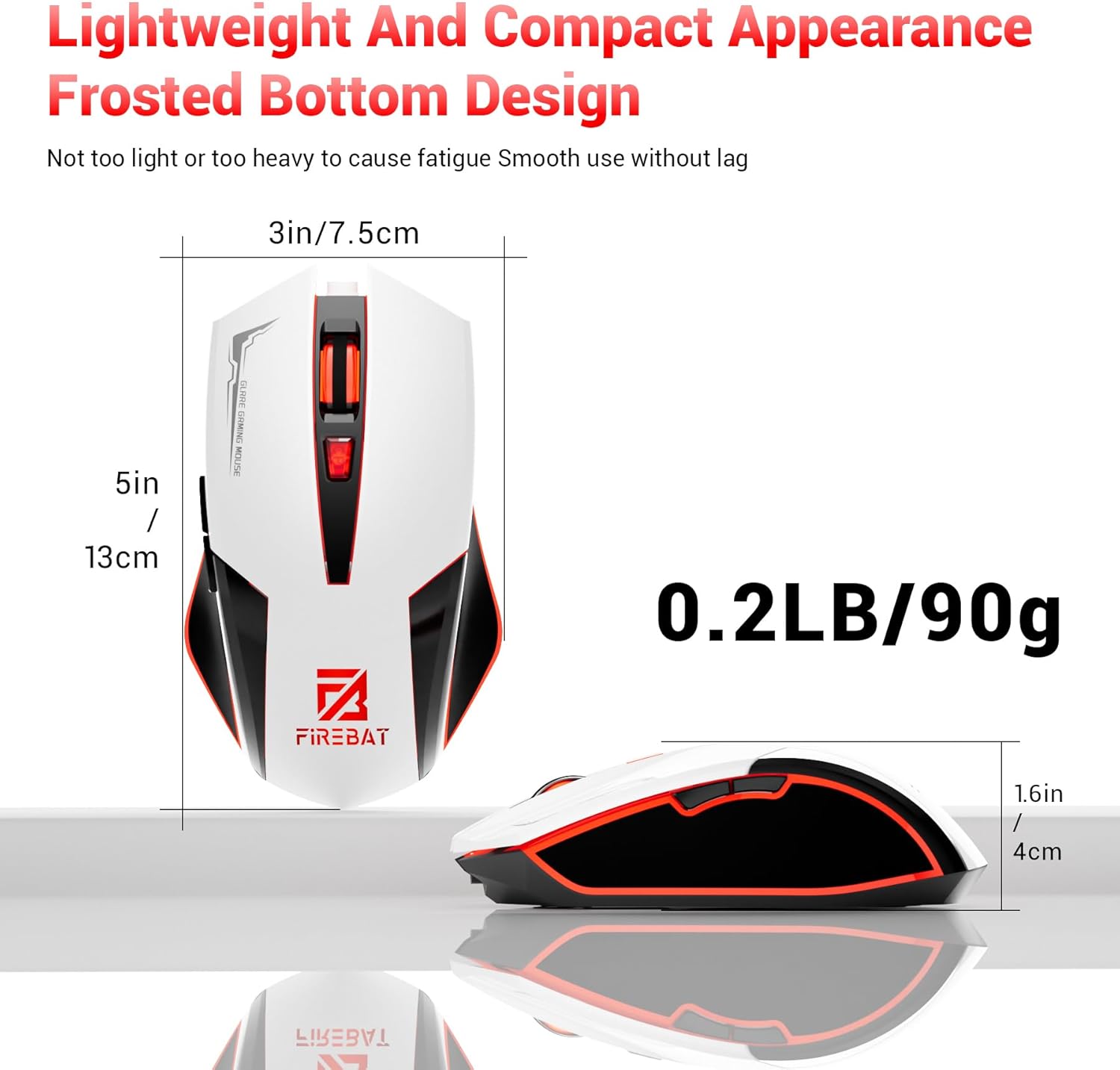
Physical dimensions and weight of the FIREBAT X3 Gaming Mouse.
7. გარანტია და მხარდაჭერა
7.1 ინფორმაცია გარანტიის შესახებ
FIREBAT products are manufactured to high-quality standards. For specific warranty details, please refer to the warranty card included with your product or visit the official FIREBAT webსაიტი. როგორც წესი, პროდუქტებს მოყვება შეზღუდული გარანტია, რომელიც ფარავს წარმოების დეფექტებს.
7.2 მომხმარებელთა მხარდაჭერა
If you encounter any issues or have questions regarding your FIREBAT X3 Gaming Mouse, please contact our customer support team:
- ელფოსტა: support@firebatpc.com
- Webსაიტი: www.firebatpc.com
Please provide your product model number (X3 Gaming Mouse) and a detailed description of your issue when contacting support for faster assistance.


