1. შესავალი
მადლობა შენაძენისთვისasing the SENCOR SPT 3907 Bluetooth Radio Player. This compact and versatile device offers multiple audio playback options, including CD, Bluetooth, USB, and FM radio. This manual provides essential information for safe and efficient use of your new player. Please read it thoroughly before operation and retain it for future reference.
2. უსაფრთხოების ინსტრუქციები
- დენის წყარო: დარწმუნდით, რომ კვების ბლოკიtage matches the rating indicated on the unit. Use only the provided power cable.
- წყალი და ტენიანობა: არ დადოთ მოწყობილობა წვიმის, ტენიანობის ან წვეთოვანი/შესხურებული სითხეების ზემოქმედების ქვეშ. არ დადოთ მოწყობილობაზე სითხით სავსე ნივთები, მაგალითად, ვაზები.
- ვენტილაცია: არ დაბლოკოთ ვენტილაციის ღიობები. მოწყობილობის გარშემო უზრუნველყავით საკმარისი სივრცე ჰაერის სათანადო ნაკადისთვის.
- სითბო: მოწყობილობა მოარიდეთ სითბოს წყაროებს, როგორიცაა რადიატორები, გამათბობლები, ღუმელები ან სხვა მოწყობილობები (მათ შორის ampგამხსნელები), რომლებიც წარმოქმნიან სითბოს.
- დასუფთავება: გაწმენდამდე გამორთეთ მოწყობილობა დენის წყაროდან. გამოიყენეთ რბილი, მშრალი ქსოვილი. არ გამოიყენოთ თხევადი ან აეროზოლური საწმენდები.
- მომსახურება: ნუ ეცდებით ამ პროდუქტის საკუთარ მომსახურებას. მიაწოდეთ ყველა სერვისი კვალიფიციურ მომსახურე პერსონალს.
- ბატარეები: When using batteries, ensure correct polarity. Do not mix old and new batteries, or different types of batteries. Remove batteries if the unit is not used for extended periods.
3. პაკეტის შიგთავსი
დარწმუნდით, რომ შეფუთვაში ყველა ნივთია:
- SENCOR SPT 3907 Radio Player
- დისტანციური მართვა
- AC დენის კაბელი
- დოკუმენტაცია (ეს სახელმძღვანელო)
4. პროდუქტის მახასიათებლები
The SENCOR SPT 3907 is designed for versatile audio entertainment:
- გამომავალი სიმძლავრე: 4W RMS for clear sound.
- CD პლეერი: Supports CD-R/RW discs with programmable playback for up to 20 songs.
- Bluetooth დაკავშირება: Bluetooth V2.1 + EDR for wireless audio streaming from compatible devices.
- USB დაკვრა: USB connection for MP3 file playback with programmable playback for up to 99 songs.
- FM რადიო: Stereo FM radio receiver with digital tuning and 30 station presets.
- AUX-IN: 3.5mm auxiliary input for connecting external audio sources.
- ჩვენება: Backlight LCD display for easy navigation.
- დისტანციური მართვა: Full-function remote control for convenient operation.
- დენის პარამეტრები: Operates on AC 100-240V or D/LR20 batteries for portability.
- დამატებითი ფუნქციები: Repeat and random playback modes.
5. კონტროლი და ფუნქციები
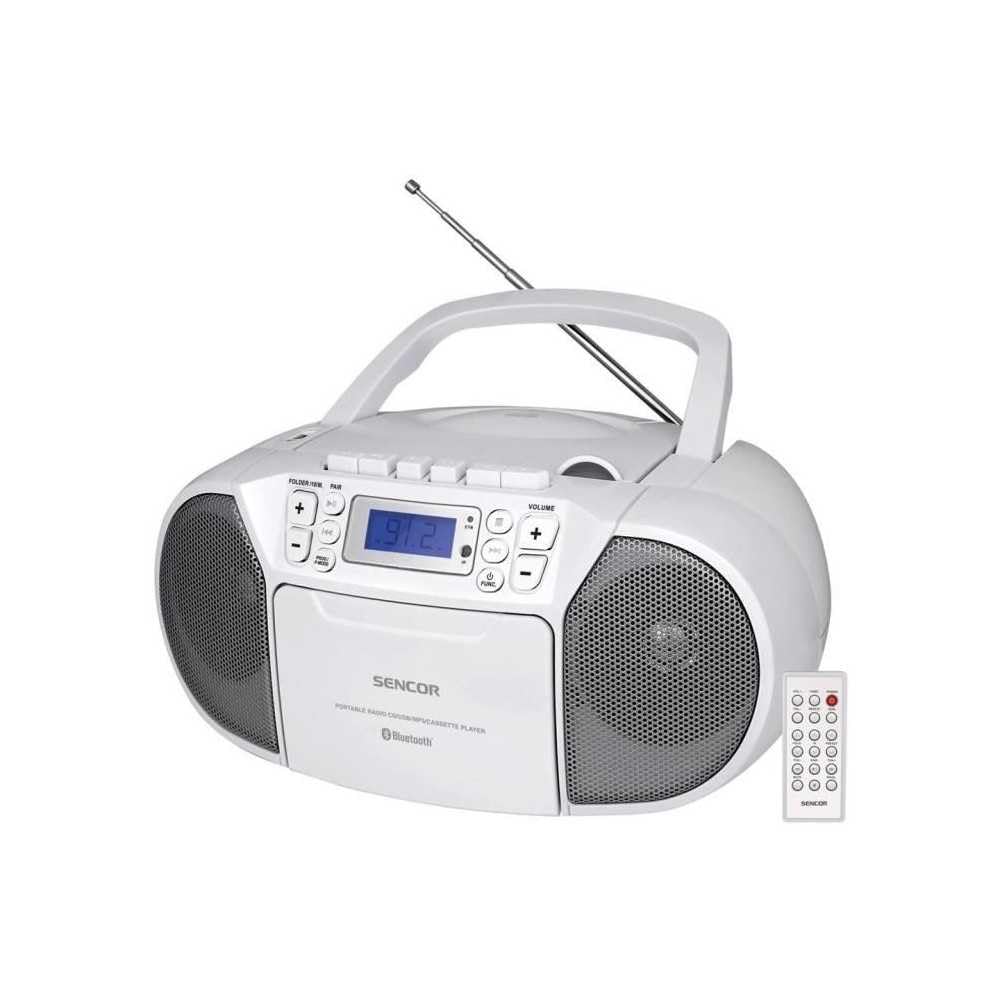
წინა view of the SENCOR SPT 3907 unit, highlighting the control buttons, LCD screen, CD tray, and speakers. The remote control is also visible.
წინა პანელის კონტროლი:
- Ჩამრთველი ღილაკი: რთავს ან გამორთავს მოწყობილობას.
- MODE ღილაკი: Switches between CD, Bluetooth, USB, FM Radio, and AUX-IN modes.
- ხმის +/- ღილაკები: არეგულირებს აუდიო გამომავალი დონეს.
- PLAY/PAUSE (►/▮▮) Button: Starts or pauses playback in CD, Bluetooth, or USB mode.
- SKIP (◀◀ / ►►) Buttons: გადადის წინა ან შემდეგ ტრეკზე/სადგურზე.
- STOP (■) Button: აჩერებს დაკვრას.
- FOLDER / PAIR Button: Navigates folders in USB mode; initiates Bluetooth pairing.
- FUNC ღილაკი: Accesses additional functions (e.g., program, repeat, random).
- LCD ეკრანი: Shows current mode, track number, frequency, and other information.
- CD განყოფილება: აუდიო CD-ების ჩასასმელად.
- USB პორტი: USB მეხსიერების მოწყობილობების დასაკავშირებლად.
- AUX-IN ჯეკი: გარე აუდიო მოწყობილობების დასაკავშირებლად.
- ყურსასმენის გამომავალი: პირადი მოსმენისთვის.
უკანა პანელის კონტროლი:
- AC დენის შეყვანა: აერთებს ცვლადი დენის კაბელს.
- FM ანტენა: გასაშლელი ტელესკოპური ანტენა FM მიღებისთვის.
დისტანციური მართვა:
The remote control duplicates most of the front panel functions for convenient operation from a distance. Refer to the remote control diagram in the included documentation for specific button layouts.
6. დაყენება
6.1 დენის კავშირი
The SENCOR SPT 3907 can be powered by AC mains or batteries.
AC სიმძლავრე:
- დარწმუნდით, რომ მოწყობილობა გამორთულია.
- Connect the supplied AC power cable to the AC input jack on the rear of the unit.
- Plug the other end of the AC power cable into a standard wall outlet (AC 100-240V, 50/60Hz).
ბატარეის სიმძლავრე:
- გახსენით კვების ელემენტის განყოფილება, რომელიც მდებარეობს ქვედა ნაწილში.
- Insert 6 x D/LR20 size batteries (not included), ensuring correct polarity (+/-) as indicated inside the compartment.
- უსაფრთხოდ დახურეთ ბატარეის განყოფილების საფარი.
Note: When the AC power cable is connected, battery power is automatically disconnected. Remove batteries if the unit will not be used for an extended period to prevent leakage.
6.2 ანტენის დაყენება
For optimal FM radio reception, fully extend the telescopic FM antenna located on the rear of the unit. Adjust its position for the best signal.
7. საოპერაციო ინსტრუქციები
7.1 ჩართვა/გამორთვა და რეჟიმის შერჩევა
- დააჭირეთ სიმძლავრე button to turn the unit on. The LCD display will light up.
- დააჭირეთ MODE button repeatedly to cycle through available modes: CD, Bluetooth, USB, FM Radio, AUX-IN. The selected mode will be shown on the LCD display.
- დააჭირეთ სიმძლავრე ღილაკი კვლავ გამორთეთ მოწყობილობა.
7.2 CD დაკვრა
- დააჭირეთ MODE ღილაკი CD რეჟიმის შესარჩევად.
- გახსენით CD განყოფილების საფარი.
- Place a CD (CD-R/RW compatible) with the label side facing up onto the spindle.
- Close the CD compartment cover. The unit will read the disc, and the total number of tracks will appear on the display.
- დააჭირეთ დაკვრა/პაუზა ღილაკი დაკვრის დასაწყებად.
- გამოიყენეთ გამოტოვება (◀◀ / ►►) ღილაკები ტრეკების გამოტოვებისთვის.
- დააჭირეთ გაჩერდი (■) დაკვრის შეჩერების ღილაკი.
- პროგრამის დაკვრა: While in STOP mode, press the გართობა button to enter program mode. Use გამოტოვება buttons to select tracks and გართობა again to confirm. Up to 20 CD songs can be programmed.
7.3 Bluetooth ოპერაცია
- დააჭირეთ MODE button to select Bluetooth mode. The display will show 'BT' and flash, indicating it's in pairing mode.
- თქვენს Bluetooth-თან დაკავშირებულ მოწყობილობაზე (მაგ., სმარტფონზე, პლანშეტზე) ჩართეთ Bluetooth და მოძებნეთ ხელმისაწვდომი მოწყობილობები.
- Select 'SPT 3907' from the list of devices. Once paired, the 'BT' indicator on the display will stop flashing and remain solid.
- Start playing audio on your connected device. The sound will be streamed through the SENCOR SPT 3907.
- გამოიყენეთ დაკვრა/პაუზა და გამოტოვება buttons on the unit or remote control to manage playback.
7.4 USB-ით დაკვრა
- Insert a USB flash drive (containing MP3 fileს) USB პორტში.
- დააჭირეთ MODE button to select USB mode. The unit will automatically read the files.
- დააჭირეთ დაკვრა/პაუზა ღილაკი დაკვრის დასაწყებად.
- გამოიყენეთ გამოტოვება (◀◀ / ►►) ღილაკები ტრეკების გამოტოვებისთვის.
- დააჭირეთ FOLDER button to navigate between folders on the USB drive.
- პროგრამის დაკვრა: While in STOP mode, press the გართობა button to enter program mode. Use გამოტოვება buttons to select tracks and გართობა again to confirm. Up to 99 MP3 songs can be programmed.
7.5 FM რადიოს მუშაობა
- დააჭირეთ MODE button to select FM Radio mode. The current frequency will appear on the display.
- გააფართოვეთ ტელესკოპური ანტენა უკეთესი მიღებისთვის.
- ავტომატური რეგულირება: დააჭირეთ და გააჩერეთ გამოტოვება (◀◀ / ►►) ღილაკებს რამდენიმე წამის განმავლობაში დააჭირეთ შემდეგი ხელმისაწვდომი სადგურის ავტომატურად მოსაძებნად.
- სახელმძღვანელო რეგულირება: მოკლედ დააჭირეთ გამოტოვება (◀◀ / ►►) buttons to fine-tune the frequency step-by-step.
- წინასწარ დაყენებული სადგურები: To save a station, tune to the desired frequency, then press the გართობა ღილაკი. გამოყენება გამოტოვება ღილაკებს წინასწარ დაყენებული ნომრის (P01-P30) ასარჩევად, შემდეგ დააჭირეთ გართობა კიდევ ერთხელ დასადასტურებლად.
- წინასწარ დაყენებული სადგურის გამოსაძახებლად, დააჭირეთ ღილაკს გართობა შენახული სადგურების გადასართავად განმეორებით დააჭირეთ ღილაკს.
7.6 AUX-IN Connection
- Connect one end of a 3.5mm audio cable (not included) to the AUX-IN jack on the SENCOR SPT 3907.
- კაბელის მეორე ბოლო შეაერთეთ თქვენი გარე აუდიო მოწყობილობის (მაგ., MP3 ფლეიერი, სმარტფონი) ყურსასმენის ჯეკთან ან აუდიო გამომავალთან.
- დააჭირეთ MODE ღილაკი AUX-IN რეჟიმის ასარჩევად.
- Start playback on your external device. The audio will be played through the SENCOR SPT 3907.
- დაარეგულირეთ მოცულობა გამოყენებით მოცულობა +/- buttons on the unit or remote control, and also on your external device.
8. მოვლა
8.1 დანადგარის გაწმენდა
Wipe the exterior of the unit with a soft, dry cloth. Do not use abrasive cleaners, waxes, or solvents as they may damage the finish. Ensure the unit is unplugged from the power source before cleaning.
8.2 CD ლინზის მოვლა
If the CD player experiences reading errors, the lens may need cleaning. Use a commercially available CD lens cleaner disc. Do not touch the lens directly.
8.3 ბატარეის გამოცვლა
When the unit operates on batteries and the sound becomes distorted or the unit stops functioning, replace all batteries with new D/LR20 batteries, ensuring correct polarity.
9. Დიაგნოსტიკა
| პრობლემა | შესაძლო მიზეზი | გამოსავალი |
|---|---|---|
| არავითარი ძალა | კვების კაბელი არ არის შეერთებული; ელემენტები დაცლილია ან არასწორად არის ჩასმული. | Check AC power connection; Replace batteries, ensuring correct polarity. |
| ხმა არ არის | ხმა ძალიან დაბალია; არჩეულია არასწორი რეჟიმი; ყურსასმენები დაკავშირებულია. | Increase volume; Select correct mode (CD, BT, USB, FM, AUX); Disconnect headphones. |
| CD არ უკრავს / არ უშვებს | CD dirty or scratched; CD inserted incorrectly; CD lens dirty. | Clean or replace CD; Insert CD with label side up; Use a CD lens cleaner. |
| Bluetooth არ უკავშირდება | Unit not in pairing mode; Device too far; Bluetooth not enabled on external device. | Ensure unit is in BT pairing mode; Move device closer; Enable Bluetooth on your device. |
| ცუდი FM მიღება | ანტენა არ არის გაშლილი ან სწორად არ არის განლაგებული; სუსტი სიგნალი. | სრულად გაშალეთ და დაარეგულირეთ ტელესკოპური ანტენა; სცადეთ მოწყობილობის სხვა ადგილას გადატანა. |
10. სპეციფიკაციები
| ფუნქცია | სპეციფიკაცია |
|---|---|
| მოდელი | SPT 3907 |
| გამომავალი სიმძლავრე | 4 W RMS |
| მხარდაჭერილი მედია | CD-R, CD-RW, Bluetooth, MP3, USB |
| Bluetooth ვერსია | V2.1 + EDR |
| FM რადიო წინასწარ დაყენებები | 30 სადგური |
| დაკავშირება | დამხმარე (3.5 მმ), USB |
| დენის წყარო | AC 100-240V, 50/60Hz; 6 x D/LR20 batteries |
| ნივთის წონა | 1 კგ 960 გ |
| ზომები | (Not specified in provided data) |
11. გარანტია და მხარდაჭერა
SENCOR products are manufactured to high-quality standards and are warranted against manufacturing defects. For specific warranty terms and conditions, please refer to the warranty card included with your purchase or visit the official SENCOR website. For technical support, service, or inquiries, please contact your local SENCOR distributor or authorized service center.