შესავალი
Thank you for choosing the Blukar K9129 Rechargeable Headlampეს სახელმძღვანელო შეიცავს აუცილებელ ინფორმაციას თქვენი თავსახურის უსაფრთხო და ეფექტური გამოყენებისთვის.amp. Please read it thoroughly before operation and retain it for future reference.
პროდუქტი დასრულდაview
ძირითადი მახასიათებლები
- Dual Color Temperatures: Features both white and warm light options for various environments.
- განათების მრავალი რეჟიმი: Offers 12 modes, including standard and motion sensor modes, with XPG White, XPG Warm, COB White, XPG+COB White, COB Red, and COB Red Strobe.
- მოძრაობის სენსორის კონტროლი: Allows hands-free operation by waving your hand within 15cm.
- USB-C დატენვადი: Built-in 1200mAh battery provides up to 30 hours of runtime on a single charge.
- ჩამქრალი სიკაშკაშე: Stepless dimming from 100% to 30% with memory function.
- Adjustable & Comfortable: 45° რეგულირებადი ლamp head and a comfortable, washable elastic headband.
- IPX5 წყალგაუმტარი: Designed to resist water splashes from all angles.
პაკეტის შიგთავსი
- Blukar K9129 Headlamp
- USB-C დამტენი კაბელი
- Helmet Clips (4x)
- მომხმარებლის სახელმძღვანელო (ეს დოკუმენტი)
დაყენება
1. საწყისი დატენვა
პირველი გამოყენების წინ, სრულად დატენეთ თავიamp. მოწოდებული USB-C დამტენი კაბელი შეაერთეთ თავაკისamp's charging port and to a USB power source (e.g., AC charger, power bank, computer). The 4 battery indicators will show charging progress. A full charge typically takes 2-3 hours.
სურათი: თავიamp being charged via its USB-C port. It can be connected to various USB power sources like an AC adapter, power bank, or computer.
2. თავსაბურავის რეგულირება
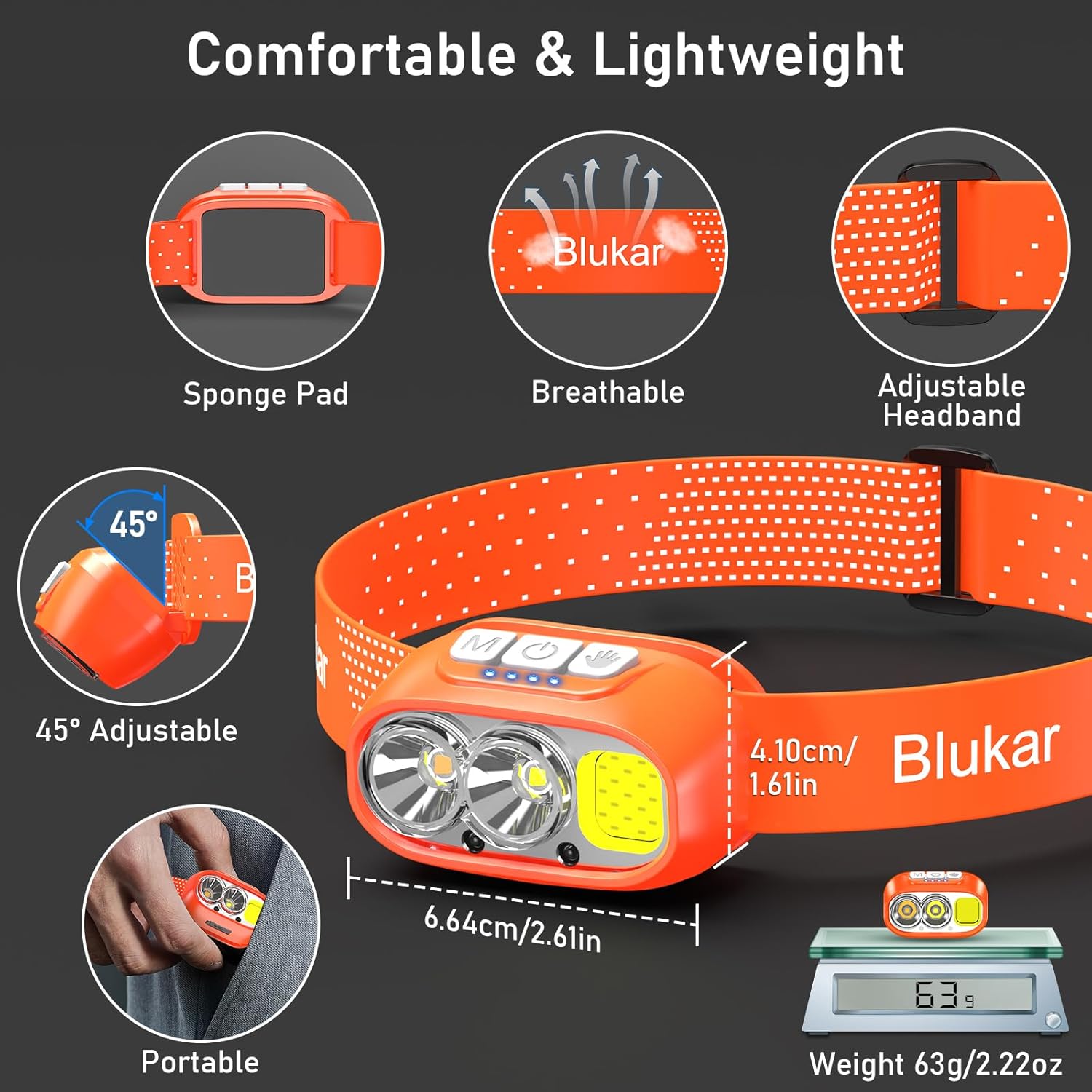
The elastic headband is adjustable to fit various head sizes. Adjust the length for a comfortable and secure fit. The headband is also removable and washable for hygiene.

Image: Details of the headlamp's comfortable and lightweight design, showing the adjustable headband, sponge pad, and 45-degree tilt capability.
3. Attaching to a Helmet (Optional)
Use the included 4 helmet clips to securely attach the headlamp to a helmet for a stable fit during activities.
ოპერაციული ინსტრუქციები
ღილაკის ფუნქციები

სურათი: თავსაფრის ახლო ხედიamp's top panel, highlighting the three independent control buttons: 'M' for Normal Mode, a hand icon for Sensor Mode, and a power icon for Power & Dimmer.
- Normal Mode Button (M): Short press to cycle through standard lighting modes.
- Sensor Mode Button (Hand Icon): Short press to activate motion sensor mode (green light indicates activation). Once active, wave your hand within 15cm to turn the light on/off.
- Power & Dimmer Button (Power Icon):
- Short press to turn the light on/off.
- Long press to adjust brightness steplessly (100%-30%).
- Features a memory function for the last used brightness and mode.
განათების რეჟიმები
თავიamp offers 12 lighting modes, accessible via the Normal Mode button and Sensor Mode button.

Image: Visual representation of the 12 lighting modes available, including various white light combinations, red light, and sensor modes. It also illustrates the stepless dimming function.
- Standard Modes (6): XPG White Light, XPG Warm Light, COB White Light, XPG+COB White Light, COB Red Light, COB Red Light Strobe.
- Sensor Modes (6): The same 6 modes as above, activated by the Sensor Mode button.
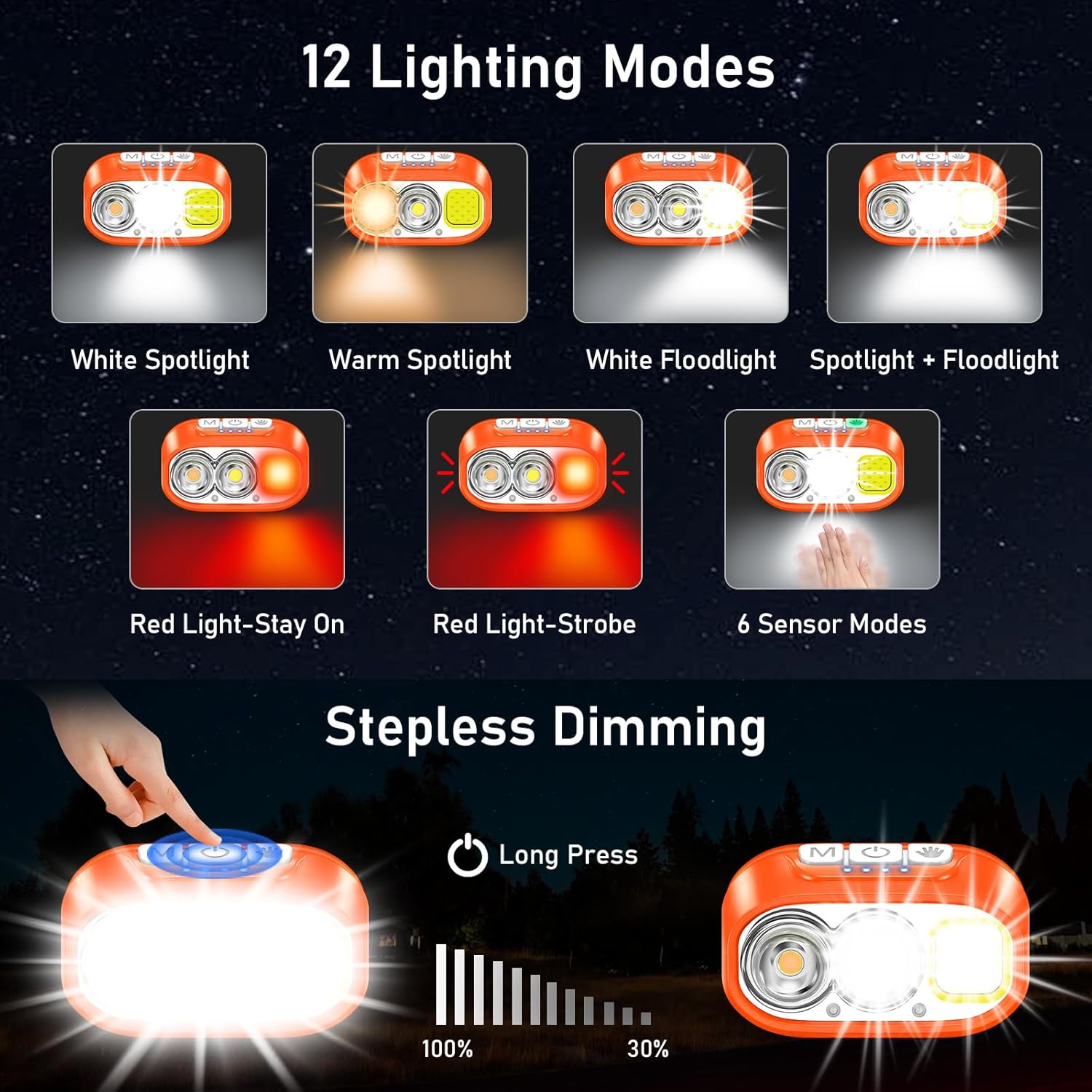
Image: Illustration of the three main light sources: White Light for general use, Warm Light for challenging weather conditions like fog or snow, and Red Light for specialized uses like night fishing or emergency signaling.
მოძრაობის სენსორის მოქმედება
To use the motion sensor, press the Sensor Mode button. A green indicator light will illuminate. Once active, simply wave your hand within 15cm (approximately 6 inches) in front of the headlamp to toggle the light on or off without touching the buttons.
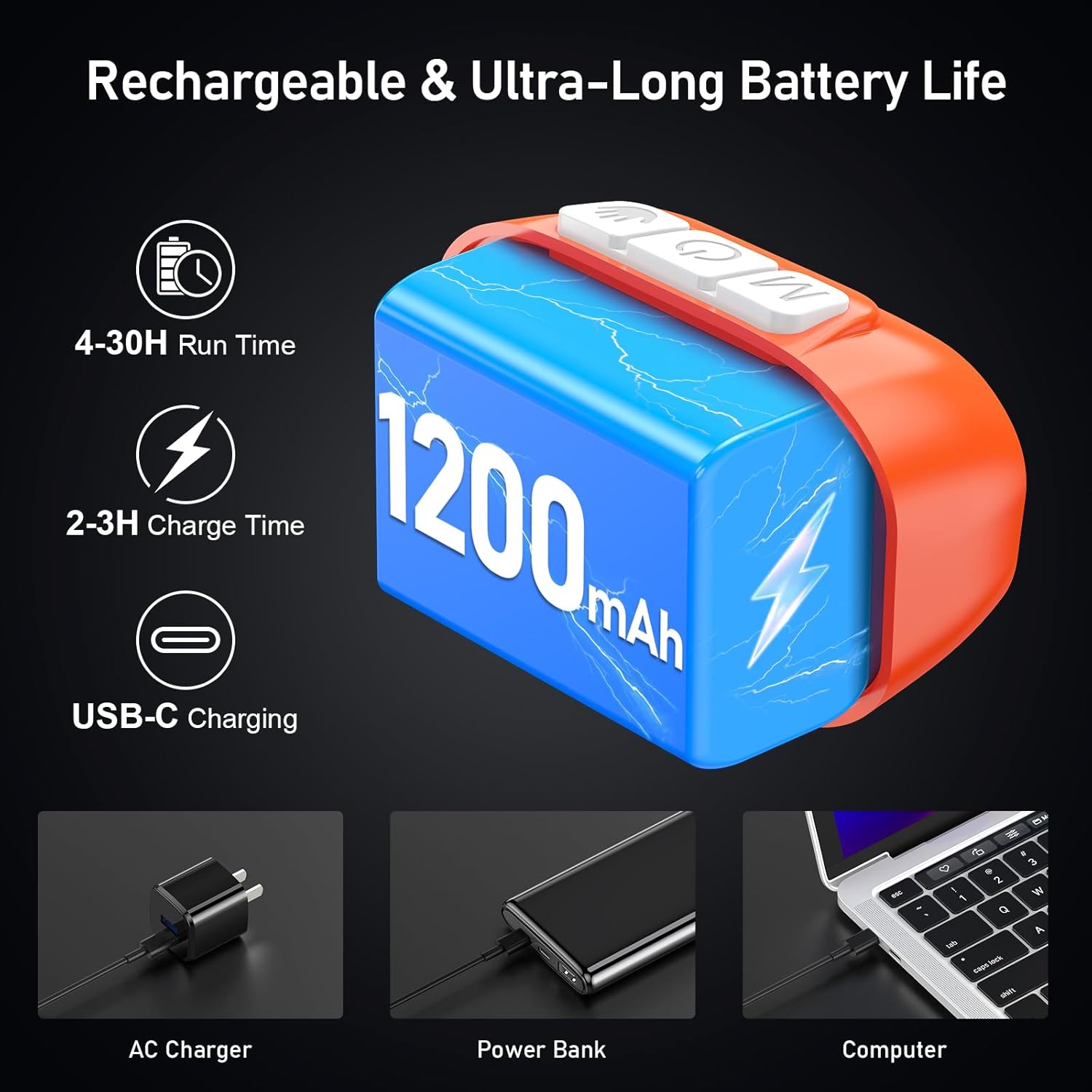
Image: A person demonstrating the motion sensor mode, turning the headlamp on and off with a hand wave while working on a car engine, highlighting the 15cm sensing distance.
სხივის კუთხის რეგულირება
თავიamp unit can be tilted up or down by 45° to direct the light precisely where needed.
სურათი: თავიamp unit is shown with an arrow indicating its 45-degree adjustable tilt capability.
მოვლა
- დასუფთავება: The elastic headband is removable and washable. Clean the headlamp სხეული რბილი, დamp ქსოვილი. არ გამოიყენოთ აბრაზიული გამწმენდები ან გამხსნელები.
- ბატარეის მოვლა: To prolong battery life, charge the headlamp regularly, even if not in frequent use. Avoid fully discharging the battery for extended periods.
- შენახვა: შეინახეთ თავიamp გრილ, მშრალ ადგილას მზის პირდაპირი სხივებისა და ექსტრემალური ტემპერატურისგან მოშორებით.
- წყლის წინააღმდეგობა: თავიamp is IPX5 waterproof, meaning it can resist water splashes. Do not submerge the headlamp წყალში.
სურათი: თავიamp is shown with water splashing over it, illustrating its IPX5 waterproof capability, which protects against water jets from any direction.
პრობლემების მოგვარება
| პრობლემა | შესაძლო მიზეზი | გამოსავალი |
|---|---|---|
| სათავეamp turns off unexpectedly in sensor mode. | Sensor reacting to unintended movement or objects. | Switch off the sensor mode if not needed, or ensure no objects are passing within 15cm of the sensor. |
| სათავეamp არ ირთვება | ბატარეა დაცლილია. | დატენეთ თავიamp fully using the provided USB-C cable. |
| სინათლის გამომუშავება სუსტია. | Low battery or dimming function activated. | Recharge the battery. Long press the Power & Dimmer button to increase brightness. |
| სათავეamp არ იტენება. | გაუმართავი კაბელი ან კვების წყარო. | Try a different USB-C cable or a different USB power source. Ensure the cable is securely connected. |
სპეციფიკაციები
| მოდელის ნომერი | K9129 |
| ბრენდი | ბლოკარი |
| მასალა | ABS |
| ფერი | ნარინჯისფერი |
| პროდუქტის ზომები | 2.61"D x 1.61"W x 1.38"H |
| ნივთის წონა | 84 გრამი (2.96 უნცია) |
| ბატარეის ტევადობა | 1200 mAh |
| ბატარეის ტიპი | ლითიუმის პოლიმერი |
| დატენვის დრო | 2-3 საათი |
| გაშვების დრო | Up to 4 hours (ultra-bright mode), up to 30 hours (soft light mode) |
| წყალგაუმტარი რეიტინგი | IPX5 |
| მოყვება კომპონენტები | USB კაბელი |
გარანტია და მხარდაჭერა
Blukar products are designed for reliability and performance. For any questions, technical support, or warranty inquiries, please contact Blukar customer service through the retailer where the product was purchased or visit the official Blukar webსაიტი.
გთხოვთ, შეინახოთ თქვენი შეძენის მტკიცებულება გარანტიის პრეტენზიებისთვის.


