1. შესავალი
მადლობა შენაძენისთვისasing the Moukey MAMP3 2.0 არხის სტერეო Amplifier. This manual provides essential information for the safe and efficient operation of your device. Please read it thoroughly before use and retain it for future reference.
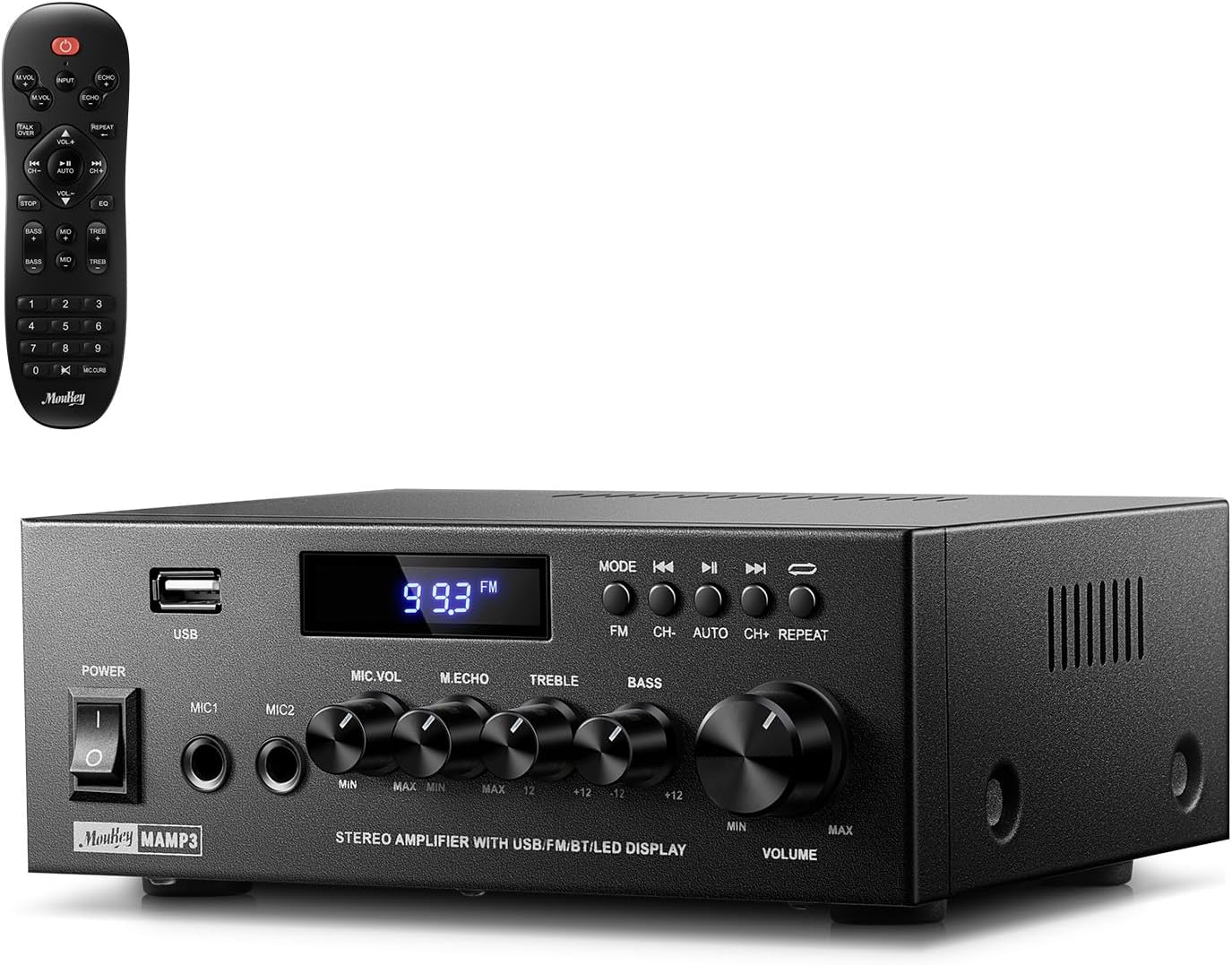
Image 1.1: The Moukey MAMP3 amplifier and its remote control.
2. უსაფრთხოების ინსტრუქციები
- ოპერაციის დაწყებამდე წაიკითხეთ ყველა ინსტრუქცია ampმაცოცხლებელი.
- შეინახეთ ampშეინახეთ მაცივარი წყლისგან, ტენიანობისგან და ექსტრემალური ტემპერატურისგან მოშორებით.
- Do not block ventilation openings. Ensure proper airflow around the unit.
- გამოიყენეთ მხოლოდ მოწყობილობასთან მიწოდებული კვების ადაპტერი.
- ნუ შეეცდებით მოწყობილობის დამოუკიდებლად შეკეთებას ან მოდიფიცირებას. ყველა სახის მომსახურება კვალიფიციურ პერსონალს მიანდეთ.
- Disconnect the power cord from the outlet if the unit will be unused for extended periods.
3. პროდუქტი დასრულდაview
3.1 ძირითადი მახასიათებლები
- 2.0 Channel Stereo Audio Output
- Bluetooth 5.3 for stable wireless connection
- Multiple Audio Inputs: RCA, USB, FM Radio, 2 Microphone Inputs
- Full-function Remote Control with EQ adjustments
- Customizable Treble, Midrange, and Bass controls
- Memory function for mode, volume, and EQ settings
- 300 Watts Peak Power Output
3.2 წინა პანელის კონტროლი და ინდიკატორები

სურათი 3.1: წინა პანელის განლაგება
- დენის შეცვლა: რთავს ან გამორთავს მოწყობილობას.
- MIC1/2: 6.35 მმ მიკროფონის შეყვანის ჯეკები.
- მიკროფონის ხმის ღილაკი: არეგულირებს დაკავშირებული მიკროფონების ხმის სიმძლავრეს.
- ექო ღილაკი: Adjusts the echo effect for microphones.
- სამების სახელური: არეგულირებს მაღალი სიხშირის აუდიო გამომავალს.
- ბასის ღილაკი: არეგულირებს დაბალი სიხშირის აუდიო გამომავალს.
- მუსიკის ხმის ღილაკი: Main volume control for all audio sources.
- USB სლოტი: აუდიოს დასაკრავად USB მეხსიერების მოწყობილობების დასაკავშირებლად.
- LED ეკრანი: აჩვენებს მიმდინარე რეჟიმს, ტრეკის ინფორმაციას ან FM სიხშირეს.
- MODE ღილაკი: Switches between input sources (BT, Aux, CD, USB, FM).
- წინა ღილაკი: Skips to the previous track (USB/BT) or FM station.
- დაკვრის/პაუზის ღილაკი: Plays or pauses audio (USB/BT).
- შემდეგი ღილაკი: Skips to the next track (USB/BT) or FM station.
- გამეორების ღილაკი: Repeats current track or all tracks (USB).
3.3 უკანა პანელის კავშირები

Image 3.2: Rear Panel Connections
- FM ანტენის შეყვანა: რადიოს მისაღებად შეაერთეთ თანდართული FM ანტენა.
- AUDIO INPUT (RCA): Connect external audio sources like CD/DVD players using RCA cables.
- AUDIO OUTPUT (Speaker Terminals): Connect passive speakers. Ensure correct polarity (+ to + and - to -).
- POWER AC INPUT: შეუერთეთ კვების ბლოკი AC– ს გამოსავალს.
4. დაყენება
4.1 შეფუთვა
ფრთხილად ამოიღეთ amplifier and all accessories from the packaging. Verify that all items listed in the 'What's in the Box' section are present.
4.2 დინამიკების დამაკავშირებელი
მAMP3 amplifier supports two passive speakers. Connect your speakers to the აუდიო გამომავალი terminals on the rear panel. Ensure that the positive (+) terminal on the amplifier connects to the positive (+) terminal on your speaker, and the negative (-) terminal on the amplifier connects to the negative (-) terminal on your speaker. Incorrect polarity can affect sound quality.

Image 4.1: Speaker Connection Diagram
4.3 აუდიო წყაროების დაკავშირება
The amplifier გთავაზობთ შეყვანის მრავალ ვარიანტს:
- RCA შეყვანა: Use RCA cables to connect devices such as CD players, DVD players, or other audio equipment to the აუდიო შეყვანა ჯეკები უკანა პანელზე.
- USB შეყვანა: ჩადეთ USB ფლეშ დრაივი მასში USB სლოტი on the front panel for direct audio playback.
- Bluetooth: Pair your Bluetooth-enabled device (smartphone, tablet, laptop) wirelessly.
- FM რადიო: Connect the included FM antenna to the FM ანტენის შეყვანა on the rear panel for radio reception. Extend the antenna for optimal signal.
- მიკროფონის შეყვანა: შეაერთეთ ორამდე მიკროფონი MIC1/2 jacks on the front panel for karaoke or public address.

Image 4.2: Available Signal Inputs
4.4 დენის კავშირი
შეაერთეთ კვების ბლოკი POWER AC INPUT on the rear panel and then plug it into a standard AC power outlet.
5. საოპერაციო ინსტრუქციები
5.1 ჩართვა/გამორთვა
დააჭირეთ დენის გადამრთველი წინა პანელზე ჩასართავად amplifier on or off. The LED display will illuminate when the unit is powered on.
5.2 შეყვანის შერჩევა
დააჭირეთ MODE button on the front panel or the remote control to cycle through the available input sources: Bluetooth (BT), Auxiliary (Aux), CD, USB, and FM radio. The selected mode will be shown on the LED display.
5.3 ხმის კონტროლი
დიდი ზომის შემობრუნება Music Volume Knob on the front panel clockwise to increase volume and counter-clockwise to decrease it. Volume can also be adjusted using the remote control.
5.4 Equalizer (EQ) Adjustment
Adjust the sound characteristics using the ტრიპლეტი და ბას კნოპი on the front panel. The remote control also provides dedicated buttons for Treble, Midrange, and Bass adjustments. The amplifier will automatically save your preferred EQ settings.
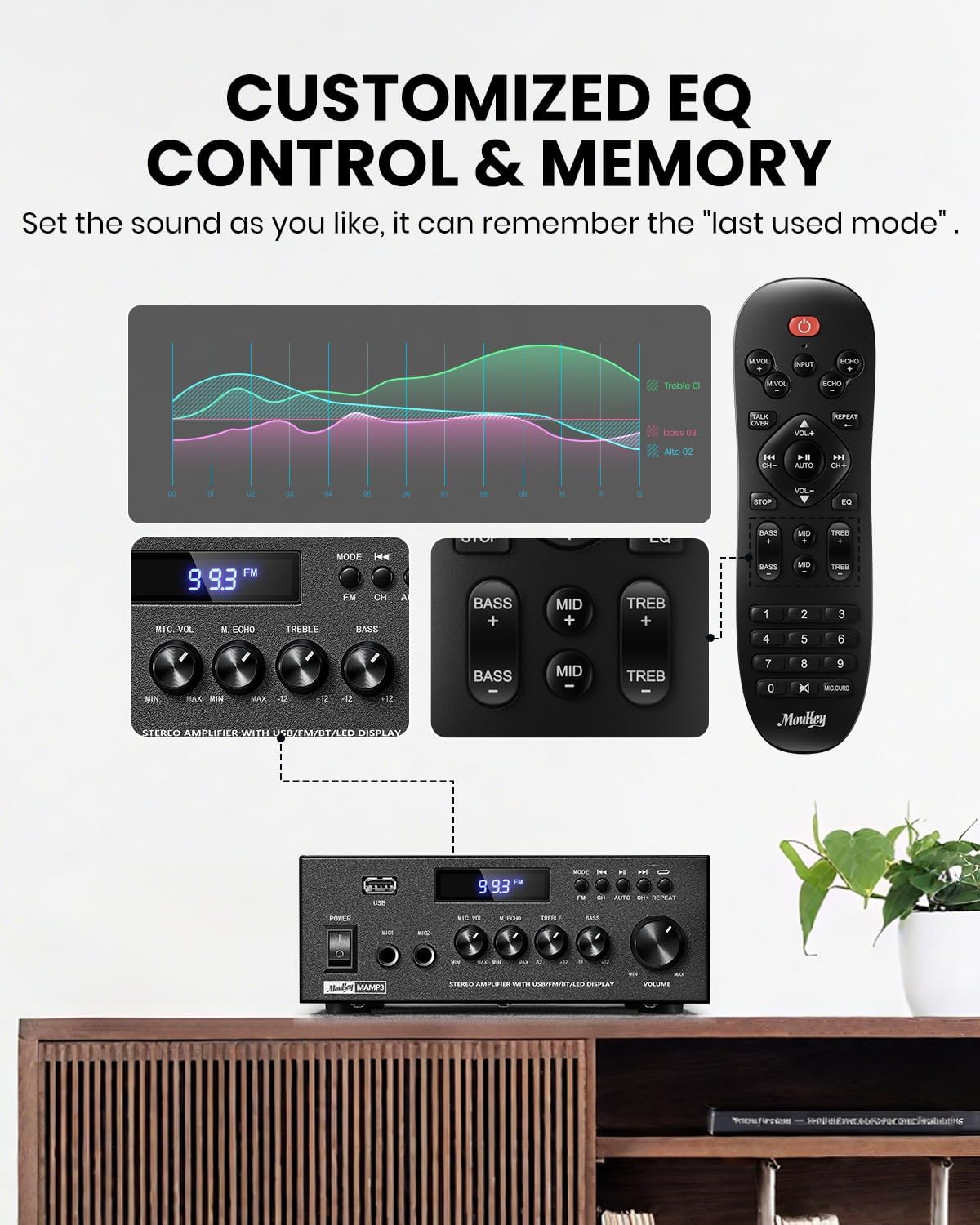
Image 5.1: Customizable EQ Control
5.5 მიკროფონის მართვა
If microphones are connected, use the მიკროფონის ხმის ღილაკი to adjust their output level and the ექო ღილაკი to add an echo effect. The remote control also features a 'Talkover' function.
5.6 Bluetooth ოპერაცია
- დააჭირეთ MODE button until "BT" appears on the LED display. The amplifier is now in Bluetooth pairing mode.
- On your mobile device, enable Bluetooth and search for "Moukey MAMP3".
- Select "Moukey MAMP3" to pair. Once connected, you will hear a confirmation tone.
- ახლა თქვენ შეგიძლიათ თქვენი მოწყობილობიდან აუდიოს დაკვრა შემდეგი გზით: ampმაცოცხლებელი.

Image 5.2: Bluetooth Pairing
5.7 FM რადიოს მუშაობა
- დააჭირეთ MODE ღილაკს დააჭირეთ მანამ, სანამ LED ეკრანზე „FM“ არ გამოჩნდება.
- ავტომატური სკანირება: Press the "AUTO" button on the remote to automatically scan and save available FM stations.
- სახელმძღვანელო რეგულირება: Use the number pad on the remote control to directly enter the desired FM frequency (e.g., for 101.1 MHz, enter 1011).
- გამოიყენეთ წინა და შემდეგი buttons to navigate between saved stations or fine-tune frequencies.
5.8 USB-ით დაკვრა
ჩადეთ USB ფლეშ დრაივი, რომელიც შეიცავს MP3 ან WAV აუდიოს fileს შევიდა USB სლოტი. The amplifier will automatically switch to USB mode and begin playback. Use the წინა, დაკვრა/პაუზა, და შემდეგი buttons to control playback. The გაიმეორეთ button allows you to repeat the current track or all tracks.
5.9 დისტანციური მართვა
The included full-function remote control allows for convenient operation from a distance. It provides control over input selection, volume, EQ settings (treble, midrange, bass), microphone echo, and talkover functions across all input modes.

Image 5.3: Upgraded Remote Control Functionality
6. მოვლა
- დასუფთავება: გამოიყენეთ რბილი, მშრალი ქსოვილი გარედან გასაწმენდად ampარ გამოიყენოთ თხევადი საწმენდი საშუალებები ან გამხსნელები.
- ვენტილაცია: Ensure that the ventilation openings are free from dust and debris to prevent overheating.
- შენახვა: ხანგრძლივი პერიოდის განმავლობაში არ გამოყენების შემთხვევაში, შეინახეთ ampშეინახეთ გამაგრილებელი გრილ, მშრალ ადგილას, მოარიდეთ მზის პირდაპირ სხივებს და ექსტრემალურ ტემპერატურას.
7. Დიაგნოსტიკა
| პრობლემა | შესაძლო მიზეზი | გამოსავალი |
|---|---|---|
| არავითარი ძალა | დენის კაბელი არ არის შეერთებული; დენის სოკეტი გაუმართავია; დენის ჩამრთველი გამორთულია. | Ensure power cord is securely connected; Test outlet with another device; Turn power switch on. |
| ხმის გამომავალი არ არის | Volume too low; Incorrect input selected; Speaker wires loose/incorrectly connected; Audio source issue. | Increase volume; Select correct input mode; Check speaker wire connections and polarity; Verify audio source is playing. |
| Bluetooth არ უკავშირდება | Amplifier not in BT mode; Device too far; Device already connected to another unit; Interference. | გადართვა amplifier to BT mode; Move device closer; Disconnect from other devices; Reduce interference. |
| ცუდი FM მიღება | ანტენა არ არის მიერთებული ან ცუდად არის განლაგებული; სუსტი სიგნალი. | Connect and adjust FM antenna position; Try auto-scan or manual tuning for stronger stations. |
| USB-ით დაკვრის პრობლემები | მხარდაუჭერელია file ფორმატირება; USB დისკი სწორად არ არის ფორმატირებული; USB დისკის ტევადობა ძალიან დიდია. | უზრუნველყოს files are MP3/WAV; Format USB drive to FAT32; Use USB drives 32GB or less. |
8. სპეციფიკაციები
| ფუნქცია | სპეციფიკაცია |
|---|---|
| მოდელის ნომერი | MAMP3 |
| გამომავალი სიმძლავრე | 300 ვატი (პიკი) |
| არხები | 2.0 სტერეო |
| დაკავშირების ტექნოლოგია | Auxiliary, Bluetooth 5.3, FM, USB |
| თავსებადი მოწყობილობები | Smartphone, Tablet, Laptop, Computer, Speakers, CD/DVD Player |
| კონექტორის ტიპი | RCA, USB, 2 Mic input |
| აუდიო გამოყვანის რეჟიმი | სტერეო |
| პროდუქტის ზომები | 6.1" სიღრმე x 7.1" სიგანე x 2.8" სიმაღლე (15.5 x 18.0 x 7.1 სმ) |
| ნივთის წონა | 2.14 ფუნტი (0.97 კგ) |
| ფერი | შავი |
8.1 რა არის ყუთში
- მუკი მAMP3 Ampუფრო ცოცხალი
- დისტანციური მართვის პულტი
- FM ანტენა
- მომხმარებლის სახელმძღვანელო
- დენის ადაპტერი
9. გარანტია და მხარდაჭერა
9.1 ინფორმაცია გარანტიის შესახებ
Moukey products are designed and manufactured to the highest quality standards. This product is covered by a limited warranty against defects in materials and workmanship. Please refer to the warranty card included with your purchase for specific terms and conditions, or visit the official Moukey webსაიტი გარანტიის შესახებ დეტალური ინფორმაციისთვის.
9.2 მომხმარებელთა მხარდაჭერა
If you encounter any issues or have questions regarding your Moukey MAMP3 amplifier, please contact our customer support team. You can find contact information on the official Moukey webსაიტის ან თქვენი შესყიდვების პლატფორმის მეშვეობით.
Webსაიტი: www.moukey.com (მაგampბმული, გთხოვთ, იხილოთ პროდუქტის ფაქტობრივი დოკუმენტაცია)
ელფოსტა: support@moukey.com (მაგampელ. ფოსტა, გთხოვთ, იხილოთ პროდუქტის ფაქტობრივი დოკუმენტაცია)


