შესავალი
Welcome to the OUKITEL C3 Cell Phone user manual. This guide provides essential information to help you set up, operate, and maintain your new smartphone. Please read this manual thoroughly to ensure proper usage and to maximize your device's potential.
რა არის ყუთში
Upon opening your OUKITEL C3 package, you should find the following items:
- 1x OUKITEL C3 მობილური ტელეფონი
- 1x 10 ვატიანი დამტენი
- 1x მონაცემთა კაბელი
- 1x ტელეფონის ქეისი
- 1x მომხმარებლის სახელმძღვანელო

Image: Contents of the OUKITEL C3 package, including the phone, charger, data cable, phone case, and manual.
Video: An unboxing demonstration of the OUKITEL C3 Cell Phone, showing the phone and its included accessories.
პროდუქტი დასრულდაview
The OUKITEL C3 is a 4G Android smartphone featuring a 6.52-inch waterdrop screen, a 5000mAh battery, and a dual-camera system. It is designed for everyday communication and multimedia use.
ძირითადი მახასიათებლები:
- ჩვენება: 6.52-inch HD Waterdrop Screen (540x1200 resolution, 450nit brightness)
- პროცესორი: Unisoc T310
- მეხსიერება: 16GB RAM (4GB fixed + 12GB virtual) + 64GB ROM, expandable up to 1TB via TF card
- ბატარეა: 5000mAh with 10W fast charging and OTG reverse charging support
- კამერები: 13 მეგაპიქსელიანი მთავარი კამერა, 5 მეგაპიქსელიანი წინა კამერა
- ოპერაციული სისტემა: Android 14
- დაკავშირება: 4G Dual SIM, Bluetooth 5.0, Wi-Fi, GPS, GLONASS, Beidou, Galileo
- უსაფრთხოება: Face ID
- ზომები: სისქე 9.3 მმ, წონა 198 გ
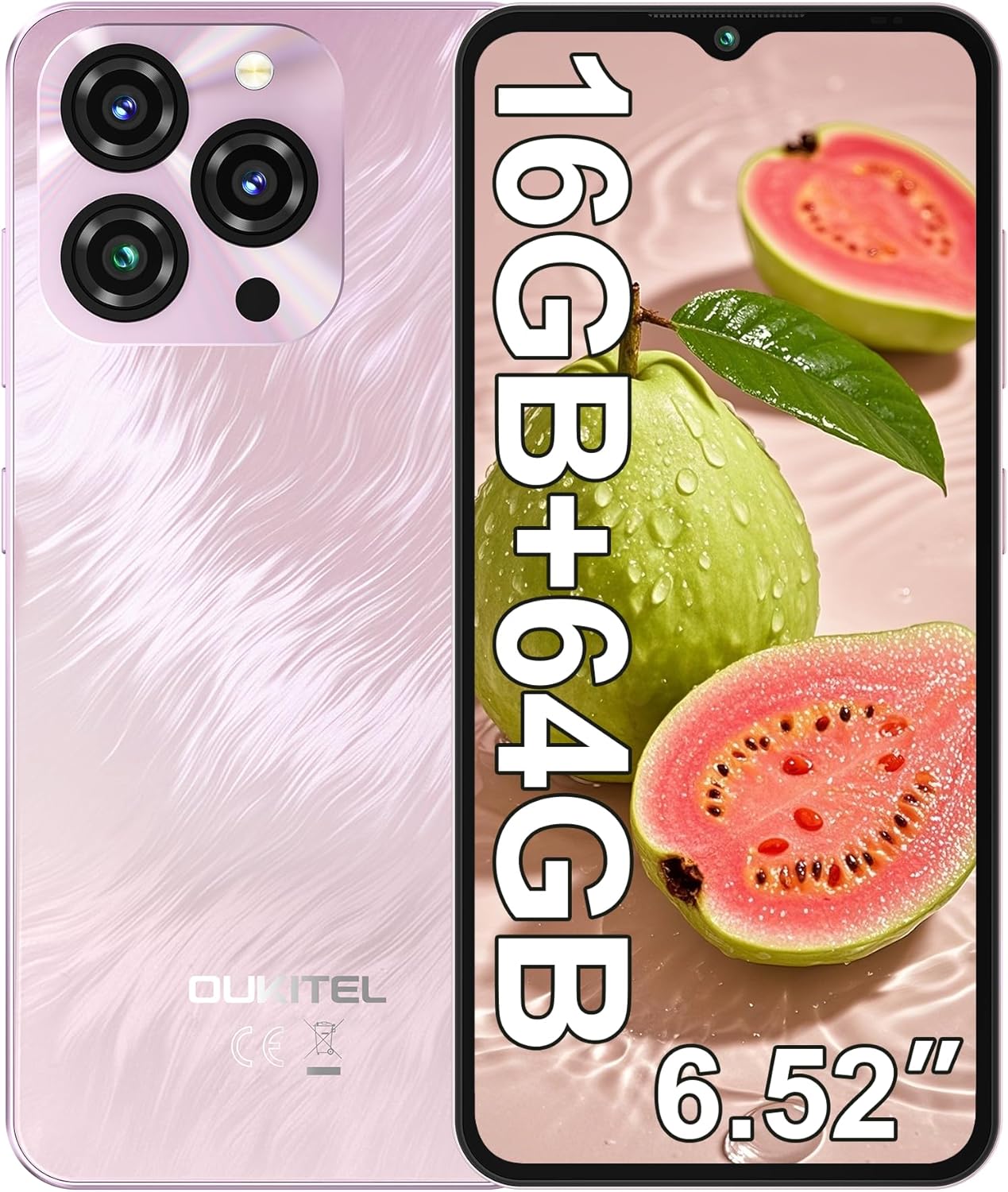
Image: The OUKITEL C3 Cell Phone, showcasinმისი დიზაინი და კამერის მოდული.

Image: Close-up of the OUKITEL C3's 6.52-inch waterdrop display, highlighting its visual quality.

Image: Visual representation of the OUKITEL C3's slim 9.3mm thickness and 198g weight.
დაყენება
1. SIM ბარათის და TF ბარათის ინსტალაცია
OUKITEL C3 მხარს უჭერს ორ Nano SIM ბარათს ან ერთ Nano SIM ბარათს და ერთ TF (microSD) ბარათს გაფართოებული შენახვისთვის.
- იპოვეთ SIM ბარათის უჯრა ტელეფონის გვერდზე.
- Insert the SIM ejector tool (included in the box) into the small hole next to the tray and push gently until the tray pops out.
- Place your Nano SIM card(s) and/or TF card into the designated slots on the tray. Ensure the gold contacts face downwards and the cards are correctly oriented.
- Carefully reinsert the tray into the phone until it is flush with the device's side.

Image: Diagram showing the SIM card tray, 3.5mm audio jack, and USB-C port on the OUKITEL C3.
2. პირველადი ჩართვა და დაყენება
- Press and hold the Power button (located on the right side of the phone) until the OUKITEL logo appears.
- მიჰყევით ეკრანზე მოცემულ მითითებებს ენის ასარჩევად, Wi-Fi ქსელთან დასაკავშირებლად და თქვენი Google ანგარიშის დასაყენებლად.
- You will also be guided through setting up security features like Face ID during this process.
3. მოწყობილობის დატენვა
Before first use, it is recommended to fully charge your OUKITEL C3.
- Connect the USB data cable to the 10W charger.
- შეაერთეთ დამტენი დენის განყოფილებაში.
- კაბელის USB-C ბოლო შეაერთეთ ტელეფონის ქვედა ნაწილში არსებულ დამტენ პორტთან.
- ბატარეის ხატულა ეკრანზე მიუთითებს დატენვის სტატუსზე.

Image: Illustration of the OUKITEL C3's 5000mAh battery and charging process.
ოპერაციული ინსტრუქციები
1. ძირითადი ნავიგაცია (Android 14)
Your OUKITEL C3 runs on Android 14, offering an intuitive user experience.
- საწყისი ეკრანი: მთავარ ეკრანებს შორის ნავიგაციისთვის გადაფურცლეთ მარცხნივ ან მარჯვნივ. ვიჯეტების, ფონების და პარამეტრების პერსონალიზებისთვის შეეხეთ და გააჩერეთ ცარიელ ადგილას.
- აპლიკაციის უჯრა: ყველა დაინსტალირებულ აპლიკაციაზე წვდომისთვის გადაფურცლეთ ეკრანის ქვედა კიდიდან ზემოთ.
- შეტყობინებები და სწრაფი პარამეტრები: გადაფურცლეთ ქვემოთ ეკრანის ზემოდან view შეტყობინებები და სწრაფი პარამეტრების გადართვა (Wi-Fi, Bluetooth და ა.შ.).
- ბოლო აპლიკაციები: ბოლო დროს გამოყენებული აპლიკაციების სანახავად გადაფურცლეთ ქვემოდან ზემოთ და გააჩერეთ (ან შეეხეთ კვადრატულ ნავიგაციის ღილაკს, თუ ის ჩართულია).

Image: The OUKITEL C3 displaying the Android 14 operating system interface with various applications.
2. კამერის გამოყენება
The OUKITEL C3 is equipped with a 13MP main camera and a 5MP front camera.
- გახსენით „კამერის“ აპლიკაცია თქვენი მთავარი ეკრანიდან ან აპლიკაციების უჯრიდან.
- Switch between the front and rear cameras using the camera switch icon.
- ფოტოს გადასაღებად შეეხეთ ჩამკეტის ღილაკს.
- Explore different modes like Video, Portrait, or Panorama if available in the camera app.

Image: Visual detailing of the OUKITEL C3's 13MP main camera and 5MP front camera capabilities.
3. დაკავშირება
- Wi-Fi: ხელმისაწვდომ ქსელებთან დასაკავშირებლად გადადით პარამეტრებში > ქსელი და ინტერნეტი > Wi-Fi.
- Bluetooth: Bluetooth მოწყობილობებთან, როგორიცაა ყურსასმენები ან დინამიკები, დასაწყვილებლად გადადით პარამეტრებში > დაკავშირებული მოწყობილობები > Bluetooth.
- GPS: Location services are enabled by default. You can manage them in Settings > Location. The phone supports GPS, GLONASS, Beidou, and Galileo for accurate positioning.
- OTG: The OUKITEL C3 supports USB On-The-Go (OTG), allowing you to connect USB devices like flash drives or keyboards using an OTG adapter (sold separately).
4. სახის ამოცნობა
Face ID provides a convenient and secure way to unlock your phone.
- Go to Settings > Security & privacy > Device unlock > Face unlock.
- Follow the on-screen instructions to register your face. Ensure good lighting and hold the phone at eye level.
- რეგისტრაციის შემდეგ, ტელეფონის განბლოკვა შეგიძლიათ უბრალოდ წინა კამერის დათვალიერებით.
მოვლა
1. ბატარეის მოვლა
- მოერიდეთ ტელეფონის ექსტრემალურ ტემპერატურაზე ზემოქმედებას.
- ოპტიმალური დატენვისა და უსაფრთხოებისთვის გამოიყენეთ მხოლოდ მოწოდებული დამტენი და კაბელი.
- ხანგრძლივი შენახვისთვის, დატენეთ ბატარეა დაახლოებით 50%-მდე და გამორთეთ მოწყობილობა.
2. პროგრამული უზრუნველყოფის განახლებები
რეგულარულად შეამოწმეთ და დააინსტალირეთ პროგრამული უზრუნველყოფის განახლებები, რათა დარწმუნდეთ, რომ თქვენს ტელეფონს აქვს უახლესი ფუნქციები, უსაფრთხოების პატჩები და მუშაობის გაუმჯობესებები.
- გადადით პარამეტრები > სისტემა > სისტემის განახლება.
- Tap "Check for update" and follow the instructions if an update is available.
3. თქვენი მოწყობილობის გაწმენდა
- ტელეფონის ეკრანისა და უკანა მხარის გასაწმენდად გამოიყენეთ რბილი, უბუშტო ქსოვილი.
- მოერიდეთ უხეში ქიმიკატების ან აბრაზიული მასალების გამოყენებას.
- ჯიუტი ლაქებისთვის, ოდნავ შეიზილეთampქსოვილი გაწმინდეთ წყლით ან ელექტრონიკისთვის განკუთვნილი ეკრანის საწმენდი საშუალებით.
პრობლემების მოგვარება
| პრობლემა | შესაძლო გამოსავალი |
|---|---|
| ტელეფონი არ ირთვება. | დარწმუნდით, რომ აკუმულატორი დატენილია. შეაერთეთ დამტენი და დაელოდეთ რამდენიმე წუთი, სანამ ხელახლა ჩართავთ. |
| Cannot make or receive calls/texts. |
|
| Apps are slow or freezing. |
|
| ბატარეა სწრაფად იშლება. |
|
| Face ID არ მუშაობს. |
|

Image: Important information regarding OUKITEL C3's carrier compatibility, specifically T-Mobile support.
სპეციფიკაციები
| ფუნქცია | დეტალი |
|---|---|
| მოდელის სახელი | ოუკიტელი C3 |
| ოპერაციული სისტემა | Android 14 |
| ჩვენება | 6.52 Inches HD Waterdrop Screen, 540 x 1200 Resolution, 60 Hz Refresh Rate |
| ოპერატიული მეხსიერება | 16 GB (4GB fixed + 12GB virtual) |
| შიდა მეხსიერება (ROM) | 64 GB |
| გაფართოებადი საცავი | 1 ტბ-მდე TF ბარათით |
| მთავარი კამერა | 13 დეპუტატი |
| წინა კამერა | 5 დეპუტატი |
| ბატარეის ტევადობა | 5000 mAh |
| დამუხტვა | 10W Fast Charging, Supports OTG Reverse Charging |
| დაკავშირება | 4G Cellular Technology, Bluetooth 5.0, Wi-Fi |
| ნავიგაცია | GPS, GLONASS, ბეიდუ, გალილეო |
| აუდიო ჯეკი | 3.5 მმ |
| SIM ბარათის ტიპი | ორმაგი ნანო SIM ბარათი |
| ზომები | 9.3 მმ სისქე |
| წონა | 198 გრამი (დაახლოებით 14.9 უნცია) |
| Supported Carrier | T-Mobile (Does not support Metro PCS, AT&T, Verizon) |
ვიდეო: ოვერview of the OUKITEL C3 Cell Phone's main features and specifications.
გარანტია და მხარდაჭერა
For warranty information and technical support, please refer to the warranty card included in your product package or visit the official OUKITEL webსაიტი. შეინახეთ შეძენის დამადასტურებელი საბუთი გარანტიის მოთხოვნისთვის.
საკონტაქტო ინფორმაცია: Please refer to the contact details provided in your product documentation or on the OUKITEL official website for customer service and support.


