1. პროდუქტი დასრულდაview
The bmani T16 Wireless Earbuds are designed for active lifestyles, offering an ultra-long 80-hour playtime with their dual LED display charging case. They feature immersive stereo sound with 10mm dynamic drivers, clear calls with dual microphones, and seamless Bluetooth connectivity. The adjustable over-ear hooks ensure a secure and comfortable fit for various activities. Easy button controls provide intuitive management of music and calls.
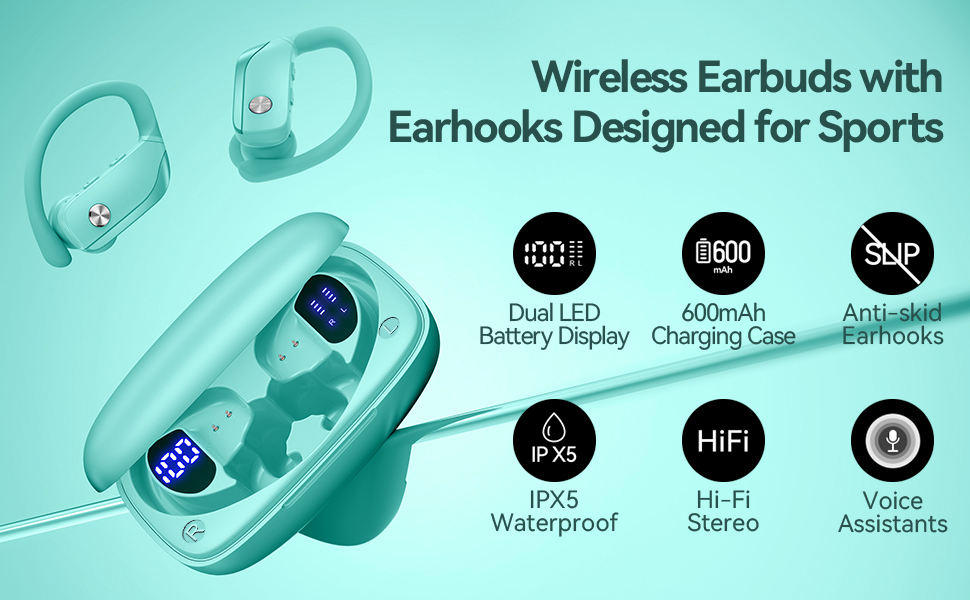
Image: bmani T16 Wireless Earbuds in their charging case, highlighting 80 hours of total playtime and the dual LED battery display.
2. რა არის ყუთში
- bmani T16 Wireless Earbuds (Left and Right)
- დამტენი ქეისი LED დისპლეით
- Eartips (Small, Medium, Large sizes)
- Type-C დატენვის კაბელი
- მომხმარებლის სახელმძღვანელო (ეს დოკუმენტი)

Image: The bmani T16 Wireless Earbuds, charging case, and various eartip sizes.
3. დაყენება და დაწყვილება
The bmani T16 earbuds feature one-step pairing for quick and easy connection to your devices.
- საწყისი დაწყვილება: გახსენით დამტენი ქეისი. ყურსასმენები ავტომატურად ჩაირთვება და დაწყვილების რეჟიმში გადავა.
- თქვენს სმარტფონზე, პლანშეტზე ან სხვა Bluetooth-თან თავსებად მოწყობილობაზე გადადით Bluetooth-ის პარამეტრებში.
- ძიება available devices and select "T16" from the list.
- დაკავშირების შემდეგ მოისმენთ ხმოვან მოთხოვნას, რომელიც ადასტურებს წარმატებული დაწყვილებას.
- ავტომატური ხელახალი დაკავშირება: After the initial pairing, the earbuds will automatically reconnect to the last paired device when removed from the charging case.

Image: Illustration of the one-step pairing process for the bmani T16 earbuds with a smartphone and other compatible devices.
Video: An official seller video demonstrating the features and pairing process of the bmani T16 Wireless Earbuds.
4. ტარების ინსტრუქცია
For optimal sound quality and a secure fit, follow these steps to wear your bmani T16 earbuds:
- Choose the correct eartip size (S, M, L) that best fits your ear canal.
- Place the flexible ear hook over the back of your ear.
- ნაზად ჩადეთ ყურსასმენი ყურის არხში.
- Adjust the earbud and hook by twisting until you achieve a comfortable and secure fit. The ear hooks are designed to adapt to different ear shapes, minimizing slippage during movement.

Image: Visual guide demonstrating how to correctly position the bmani T16 earbuds with their flexible ear hooks for a secure fit.
5. ოპერაციული კონტროლი
The bmani T16 earbuds feature intuitive physical buttons for easy control of your audio and calls.
- დაკვრა/პაუზა: ერთხელ დააწკაპუნეთ ნებისმიერ ყურსასმენზე.
- შემდეგი სიმღერა: Quick double-click on the Right (R) earbud.
- წინა ჩანაწერი: Quick double-click on the Left (L) earbud.
- მოცულობა: ყურსასმენზე დააჭირეთ ღილაკს „+“.
- Ხმის დაწევა: ყურსასმენზე დააჭირეთ ღილაკს „-“.
- ზარის პასუხი/დასრულება: ერთხელ დააწკაპუნეთ ნებისმიერ ყურსასმენზე.
- ზარის უარყოფა: Hold either earbud button.
- ხმოვანი ასისტენტის (Siri/Google Assistant) გააქტიურება: Quick triple-click on either earbud.
- ჩართვა/გამორთვა: Hold the button on either earbud.
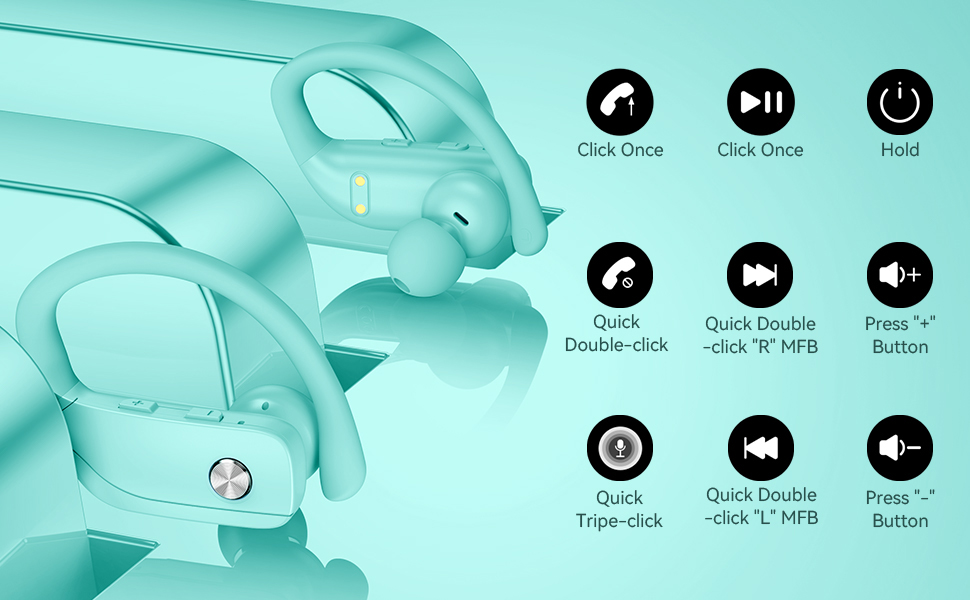
Image: Detailed diagram showing the various button controls on the bmani T16 earbuds for managing audio playback, calls, and voice assistant.
6. დამუხტვა
The bmani T16 earbuds and charging case provide an impressive 80 hours of total playtime.
- ყურსასმენის დატენვა: Place the earbuds back into the charging case. The LED indicators on the case will show the charging status of each earbud. Each earbud offers up to 8 hours of playtime per charge.
- კორპუსის დატენვა: Connect the provided Type-C charging cable to the charging port on the case and to a USB power source. The digital display on the left side of the case will show the remaining power percentage დატენვის შემთხვევაში.
- The charging case can recharge the earbuds multiple times, extending total usage to 80 hours.
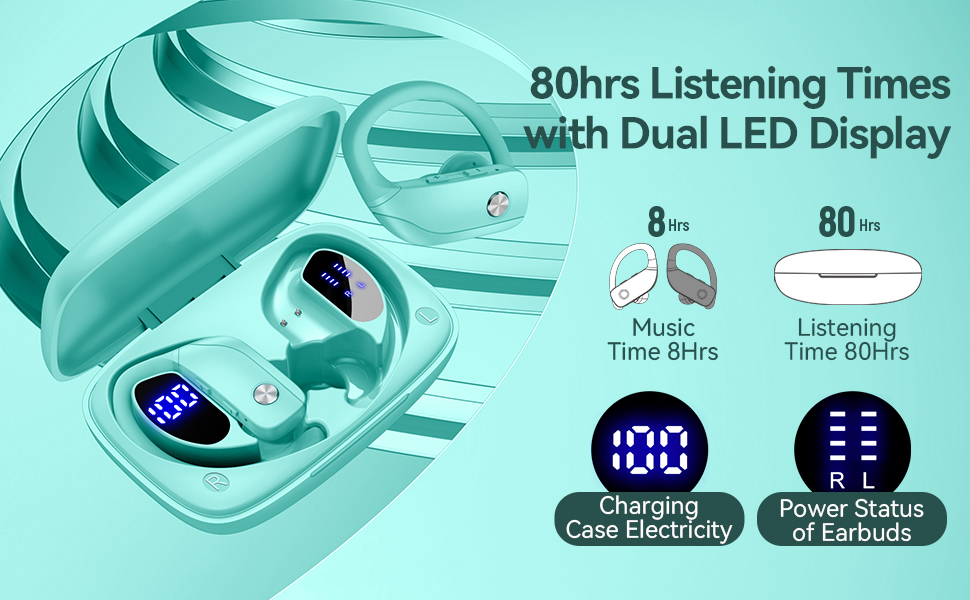
Image: The bmani T16 charging case with its dual LED digital display, indicating the battery percentage of the case and the charging status of each earbud.
ვიდეო: ოფიციალური გამყიდველის ვიდეო ჩვენებაasing the 48-hour playback (note: product features state 80H) and LED display of the bmani T16 Sport Earphones.
7. მოვლა
- Regularly clean the earbuds and charging contacts with a soft, dry cloth to prevent dust and debris buildup.
- მოერიდეთ ყურსასმენების ექსტრემალურ ტემპერატურაზე ან მზის პირდაპირ სხივებზე ხანგრძლივი პერიოდის განმავლობაში ყოფნას.
- ყურსასმენები, როდესაც არ იყენებთ, დამტენ ქეისში შეინახეთ, რათა დაიცვათ ისინი და დატენილი იყოს.
- The earbuds are sweat-resistant and dust-resistant, but avoid submerging them in water.
8. Დიაგნოსტიკა
- ყურსასმენები არ წყვილდება: Ensure both earbuds are removed from the case and are powered on. Turn off Bluetooth on your device and turn it back on. If issues persist, try resetting the earbuds (refer to the full user manual for specific reset instructions).
- ხმა არ არის: Check the volume level on both your device and the earbuds. Ensure the earbuds are properly connected to your device via Bluetooth.
- დატენვის პრობლემები: დარწმუნდით, რომ დამტენი კაბელი საიმედოდ არის დაკავშირებული როგორც ქეისთან, ასევე კვების წყაროსთან. დარწმუნდით, რომ ყურსასმენებზე და ქეისის შიგნით დამტენი კონტაქტები სუფთაა და ნარჩენებისგან თავისუფალი.
- არასტაბილური კავშირი: Ensure your device is within the Bluetooth range (approximately 33 feet/10 meters) and there are no significant obstacles between the earbuds and your device.
9. სპეციფიკაციები
| მოდელის სახელი | T16 |
| დაკავშირების ტექნოლოგია | უსადენო (Bluetooth 5.0) |
| სათამაშო დრო (ყურსასმენები) | 8 საათამდე დატენვისთვის |
| თამაშის საერთო დრო (ქეისით) | 80 საათამდე |
| აუდიო დრაივერის ტიპი | 10 მმ დინამიური დრაივერი |
| ხმაურის კონტროლის ფუნქციები | Noise Cancellation (Dual Mics) |
| წყლის წინააღმდეგობის დონე | Sweat-resistant and Dust-resistant |
| კონტროლის მეთოდი | ღილაკების კონტროლი |
| ყურის განთავსება | ყურზე |
| ნივთის წონა | 2 უნცია |
10. გარანტია და მხარდაჭერა
bmani offers a lifetime warranty for permanent replacement of damaged, defective, upgraded, or lost products. Please refer to the warranty card included in your package for activation details and terms. For further assistance, please contact bmani customer support.


