უსაფრთხოების მნიშვნელოვანი ინფორმაცია
- წაიკითხეთ და გაითვალისწინეთ ეს ინსტრუქციები.
- არ გამოიყენოთ ეს პროდუქტი წყალთან ახლოს.
- გაწმინდეთ მხოლოდ მშრალი ქსოვილით.
- შეამოწმეთ ტtagთქვენი ადგილობრივი ქსელის ელექტრომომარაგების ე.
- Do not block any ventilation openings. Install under the manufacturer's instructions.
- არ დააინსტალიროთ სითბოს წყაროსთან ახლოს, როგორიცაა რადიატორები, სითბოს რეგისტრები, ღუმელები ან სხვა მოწყობილობა (მათ შორის ampგამხსნელები), რომლებიც წარმოქმნიან სითბოს.
- გამოიყენეთ მხოლოდ მწარმოებლის მიერ მითითებული თანდართული უპირატესობები/აქსესუარები.
- გამორთეთ ეს პროდუქტი ელვისებური ქარიშხლის დროს და ხანგრძლივი გამოუყენებლობის დროს.
- მიმართეთ ყველა მომსახურება კვალიფიციურ მომსახურე პერსონალს.
პაკეტის შიგთავსი
The Donner MAMP4 5.1 Channel Audio Ampგამაფხვიერებელი პაკეტი მოიცავს:
- დონერი მ.AMP4 სტერეო მიმღები
- დისტანციური მართვა
- FM ანტენა
- მომხმარებლის სახელმძღვანელო
დაყენების სახელმძღვანელო
1. დინამიკებისა და საბვუფერის შეერთება
მAMP4 amplifier supports a 5.1 channel setup, allowing connection of 5 speakers and 1 subwoofer. Ensure correct polarity (+/-) when connecting speakers.

Image: Diagram showing the 5.1 channel speaker and subwoofer connections on the rear panel of the Donner MAMP4 ampმაცოცხლებელი.

სურათი: დეტალური view of the rear panel of the Donner MAMP4 amplifier, highlighting speaker terminals and various input/output ports.
2. აუდიო წყაროების დაკავშირება
The amplifier offers multiple input options for various audio sources:
- Bluetooth 5.3: თავსებადი მოწყობილობებიდან უსადენო აუდიო სტრიმინგისთვის.
- USB: Connect a USB drive (up to 64 GB) for direct music playback.
- RCA: Connect devices like CD/DVD players or other audio equipment.
- AC-3: For surround sound input.
- ოპტიკური/კოაქსიალური: Digital audio inputs for smart TVs and other digital sources.
- AUX IN: General auxiliary input.
- FM რადიო: რადიოს მისაღებად შეაერთეთ თანდართული FM ანტენა.
- Microphone Inputs (2x 1/4''): For karaoke or public address.

Image: Front panel of the Donner MAMP4 amplifier showing various input options including USB, AUX, and microphone jacks, along with Bluetooth and FM indicators.
3. დენის კავშირი
Connect the power cord to a wall outlet. Ensure the unit is turned off before making any connections.
4. პირველადი ჩართვა
ჩართვისთვის დააჭირეთ წინა პანელზე არსებულ ჩართვის ღილაკს amplifier on. The LED display will illuminate.

Image: The Donner MAMP4 amplifier integrated into a home theater setup, demonstrating its role in enhancing stereo and surround sound.
ოპერაციული ინსტრუქციები
1. შეყვანის შერჩევა
Use the 'MODE' button on the front panel or the 'INPUT' button on the remote control to cycle through available input modes: Bluetooth, USB, FM, RCA, AC-3, Optical, Coaxial, and AUX.
2. Volume and EQ Control
Adjust the master volume using the large knob on the front panel or the 'VOL+/-' buttons on the remote. The amplifier features independent controls for Treble, Midrange, and Bass on both the unit and the remote, allowing for customized sound profiles. The MAMP4 automatically saves your mode selection, volume, and EQ settings for convenience.
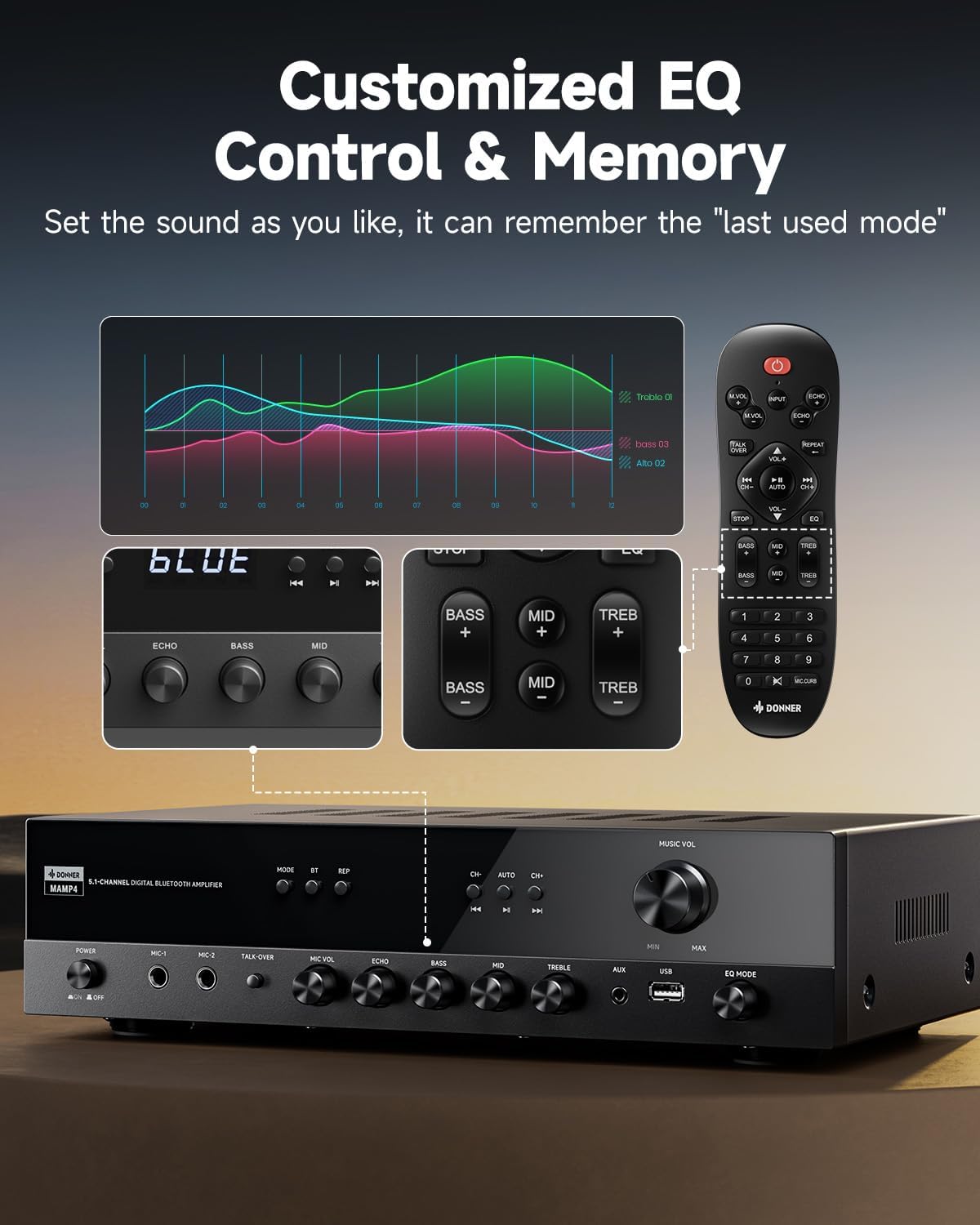
Image: Close-up of the Donner MAMP4 amplifier's front panel and remote control, illustrating the customizable EQ settings for bass, mid, and treble, and the memory function.
3. Bluetooth დაწყვილება
Select 'Bluetooth' mode. On your device, search for 'DONNER MAMP4' and pair. Use the Play/Pause button or Prev/Next buttons on the remote to control playback.
4. FM რადიო ოპერაცია
In FM mode, you can quickly select your preferred FM frequency by entering the numbers directly using the remote control. Use the 'CH+/-' buttons for automatic channel search.

Image: The Donner MAMP4 amplifier with its remote control, demonstrating the ease of selecting FM frequencies by direct numerical input.
5. Microphone Functions
The amplifier includes dual 1/4'' microphone jacks. Adjust microphone volume and echo effect using dedicated knobs. The 'Talk Over' function lowers background music for clearer voice output during events or speeches.
6. დისტანციური მართვა
The upgraded remote control provides full functionality, including treble, midrange, bass, echo, and Talkover settings in any input mode.

Image: Comparison of the new and old style remote controls for the Donner amplifier, highlighting the expanded functionality of the upgraded remote for input selection, EQ, echo, and Talkover.
7. პროდუქტის შემაჯამებელი ვიდეო
Video: A product summary video for the Donner ampლიფიერი, შოუasing its features and functionalities.
8. Donner 5.1 Channel Stereo Receiver Overview
ვიდეო: ოფიციალური პირი დასრულდაview video from DonnerDirect, detailing the features and benefits of the Donner 5.1 Channel Stereo Receiver.
მოვლა
To ensure the longevity and optimal performance of your Donner MAMP4 ampლიფიერი, დაიცავით შემდეგი მოვლის ინსტრუქციები:
- დასუფთავება: Use a soft, dry cloth to clean the exterior of the unit. Avoid liquid cleaners or abrasive materials.
- ვენტილაცია: Ensure that all ventilation openings on the amplifier are clear and unobstructed to prevent overheating.
- შენახვა: If the unit will not be used for an extended period, unplug the power cord from the outlet.
- დისტანციური მართვის ბატარეები: Replace batteries in the remote control as needed. Dispose of used batteries properly according to local regulations.
პრობლემების მოგვარება
If you encounter issues with your Donner MAMP4 ampლიფიერისთვის იხილეთ შემდეგი გავრცელებული გადაწყვეტილებები:
- ძალა არ არის: დარწმუნდით, რომ კვების კაბელი საიმედოდ არის შეერთებული ორივე amplifier and a working wall outlet. Check the power switch on the front panel.
- ხმა არ არის: Verify that the correct input source is selected. Check all speaker and audio source connections for proper seating and polarity. Adjust volume levels.
- Hissing Sound in Standby: მAMP4 has optimized noise reduction with added relays. If a persistent hissing sound occurs, ensure all connections are secure and try unplugging the unit for a few minutes before reconnecting.
- Bluetooth დაწყვილების პრობლემები: უზრუნველყოს amplifier is in Bluetooth mode and your device's Bluetooth is enabled and discoverable. Try restarting both devices.
- FM რადიოს ცუდი მიღება: Ensure the FM antenna is properly connected and extended. Try repositioning the antenna for better signal.
- მიკროფონი არ მუშაობს: Ensure microphones are securely plugged into the correct jacks. Adjust 'MIC VOL' and 'ECHO' knobs.
For persistent issues, please contact Donner customer support or refer to qualified service personnel.
სპეციფიკაციები
| ფუნქცია | აღწერა |
|---|---|
| მოდელი | MAMP4 |
| გამომავალი სიმძლავრე (RMS) | L/R Speakers: 60W/4R; Surround & Center Speakers: 25W × 3 |
| არხები | 5.1 არხი |
| Bluetooth ვერსია | 5.3 |
| USB მხარდაჭერა | 64 გბ-მდე |
| აუდიო საშუალებები | 1 RCA, 1 AC-3, 2 Mic-in, AUX IN, Optical, Coaxial |
| FM რადიოსიხშირე | 76-108 MHz |
| EQ კონტროლი | Treble, Midrange, Bass (independent adjustment) |
| განსაკუთრებული თვისებები | Talk Over function, Settings Memory, Low Noise Design |
| პროდუქტის ზომები | 9.76 x 14.96 x 3.86 ინჩი |
| ნივთის წონა | 13.2 ფუნტი |
გარანტია და მხარდაჭერა
For warranty information, technical support, or any inquiries regarding your Donner MAMP4 amplifier, please contact Donner customer service.
- მწარმოებელი: დონერი
- გაყიდვების შემდგომი სერვისი ელ.ფოსტა: service@donnermusic.com
- პროფესიონალური დახმარება: მიმართეთ ყველა მომსახურება კვალიფიციურ მომსახურე პერსონალს.


