1. უსაფრთხოების მნიშვნელოვანი ინსტრუქციები
Please read all safety instructions carefully before using this appliance. Failure to follow these instructions may result in electric shock, fire, or serious personal injury.
- გაწმენდის ან რაიმე სახის ტექნიკური მომსახურების ჩატარებამდე ყოველთვის გამორთეთ ვენტილატორი დენიდან.
- ვენტილატორის მუშაობის დროს არ ჩაყოთ თითები ან რაიმე საგნები ცხაურში.
- დარწმუნდით, რომ ვენტილატორი სტაბილურ, სწორ ზედაპირზეა განთავსებული, რათა თავიდან აიცილოთ გადაბრუნება.
- შეინახეთ დენის კაბელი გაცხელებული ზედაპირებისგან.
- არ გამოიყენოთ ვენტილატორი დაზიანებული სადენით ან შტეფსით.
- ეს მოწყობილობა განკუთვნილია მხოლოდ შიდა გამოყენებისთვის.
2. პაკეტის შიგთავსი
დარწმუნდით, რომ ყველა ნივთი შედის თქვენს პაკეტში:
- 1 × Dreo Poly Fan (DR-HPF007S)
- 1 × დენის ადაპტერი
- 1 × Remote Control (Battery included)
- 1 × Screw for Base
- 1 × Screwdriver for Base
3. დაყენება და შეკრება
Follow these steps to assemble your DREO Smart Fan:
- ფრთხილად ამოიღეთ ყველა კომპონენტი შეფუთვიდან.
- Attach the fan body to the pedestal column.
- Secure the base to the bottom of the pedestal column using the provided screw and screwdriver.
- Attach the remote control holder to the pedestal column at a convenient height.
- Plug the power adapter into the fan and then into a power outlet.
Video: PolyFan Assembly and Clean
This video demonstrates the step-by-step assembly process and how to clean the PolyFan. It shows how to attach the base, secure the column, and connect the power adapter. It also covers disassembling parts for cleaning.
Video: Dreo HPF004S Installation Video
This video provides a visual guide for the installation of the Dreo HPF004S fan, which shares similar assembly steps with the DR-HPF007S model.
4. საოპერაციო ინსტრუქციები
Your DREO Smart Fan offers multiple control methods and customizable settings for optimal comfort.
4.1 კონტროლის მეთოდები
- შეხების კონტროლი: Use the intuitive touch panel on the fan's pedestal.
- დისტანციური მართვა: Operate the fan from a distance with the included remote.
- DREO App: Connect via Wi-Fi for advanced features, scheduling, and voice control.
- ხმის კონტროლი: Integrate with Alexa or Google Assistant for hands-free operation.
4.2 Fan Speeds and Airflow Modes
- 9 გულშემატკივართა სიჩქარე: Adjust airflow intensity from a gentle breeze to powerful circulation.
- 6 Airflow Modes: Choose from Normal, Natural, Sleep, Auto, Custom, and Turbo modes to suit your preference.

Image: Fan Modes and Speeds
The fan's display shows the current speed and selected mode, offering 9 speed levels and 6 distinct airflow modes for personalized comfort.
4.3 რხევა
- 3D რხევა: Enjoy wide-area coverage with 150° horizontal and 120° vertical oscillation.
- Position-based Oscillation: (DREO app exclusive) The fan adjusts its airflow direction based on your movement within the room.

Image: 3D Oscillation
This image illustrates the fan's ability to oscillate both horizontally (150°) and vertically (120°), providing comprehensive air circulation.
Video: Dreo Smart Position-based Oscillation Fan TurboPoly Fan 707S
This video highlights the smart position-based oscillation feature of the fan, demonstrating how it tracks movement to maintain airflow.
4.4 ტაიმერის ფუნქცია
ვენტილატორის ავტომატური გამორთვის დაყენება მითითებული პერიოდის შემდეგ:
- მოწყობილობაზე: 8 საათამდე.
- DREO App: Up to 12 hours for extended control.
4.5 Smart Features via DREO App
- განრიგი: Program the fan to turn on/off at specific times.
- ტემპერატურის ტრიგერები: Set the fan to adjust speed based on ambient temperature.
- სამუშაო მაგიდის ვიჯეტები: Quick access to fan controls from your smartphone home screen.
- მშვიდი ოპერაცია: Operates as low as 25dB for undisturbed sleep.
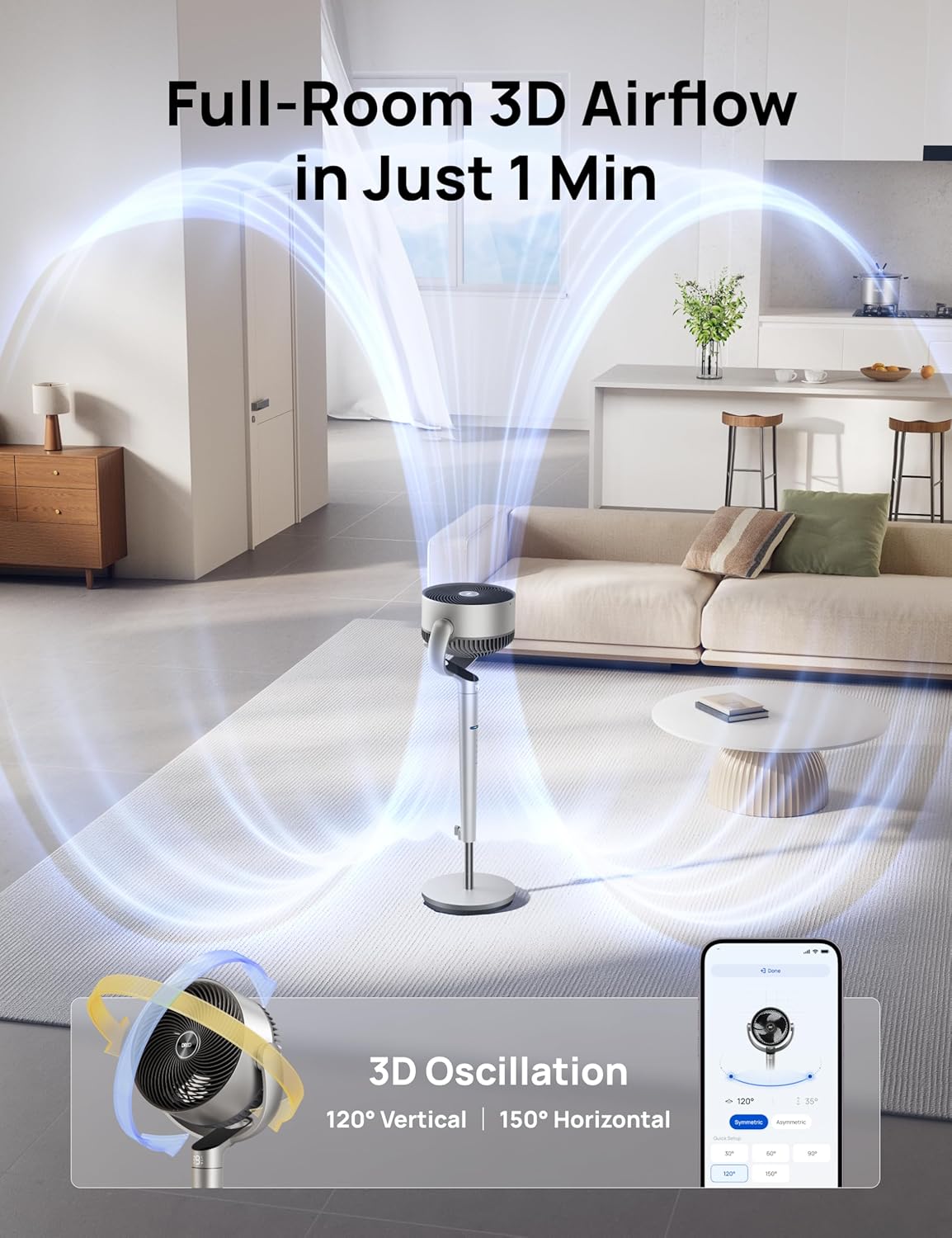
Image: App Control Interface
The DREO app provides comprehensive control over fan settings, including modes, speeds, oscillation, and smart features.
5. დასუფთავება და მოვლა
რეგულარული წმენდა უზრუნველყოფს თქვენი ვენტილატორის ოპტიმალურ მუშაობას და ხანგრძლივი მუშაობის ხანგრძლივობას.
- გაწმენდის წინ ყოველთვის გამორთეთ ვენტილატორი.
- გაწმინდეთ გარე ზედაპირები რბილი, დamp ქსოვილი.
- To clean the fan blades, remove the front grille by rotating it counter-clockwise.
- Rotate the blade cap counter-clockwise to remove it, then carefully take out the blade from the shaft.
- Rinse the cap, blade, and grille under running water. Dry all parts thoroughly before reassembling.
- Reassemble the fan by reversing the disassembly steps.
Video: PolyFan Assembly and Clean
This video demonstrates how to disassemble the fan for cleaning and reassemble it, ensuring proper maintenance.
6. Დიაგნოსტიკა
If you encounter any issues with your DREO Smart Fan, refer to the following common solutions:
- ვენტილატორი არ ირთვება: Ensure the power cord is securely plugged into a working outlet. Check if the power adapter is correctly connected to the fan.
- სუსტი ჰაერის ნაკადი: Verify that the fan speed is set to an appropriate level. Clean the fan blades and grilles to remove any dust buildup.
- არაჩვეულებრივი ხმაური: Ensure all parts are assembled correctly and securely. Clean the fan to remove any foreign objects that might be causing noise.
- დისტანციური მართვა არ მუშაობს: Check the battery in the remote control. Ensure there are no obstructions between the remote and the fan.
- Wi-Fi კავშირის პრობლემები: Ensure your Wi-Fi network is 2.4GHz. Restart your router and the fan, then try connecting again via the DREO app.
7. სპეციფიკაციები
| ფუნქცია | დეტალი |
|---|---|
| ბრენდი | დრეო |
| მოდელის სახელი | DR-HPF007S |
| პროდუქტის ზომები | 13.7"D x 8.7"W x 42.52"H |
| დენის წყარო | DC |
| ვატtage | 50 ვატი |
| ტtage | 120 ვოლტი |
| ხმაურის დონე | 25 დეციბელი |
| ჰაერის ნაკადის მოცულობა | 1404 კუბური ფუტი წუთში |
| სიჩქარე | 8 მეტრი წამში |
| სიმძლავრის დონეების რაოდენობა | 9 |
| განსაკუთრებული თვისებები | Adjustable Height, Adjustable Tilt, Oscillating, Remote Controlled, Timer, Wi-Fi, Voice Control |
| კონტროლის მეთოდი | აპლიკაცია, დისტანციური, შეხება |
| შიდა/გარე გამოყენება | შიდა |
| ნივთის წონა | 17.96 ფუნტი |
| UPC | 810142858212 |
8. გარანტია და მხარდაჭერა
For product support, warranty information, or any inquiries, please contact Dreo customer service:
- Webსაიტი: www.dreo.com
- ელფოსტა: support@dreo.com
- ტელეფონი: (888) 290-1688 (Mon-Fri, 9:00 AM-5:00 PM PST/PDT)


