1. შესავალი
Welcome to the DOOGEE Note56 user manual. This guide provides essential information on setting up, operating, and maintaining your new smartphone. The DOOGEE Note56 is a SIM-free smartphone running on Android 16, featuring a 6.56-inch 90Hz HD+ display, a large 6150mAh battery, and an 8MP AI camera. Please read this manual carefully to ensure optimal performance and longevity of your device.
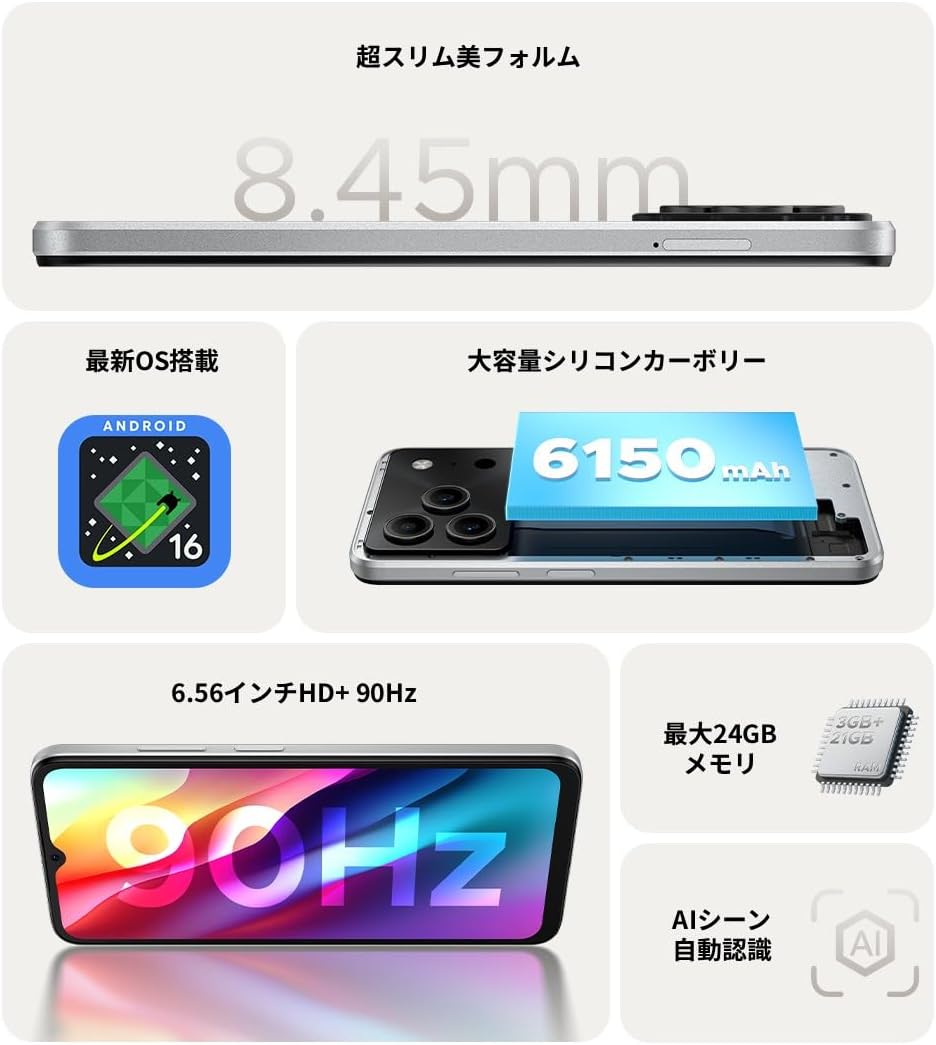
სურათი 1.1: დასრულდაview of DOOGEE Note56 key features.
2. მოწყობილობა დასრულდაview
The DOOGEE Note56 is designed with a sleek and lightweight profile, measuring 8.45mm thin and weighing 195g. It features a geometric lens module for its camera system and a durable build.

Figure 2.1: The ultra-slim and lightweight design of the DOOGEE Note56.
3. დაწყება
3.1 პაკეტის შიგთავსი
დარწმუნდით, რომ ყველა ნივთი თქვენი პროდუქტის შეფუთვაშია:
- 1 x DOOGEE Note56 Smartphone
- 1 x Type-C USB კაბელი
- 1 x დენის ადაპტერი
- 1 x Pre-applied Protective Film
- 1 x SIM უჯრის ეჟექტორის პინი
- 1 x ტელეფონის შემთხვევა
- 1 x პაკეტის ყუთი
- 1 x ინსტრუქციის სახელმძღვანელო
- 1 x საგარანტიო ბარათი

Figure 3.1: Included accessories with your DOOGEE Note56.
3.2 SIM ბარათის დაყენება
Your DOOGEE Note56 supports Dual SIM functionality. To install your SIM card(s):
- იპოვეთ SIM ბარათის უჯრა მოწყობილობის გვერდზე.
- ჩადეთ SIM ბარათის ამომხტარი ქინძისთავი უჯრის გვერდით მდებარე პატარა ხვრელში და ფრთხილად დააჭირეთ, სანამ უჯრა არ ამოვარდება.
- მოათავსეთ თქვენი Nano-SIM ბარათი(ები) და/ან microSD ბარათი უჯრაზე განკუთვნილ ჭრილებში. დარწმუნდით, რომ ოქროსფერი კონტაქტები ქვემოთაა მიმართული.
- ფრთხილად ჩასვით უჯრა მოწყობილობაში, სანამ ის გვერდითა მხარეს არ გასწორდება.
3.3 პირველადი ჩართვა და დაყენება
მოწყობილობის პირველად ჩასართავად:
- დააჭირეთ და გეჭიროთ ჩართვის ღილაკი, სანამ DOOGEE-ს ლოგო არ გამოჩნდება.
- მიჰყევით ეკრანზე გამოტანილ მითითებებს ენის ასარჩევად, Wi-Fi-სთან დასაკავშირებლად და თქვენი Google ანგარიშის დასაყენებლად.
- You can also set up security features like face recognition during this process.
3.4 მოწყობილობის დატენვა
Connect the Type-C USB cable to the charging port at the bottom of the phone and the other end to the power adapter. Plug the adapter into a wall outlet. The battery indicator on the screen will show charging status. For optimal battery life, fully charge the device before first use.
4. თქვენი მოწყობილობის მუშაობა
4.1 Android 16 ოპერაციული სისტემა
The DOOGEE Note56 runs on the latest Android 16 operating system, offering a faster, more secure, and intuitive user experience. Key features include:
- გაუმჯობესებული შესრულება: Improved app launch speeds and overall system responsiveness.
- Simplified UI: An easy-to-navigate interface suitable for all users.
- Stronger Security: Advanced privacy protection features to keep your data safe.
- ჭკვიანი მახასიათებლები: Customize screen colors, Super Clipboard, Dual System Mode, Smart Body Sensing, Memory Expansion, and Screen Optimization.

Figure 4.1: Key features of the Android 16 operating system.
4.2 ჩვენების მახასიათებლები
Experience smooth visuals on the 6.56-inch HD+ IPS display with a 90Hz refresh rate. This ensures fluid scrolling and video playback, reducing eye strain. The display also includes dedicated Reading Mode and Night Mode for comfortable viewსხვადასხვა განათების პირობებში.

Figure 4.2: The 6.56-inch HD+ 90Hz display for a smooth visual experience.
4.3 კამერის ფუნქციები
Capture vibrant and natural photos with the 8MP AI main camera and 5MP front camera. The AI correction automatically optimizes settings for various scenes, including people, landscapes, and food. Enjoy diverse shooting modes:
- HDR: For balanced exposure in challenging lighting.
- პრო რეჟიმი: კამერის პარამეტრების ხელით კონტროლი.
- ღიმილის გადაღება: Automatically takes a photo when a smile is detected.
- პანორამა: ფართო პეიზაჟების გადაღება views.
- ღამის რეჟიმი: Improved low-light photography.
- ფილტრები: Apply various effects to your photos.
- Beauty Mode (Front Camera): Enhance selfies.
- Portrait Effects (Front Camera): Add depth to your selfies.

Figure 4.3: AI scene recognition automatically adjusts camera settings for optimal results.

Figure 4.4: Capturing clear moments with the 8MP main camera.

Figure 4.5: Easy selfies with the 5MP front camera.
4.4 ბატარეის მართვა
The DOOGEE Note56 is equipped with a large 6150mAh Silicon-Carbon battery, providing extended usage throughout the day. The convenient Type-C charging port ensures easy and smooth charging.
- Supports approximately 1000 charge/discharge cycles.
- 20% smaller in size for a lighter design.
- Estimated usage times: 7 hours web browsing, 49.5 hours music playing, 14 hours video watching, 28 hours calling.
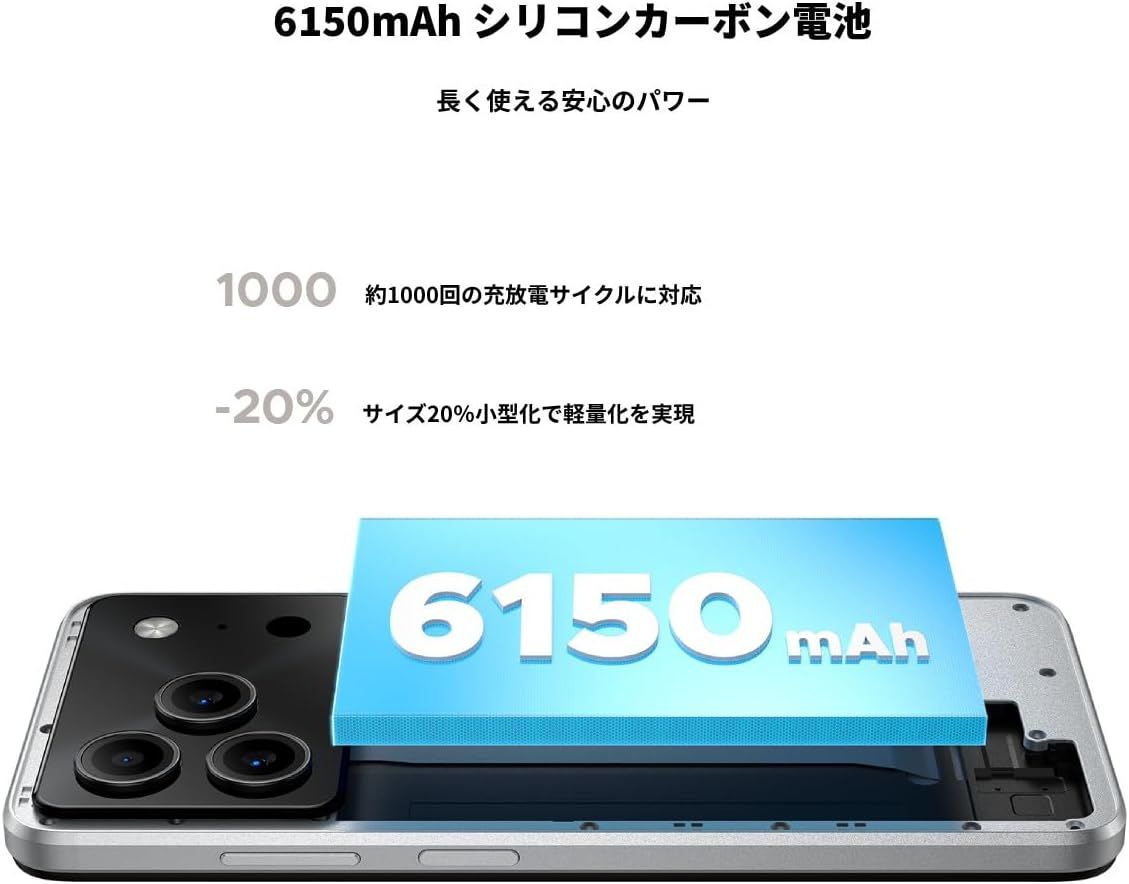
Figure 4.6: The 6150mAh Silicon-Carbon battery provides long-lasting power.

Figure 4.7: Slim design with powerful battery performance.
4.5 შესრულება და შენახვა
The DOOGEE Note56 is powered by a Unisoc SC9863A Octa-core processor for smooth and efficient operation. It comes with 24GB of RAM (including virtual expansion) and 64GB of internal storage, expandable up to 2TB with a microSD card, ensuring ampთავისუფალი ადგილი თქვენი აპლიკაციებისთვის, ფოტოებისთვის და files.

Figure 4.8: Internal memory configuration for smooth multitasking.
4.6 დაკავშირებადობა და სხვა მახასიათებლები
The device supports 4G Dual SIM, allowing you to manage work and personal life separately. It includes standard connectivity options like Bluetooth and Wi-Fi. Additional features:
- USB OTG: შეაერთეთ გარე USB მოწყობილობები.
- GPS: For accurate navigation.
- 3.5 მმ ყურსასმენის ჯეკი: Enjoy music and calls with wired headphones.
- FM რადიო: Listen to your favorite radio stations anytime.

Figure 4.9: Face recognition, GPS navigation, and FM radio features.

Figure 4.10: Connect wired headphones via the 3.5mm jack.
4.7 უსაფრთხოების მახასიათებლები
The DOOGEE Note56 offers convenient and secure unlocking methods:
- Სახის ამოცნობა: Unlock your device quickly and securely using your face.
- თითის ანაბეჭდის ამოცნობა: (If applicable, check device for sensor) Another secure method for unlocking and authenticating.
5. მოვლა და მოვლა
To ensure the longevity and optimal performance of your DOOGEE Note56, follow these maintenance guidelines:
- დასუფთავება: ეკრანისა და კორპუსის გასაწმენდად გამოიყენეთ რბილი, უბუშტო ქსოვილი. მოერიდეთ უხეში ქიმიკატების ან აბრაზიული მასალების გამოყენებას.
- გარემო პირობები: მოერიდეთ მოწყობილობის ექსტრემალურ ტემპერატურაზე, მზის პირდაპირ სხივებზე ან ჭარბ ტენიანობაზე ზემოქმედებას.
- პროგრამული განახლებები: რეგულარულად შეამოწმეთ და დააინსტალირეთ სისტემის განახლებები, რათა ისარგებლოთ უახლესი ფუნქციებით, უსაფრთხოების პატჩებით და მუშაობის გაუმჯობესებით.
- ბატარეის მოვლა: მოერიდეთ აკუმულატორის ხშირ სრულად დაცლას. ხანგრძლივი შენახვისთვის, შეინარჩუნეთ აკუმულატორის დატენვის დაახლოებით 50%-მდე დონე.
- დაცვა: Use the provided phone case and screen protector to guard against scratches and minor impacts.
6. Დიაგნოსტიკა
If you encounter issues with your DOOGEE Note56, try the following basic troubleshooting steps:
- მოწყობილობა არ ჩართულია: დარწმუნდით, რომ აკუმულატორი დატენილია. შეაერთეთ დამტენი და დაელოდეთ რამდენიმე წუთი, სანამ ხელახლა ჩართავთ.
- დატენვის საკითხები: Check the charging cable and adapter for damage. Try a different outlet or charging accessory.
- ქსელთან დაკავშირების პრობლემები: Ensure your SIM card is correctly inserted. Check if airplane mode is off. Restart the device.
- აპლიკაციის გაყინვა/გათიშვა: დახურეთ პრობლემური აპლიკაცია და ხელახლა გახსენით. თუ პრობლემა კვლავ მოგვარდება, გადატვირთეთ ტელეფონი.
- ნელი შესრულება: Close unnecessary background apps. Clear cache for frequently used apps. Consider freeing up storage space.
For more detailed troubleshooting or persistent issues, please refer to the FAQ section on the product page or contact customer support.
7. სპეციფიკაციები
Key technical specifications for the DOOGEE Note56:
| ფუნქცია | სპეციფიკაცია |
|---|---|
| ეკრანის ზომა | 6.56 ინჩი |
| ბატარეის ტევადობა | 6150 mAh |
| ფერი | თეთრი |
| ბრენდის სახელი | დოოჯი |
| მწარმოებელი | დოოჯი |
| გამოშვების წელი | 2025 |
| მოყვება კომპონენტები | SIM Tray Ejector, USB Cable, Power Adapter, Phone Case |
| თავსებადი OS | Android 16 |
| სხვა ფუნქციები | USB OTG, Dual SIM, Expandable Memory |
| დაკავშირება | Bluetooth, WiFi |
| ჩვენების ტიპი | LCD |
| პროდუქტის ზომები | 16.38 x 7.58 x 0.84 სმ; 195 გ |
| ოპერაციული სისტემა | Android 16 |
| დაინსტალირებული ოპერატიული მეხსიერების ზომა | 24 GB |
| CPU სიჩქარე | 1.6 გჰც |
| მეხსიერების შენახვის მოცულობა | 64 GB |
8. გარანტია და მხარდაჭერა
Your DOOGEE Note56 comes with a 12-month quality warranty (excluding human-caused damage) and a 30-day refund guarantee. The product is fully compatible with major Japanese carrier networks.
If you require support or have any questions, please contact our customer service. You can typically find contact information by clicking on the seller's name below the "Add to Cart" button on the product page and selecting "Ask a Question."


