1. შესავალი
This manual provides essential information for the NIMO 15.6" Gaming Laptop (Model N159). It covers product features, setup procedures, operating instructions, maintenance guidelines, troubleshooting tips, and detailed specifications. Please read this manual thoroughly before using your new laptop to ensure optimal performance and longevity.

Image: The NIMO 15.6" Gaming Laptop, showcasing its display and key features like fingerprint unlock, Type-C PD charger, and backlit keyboard.
2. რა არის ყუთში
დარწმუნდით, რომ შეფუთვაში ყველა ნივთია:
- 1 x NIMO N159 ლეპტოპი
- 1 x Type-C 100W PD სწრაფი დამტენი
- 1 x მომხმარებლის სახელმძღვანელო (ეს დოკუმენტი)
- Windows 11 Home Operating System (pre-installed)
- Warranty Information (2 Years Warranty, 90 Days Return)
3. პროდუქტი დასრულდაview
3.1 ძირითადი მახასიათებლები
- პროცესორი: AMD Ryzen 7 7735HS (8 Cores, 16 Threads, up to 4.75GHz)
- გრაფიკა: Integrated AMD Radeon 680M GPU
- ჩვენება: 15.6" Full HD (1920x1080) IPS Anti-Glare Display
- მეხსიერება: 16 GB DDR5 ოპერატიული მეხსიერება (განახლებადი)
- შენახვა: 1TB PCIe 4.0 SSD (upgradeable)
- დამუხტვა: 100W Type-C PD Fast Charger
- უსაფრთხოება: Fingerprint Reader for secure unlock
- კლავიატურა: Backlit Keyboard with Numeric Keypad
- აუდიო: Dual 2W stereo speakers, dual beamforming microphones
- Webკამერა: 2MP with physical camera shutter
- ოპერაციული სისტემა: Windows 11 მთავარი

Image: An illustration detailing the AMD Ryzen 7 7735HS processor, highlighting its 8 cores, 16 threads, and integrated Radeon 680M graphics for balanced performance.
3.2 პორტები და კონექტორები
Familiarize yourself with the available ports on your NIMO laptop:

Image: A detailed diagram illustrating the location and type of ports on the NIMO laptop, including USB 2.0, USB 3.2 Gen1, Type-C Gen2 (multifunction), HDMI 2.0, Audio Jack, Micro SD Reader, and Kensington Lock.
- USB 2.0 პორტი: ძველი USB მოწყობილობების დასაკავშირებლად.
- USB 3.2 Gen1 Ports (x4): თავსებადი USB მოწყობილობებით მაღალსიჩქარიანი მონაცემთა გადაცემისთვის.
- Type-C Gen2 Ports (x2, Multifunction): Supports data transfer, video output, and power delivery (100W PD fast charging).
- HDMI 2.0 პორტი: გარე ეკრანებთან ან ტელევიზორებთან დასაკავშირებლად.
- აუდიო ჯეკი: ყურსასმენების ან გარე დინამიკების შესაერთებლად.
- მიკრო SD წამკითხველი: For reading Micro SD memory cards.
- Kensington Lock Slot: თქვენი ლეპტოპის თავსებადი საკეტით დასაცავად.
4. დაყენება
4.1 საწყისი ჩართვა
- ამოიღეთ ლეპტოპი და ყველა აქსესუარი ყუთიდან.
- Connect the 100W Type-C PD Fast Charger to one of the Type-C ports on the laptop and then to a power outlet.
- გახსენით ლეპტოპის სახურავი. შესაძლოა, ლეპტოპი ავტომატურად ჩაირთოს ან ჩართვის ღილაკზე დაჭერა დაგჭირდეთ.
- Windows 11 Home-ის დაყენების დასასრულებლად, მათ შორის ენის შერჩევის, ქსელური კავშირისა და მომხმარებლის ანგარიშის შექმნისთვის, მიჰყევით ეკრანზე მოცემულ ინსტრუქციებს.
4.2 ბატარეის დატენვა
Before first use, it is recommended to fully charge the laptop battery. The 100W Type-C PD Fast Charger can provide approximately 5 hours of usage time with just 1 hour of charging.

Image: A visual representation of the 100W Type-C lightning-fast charger connected to the NIMO laptop, demonstrating its ability to charge quickly and efficiently.
5. საოპერაციო ინსტრუქციები
5.1 ჩართვა/გამორთვა და ძილის რეჟიმი
- ჩართვა: დააჭირეთ კლავიატურაზე მდებარე ჩართვის ღილაკს.
- Გამორთვა: Windows-ში დააწკაპუნეთ დაწყების ღილაკზე, შემდეგ აირჩიეთ ჩართვა > გამორთვა.
- Ძილის რეჟიმი: დააწკაპუნეთ დაწყების ღილაკზე, შემდეგ აირჩიეთ ჩართვა > ძილი, ან დახურეთ ლეპტოპის სახურავი.
5.2 Using the Fingerprint Unlock
The fingerprint reader is integrated into the touchpad for quick and secure access.
- During Windows setup or later in Windows Settings, configure your fingerprint for login.
- To unlock, simply place your registered finger on the fingerprint reader on the touchpad.
5.3 Adjusting the Backlit Keyboard
The keyboard backlight can be adjusted for comfortable typing in various lighting conditions.

Image: A visual guide demonstrating the fingerprint unlock feature on the touchpad and the functionality of the backlit keyboard, including how to cycle through brightness settings using the F9 key.
- დააჭირეთ F9 key to cycle through backlight settings:
- 1 Tap: Light (Temporary)
- 2 Taps: Light (Temporary)
- 3 Taps: Light (Constant)
- 4 Taps: Off
5.4 გამოყენებით Webcam Shutter
For privacy, the laptop includes a physical camera shutter.
- Slide the shutter to the left to open the camera.
- Slide the shutter to the right to close and cover the camera lens.

Image: A visual guide demonstrating the physical camera shutter, showing both the 'Camera Open' and 'Camera Close' statuses for enhanced privacy.
6. მოვლა
6.1 ლეპტოპის გაწმენდა
- Always power off the laptop and disconnect the charger before cleaning.
- გამოიყენეთ რბილი, უბინავის ქსოვილი ოდნავ დampგარეცხეთ წყლით ან ეკრანის საწმენდი საშუალებით.
- კლავიატურისა და კორპუსისთვის გამოიყენეთ რბილი, მშრალი ქსოვილი. მოერიდეთ უხეში ქიმიკატების ან აბრაზიული მასალების გამოყენებას.
- პერიოდულად გამოიყენეთ შეკუმშული ჰაერი სავენტილაციო ხვრელებისგან მტვრის მოსაშორებლად.
6.2 ბატარეის მოვლა
- მოერიდეთ ბატარეის ხშირ სრულ დაცლას.
- თუ ლეპტოპი დიდი ხნის განმავლობაში არ გამოიყენება, შეინახეთ გრილ და მშრალ ადგილას.
- არ დაუშვათ ლეპტოპის ექსტრემალურ ტემპერატურაზე გაშვება.
6.3 პროგრამული უზრუნველყოფის განახლებები
ოპტიმალური მუშაობისა და უსაფრთხოების უზრუნველსაყოფად, რეგულარულად შეამოწმეთ და დააინსტალირეთ ოპერაციული სისტემისა და დრაივერების განახლებები.
7. Დიაგნოსტიკა
| პრობლემა | შესაძლო მიზეზი | გამოსავალი |
|---|---|---|
| ლეპტოპი არ ირთვება. | დაბალი ბატარეის ან დენის ადაპტერის პრობლემა. | Connect the charger and wait a few minutes before attempting to power on. Ensure the charger is properly connected to both the laptop and the power outlet. |
| ეკრანი ცარიელი ან შავია. | ლეპტოპი ძილის რეჟიმშია, ეკრანის პარამეტრების პრობლემა ან აპარატურის პრობლემა. | Press any key or the power button to wake from sleep. Try connecting an external monitor to check if the display output works. Restart the laptop. |
| კლავიატურის განათება არ მუშაობს. | Backlight turned off or at lowest setting. | დააჭირეთ F9 key repeatedly to cycle through brightness levels and turn on the backlight. |
| Fingerprint unlock not working. | Finger not properly placed, or sensor issue. | Ensure your finger is clean and dry and covers the sensor completely. Re-register your fingerprint in Windows Settings if the issue persists. |
| ნელი შესრულება. | ძალიან ბევრი გაშვებული აპლიკაცია, არასაკმარისი მეხსიერება ან მოძველებული დრაივერები. | Close unnecessary applications. Check available storage space. Update Windows and device drivers. |
If you encounter issues not listed here or require further assistance, please contact NIMO customer support.
8. სპეციფიკაციები
| ბრენდი | ნიმო |
| მოდელის სახელი | NIMO N159B |
| ეკრანის ზომა | 15.6 ინჩი |
| ეკრანის გარჩევადობა | 1920 x 1080 Pixels (FHD IPS) |
| პროცესორი | AMD Ryzen 7 7735HS (8 Cores, 4.75 GHz Max Turbo) |
| ოპერატიული მეხსიერება | 16 გბ DDR5 (4800 მჰც) |
| მყარი დისკი | 1024 GB SSD (PCIe 4.0) |
| გრაფიკული კოპროცესორი | AMD Radeon 680M (ინტეგრირებული) |
| ოპერაციული სისტემა | Windows 11 მთავარი |
| უკაბელო ტიპი | 802.11a/b/g/n/ac |
| USB 2.0 პორტები | 1 |
| USB 3.0 პორტები | 4 |
| ბატარეის საშუალო ხანგრძლივობა | 5 Hours (54Wh, 11.4V/4700mAh) |
| ნივთის წონა | 3.8 ფუნტი |
| პროდუქტის ზომები | 14.07 x 8.98 x 0.76 ინჩი |
| ფერი | ლურჯი |
| უკანა Webკამერის რეზოლუცია | 2 დეპუტატი |
| განსაკუთრებული თვისებები | განათებული კლავიატურა, თითის ანაბეჭდის წამკითხველი, HD აუდიო, რიცხვითი კლავიატურა |
9. გარანტია და მხარდაჭერა
9.1 მწარმოებლის გარანტია
Your NIMO N159 laptop is covered by a comprehensive 2 წლიანი მწარმოებლის გარანტია from Nimo Direct Inc. This warranty covers defects in materials and workmanship under normal use. For warranty claims, please contact customer support.

Image: A technician working on a laptop's internal components, representing the 2-year support provided for Nimo products.
9.2 დაბრუნების პოლიტიკა
Nimo Direct Inc. offers a 90-Day Hassle-Free Return Policy. You may return any Nimo product for any reason within 90 days of purchase. Please refer to your purchase documentation for specific return procedures.
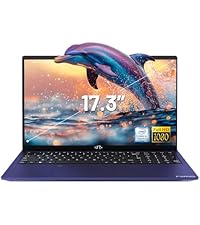
Image: A delivery person handing a package to a customer, illustrating the 90-day return policy for Nimo products.
9.3 მომხმარებელთა მხარდაჭერა
For any product-related questions, technical assistance, or warranty claims, please contact our professional after-sales service team. Our dedicated support team is available to resolve issues or facilitate replacements.
- ელფოსტა: service@nimopc.com
- ონლაინ: Visit the official NIMO website or product page for contact options.

Image: Customer service representatives wearing headsets, indicating professional customer assistance available via phone and live chat.


