1. პროდუქტი დასრულდაview
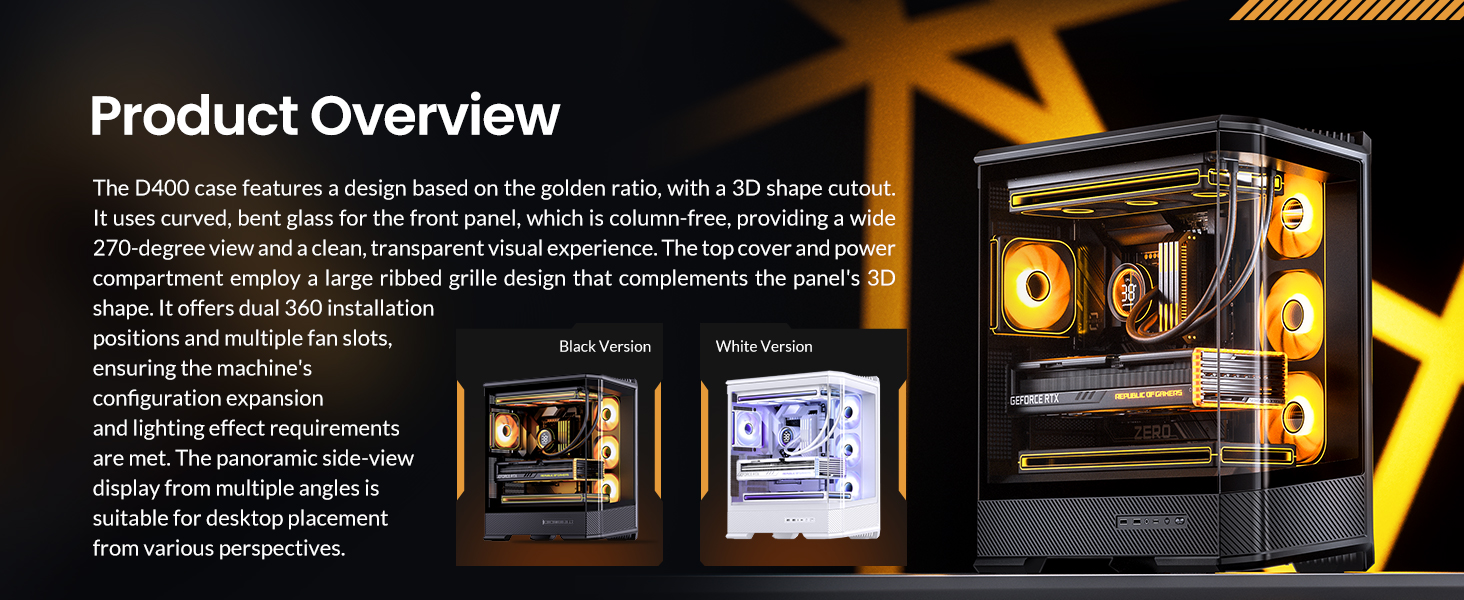
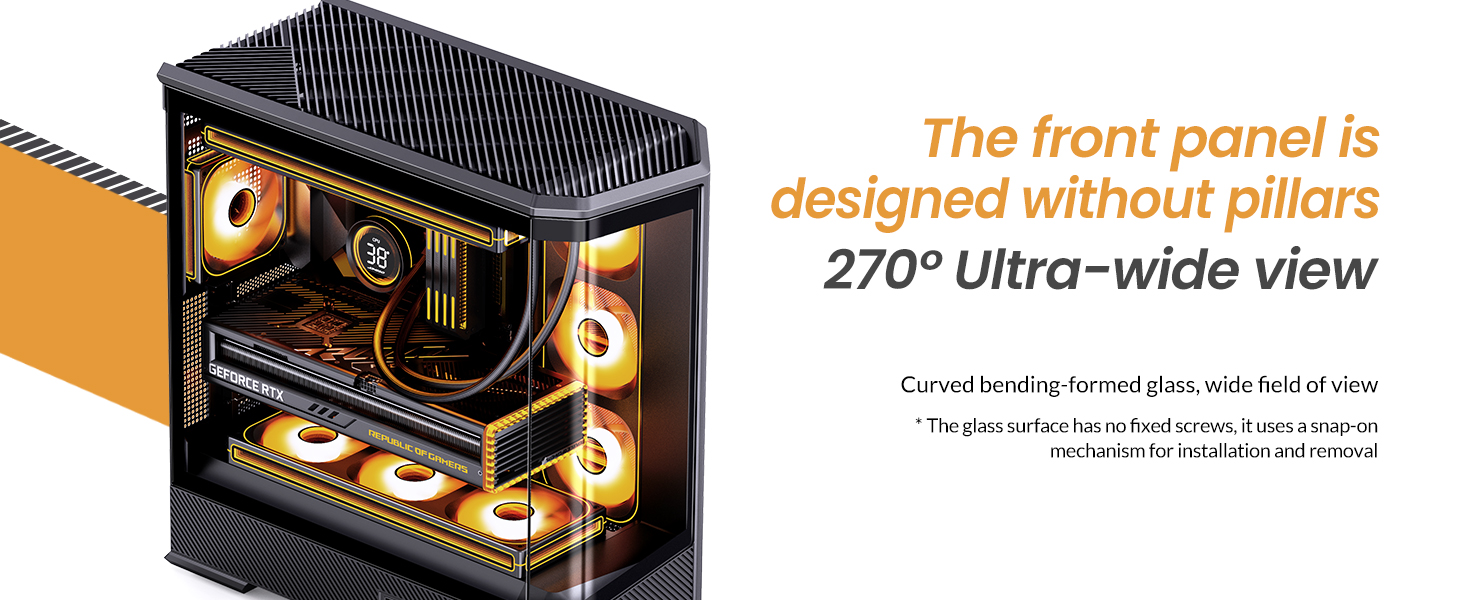
The JONSBO D400 is a white ATX Mid-Tower PC case featuring a three-dimensional beveled curved glass design, allowing for clear visibility of internal hardware. It supports BTF motherboards, ATX power supplies, and dual 360mm AIO liquid coolers, offering extensive cooling and component compatibility.
ძირითადი მახასიათებლები:
- ზომები: 488mm (L) x 239mm (W) x 514mm (H) (including feet).
- დიზაინი: Three-dimensional beveled curved glass for enhanced aesthetics and hardware visibility.
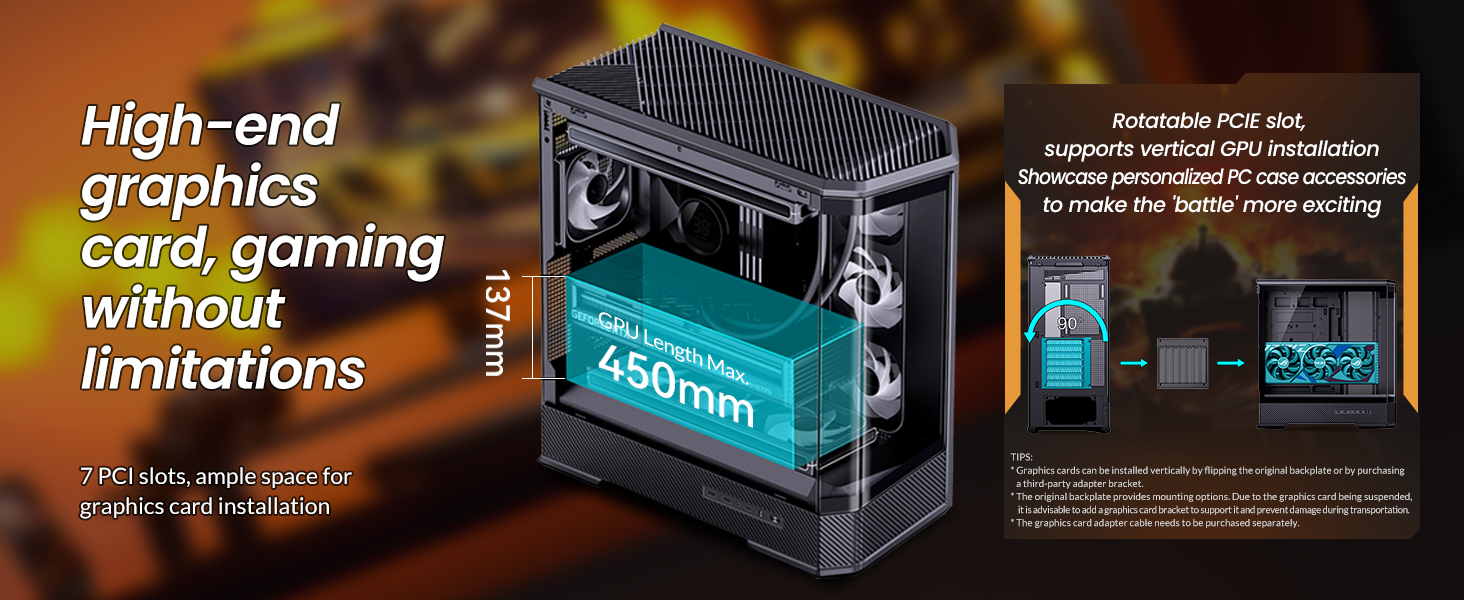
- GPU მხარდაჭერა: Graphics cards up to 450mm in length.
- PSU მხარდაჭერა: ATX PS2 power supplies.
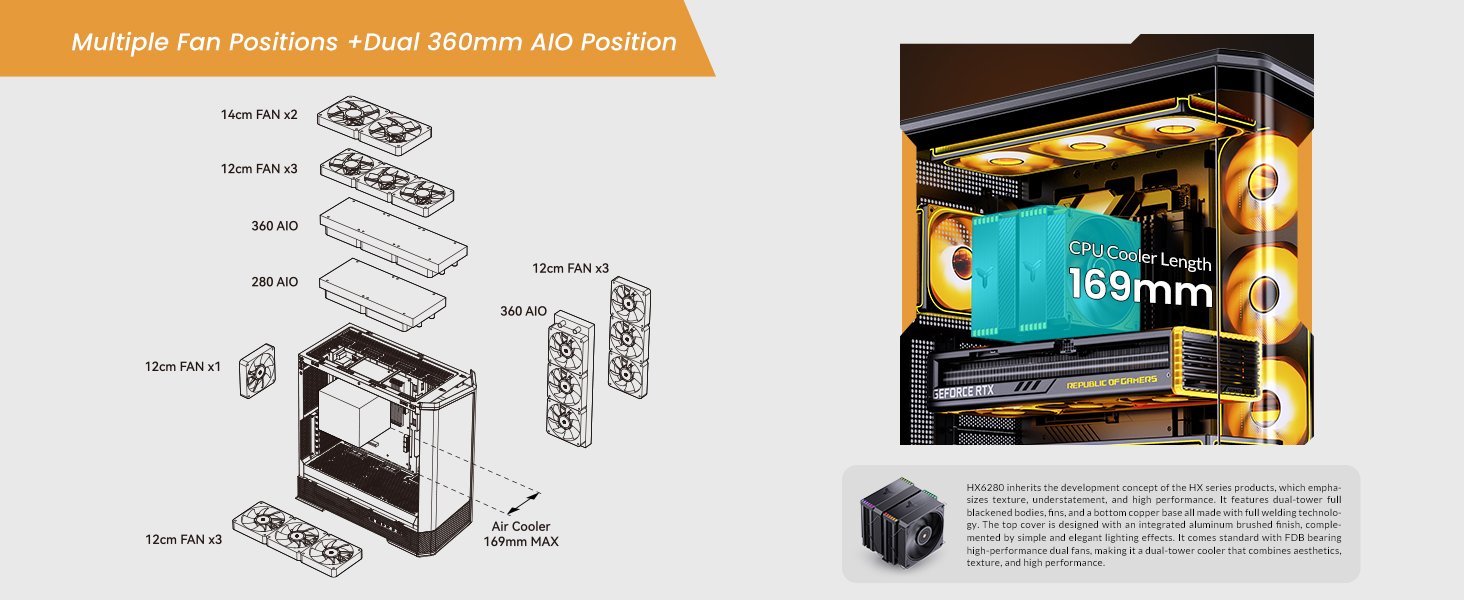
- ჰაერის გაგრილება: CPU coolers up to 169mm in height.
- Liquid Cooling (AIO): Supports top-mounted 240mm, 280mm, or 360mm AIOs, and side-mounted 360mm AIOs.
- Fan Positions: Up to 10 fan positions for optimal airflow (Top: 3x120mm/2x140mm; Side: 3x120mm; Rear: 1x120mm; Power Compartment: 3x120mm).
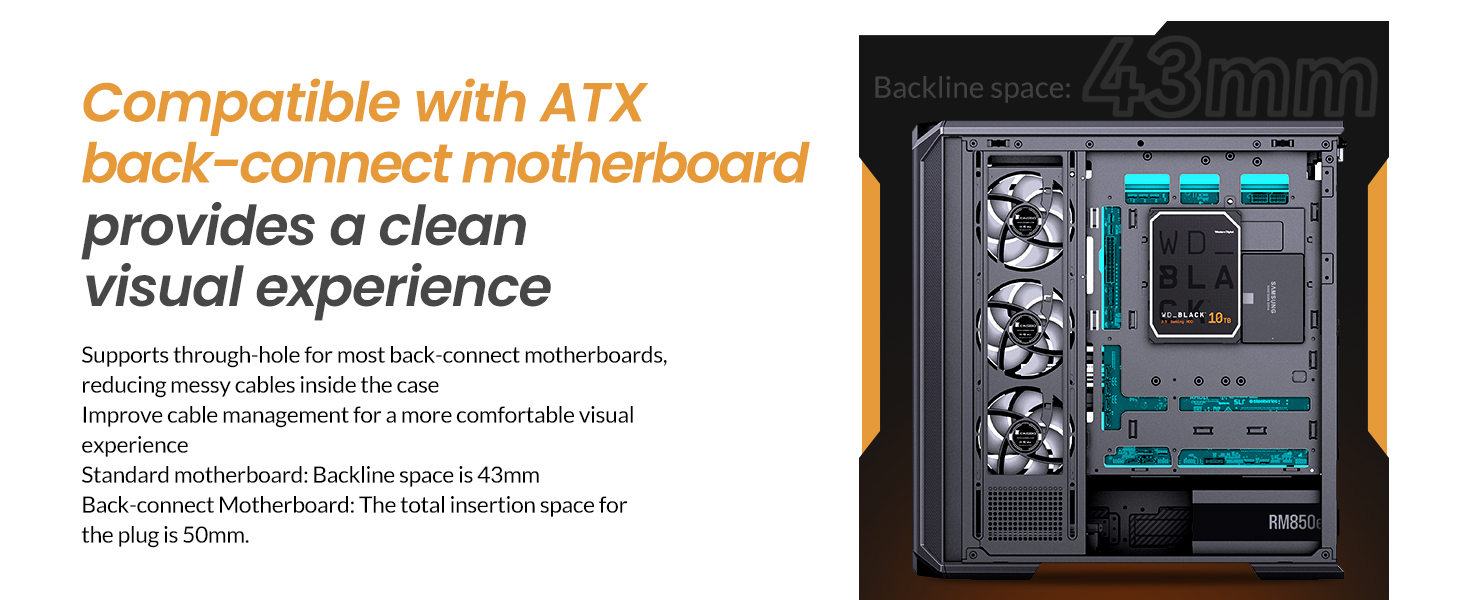
- წამყვანი ყურეები: Flexible storage options including 2x 2.5" SSDs, or 1x 3.5" HDD + 1x 2.5" SSD (back side), and 1x 2.5" SSD or 1x 3.5" HDD (PSU compartment).
- წინა I/O: 1x USB3.2 Gen2 Type-C, 2x USB3.0, 1x AUDIO + 1x MIC (2-in-1).
- გაფართოების სლოტები: 7.

2. სპეციფიკაციები
| ფუნქცია | დეტალი |
|---|---|
| ბრენდი | ჯონსბო |
| მოდელის სახელი | D400 |
| საქმის ტიპი | Mid კოშკი |
| ფერი | თეთრი |
| მასალა | მეტალი |
| პროდუქტის ზომები (LxWxH) | 19.21 x 9.21 x 20.43 ინჩი (488x239x514 მმ) |
| ნივთის წონა | 23.6 ფუნტი |
| დედაპლატის თავსებადობა | ATX, Micro ATX, Mini ITX, BTF Motherboard |
| GPU-ს სიგრძე (მაქს.) | ≤450 მმ |
| CPU გამაგრილებლის სიმაღლე (მაქს.) | 169 მმ |
| PSU მხარდაჭერა | ATX PS2 (≤200mm), Bottom Mount |
| AIO Support | Top: 240mm/280mm/360mm (optional); Side: 360mm (optional) |
| Fan Positions | Top: 3x120mm/2x140mm; Side: 3x120mm; Rear: 1x120mm; Power Compartment: 3x120mm |
| Drive Bays | Back Side: 2x 2.5" SSD or 1x 3.5" HDD + 1x 2.5" SSD; PSU Compartment: 1x 2.5" SSD or 1x 3.5" HDD |
| წინა I / O პორტები | 1x USB3.2 Gen2 Type-C, 2x USB3.0, 1x AUDIO + 1x MIC (2-in-1) |
| გაფართოების სლოტები | 7 |
3. დაყენება და ინსტალაცია
This section provides general guidelines for installing components into your JONSBO D400 PC case. Always refer to the specific manuals for your individual components (motherboard, GPU, PSU, etc.) for detailed instructions.
3.1 საქმის მომზადება
- Carefully remove the side glass panels. The beveled curved glass design allows for easy access.
- Identify the motherboard standoffs. Ensure they match your motherboard's form factor (ATX, Micro ATX, Mini ITX, or BTF).

3.2 დედაპლატის ინსტალაცია
- Align your motherboard with the standoffs in the case.
- დაამაგრეთ დედა დაფა მოწოდებული ხრახნების გამოყენებით.
- Connect the front I/O cables (USB 3.0, USB Type-C, Audio, Power/Reset switches, LED indicators) to the appropriate headers on your motherboard.
3.3 ელექტრომომარაგების განყოფილება (PSU) ინსტალაცია
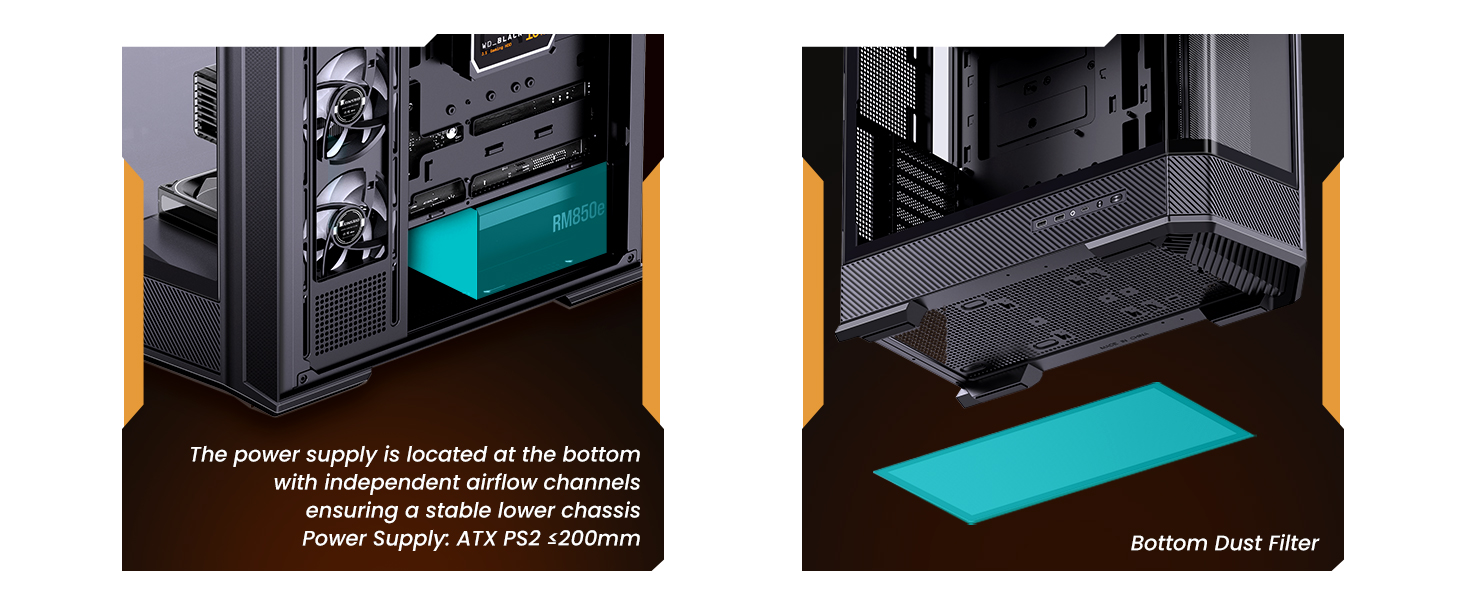
- The JONSBO D400 supports ATX PS2 power supplies and features a bottom-mount design.
- Install the PSU into its designated compartment at the bottom rear of the case.
- Secure the PSU with screws.
- გაატარეთ საჭირო კვების კაბელები კაბელების მართვის ღარებში.
3.4 გრაფიკული ბარათის (GPU) ინსტალაცია
- კორპუსი მხარს უჭერს 450 მმ-მდე სიგრძის ვიდეო პროცესორებს.
- მოხსენით საჭირო გაფართოების სლოტების გადასაფარებლები კორპუსის უკანა მხარეს.
- Insert your GPU into the primary PCIe slot on your motherboard and secure it with screws.
- Connect the required PCIe power cables from your PSU to the GPU.
3.5 Cooling System Installation (Fans & AIO)
- The D400 offers 10 fan positions: Top (3x120mm/2x140mm), Side (3x120mm), Rear (1x120mm), and Power Compartment (3x120mm).
- For AIO liquid coolers, the case supports up to 360mm radiators on the top and side.
- Install fans or radiators into your desired positions, ensuring proper airflow direction (intake/exhaust).
- Connect fan and AIO pump cables to your motherboard headers or a fan controller.
3.6 მეხსიერების დისკის ინსტალაცია
- The case provides mounting options for 2.5" SSDs and 3.5" HDDs.
- Install your drives into the designated drive bays (back side of motherboard tray or PSU compartment).
- Secure the drives with screws and connect SATA data and power cables.

4. საოპერაციო ინსტრუქციები
Once all components are installed and secured, and the side panels are reattached, your JONSBO D400 PC is ready for operation.
4.1 ჩართვა
- Ensure all external cables (power, monitor, peripherals) are securely connected.
- Flip the power switch on your PSU to the 'On' position.
- Press the power button on the front I/O panel of your case to start your system.
4.2 Using Front I/O Ports
The front I/O panel provides convenient access to various ports:
- USB3.2 Gen2 Type-C: თავსებადი მოწყობილობებით მაღალსიჩქარიანი მონაცემთა გადაცემისთვის.
- USB3.0: USB მოწყობილობების, როგორიცაა გარე დისკები, კლავიატურები და მაუსები, დასაკავშირებლად.
- AUDIO (2-in-1): For connecting headphones or headsets with a combined audio/microphone jack.
5. მოვლა
რეგულარული მოვლა უზრუნველყოფს თქვენი კომპიუტერის კომპონენტების ოპტიმალურ მუშაობას და ხანგრძლივ მუშაობას.
5.1 მტვრის ფილტრების გაწმენდა
- The JONSBO D400 features a removable bottom dust filter.
- Periodically remove and clean the dust filter to prevent dust buildup and maintain good airflow.
- Use compressed air or a soft brush to remove dust.
5.2 გარე ზედაპირების გაწმენდა
- Wipe the exterior surfaces, including the glass panels, with a soft, lint-free cloth.
- For stubborn smudges on glass, use a mild glass cleaner applied to the cloth (not directly to the glass).
6. Დიაგნოსტიკა
If you encounter issues with your JONSBO D400 PC case or its installed components, consider the following common troubleshooting steps:
6.1 ძალა არ არის
- Ensure the PSU is switched on and the power cable is securely connected to both the PSU and the wall outlet.
- დარწმუნდით, რომ წინა პანელის ჩართვის ღილაკის კაბელი სწორად არის დაკავშირებული დედაპლატთან.
6.2 გადახურების პრობლემები
- Check that all installed fans are spinning and oriented correctly for optimal airflow (e.g., front/side intake, rear/top exhaust).
- Ensure CPU cooler and AIO radiators are properly seated and fans are functioning.
- Clean any dust filters and internal components to improve heat dissipation.
6.3 კომპონენტების შესაბამისობის საკითხები
- If a component does not fit, double-check its dimensions against the case specifications (GPU length ≤450mm, CPU cooler height ≤169mm, PSU length ≤200mm).
- Ensure proper alignment and removal of any necessary modular parts of the case during installation.
6.4 Front I/O Not Functioning
- Verify that all front I/O cables (USB, Audio) are correctly connected to their respective headers on the motherboard.
- Check your motherboard's manual for correct pin assignments.
7. გარანტია და მხარდაჭერა
7.1 დაბრუნების პოლიტიკა
This product is subject to a 30-day return/replacement policy from the date of purchase. Please refer to your retailer's specific return terms and conditions.
7.2 ტექნიკური მხარდაჭერა
For technical assistance or further inquiries, please visit the official JONSBO website or contact their customer support. Keep your proof of purchase handy when seeking support.
8. ვიდეო დემონსტრაციები
JONSBO D400 ATX PC Case Overview
ეს ვიდეო გთავაზობთ ყოვლისმომცველ მიმოხილვასview of the JONSBO D400 ATX PC case, showcasing its design, features, and internal layout. It highlights the aesthetic appeal and functional aspects of the case.


