1. შესავალი
The DOOGEE Note56X Pro is an Android 16 smartphone designed for optimal performance and user experience. It features a sleek design, a powerful octa-core processor, a high-capacity battery, and advanced camera capabilities. This manual provides essential information for setting up, operating, and maintaining your device.

This image displays the DOOGEE Note56X Pro smartphone in light blue and black, showcasinეს არის ელეგანტური პროფესიონალიfile and key features such as its 8.45mm ultra-thin design, 6150mAh silicon-carbon battery, integrated Gemini AI with Android 16, 128GB expandable ROM, and a 6.56-inch HD+ 90Hz display.
2. რა არის ყუთში
დარწმუნდით, რომ ყველა ნივთი თქვენი პროდუქტის შეფუთვაშია:
- 1 x DOOGEE Note56X Pro Smartphone
- 1 x დამტენი კაბელი
- 1 x დამტენი
- 1 x ეკრანის დამცველი (წინასწარ გამოყენებული)
- 1 x SIM Card Ejection Tool
- 1 x დამცავი ქეისი
- 1 x შესაფუთი ყუთი
- 1 x მომხმარებლის სახელმძღვანელო
- XXX x სერვისის ბარათი
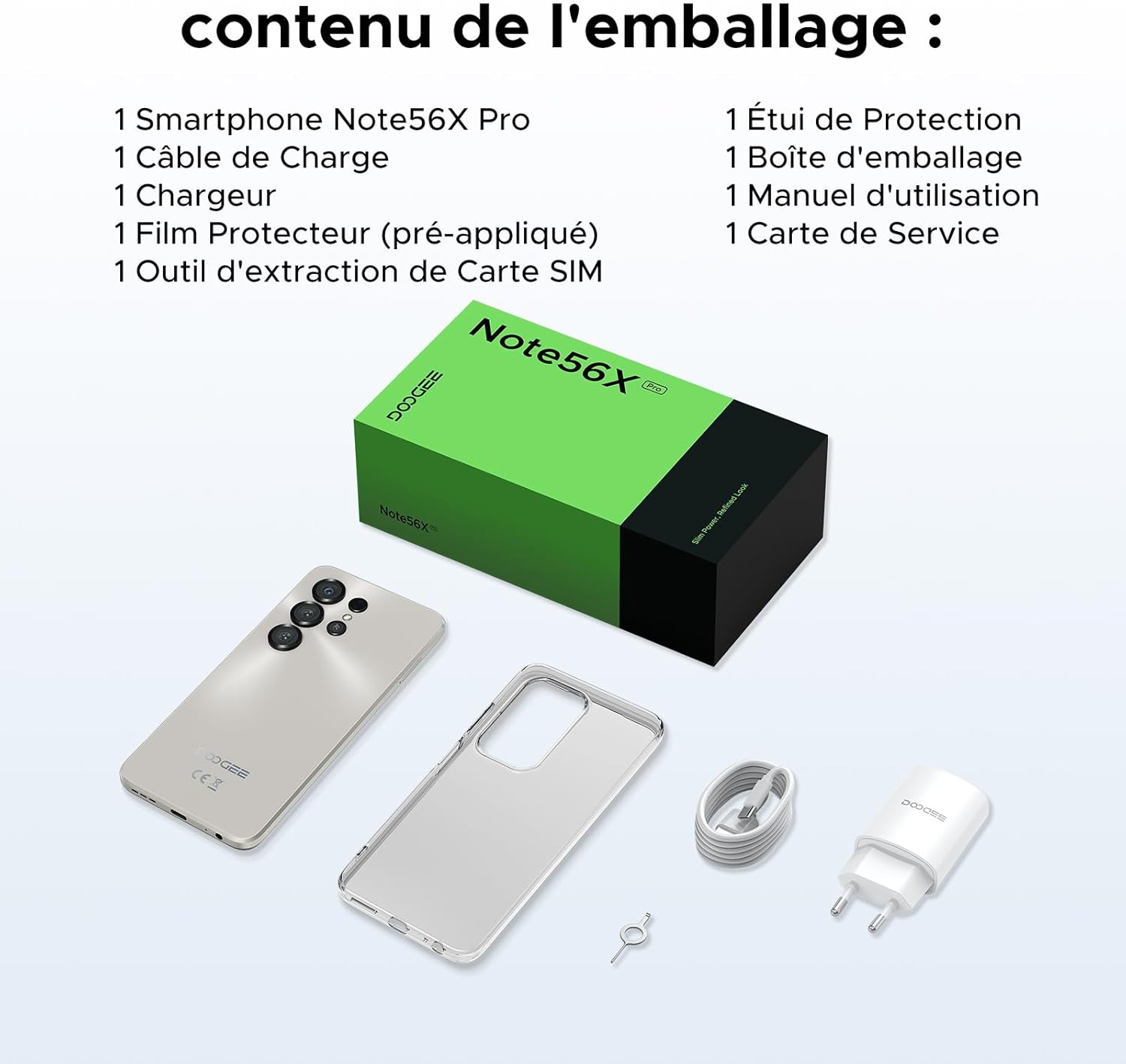
This image shows the contents included in the DOOGEE Note56X Pro packaging: the smartphone, a charging cable, a charger, a pre-applied screen protector, a SIM card ejection tool, a protective case, the packaging box, a user manual, and a service card.
3. დაწყება
3.1. SIM ბარათების ჩასმა
The DOOGEE Note56X Pro supports Dual SIM functionality. To insert your SIM card(s):
- იპოვეთ SIM ბარათის უჯრა მოწყობილობის გვერდზე.
- Use the provided SIM ejection tool to open the tray.
- მოათავსეთ თქვენი Nano-SIM ბარათი(ები) და/ან microSD ბარათი უჯრაში ოქროსფერი კონტაქტებით ქვემოთ.
- ფრთხილად ჩასვით უჯრა ისევ ჭრილში, სანამ ის მოწყობილობას არ გაუსწორდება.
3.2. ჩართვა/გამორთვა
- ჩართვა: დააჭირეთ და გეჭიროთ ჩართვის ღილაკი, სანამ DOOGEE-ს ლოგო არ გამოჩნდება.
- გამორთვა: დააჭირეთ და გეჭიროთ ჩართვის ღილაკი ეკრანზე ჩართვის პარამეტრების გამოჩენამდე, შემდეგ აირჩიეთ „გამორთვა“.
- გადატვირთვა: დააჭირეთ და გააჩერეთ ჩართვის ღილაკი, სანამ ჩართვის პარამეტრები არ გამოჩნდება, შემდეგ აირჩიეთ „გადატვირთვა“.
3.3. საწყისი დაყენება
პირველი ჩართვისას, საწყისი დაყენების დასასრულებლად მიჰყევით ეკრანზე გამოსახულ მითითებებს:
- აირჩიეთ თქვენი ენა.
- დაუკავშირდით Wi-Fi ქსელს.
- შედით თქვენი Google ანგარიშით ან შექმენით ახალი.
- Set up screen lock (PIN, pattern, password, fingerprint, or Face ID).
- Review და დაეთანხმეთ წესებსა და პირობებს.
4. თქვენი მოწყობილობის მუშაობა
4.1. ჩვენება
The Note56X Pro features a 6.56-inch HD+ IPS Waterdrop display with a 90Hz refresh rate, offering smooth visuals and vibrant colors. The 90% screen-to-body ratio provides an immersive viewგამოცდილება.

This graphic highlights the display features of the DOOGEE Note56X Pro, including a 90Hz refresh rate for smooth visuals, support for 16.7 million colors, and a 90% screen-to-body ratio for an immersive viewგამოცდილება.
A brief video demonstrating the smooth gaming experience on the DOOGEE Note56X Pro's 6.56-inch HD+ 90Hz display, showing responsive gameplay.
4.2. შესრულება
Powered by an UNISOC T7225 Octa-Core processor, the Note56X Pro ensures fluid multitasking and efficient application launch. It comes with 32GB of RAM (4GB physical + 28GB virtual) and 128GB of internal storage, expandable up to 2TB via a TF card (sold separately).

This image presents a technical diagram of the UNISOC T7225 Octa-Core processor, highlighting its 1.8 GHz high frequency and Mali G57 ARM GPU, ensuring smooth performance for web browsing, online learning, and chats.

This graphic illustrates the memory configuration of the DOOGEE Note56X Pro, featuring 32GB RAM (4GB physical + 28GB virtual) and 128GB ROM, expandable up to 2TB with a TF card (sold separately), providing ampთავისუფალი სივრცე აპლიკაციებისა და მედიისთვის.
A short video highlighting the internal components of the DOOGEE Note56X Pro, specifically the Octa-Core UNISOC T7225 processor and the 32GB RAM (4GB + 28GB virtual) and 128GB ROM configuration.
4.3. ბატარეა
Equipped with a 6150mAh Silicon-Carbon battery, the Note56X Pro offers extended usage time and supports 5W reverse charging. The battery is designed for durability, with up to 1000 charge/discharge cycles and an estimated 4-year lifespan.

A detailed diagram showing the internal structure of the 6150mAh Silicon-Carbon battery within the DOOGEE Note56X Pro, emphasizing its extended endurance, 1000 charge/discharge cycles, 4-year lifespan, 20% reduced size, and 5W reverse charging capability.
მოკლე ვიდეო ჩვენებაasing the sleek design, vertical lens arrangement, ultra-thin 8.45mm body, lightweight 195g build, and available colors (Midnight Black, Glacier Blue, Titanium Grey Mist) of the DOOGEE Note56X Pro.
4.4. კამერა
Capture clear and vibrant photos with the Note56X Pro's camera system:
- მთავარი კამერა: 13MP with AI recognition, HDR, Pro Mode, Smile Capture, Panoramas, Burst Mode, Night Mode, and Fun Filters.
- წინა კამერა: 8MP with Beauty Mode and Portrait Mode for natural selfies.

This graphic highlights the features of the 13MP main camera on the DOOGEE Note56X Pro, including AI recognition, HDR, Pro Mode, Smile Capture, Panoramas, Burst Mode, Night Mode, and Fun Filters, illustrated with a landscape photo taken by the phone.

This image showcases the 8MP front camera features of the DOOGEE Note56X Pro, including Beauty Mode and Portrait Mode, designed to simplify photography and produce bright, natural selfies.

This graphic details the intelligent features of the Google Smart Camera on the DOOGEE Note56X Pro, such as displaying search results, text extraction and translation, homework analysis, plant and animal identification, and online search capabilities.
4.5. დაკავშირება
The device supports 4G cellular networks, Wi-Fi, Bluetooth 5.0, and NFC for secure contactless payments. It also includes GPS for precise navigation and OTG functionality for connecting external devices.
4.6. უსაფრთხოების მახასიათებლები
The Note56X Pro offers multiple security options to protect your data:
- Face ID: განბლოკეთ თქვენი ტელეფონი სახის ამოცნობის გამოყენებით.
- თითის ანაბეჭდის ამოცნობა: გვერდზე დამონტაჟებული თითის ანაბეჭდის სენსორი უზრუნველყოფს სწრაფ და უსაფრთხო წვდომას.
- ასევე ხელმისაწვდომია სტანდარტული PIN კოდის, ნიმუშის და პაროლის ვარიანტები.
4.7. Operating System and AI
Running on Android 16, the Note56X Pro provides an intuitive and secure user experience. It integrates Google Gemini AI, offering intelligent assistance for various tasks.

A visual representation of the Android 16 operating system interface on the DOOGEE Note56X Pro, showcasing various application icons and a clean, intuitive user experience.

This image shows the Google Gemini AI chat interface on the DOOGEE Note56X Pro, demonstrating its capability for planning vacations, discussing current events, and practicing interview კითხვები.
5. სპეციფიკაციები
| ფუნქცია | სპეციფიკაცია |
|---|---|
| ბრენდი | დოოჯი |
| მოდელის სახელი | Note56X Pro |
| ოპერაციული სისტემა | Android 16 |
| ეკრანის ზომა | 6.56 ინჩი |
| ეკრანის გარჩევადობა | 720 x 1612 |
| განახლების სიხშირე | 90 ჰც |
| პროცესორი | UNISOC T7225 რვა ბირთვი |
| დაინსტალირებული ოპერატიული მეხსიერების ზომა | 32 გბ (4 გბ ფიზიკური + 28 გბ ვირტუალური) |
| მეხსიერების შენახვის მოცულობა | 128 GB (გაფართოება 2 ტბ-მდე) |
| ბატარეის ტიპი | ლითიუმ-პოლიმერი |
| ბატარეის ტევადობა | 6150 mAh |
| ფიჭური ტექნოლოგია | 4G |
| უსადენო გადამზიდავი | ყველა ოპერატორი (განბლოკილი) |
| დაკავშირება | Wi-Fi, Bluetooth 5.0, NFC |
| განსაკუთრებული თვისებები | Dual SIM, Integrated GPS, USB OTG Support, Face ID, Fingerprint Recognition |
| აუდიო ჯეკი | 3.5 მმ |
| ზომები (სისქე) | 8.45 მმ |
| წონა | 195 გ |

მხარე view of the DOOGEE Note56X Pro, emphasizing its ultra-thin 8.45mm profile and lightweight 195g construction, designed for easy portability and comfortable handling throughout the day.

This image displays the DOOGEE Note56X Pro in its available elegant colors: Midnight Black, Titanium Grey Mist, and Glacier Blue, showcasing the aesthetic options for the device.
6. მოვლა
To ensure the longevity and optimal performance of your DOOGEE Note56X Pro, follow these maintenance guidelines:
- დასუფთავება: ეკრანისა და კორპუსის გასაწმენდად გამოიყენეთ რბილი, უბუშტო ქსოვილი. მოერიდეთ აბრაზიულ მასალებს ან მკაცრ ქიმიკატებს.
- პროგრამული განახლებები: Regularly check for and install system updates to benefit from the latest features, security patches, and performance improvements. Go to პარამეტრები > სისტემა > სისტემის განახლება.
- ბატარეის მოვლა: მოერიდეთ ექსტრემალურ ტემპერატურას. არ დაუშვათ ელემენტის ხშირად სრულად დაცლა. ოპტიმალური დატენვისთვის გამოიყენეთ ორიგინალი დამტენი.
- შენახვის მენეჯმენტი: პერიოდულად გაწმინდეთ არასაჭირო files and uninstall unused apps to free up storage space and maintain device speed.
- დაცვა: Use the provided protective case and screen protector to guard against scratches and minor impacts.
7. Დიაგნოსტიკა
If you encounter issues with your DOOGEE Note56X Pro, try the following solutions:
- მოწყობილობა არ ირთვება: დარწმუნდით, რომ აკუმულატორი დატენილია. შეაერთეთ დამტენი და დაელოდეთ რამდენიმე წუთი, სანამ ხელახლა ჩართავთ.
- ეკრანი არ რეაგირებს: Force restart the device by pressing and holding the Power button for about 10-15 seconds.
- აპლიკაციების გათიშვა/გაყინვა: პრობლემური აპლიკაციის ქეშის გასუფთავება (პარამეტრები > აპლიკაციები > [აპლიკაციის სახელი] > მეხსიერება და ქეში > ქეშის გასუფთავება). თუ პრობლემა კვლავ მოგვარდება, წაშალეთ და ხელახლა დააინსტალირეთ აპლიკაცია.
- ცუდი ბატარეის ხანგრძლივობა: Check background app usage (პარამეტრები > ბატარეა). Reduce screen brightness, disable unused features like Wi-Fi, Bluetooth, GPS when not needed.
- ქსელთან დაკავშირების პრობლემები: Toggle Airplane Mode on and off. Restart the device. Check SIM card insertion. Reset network settings (პარამეტრები > სისტემა > პარამეტრების გადატვირთვა > Wi-Fi-ს, მობილურის და Bluetooth-ის გადატვირთვა).
- Fingerprint/Face ID Not Working: Ensure your fingers are clean and dry for fingerprint scanning. For Face ID, ensure adequate lighting and that your face is clearly visible to the front camera. Re-register your fingerprint or face if necessary.
- ნელი შესრულება: დახურეთ გამოუყენებელი ფონური აპლიკაციები. გაასუფთავეთ ქეში და დროებითი აპლიკაციები. files. Consider a factory reset as a last resort (პარამეტრები > სისტემა > გადატვირთვის ოფციები > წაშალე ყველა მონაცემი (ქარხნული პარამეტრების გადატვირთვა) - შენიშვნა: ეს თქვენს ტელეფონზე ყველა მონაცემს წაშლის. პირველ რიგში, მნიშვნელოვანი ინფორმაციის სარეზერვო ასლი შექმენით.).
8. გარანტია და მხარდაჭერა
Your DOOGEE Note56X Pro comes with a 24-month warranty and a 30-day return policy. For any questions or assistance, please contact DOOGEE customer service via Amazon. Our dedicated support team is available to help you.

This image displays DOOGEE's customer service commitments: a 30-day money-back and free return guarantee, a 2-year limited warranty, and 24/7 online individual assistance.