
შესავალი
This manual provides essential information for the setup, operation, and maintenance of your Hyperkin The Competitor Wired Controller. Designed for precision and performance, this controller is compatible with Xbox Series X|S, Xbox One, and Windows PC. Please read this manual thoroughly before use to ensure optimal performance and longevity of your device.
პაკეტის შიგთავსი
დარწმუნდით, რომ თქვენს პაკეტში ყველა ნივთია:
- Hyperkin The Competitor Wired Controller
- მოხსნადი USB-C კაბელი
- სწრაფი დაწყების სახელმძღვანელო
- Swappable Stick Caps (Domed & Concave)

Image: Contents of the Hyperkin The Competitor package, including the controller, cable, and documentation.
დაყენება
The Hyperkin The Competitor Wired Controller offers plug-and-play functionality for supported platforms.
Xbox Series X|S-თან ან Xbox One-თან დაკავშირება:
- დარწმუნდით, რომ თქვენი Xbox კონსოლი ჩართულია.
- Connect the detachable USB-C cable to the USB-C port on the top of the controller.
- Plug the USB-A end of the cable into an available USB port on your Xbox console.
- The controller will automatically connect and be ready for use.
Connecting to PC (Windows):
- დარწმუნდით, რომ თქვენი კომპიუტერი ჩართულია.
- Connect the detachable USB-C cable to the USB-C port on the top of the controller.
- Plug the USB-A end of the cable into an available USB port on your PC.
- Windows will automatically detect and install the necessary drivers. The controller will be ready for use once the installation is complete.
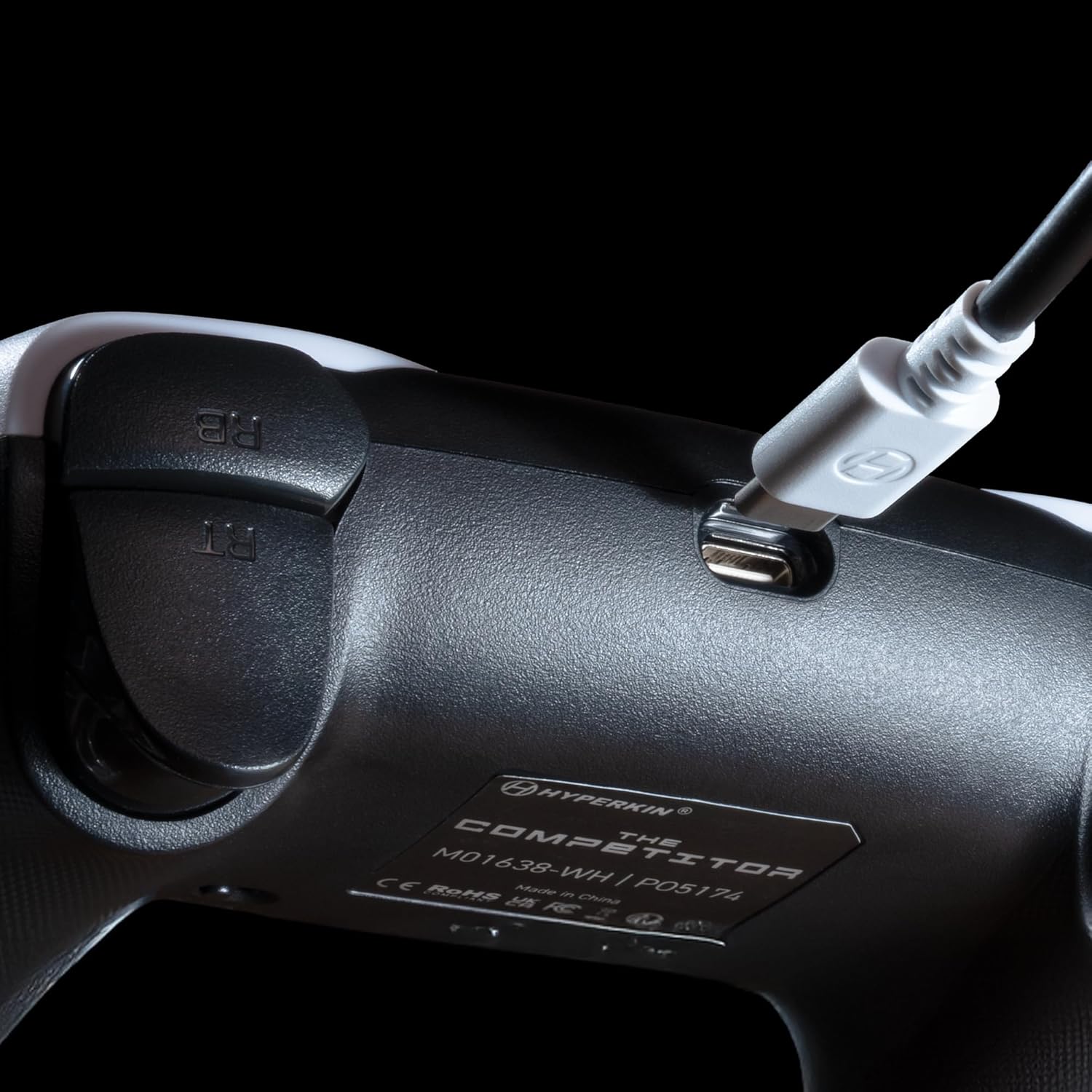
სურათი: ახლო ხედი view of the USB-C port on the Hyperkin The Competitor controller, illustrating the connection point for the detachable cable.
კონტროლერის მუშაობა
Familiarize yourself with the key features and controls of your Hyperkin The Competitor controller.
ძირითადი მახასიათებლები:
- ჰოლის ეფექტის ჯოისტიკები: Experience drift-free accuracy and magnetic precision for ultra-smooth movement and long-lasting durability.
- იმპულსების გამომწვევები: Provides immersive and reliable haptic feedback for enhanced gameplay.
- Symmetrical Analog Stick Layout: Offers a balanced and comfortable design, supporting precision play.
- Segmented Traditional D-pad: Delivers ultra-responsive control and satisfying feedback for pinpoint accuracy.
- პროგრამირებადი უკანა ღილაკები: Two customizable rear buttons for on-the-fly remapping to suit your playstyle.
- გამოყოფილი დადუმების ღილაკი: Quickly mute your microphone during gameplay.
- Swappable Stick Caps: Customize your feel with included Domed and Concave stick caps.
- Anti-Friction Gates & Metal Glide Rings: Engineered for ultra-smooth control and reduced wear.

Image: Diagram highlighting the Hall Effect Sticks and the Symmetrical Twin Stick Layout of the controller.

Image: Diagram illustrating the Hall Effect Impulse Triggers and the location of the programmable Back Buttons.

სურათი: დეტალური views of the Traditional Segmented D-Pad, the interchangeable Dome and Concave stick caps, and the Metal Glide Rings.
Programming Back Buttons:
Specific instructions for programming the back buttons are typically found in the Quick Start Guide included with your product or on the Hyperkin official support website. Generally, this involves a combination of holding a program button and pressing the desired back button and the button you wish to map.
მოვლა
თქვენი კონტროლერის ხანგრძლივი მომსახურებისა და ოპტიმალური მუშაობის უზრუნველსაყოფად, დაიცავით შემდეგი ტექნიკური მომსახურების ინსტრუქციები:
- დასუფთავება: კონტროლერის გასაწმენდად გამოიყენეთ რბილი, მშრალი ქსოვილი. ჯიუტი ჭუჭყის შემთხვევაში, ოდნავ გაწმინდეთ.ampქსოვილი წყლით დაასველეთ. მოერიდეთ უხეში ქიმიკატების ან აბრაზიული საწმენდი საშუალებების გამოყენებას.
- შენახვა: შეინახეთ კონტროლერი გრილ, მშრალ ადგილას, მოარიდეთ მზის პირდაპირ სხივებს და ექსტრემალურ ტემპერატურას.
- საკაბელო მოვლა: Avoid sharply bending or twisting the USB-C cable. Always grasp the connector, not the cable, when plugging or unplugging.
- მოერიდეთ წვეთებს: დაიცავით კონტროლერი ვარდნისა და დარტყმისგან, რამაც შეიძლება დააზიანოს შიდა კომპონენტები.
პრობლემების მოგვარება
If you encounter issues with your Hyperkin The Competitor controller, try the following steps:
- კონტროლერი არ პასუხობს:
- Ensure the USB-C cable is securely connected to both the controller and the console/PC.
- სცადეთ კონტროლერის სხვა USB პორტში შეერთება.
- გადატვირთეთ თქვენი კონსოლი ან კომპიუტერი.
- Test the controller on another compatible device if possible.
- Buttons/Joysticks Not Working Correctly:
- დარწმუნდით, რომ ღილაკების ან ჯოისტიკების გარშემო ნარჩენები არ არის ჩარჩენილი.
- Perform a system update on your console or PC to ensure the latest drivers are installed.
- If using on PC, check controller calibration settings in your operating system.
- Audio Issues (Mic Mute Button):
- Ensure the dedicated mute button is not activated.
- Check your in-game or system audio settings.
If problems persist after attempting these steps, please contact Hyperkin customer support for further assistance.
სპეციფიკაციები
| მოდელის ნომერი | M01638-WH |
| თავსებადობა | Xbox Series X|S, Xbox One, PC (Windows) |
| დაკავშირება | Wired (Detachable USB-C to USB-A cable) |
| ჯოისტიკები | დარბაზის ეფექტი |
| ტრიგერები | იმპულსური ტრიგერები |
| განლაგება | Symmetrical Analog Sticks |
| D-pad | Segmented Traditional D-pad |
| ღილაკები | ABXY, Menu, View, Share, Xbox Guide, 2 Programmable Back Buttons, Dedicated Mic Mute Button |
| მორგება | Swappable Stick Caps (Domed & Concave) |
| ზომები | 6.25 x 2.5 x 5 ინჩი |
| წონა | 15.6 უნცია |
გარანტია და მხარდაჭერა
საგარანტიო ინფორმაცია:
Warranty details for the Hyperkin The Competitor Wired Controller are typically provided with your product packaging or can be found on the official Hyperkin webსაიტი. გთხოვთ, შეინახოთ შეძენის დამადასტურებელი საბუთი გარანტიასთან დაკავშირებული ნებისმიერი პრეტენზიისთვის.
მომხმარებელთა მხარდაჭერა:
For technical assistance, troubleshooting, or further inquiries, please visit the official Hyperkin support page or contact their customer service directly. Refer to the contact information provided in your product's Quick Start Guide or on the Hyperkin webსაიტი.