1. პროდუქტი დასრულდაview
The Baseus BS1 NC Semi-in-Ear Noise Cancelling Earbuds offer a blend of comfort and advanced audio technology. Featuring Adaptive Hybrid Active Noise Cancellation (ANC), Hi-Res Audio with LDAC support, and a lightweight design, these earbuds are engineered for extended listening and clear communication. They are also equipped with a 6-microphone AI system for clear calls and IP55 water and dust resistance.

Image: Baseus BS1 NC Semi-in-Ear Noise Cancelling Earbuds and their charging case in black.
2. პაკეტის შიგთავსი
დარწმუნდით, რომ ყველა ნივთი შეფუთვაშია:
- Baseus Bass BS1 NC Semi-in-Ear Earbuds (Left and Right)
- დამუხტვის ქეისი
- USB-C დამტენი კაბელი
- სწრაფი დაწყების სახელმძღვანელო

Image: The complete retail package for the Baseus BS1 NC Earbuds, showing the earbuds, charging case, USB-C cable, and quick start guide.
3. ყურსასმენებისა და ქეისის დატენვა
For optimal performance, fully charge the earbuds and charging case before first use.
3.1 ყურსასმენების დატენვა
- მოათავსეთ ყურსასმენები დამტენ ქეისში. დარწმუნდით, რომ ისინი სწორად არის მოთავსებული შესაბამის ჭრილებში (L - მარცხნივ, R - მარჯვნივ).
- დახურეთ დამტენი ქეისი. ყურსასმენები ავტომატურად დაიწყებენ დატენვას.
3.2 ქეისის დატენვა
- მოწოდებული USB-C დამტენი კაბელი შეაერთეთ ქეისზე არსებულ დამტენ პორტთან.
- კაბელის მეორე ბოლო შეაერთეთ USB კვების ადაპტერთან (არ მოყვება) ან კომპიუტერის USB პორტთან.
- The LED indicator on the case will show the charging status:
- მწვანე: 75%-დან 100%-მდე დატენილია
- ყვითელი: 25%-დან 75%-მდე დატენილია
- წითელი: Below 25% charged
- A full charge for the case provides up to 40 hours of total playtime for the earbuds (with ANC off). A 10-minute charge can provide up to 2 hours of playback.

Image: The Baseus BS1 NC Earbuds resting in their open charging case, highlighting the 40-hour total playtime and rapid charging capabilities.
4. დაწყვილება და დაკავშირება
4.1 საწყისი დაწყვილება
- გახსენით დამტენი ქეისი. ყურსასმენები ავტომატურად გადავა დაწყვილების რეჟიმში.
- თქვენს მოწყობილობაზე (სმარტფონი, პლანშეტი, კომპიუტერი) ჩართეთ Bluetooth.
- ძიება "Baseus Bass BS1 NC" in the list of available Bluetooth devices.
- Select "Baseus Bass BS1 NC" to connect. A voice prompt will confirm successful pairing.
4.2 ავტომატური ხელახალი დაკავშირება
Once paired, the earbuds will automatically reconnect to the last connected device when removed from the charging case and within Bluetooth range.
4.3 მრავალპუნქტიანი კავშირი
The Baseus BS1 NC supports Baseus Smart-Connect (BSC) technology, allowing simultaneous connection to two devices. This enables seamless switching between audio sources without manual re-pairing.
To use multipoint connection:
- ყურსასმენები თქვენს პირველ მოწყობილობას დააწყვილეთ.
- Disconnect the earbuds from the first device's Bluetooth settings (do not unpair).
- ყურსასმენები მეორე მოწყობილობასთან დააწყვილეთ.
- Reconnect the earbuds to the first device from its Bluetooth settings. The earbuds should now be connected to both devices.
Audio will automatically switch to the device playing content or receiving a call.
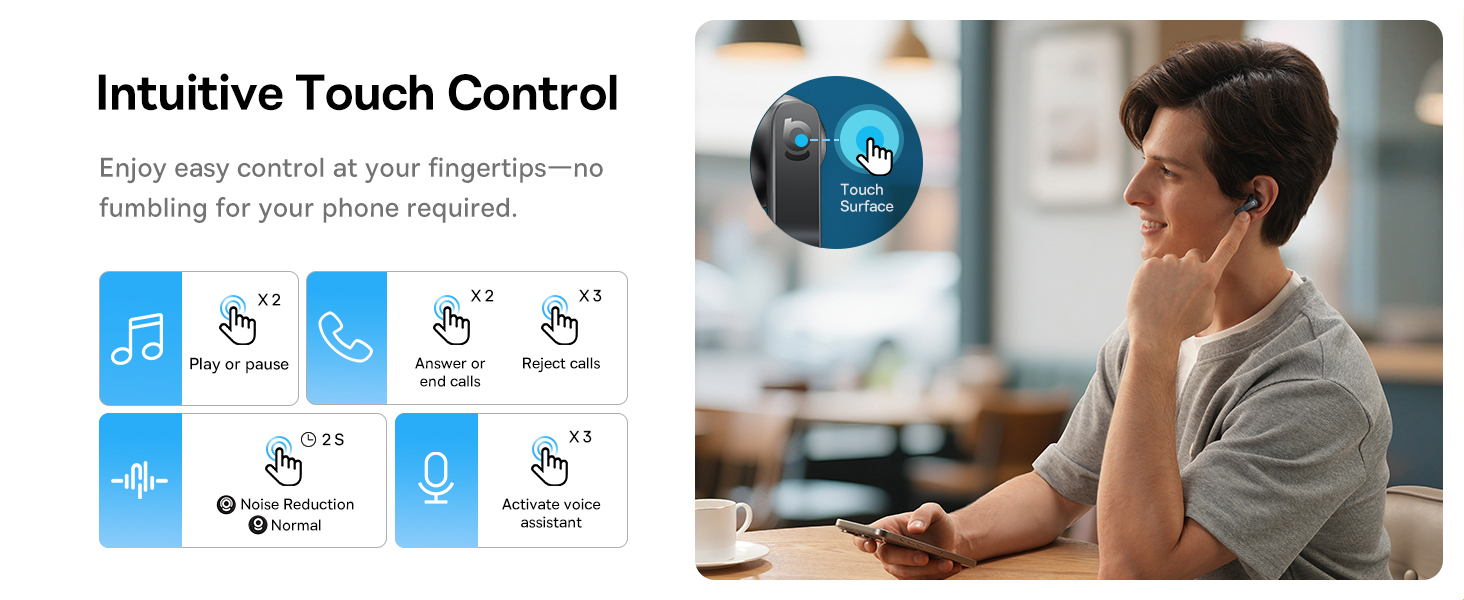
Image: A visual representation of the Baseus BS1 NC Earbuds connected to both a laptop and a smartphone, showcasing the instant multipoint connection feature.
5. ყურსასმენების ტარება
The Baseus BS1 NC earbuds feature a semi-in-ear design for comfortable, pressure-free wear. For optimal sound quality and noise cancellation, ensure a proper fit.
- იდენტიფიცირება მარცხენა (L) და მარჯვენა (R) ყურსასმენები.
- ფრთხილად ჩადეთ თითოეული ყურსასმენი ყურის არხში.
- Adjust the earbud until it feels secure and comfortable. The stem should point slightly forward or downward.

Image: A person wearing the Baseus BS1 NC Earbuds, illustrating their ergonomic and lightweight design for all-day comfort.
6. საოპერაციო ინსტრუქციები
6.1 შეეხეთ კონტროლი
The earbuds feature intuitive touch controls on their stems. The following are default functions, which may be customizable via the Baseus app:
| მოქმედება | ფუნქცია |
|---|---|
| Double-tap (Left or Right Earbud) | დაკვრა/პაუზა მუსიკა, პასუხის გაცემა/ზარის დასრულება |
| Triple-tap (Left or Right Earbud) | Reject call, Activate voice assistant |
| დააჭირეთ და გააჩერეთ (2 წამი) | Switch Noise Control Mode (ANC/Normal/Transparency) |

Image: An illustration detailing the intuitive touch controls on the Baseus BS1 NC Earbuds for various functions like play/pause, call management, noise reduction, and voice assistant activation.
6.2 ხმაურის კონტროლის რეჟიმები
The Baseus BS1 NC earbuds offer three noise control modes:
- Adaptive Hybrid ANC (Active Noise Cancellation): Reduces ambient noise for an immersive listening experience. Ideal for noisy environments.
- გამჭვირვალობის რეჟიმი: Allows you to hear your surroundings while still enjoying your audio. Useful for awareness in urban settings or conversations.
- ნორმალური რეჟიმი: სტანდარტული აუდიო დაკვრა აქტიური ხმაურის გაუქმების ან გამჭვირვალობის ფუნქციების გარეშე.
Switch between modes by pressing and holding the touch area on either earbud for 2 seconds.

Image: A cutaway diagram of a Baseus BS1 NC earbud in an ear, illustrating the semi-in-ear fit and the availability of Adaptive Noise Cancelling and Transparency Mode.
6.3 Hi-Res Audio with LDAC
These earbuds support LDAC technology, enabling high-resolution audio transmission for a detailed and rich sound experience. Ensure your device supports LDAC and activate it in your device's Bluetooth settings for the best audio quality.

Image: The Baseus BS1 NC Earbuds surrounded by sound waves, emphasizing features like Hi-Res Audio, SuperBass 2.0, and 13mm dynamic drivers for powerful sound.
6.4 6-Mic AI Clear Calls
The earbuds are equipped with 6 microphones and AI noise isolation technology to ensure your voice is clear during calls, even in noisy environments. Wind noise reduction further enhances call clarity outdoors.
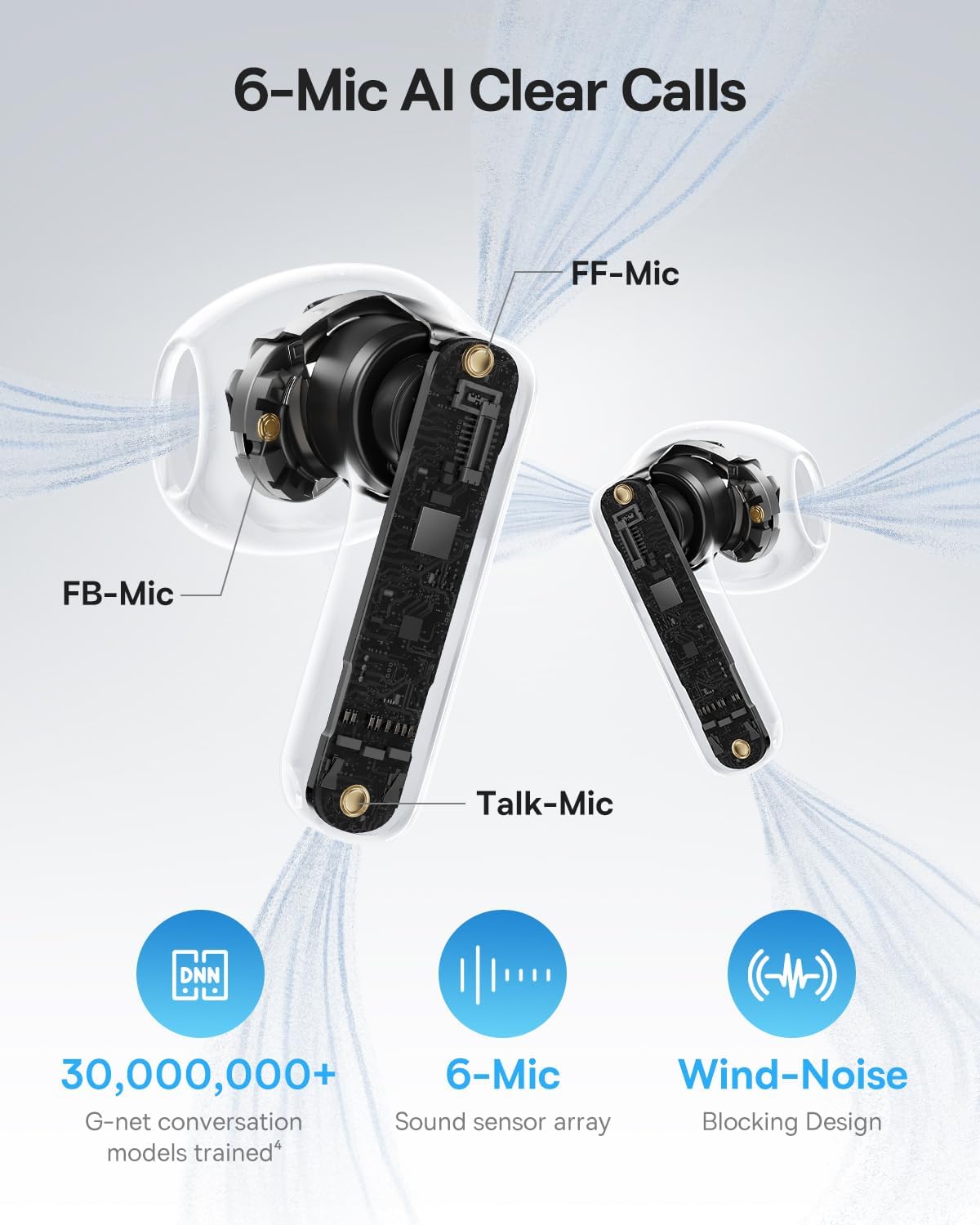
Image: A detailed diagram of the Baseus BS1 NC earbud, highlighting the placement of the FF-Mic, FB-Mic, and Talk-Mic, which contribute to the 6-Mic AI Clear Call technology and wind-noise blocking design.
6.5 Smart App Control
Download the dedicated Baseus app for enhanced control and customization options. The app allows you to:
- Adjust Bass Boost levels.
- Select from various EQ Modes.
- Control Spatial Acoustics settings.
- Use the "Find Your Earbuds" feature.
Note: In guest mode, no account creation or permissions are required to customize features, but GPS access is needed to locate lost earbuds.

Image: A smartphone displaying the Baseus app interface, which offers various sound control options including Bass Boost, EQ Modes, Spatial Acoustics, and a "Find Your Earbuds" function.
7. მოვლა და მოვლა
7.1 დასუფთავება
- რეგულარულად გაწმინდეთ ყურსასმენები და დამტენი ქეისი რბილი, მშრალი, ბუსუსების გარეშე ქსოვილით.
- არ გამოიყენოთ უხეში ქიმიკატები, გამწმენდი გამხსნელები ან ძლიერი სარეცხი საშუალებები.
- Gently remove any earwax or debris from the earbud mesh and charging contacts using a small, soft brush or cotton swab.
7.2 წყლისა და მტვრისგან დაცვა (IP55)
The earbuds are rated IP55, meaning they are protected against limited dust ingress and low-pressure water jets from any direction. This makes them suitable for workouts and light rain exposure.
- ყურსასმენები წყალში არ ჩაძიროთ.
- დამტენი კონტაქტების დაზიანების თავიდან ასაცილებლად, დარწმუნდით, რომ ყურსასმენები მშრალია, სანამ მათ დამტენ ქეისში დააბრუნებთ.
- დამტენი ყუთი არ არის წყალგამძლე.

Image: The Baseus BS1 NC Earbuds shown with water droplets, signifying their IP55 rating for dust and water resistance.
7.3 შენახვა
შეინახეთ ყურსასმენები დამუხტვის ჩანთაში, როდესაც არ იყენებთ, რათა დაიცვან ისინი და დაიტენონ.
8. Დიაგნოსტიკა
If you encounter issues with your Baseus BS1 NC earbuds, refer to the following common solutions:
- ხმის/კავშირის პრობლემები არ არის:
- დარწმუნდით, რომ ყურსასმენები დატენილია.
- Verify Bluetooth is enabled on your device and "Baseus Bass BS1 NC" is selected.
- Try placing earbuds back in the case, closing it, and then reopening to reset the connection.
- დაივიწყეთ მოწყობილობა თქვენს Bluetooth პარამეტრებში და ხელახლა დააწყვილეთ.
- ერთი ყურსასმენი არ მუშაობს:
- დარწმუნდით, რომ ორივე ყურსასმენი დატენულია.
- ორივე ყურსასმენი ჩადეთ ქეისში, დახურეთ და ხელახლა გახსენით.
- გაწმინდეთ დამტენი კონტაქტები როგორც ყურსასმენებზე, ასევე ქეისის შიგნით.
- ხმის ცუდი ხარისხი:
- დარწმუნდით, რომ ყურსასმენები სწორად არის ჩასმული ყურებში.
- გაწმინდეთ ყურსასმენის ბადე ნებისმიერი დაბრკოლების მოსაშორებლად.
- Check your device's audio settings and ensure LDAC is enabled if supported.
- ANC არაეფექტურია:
- Ensure ANC mode is activated via touch control or the Baseus app.
- Adjust the earbuds for a better seal in your ears.
9. სპეციფიკაციები
| ფუნქცია | დეტალი |
|---|---|
| მოდელის სახელი | Baseus Bass BS1 NC |
| ხმაურის კონტროლი | Adaptive Noise Cancellation, Environmental Noise Cancellation, Hybrid Noise Cancellation |
| დაკავშირების ტექნოლოგია | Bluetooth 6.0, უსადენო |
| უსადენო საკომუნიკაციო ტექნოლოგია | Bluetooth 6.0 |
| Bluetooth დიაპაზონი | 10 მეტრი |
| აუდიო დრაივერის ტიპი | დინამიური დრაივერი |
| აუდიო დრაივერის ზომა | 13 მილიმეტრი |
| სიხშირის პასუხი | 40 კჰც |
| აუდიო შეყოვნება | 60 მილიწამი |
| ელემენტის ხანგრძლივობა (ყურსასმენები) | 7 Hours (ANC off) |
| თამაშის საერთო დრო (ქეისით) | 40 Hours (ANC off) |
| დატენვის დრო (სწრაფი დატენვა) | 10 წუთი 2 საათის განმავლობაში დაკვრისთვის |
| წყლის წინააღმდეგობის დონე | IP55 (მხოლოდ ყურსასმენები) |
| კონტროლის ტიპი | შეეხეთ Control |
| მასალა | აკრილონიტრილი ბუტადიენ სტიროლი (ABS), პოლიკარბონატი (PC) |
| ნივთის წონა (ყურსასმენები) | 4გრ თითო ყურსასმენი |
| Product Dimensions (Earbuds) | 1.2 x 0.7 x 0.7 ინჩი |
| თავსებადი მოწყობილობები | Devices with Bluetooth Audio Capability, including iOS, Android, Windows, Mac OS and Switch. |
10. პროდუქტის ოფიციალური ვიდეო
Watch the official product video for a visual guide on the Baseus BS1 NC Earbuds:
ვიდეო: Baseus-ის ოფიციალური პროდუქტის ვიდეოasing the features and usage of the Baseus BS1 NC Semi-in-Ear True Wireless Earbuds.
11. გარანტია და მხარდაჭერა
For warranty information, technical support, FAQs, and further assistance, please visit the official Baseus support center.
Refer to the Quick Start Guide included in your package for a direct link or visit the Baseus webსაიტი.
Note: Protection plans may be available for purchase separately.


