1. შესავალი
This manual provides essential information for the safe and efficient operation of your Thomson 43FT2S15 FHD LED Smart TV. Please read this manual thoroughly before using the television and retain it for future reference.
2. უსაფრთხოების ინფორმაცია
ამ პროდუქტის გამოყენებისას ყოველთვის დაიცავით უსაფრთხოების ძირითადი ზომები, რათა შეამციროთ ხანძრის, ელექტროშოკის და დაზიანების რისკი.
- არ დაუშვათ ტელევიზორი წვიმის ან ტენიანობის ქვეშ.
- არ დაბლოკოთ სავენტილაციო ღიობები.
- უზრუნველყავით კვების კაბელის სათანადო დამიწება.
- არ დადოთ ტელევიზორი არასტაბილურ ეტლზე, სადგამზე, სამფეხაზე, სამაგრზე ან მაგიდაზე.
- გამორთეთ ტელევიზორი ელექტრომომარაგებიდან ჭექა-ქუხილის დროს ან ხანგრძლივი გამოყენებისას.
- მიმართეთ ყველა მომსახურება კვალიფიციურ მომსახურე პერსონალს.
3. პაკეტის შიგთავსი
დარწმუნდით, რომ ქვემოთ ჩამოთვლილი ყველა ნივთი შედის თქვენს პაკეტში:
- Thomson 43FT2S15 FHD LED Smart TV
- დენის ადაპტერი
- დისტანციური მართვა
- მომხმარებლის სახელმძღვანელო (ეს დოკუმენტი)
- საგარანტიო ბარათი

სურათი: წინა მხარე view of the Thomson 43FT2S15 Smart TV.
4. დაყენება
4.1 ფიზიკური მონტაჟი
The Thomson 43FT2S15 TV is designed for table mounting. Ensure the TV is placed on a stable, flat surface.

Image: Diagram showing the dimensions of the Thomson 43FT2S15 Smart TV. The screen size is 109 cm (43 inches) diagonally, with a width of 95 cm and height of 60 cm (including stand). The depth is 6 cm.
ზომები (W x H x D): 95 cm x 60 cm x 6 cm (without stand, depth is 6 cm). The screen diagonal is 109 cm (43 inches).
4.2 მოწყობილობების დაკავშირება
Connect your external devices to the appropriate ports on the TV. Refer to the diagram below for port locations.
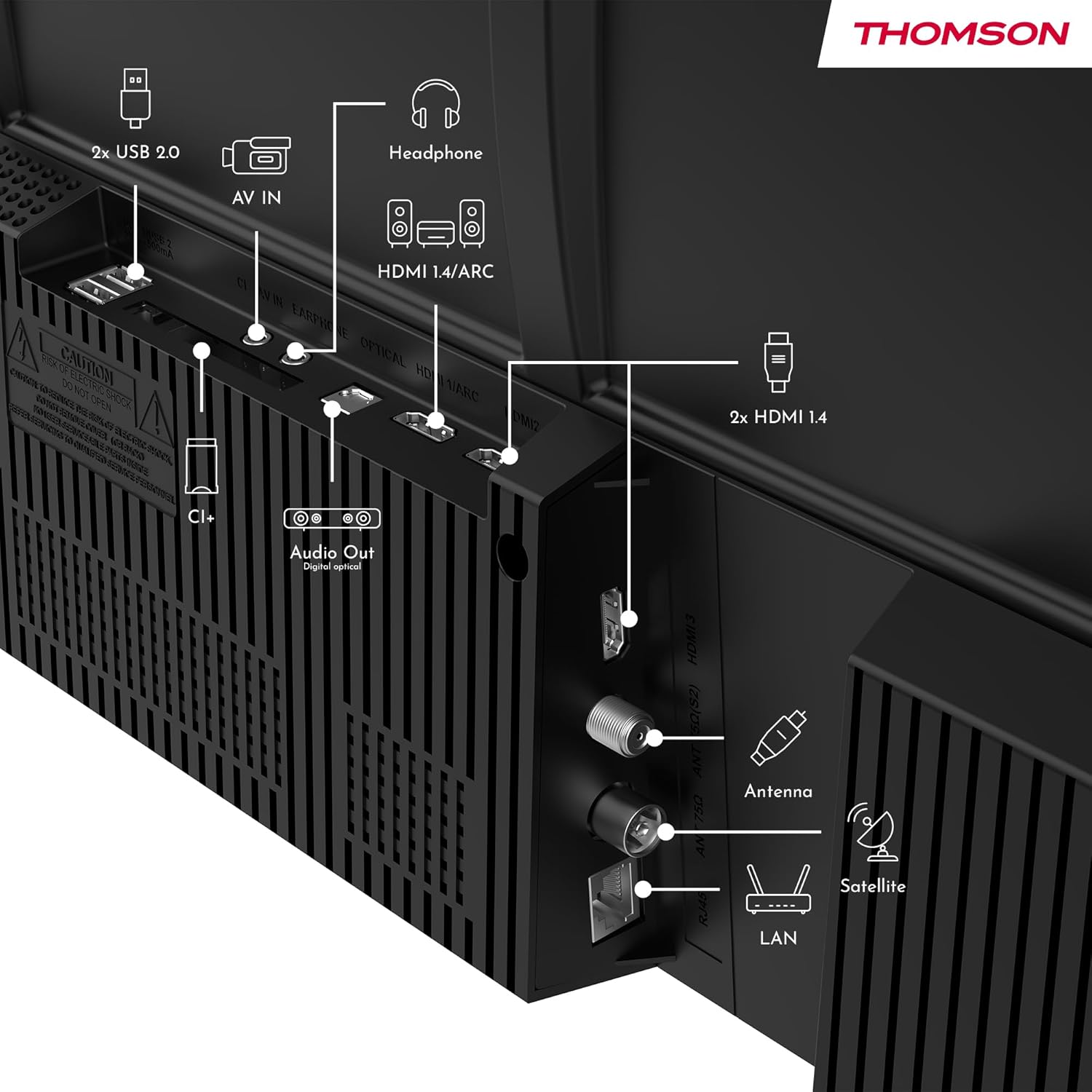
სურათი: უკანა view of the Thomson 43FT2S15 Smart TV showing various connection ports. These include 2x USB 2.0, AV IN, Headphone out, HDMI 1.4/ARC, Optical Audio Out, CI+, Antenna (DVB-T2/C), Satellite (DVB-S2), and LAN (Ethernet).
- HDMI: Connect external devices like Blu-ray players, game consoles, or set-top boxes. The TV has 2 HDMI 1.4 ports, one with ARC support.
- USB: For connecting USB storage devices. The TV has 2 USB 2.0 ports.
- ანტენა/თანამგზავრი: Connect your terrestrial or satellite antenna for live TV.
- ლოკალური ქსელი (ეთერნეტი): სადენიანი ინტერნეტ კავშირისთვის.
- Wi-Fi: უკაბელო ინტერნეტთან დასაკავშირებლად.
- Bluetooth: თავსებადი უსადენო აქსესუარების დასაკავშირებლად.
- აუდიო გამომავალი (ოპტიკური): For connecting to an external sound system.
- ყურსასმენი: ყურსასმენების დასაკავშირებლად.
- CI+ სლოტი: For inserting a Conditional Access Module (CAM) for encrypted channels.
5. საოპერაციო ინსტრუქციები
5.1 ჩართვა/გამორთვა
Connect the power adapter to the TV and a power outlet. Press the power button on the remote control to turn the TV on or off.
5.2 TiVo OS and Smart Features
Your Thomson Smart TV is powered by TiVo OS, which integrates live TV, streaming applications, and on-demand services into a single, intuitive interface. Personalized recommendations help you discover new content.

Image: The Thomson Smart TV displaying the TiVo OS interface with various streaming apps like Netflix, Canal+, Prime Video, YouTube, and Disney+.
5.3 ხმის კონტროლი
Use the TiVo Voice Control feature to navigate channels, open applications, or search for content across different platforms using voice commands. The remote control includes a microphone for this function.

Image: The Thomson Smart TV remote control highlighting the voice control microphone, backlit buttons, and direct access buttons for streaming services.
5.4 Wireless Display
Mirror content from your smartphone, tablet, or laptop to the TV screen using the Wireless Display function. This allows for easy sharing of videos, photos, and applications.
5.5 აუდიო და ვიდეო გაუმჯობესებები
- Dolby აუდიო: Experience enhanced sound quality with Dolby Audio, providing clear dialogue and immersive, multi-dimensional effects.

Image: A Thomson Smart TV displaying content with visual representations of sound waves, indicating the Dolby Audio feature.
- HDR10: Enjoy sharper contrast and lifelike colors with HDR10 technology, revealing details in both bright highlights and deep shadows.

Image: A split-screen comparison showing the difference between SDR (Standard Dynamic Range) and HDR10 (High Dynamic Range) image quality on a Thomson Smart TV, demonstrating improved contrast and color.
5.6 დისტანციური მართვა
The ergonomic remote control features backlit buttons for easy navigation in low light conditions. It also includes direct access buttons for popular streaming services such as Netflix, YouTube, Prime Video, Disney+, and Canal+.
6. მოვლა
თქვენი ტელევიზორის ხანგრძლივი მომსახურებისა და ოპტიმალური მუშაობის უზრუნველსაყოფად, დაიცავით შემდეგი ტექნიკური ინსტრუქციები:
- ეკრანის გაწმენდა: ფრთხილად გაწმინდეთ ეკრანი რბილი, ბუსუსების გარეშე ქსოვილით. ჯიუტი ლაქების შემთხვევაში გამოიყენეთ ტელევიზორებისთვის სპეციალურად შექმნილი ეკრანის საწმენდი საშუალება, რომელიც წაისვით ქსოვილზე და არა პირდაპირ ეკრანზე.
- კაბინეტის დასუფთავება: ტელევიზორის კარადის გასაწმენდად გამოიყენეთ რბილი, მშრალი ქსოვილი. არ გამოიყენოთ აბრაზიული საწმენდები ან გამხსნელები.
- ვენტილაცია: გადახურების თავიდან ასაცილებლად, დარწმუნდით, რომ ტელევიზორის უკანა მხარეს სავენტილაციო ღიობები არ არის დაბლოკილი.
- დენის კაბელი: რეგულარულად შეამოწმეთ კვების კაბელი დაზიანების არსებობაზე. დაზიანების შემთხვევაში, დაუკავშირდით კვალიფიციურ სერვის პერსონალს მისი შესაცვლელად.
7. Დიაგნოსტიკა
თუ თქვენს ტელევიზორთან დაკავშირებით პრობლემები შეგექმნათ, გაეცანით შემდეგ გავრცელებული პრობლემების მოგვარების ნაბიჯებს:
- ძალა არ არის:
- Check if the power cord is securely connected to the TV and the power outlet.
- Ensure the power outlet is functioning by plugging in another device.
- სცადეთ დააჭიროთ ჩართვის ღილაკს თავად ტელევიზორზე და არა მხოლოდ პულტზე.
- სურათი/ხმა არ არის:
- დარწმუნდით, რომ სწორი შეყვანის წყაროა შერჩეული (მაგ., HDMI 1, ანტენა).
- შეამოწმეთ ტელევიზორსა და გარე მოწყობილობებს შორის ყველა საკაბელო კავშირი.
- დაარეგულირეთ ხმის სიმძლავრე და დარწმუნდით, რომ ტელევიზორი არ არის გამორთული.
- დისტანციური მართვა არ მუშაობს:
- შეცვალეთ ბატარეები დისტანციურ კონტროლში.
- დარწმუნდით, რომ დისტანციურ მართვასა და ტელევიზორის ინფრაწითელ სენსორს შორის არანაირი დაბრკოლება არ არის.
- Smart TV Features Not Working (Wi-Fi/Apps):
- Check your internet connection. Restart your router if necessary.
- Go to the TV's network settings to ensure it's connected to Wi-Fi or Ethernet.
- სცადეთ ტელევიზორის გადატვირთვა.
For more complex issues, please contact customer support or refer to the manufacturer's webსაიტი.
8. სპეციფიკაციები
Key technical specifications for the Thomson 43FT2S15 FHD LED Smart TV:
| ფუნქცია | სპეციფიკაცია |
|---|---|
| ბრენდი | ტომსონი |
| მოდელი | 43FT2S15 |
| ეკრანის ზომა | 43 ინჩი (109 სმ) |
| ჩვენების ტექნოლოგია | LED |
| რეზოლუცია | 1920 x 1080 (FHD) |
| განახლების სიხშირე | 60 ჰც |
| ასპექტის თანაფარდობა | 16:9 |
| ოპერაციული სისტემა | TiVo OS |
| აუდიო ტექნოლოგია | Dolby Audio (Dolby Atmos encoding) |
| HDR მხარდაჭერა | HDR10 |
| დაკავშირება | Wi-Fi, Ethernet, Bluetooth, 2x HDMI 1.4 (1x ARC), 2x USB 2.0, Optical Audio Out, AV In, Headphone, CI+ |
| ტიუნერები | DVB-T2/C/S2 (Triple Tuner) |
| მხარდაჭერილი ინტერნეტ სერვისები | Netflix, YouTube, Prime Video, Disney+, Canal+, Browser |
| ზომები (პროდუქტი) | 6 x 95 x 60 სმ; 6.5 კგ |
| ენერგოეფექტურობის კლასი | E |

Image: Energy efficiency label for the Thomson 43FT2S15 Smart TV, showing an energy class of E and energy consumption of 42 kWh/1000h (SDR) and 46 kWh/1000h (HDR).
პროდუქტის შესახებ დეტალური ინფორმაციისთვის იხილეთ EPREL მონაცემთა ბაზა: https://eprel.ec.europa.eu/qr/1969521
9. გარანტია და მხარდაჭერა
Your Thomson 43FT2S15 TV comes with a warranty. Please refer to the included Warranty Card for specific terms and conditions.
For technical support or service inquiries, please contact the manufacturer:
- მწარმოებელი: ნაკადიview GmbH
- Webსაიტი: www.streamview.com
- ელფოსტა: კონტაქტი@ნაკადიview.com
- ტელეფონი: +4318900066
Please have your model number (43FT2S15) and purchase information ready when contacting support.


