შესავალი
Thank you for choosing the ZIPRO Eclipse X Foldable Exercise Bike. This manual provides essential information for the safe and efficient use of your new fitness equipment. The Eclipse X is designed for comfortable home workouts, featuring a foldable structure, adjustable seat, and stable design. It integrates easily into small spaces and is simple to move. Its adjustable magnetic resistance system offers 8 levels, ensuring smooth and silent operation suitable for all fitness levels.
უსაფრთხოების ინფორმაცია
გთხოვთ, აწყობამდე და გამოყენებამდე ყურადღებით წაიკითხოთ ყველა ინსტრუქცია. შეინახეთ ეს სახელმძღვანელო მომავალი მითითებისთვის.
- რაიმე სავარჯიშო პროგრამის დაწყებამდე გაიარეთ კონსულტაცია ექიმთან.
- ყოველი გამოყენების წინ დარწმუნდით, რომ ყველა ნაწილი საიმედოდ არის დამაგრებული.
- Place the exercise bike on a flat, stable surface.
- მოარიდეთ ბავშვებს და შინაურ ცხოველებს მოწყობილობისგან მუშაობის დროს.
- არ გადააჭარბოთ მომხმარებლის მაქსიმალურ წონას, რომელიც 110 კგ-ს (242 ფუნტი) შეადგენს.
- ჩაიცვით შესაბამისი სავარჯიშო ტანსაცმელი და ფეხსაცმელი.
- დაუყოვნებლივ შეწყვიტეთ ვარჯიში, თუ გრძნობთ სისუსტეს, თავბრუსხვევას ან ტკივილს.
დაყენება და შეკრება
The ZIPRO Eclipse X is designed for easy setup. Follow these steps to prepare your bike for use.
1. ამოფუთვა
Carefully remove all components from the packaging. Check against the parts list (not provided in this manual, refer to your product's included guide) to ensure all items are present and undamaged.
2. Unfolding the Bike
To unfold the bike, locate the folding mechanism (often a pin or lever near the main frame hinge). Release the mechanism and carefully extend the frame until it locks into the upright position. Ensure the locking pin is fully engaged for stability.


3. სავარძლის რეგულირება
The seat height and distance are adjustable for optimal comfort. Loosen the adjustment knob located beneath the seat, slide the seat to your desired height and distance, and then securely tighten the knob. Ensure your knees have a slight bend at the bottom of the pedal stroke.


ოპერაციული ინსტრუქციები
1. Powering On the Console
The console is battery-powered. It will automatically turn on when you start pedaling or press any button. To conserve battery, it will automatically turn off after a period of inactivity.
2. Using the Console Display
The integrated computer display tracks your workout metrics:
- დრო: თქვენი ვარჯიშის ხანგრძლივობა.
- სიჩქარე: ველოსიპედის მიმდინარე სიჩქარე.
- მანძილი: სესიის განმავლობაში გავლილი მანძილის ჯამური რაოდენობა.
- კალორიები: სავარაუდო დამწვარი კალორიები.
- პულსი: Heart rate measured via hand sensors on the handlebars.
Use the "MODE" button to cycle through display functions. "RESET" typically clears current workout data. "SET" may be used for setting target values.


3. Adjusting Magnetic Resistance
The bike features 8 levels of magnetic resistance. Turn the resistance knob, located on the main frame, clockwise to increase resistance and counter-clockwise to decrease it. Start with a lower resistance and gradually increase as your fitness improves.
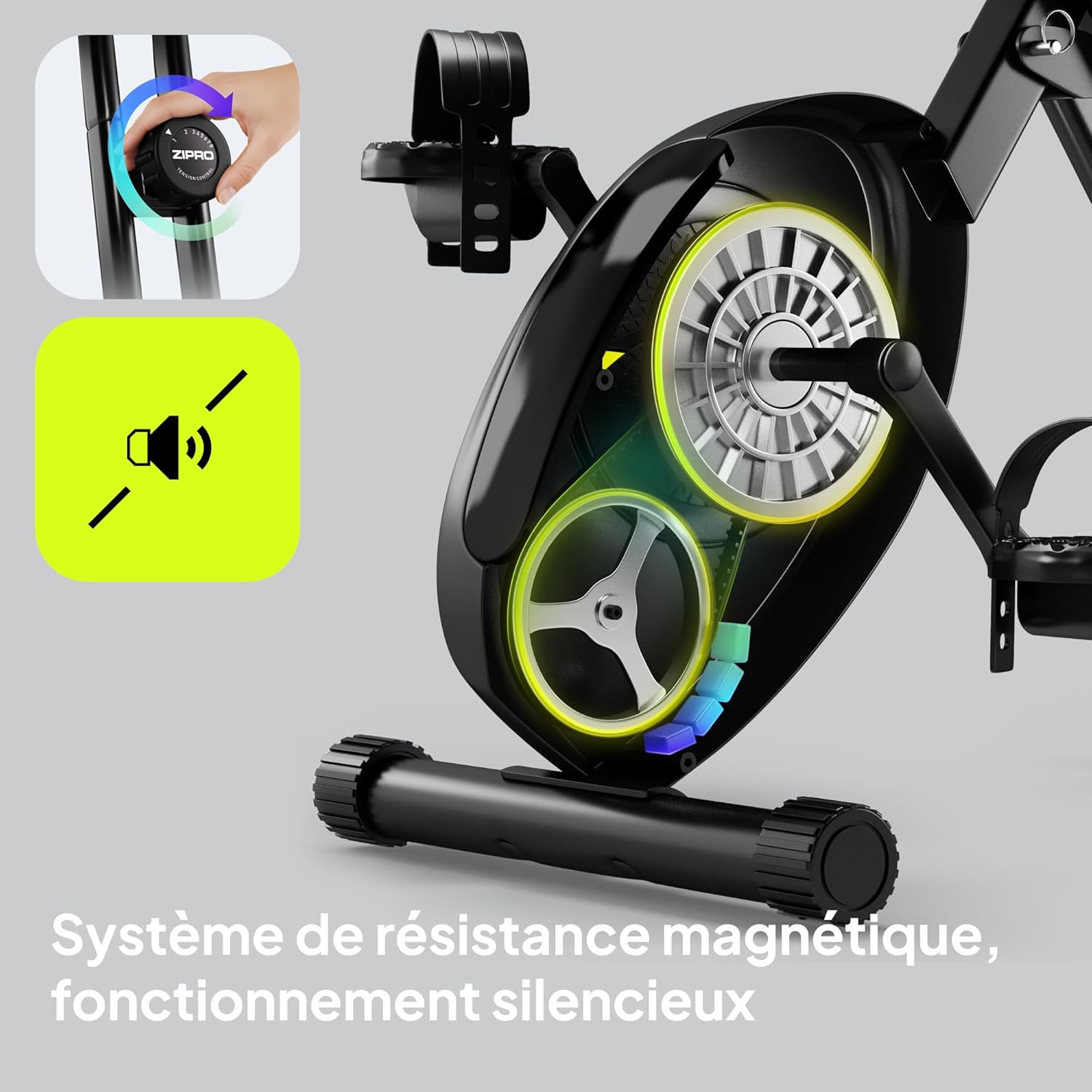

4. Using Pedal Straps
The non-slip pedals are equipped with adjustable straps. Place your feet on the pedals and tighten the straps to secure your feet, preventing them from slipping during your workout.
5. Bluetooth Connectivity and Phone Holder
The ZIPRO Eclipse X features Bluetooth connectivity, allowing for data management with compatible fitness applications. A phone holder is integrated into the console for convenience.

მოვლა
რეგულარული მოვლა უზრუნველყოფს თქვენი სავარჯიშო ველოსიპედის ხანგრძლივ მუშაობას და უსაფრთხო მუშაობას.
- დასუფთავება: გაასუფთავეთ ველოსიპედი რეკლამითamp ყოველი გამოყენების შემდეგ ნაჭერი ოფლისა და მტვრის მოსაშორებლად. მოერიდეთ აბრაზიულ საწმენდ საშუალებებს.
- ინსპექტირება: პერიოდულად შეამოწმეთ ყველა ჭანჭიკი, თხილი და მოძრავი ნაწილი მჭიდროდ და ცვეთაზე. მოუჭირეთ ყველა ფხვიერი შესაკრავი.
- შეზეთვა: მაგნიტური წინააღმდეგობის სისტემა, როგორც წესი, არ საჭიროებს მოვლას. არ შეზეთოთ შიდა კომპონენტები, თუ მწარმოებლის მიერ სხვაგვარად არ არის მითითებული.
- შენახვა: When not in use, fold the bike for compact storage. Ensure it is stored in a dry, cool place away from direct sunlight.


პრობლემების მოგვარება
გავრცელებული პრობლემებისა და მათი გადაჭრის გზებისთვის იხილეთ ეს განყოფილება.
| პრობლემა | შესაძლო მიზეზი | გამოსავალი |
|---|---|---|
| კონსოლი არ ჩანს | მკვდარი ბატარეები; ფხვიერი კავშირი; | Replace batteries (AA or AAA, typically); Check console cable connections. |
| არაჩვეულებრივი ხმაური მუშაობის დროს | Loose parts; Friction from moving components | Check and tighten all bolts and nuts. Ensure no foreign objects are caught in the mechanism. |
| წინააღმდეგობა არ იცვლება | წინააღმდეგობის კაბელი გათიშული ან დაზიანებულია | Inspect the resistance cable connection to the knob and the flywheel. Contact support if damaged. |
| ველოსიპედი არასტაბილურად გამოიყურება | Not fully unfolded/locked; Uneven surface | Ensure the folding mechanism is fully engaged. Place the bike on a level surface. |
სპეციფიკაციები
| ფუნქცია | დეტალი |
|---|---|
| მოდელის სახელი | Eclipse X |
| საქონლის მოდელის ნომერი | 15248434 |
| ბრენდი | ZIPRO |
| ფერი | შავი |
| წინააღმდეგობის მექანიზმი | მაგნიტური (8 დონე) |
| წამყვანი სისტემა | პედლები |
| მასალა | PU (main material) |
| მომხმარებლის მაქსიმალური წონა | 110 კგ |
| Max Recommended User Height | 185 სანტიმეტრი |
| პროდუქტის ზომები (L x W x H) | 85.5 x 44.5 x 107.5 cm (Unfolded) |
| დაკეცილი კვალი | 0.5 მ²-ზე ნაკლები |
| ნივთის წონა | 14.4 კგ |
| დენის წყარო | ბატარეით მუშაობს (კონსოლისთვის) |
| განსაკუთრებული თვისებები | Bluetooth connectivity, Integrated transport wheels, Adjustable seat (height and distance), Foldable design |
| რეკომენდებული გამოყენება | შიდა |
| წარმოშობის ქვეყანა | ჩინეთი |
საგარანტიო ინფორმაცია
The ZIPRO Eclipse X exercise bike comes with a standard manufacturer's warranty. Please refer to the warranty card included with your product for specific terms, conditions, and duration. Keep your proof of purchase for any warranty claims.
მომხმარებელთა მხარდაჭერა
For technical assistance, spare parts, or any questions regarding your ZIPRO Eclipse X exercise bike, please contact ZIPRO customer support. Contact details can typically be found on the manufacturer's webადგილზე ან შესაფუთ მასალებზე.
You may also visit the official ZIPRO webსაიტი ხშირად დასმული კითხვებისა და დამატებითი რესურსებისთვის: www.zipro.pl (შენიშვნა: ეს არის ჩანაცვლების ველი URL, please verify the correct support webსაიტი).


