შესავალი
The Havit H2015PRO is a versatile gaming headset designed for multi-platform compatibility and immersive audio experiences. Featuring five distinct connection modes, this headset offers flexibility for various gaming setups and entertainment needs. It delivers high-fidelity sound with 360° spatial audio and low latency, ensuring a competitive edge in gaming. This manual provides essential information for setting up, operating, maintaining, and troubleshooting your Havit H2015PRO headset.
პროდუქტი დასრულდაview
The Havit H2015PRO headset includes the following components:
- Havit H2015PRO Gaming Headset
- მოხსნადი მიკროფონი
- 2.4 GHz USB Wireless Dongle
- USB-C დამტენი კაბელი
- 3.5 მმ აუდიო კაბელი
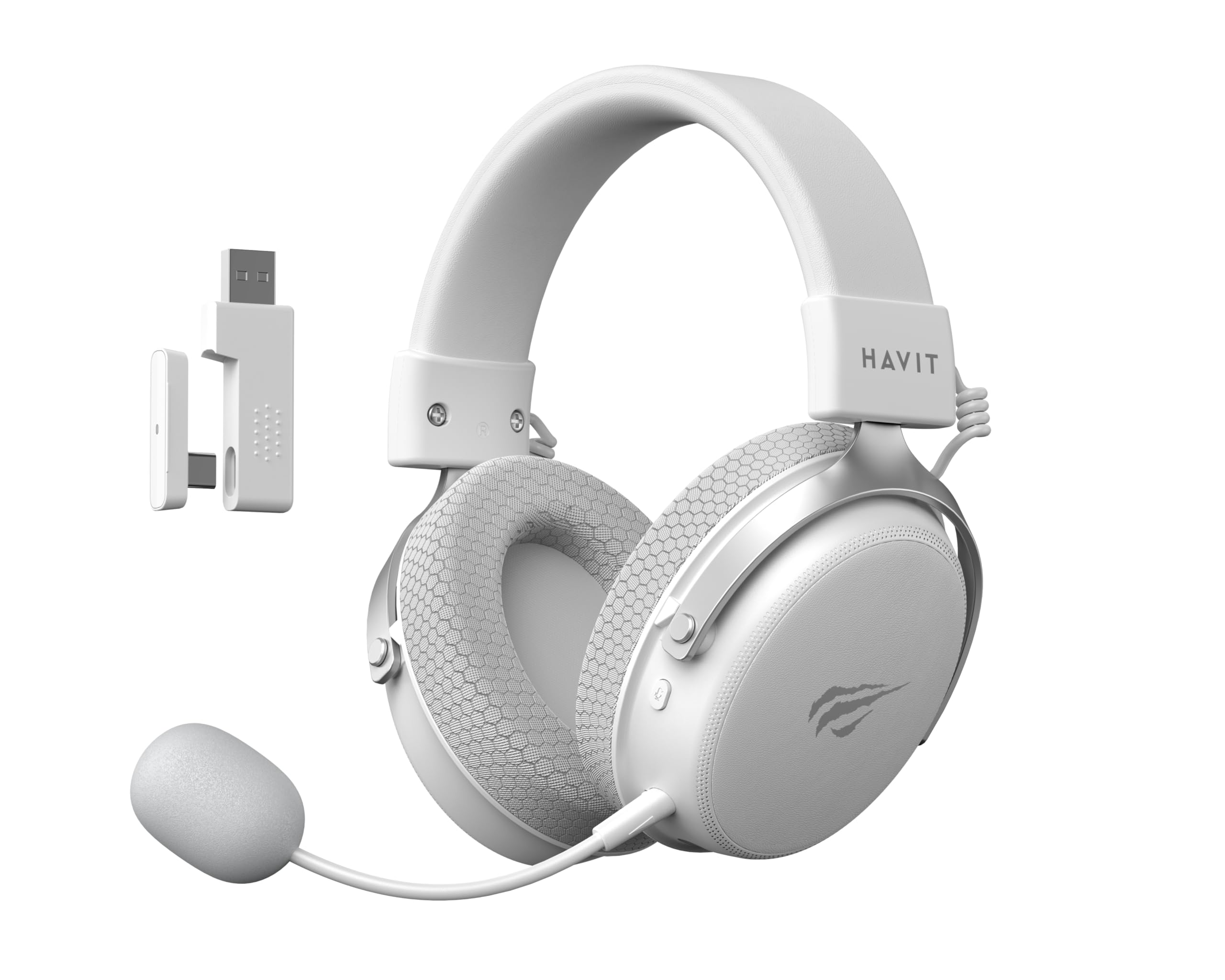
Image: The Havit H2015PRO headset in white, showcasing the main unit, detachable microphone, and the 2.4 GHz USB wireless dongle. This image provides a clear view of the primary components included with the product.
დაყენება
The Havit H2015PRO offers five connectivity options to suit various devices and preferences.
1. 2.4 GHz Wireless Connection (USB Dongle)
- Insert the 2.4 GHz USB wireless dongle into an available USB port on your PC, PlayStation, or Nintendo Switch (in docked mode).
- Power on the headset. The headset should automatically connect to the dongle.
- დარწმუნდით, რომ ყურსასმენი არჩეულია აუდიო გამომავალ და შემავალ მოწყობილობად თქვენი სისტემის პარამეტრებში.
2. Bluetooth კავშირი
- Power on the headset and switch it to Bluetooth mode (refer to the headset controls for mode selection).
- On your device (smartphone, tablet, PC with Bluetooth), go to Bluetooth settings and enable Bluetooth.
- Select "Havit H2015PRO" from the list of available devices to pair.
3. სადენიანი კავშირი (3.5 მმ აუდიო კაბელი)
- 3.5 მმ-იანი აუდიო კაბელის ერთი ბოლო ყურსასმენის 3.5 მმ-იან პორტს შეაერთეთ.
- Connect the other end to the 3.5mm audio jack on your PC, console controller, or mobile device.
- This mode does not require the headset to be powered on.
4. Wired Connection (USB-C Cable)
- Connect the USB-C cable to the headset's USB-C port.
- Connect the other end to a compatible USB-C port on your PC or device.
- This connection can be used for both audio and charging.

სურათი: კუთხოვანი view of the Havit H2015PRO headset, highlighting the earcups, headband, and visible controls on the side. This perspective helps in identifying connection ports and buttons.
ოპერაციული ინსტრუქციები
ჩართვა/გამორთვა
- ჩართვისთვის, დააჭირეთ და გეჭიროთ ჩართვის ღილაკი, სანამ ინდიკატორის შუქი არ აინთება.
- გამორთვისთვის, დააჭირეთ და გეჭიროთ ჩართვის ღილაკი, სანამ ინდიკატორის შუქი არ გაქრება.
ხმის კონტროლი
- Use the volume roller or buttons located on the earcup to adjust the audio level.
მიკროფონის გამოყენება
- Attach the detachable microphone to the designated port on the headset.
- Adjust the microphone's flexible arm for optimal voice pickup.
- Use the microphone mute button (if available) on the headset to toggle mute on/off.
ყურსასმენის დატენვა
- Connect the USB-C charging cable to the headset's USB-C port and the other end to a USB power source.
- The indicator light will show charging status (e.g., red for charging, off or green for fully charged).
- სრული დატენვა, როგორც წესი, დაახლოებით 2-3 საათს გრძელდება.
მოვლა
Proper care ensures the longevity and performance of your Havit H2015PRO headset.
- დასუფთავება: Use a soft, dry cloth to wipe the headset. For earcups, a slightly damp cloth with mild soap can be used, but ensure no moisture enters the speaker grilles.
- შენახვა: შეინახეთ ყურსასმენი გრილ, მშრალ ადგილას, მოარიდეთ მზის პირდაპირ სხივებს და ექსტრემალურ ტემპერატურას.
- ბატარეის მოვლა: ელემენტის ხანგრძლივობის შესანარჩუნებლად, მოერიდეთ ყურსასმენის ხშირ სრულად დაცლას. რეგულარულად დატენეთ, მაშინაც კი, თუ დიდი ხნის განმავლობაში არ იყენებთ.
- მოერიდეთ სითხეებს: Do not expose the headset to water or other liquids, as it is not water-resistant.
პრობლემების მოგვარება
If you encounter issues with your Havit H2015PRO headset, refer to the following common solutions:
| პრობლემა | გამოსავალი |
|---|---|
| ყურსასმენიდან ხმა არ არის |
|
| მიკროფონი არ მუშაობს |
|
| Headset not connecting wirelessly |
|
| დატენვის პრობლემები |
|
სპეციფიკაციები
Detailed technical specifications for the Havit H2015PRO headset:
- მოდელის სახელი: HAVIT H2015PRO
- კავშირის ტექნოლოგია: Hybrid (2.4 GHz Wireless, Bluetooth, 3.5mm Jack, USB-C)
- დრაივერის ზომა: 53 მმ
- წინაღობა: 64 Ohms
- სიხშირის პასუხი: 20.2 Hz (Specific value provided, typical range is 20Hz-20kHz)
- ბატარეის მოცულობა: 1500 mAh
- დაბალი შეყოვნება: 24 ms
- აუდიო მახასიათებლები: 360° Spatial Audio, Virtual 7.1 Surround Sound
- მიკროფონი: მოსახსნელი და რეგულირებადი
- კონტროლის ტიპი: Integrated (Touch controls)
- მასალა: პლასტიკური
- პროდუქტის წონა: 500 გრამი
- თავსებადობა: Desktops, PC, PlayStation, Xbox, Nintendo Switch, Mobile Devices
- წყლის წინააღმდეგობის დონე: არ არის წყალგამძლე

სურათი: წინა მხარეს view of the Havit H2015PRO headset, clearly showing the earcups, headband, and the attached microphone. This view emphasizes the ergonomic design and microphone placement.
გარანტია და მხარდაჭერა
საგარანტიო ინფორმაცია
The Havit H2015PRO headset comes with a 1 წლიანი მწარმოებლის გარანტიაეს გარანტია ფარავს მასალებისა და დამუშავების დეფექტებს ნორმალური გამოყენების შემთხვევაში. გთხოვთ, შეინახოთ შეძენის დამადასტურებელი საბუთი გარანტიის მოთხოვნებისთვის.
მომხმარებელთა მხარდაჭერა
For technical assistance, warranty claims, or further inquiries, please contact Havit customer support through their official website or the retailer where the product was purchased. Provide your product model number (H2015PRO) and proof of purchase when seeking support.


